
Google is withdrawing the feature that lets a small business send email from its own domain address without leaving a personal Gmail account. Its Gmail Help article "Learn about changes to third-party email account support in Gmail" (checked November 2026) gives the schedule: the notice period began in Q3 2026, Q3 and Q4 2026 are a transition period in which new configurations may already be restricted, and in January 2027 Gmail "will fully remove 'Send as' for third-party accounts, Gmailify, and POP". Spam Resource reported the published support page and FAQ on 5 November 2026. If you bill 20 to 200 client domains, some of those clients send domain mail from inside Gmail today.
Only half of that arrangement breaks, and it is the half you can charge for. Google's own FAQ says auto-forwarding from a third-party provider into Gmail "is independent of Gmail's 'Send as' feature and does not affect it". Sending is what disappears, so every forwarder-only address in your book needs a real mailbox behind it by January. On Atriomail that is a $1.39 line item on the invoice the client already gets, and creating an account at the sign-up page is free and needs no card, with mailboxes billed from the first one.
Table of Contents
- What Google Is Actually Removing, and When
- How to Find the Clients This Breaks
- Gmail vs Atriomail for Resellers
- The 15 GB Your Client Is Also Using for Photos
- What Each Affected Client Actually Needs Now
- When Gmail Makes Sense
- Where Atriomail Fits
- FAQ
Key Takeaways
| Point | Details |
|---|---|
| Three Gmail features go in January 2027 | Send As for third-party addresses, Gmailify and POP fetching. New configurations may already be restricted (Gmail Help, checked November 2026). |
| Receiving survives, sending does not | Google confirms auto-forwarding into Gmail is unaffected. Clients keep reading there; they cannot send their domain address from it. |
| Forwarder-only addresses become mailboxes | An alias pointing at a client's Gmail was never billable on its own. From January it needs a mailbox that can authenticate and send. |
| Atriomail turns that into a billable line | $1.39 per mailbox per month with 15 GB included, webmail and IMAP or SMTP for sending, and Forward a copy so the client still reads everything in Gmail. |
Price the mailboxes before the tickets arrive. Atriomail is $1.39 per mailbox per month with 15 GB included, no minimum and no long-term contract, so you can convert one client now and the rest in January.
What Google Is Actually Removing, and When
Google's help article names three features, and your clients use them in different combinations:
- Send As for third-party addresses. Google's wording: "You will no longer be able to send mail from third-party email accounts in Gmail on the web or in the Gmail mobile apps." Setting it up needs the SMTP server, username and password for that account, which is why your mail server's credentials sit in a client's Gmail settings right now (Gmail Help, "Send emails from a different address or alias", checked November 2026).
- Gmailify. Gmail's spam handling and inbox organisation applied to a third-party account.
- POP fetching. The "Check mail from other accounts" setting that pulls mail out of another mailbox on a schedule.
What is not changing matters as much. Gmail-to-Gmail Send As and Google Workspace aliases are untouched, reading Gmail itself from Outlook or Thunderbird over IMAP or POP stays supported, and auto-forwarding set up at the provider end keeps delivering. For sending, the only paths Google commits to are the provider's own interface or "a desktop client to connect to your third-party account via IMAP/SMTP", and it warns against extensions that replicate Send As because they ask for credentials or OAuth tokens.
Be clear about what this is: a change inside Gmail, not a limitation of any mail host. It lands the same way on a cPanel mailbox, on any of the hosting types in our email hosting glossary of terms, and on an Atriomail mailbox. No Atriomail setting brings Send As back. What a host changes is how painless the alternative is.
How to Find the Clients This Breaks
Affected clients fall into three buckets, two of them visible from your own records in an afternoon.
Bucket one: an alias or forwarder pointing at a gmail.com address, with no mailbox behind it. Every reseller has some: sales@clientdomain.com forwards to the owner's personal Gmail, and the owner replies with Send As so it looks like it came from the domain. Receiving keeps working. Replying will not. Pull the forwarder list for every client domain and flag every destination at gmail.com or googlemail.com. If you keep an inventory as part of managing client email accounts, that list exists already.
Bucket two: a real mailbox the client never opens, because Gmail fetches it. POP fetching and Send As both end, so this client loses the whole workflow at once. A mailbox whose last webmail or IMAP login is months old while mail keeps arriving is the giveaway.
Bucket three: a client sending through your SMTP server from somewhere you cannot see. Harder to enumerate, so ask. A note naming the January 2027 date will surface more than any log query, and agencies handling email across many client accounts usually find the number is higher than expected.
While the domain list is open, run each one through our free DNS checker at /dns-checker/: a client whose sending path is about to move is one whose SPF, DKIM and DMARC you want correct first.
One domain, one evening, no card. Create an Atriomail account, add a test domain, and create the first mailbox when you are ready. Creating the account is free and needs no card, and mailboxes are billed from the first one at $1.39 with 15 GB included.
Gmail vs Atriomail for Resellers
The Gmail column describes a personal Gmail account used with a domain address, which is what the affected clients have. Google Workspace is a different product, unaffected by this change.
| Gmail vs Atriomail for resellers | Personal Gmail with a domain address | Atriomail |
|---|---|---|
| Price per mailbox | $0, nothing to bill. | $1.39 per mailbox per month wholesale; you set the resale price. |
| Included storage | 15 GB per Google Account, shared with Drive and Photos (Google One storage pages, checked November 2026). | 15 GB with each mailbox, not a shared pool. |
| Extra storage | A Google One plan on the client's own account, from 100 GB (Google One plans, checked November 2026). | $0.60 per 5 GB block per month, billed on the size you set. |
| Sending the domain address after January 2027 | Not from Gmail on the web or in the mobile apps; Google points users to the provider's interface or a desktop client. | Webmail with every mailbox, or any mail app over IMAP with SSL/TLS on port 993 and SMTP with STARTTLS on port 587. |
| Still reading in Gmail | POP fetching and Gmailify end; auto-forwarding from the provider is unaffected. | Forward a copy sends a copy of each new message to one other address; spam-marked mail and bounces are not forwarded. |
| How you bill each client | You cannot; any subscription is between the client and Google. | Mailboxes and 5 GB blocks clients add in the WHMCS client area bill at your retail prices; or sell them as Blesta configurable options, or drive the REST API. |
| WHMCS module | None. | Version 3.1.1 for WHMCS 9, from the Plugins page in the panel: Create, Suspend, Unsuspend, Terminate, Change Package. |
| DNS setup | No MX change. | Automatic mail DNS on Cloudflare and Namecheap for domains in the connected account; elsewhere, records from the DNS Setup dialog. |
| Migration | Not applicable. | Free IMAP migration from any server allowing IMAP sign-in with a password, Gmail and Google Workspace included with an app password. Mail and folders only. |
| White-label and what the client sees | Google's brand, end to end. | Panel on your own hostname with your product name and favicon, your logo on help center pages. Included from 50 paid mailboxes, $50 a month below that, no setup fee. Raw headers, the webmail interior and payment pages stay neutral. |
| Support | Gmail Help and the Gmail community forum (checked November 2026). | Live chat inside the signed-in control panel, included with every account; an AI assistant answers first and people take over during business hours. |
The row to reread is the billing one. A client on personal Gmail is not a customer of yours on the email line, however much of your time their domain consumes. The same client on Atriomail is a recurring charge on an invoice you already send, with mailbox and storage caps set per domain through the module or the API.
The 15 GB Your Client Is Also Using for Photos
The storage row deserves its own note, because it explains why some of these clients have complained about missing mail for years. The free 15 GB on a Google Account is not 15 GB of mail: it is shared across Gmail, Drive and Google Photos. A client who backs up a phone camera roll can fill it without sending a single email, and you cannot see that storage or sell more of it, because the Google One subscription is theirs.
On Atriomail the 15 GB is included with each mailbox and is not a shared pool, so a photo library has nothing to do with whether a client's mail fits, and extra storage comes in 5 GB blocks at $0.60 a month, billed on the size you set.
What Each Affected Client Actually Needs Now
The forwarder-only client needs a mailbox. Something has to authenticate and send, and a forwarder cannot. On Atriomail that is structural too: aliases, forwarders and catch-alls are not billed, but they can only be added to a domain that already has at least one mailbox, and a mailbox on a different domain does not count, a rule our guide to aliases, forwarders and catch-alls sets out in full. You create the mailbox, keep the forwarder if others still rely on it, and tell the client where to press send.
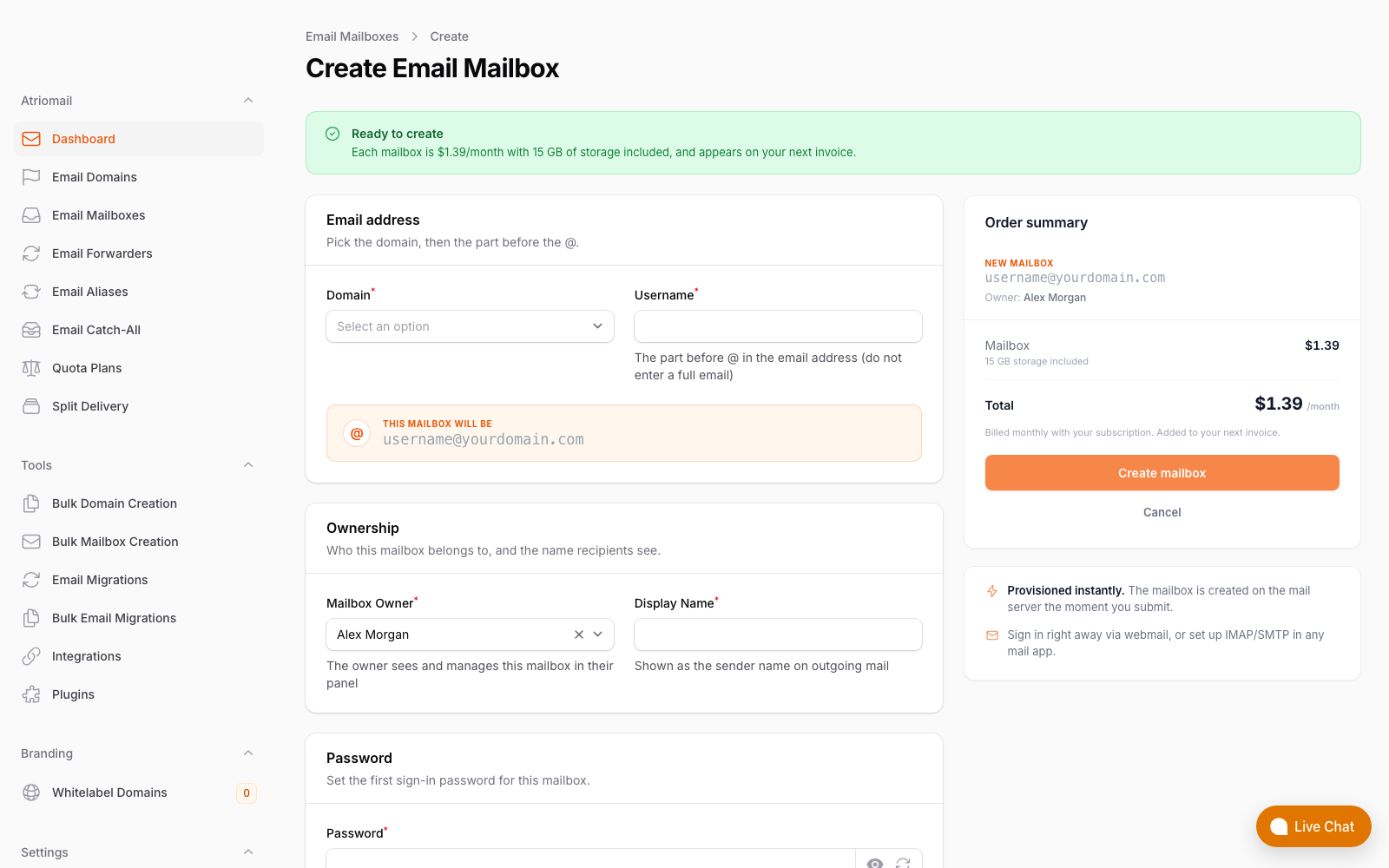
Creating the mailbox a forwarder-only address will sit behind, in the Atriomail control panel.
The client who only wants to read in Gmail can keep reading in Gmail. This is the conversation that loses resellers mailboxes, because the client hears "you have to change how you read email" and refuses. They do not have to. Set Forward a copy on the Atriomail mailbox and a copy of every new message goes to their Gmail address while the mailbox keeps its own mail. It is one address per mailbox, never the mailbox itself, and spam-marked messages and bounce notices are not forwarded, worth saying out loud to anyone who will treat the copy as their only inbox. The Forward a copy guide covers the rest.
The client with mail already in Gmail needs it moved. Atriomail's IMAP migration is built into the panel and has no charge, and Gmail and Google Workspace mailboxes migrate with an app password, noting that Google requires 2-Step Verification for app passwords and a Workspace administrator can block them. It keeps the folder structure and the original date on every message, and moves mail only, not calendars or contacts. Bulk migration lists many mailboxes from one old server in a single job, every account needs its own password, and large books are planned with us first, so read a bulk mailbox migration walkthrough first.
One warning specific to Atriomail: if the domain's DNS is on a connected Cloudflare or Namecheap account, writing the MX record moves that domain's mail as soon as the domain clears the security check, so add the domain when you are ready to switch. Afterwards, the panel's Message log covers the last 30 days of what each mailbox sent and received, with each message's outcome and, for mail sent to other providers, the receiving server's answer. It holds nothing before 13 November 2026 and updates every 15 minutes, but it settles a January argument about a reply that never arrived.
When Gmail Makes Sense
Some clients should still be on Google in January, and pretending otherwise costs you credibility:
- The client whose real product is Docs, Sheets, Drive and Meet. A mailbox is not a collaboration suite. If the daily work happens in Google's editors, Google Workspace is the right tool, and its Send As and aliases are untouched.
- The client who only ever receives. An address that takes contact-form mail and never replies can stay a forwarder into Gmail indefinitely, because forwarding is unaffected.
- The client standardised on Google identity. Where staff sign in to a dozen systems with Google accounts, moving mail elsewhere creates two identity stories instead of one.
- The one-person business that will not learn a second interface. Some will take the Gmail mobile app, which Google says keeps access to third-party accounts, over anything you propose.
What none of those clients gives you is a mailbox whose billing relationship you own. It is the trade described in leaving the big providers for white-label control, except that in January it arrives with a date on it.
Where Atriomail Fits
Work the arithmetic on a 200-mailbox book, the size this is aimed at. At $1.39 per mailbox Atriomail bills you $278 a month. Resold at $5.00 per mailbox the book is $1,000 a month, so $722 stays with you, about 72 percent, before card fees, support time and any white-label fee. At 200 paid mailboxes white-label branding is included, so that fee is zero; only below 50 paid mailboxes is it $50 a month, with no setup fee, on the same invoice as the mailboxes.
Now the part this change creates. Say 60 addresses across that book are forwarder-only arrangements into personal Gmail accounts, earning you nothing today. Converted to mailboxes they cost 60 times $1.39, or $83.40 a month wholesale, and at the same $5.00 resale price they bring in $300 a month, leaving $216.60 a month, again before card fees, support time and any white-label fee. It is the conversation January forces on you anyway, except you have it on your own schedule with a price attached. There is no free trial and no free tier: creating the account costs nothing and needs no card, and mailboxes are billed from the first one. The pricing page has the calculator.
Which reader should choose which? If your clients' work genuinely lives in Google's editors, buy Workspace and bill the service around it. If what they need is a professional address that sends reliably from their own domain, host the mailbox yourself: you get the recurring line, storage you can quote, the WHMCS or Blesta charge on the invoice you already send, and a client who calls someone instead of searching a forum. On who handles the client when something breaks, first-line chat support for your clients is described at /reseller-support/, during business hours, with an AI assistant answering first and people taking over. If you are still deciding whether to own the mailbox, start with what reseller email hosting actually is.
Moving 50 or more mailboxes in one go? Large books are planned with us first, so talk to the team before you quote the project. Every account needs its own password for a bulk migration.
Frequently Asked Questions
Does this affect Google Workspace clients too?
No. Google's help article states that Gmail-to-Gmail aliases and Google Workspace Send As are not affected, and that the change applies only to third-party, non-Google accounts. The clients at risk use a personal Gmail account with an address on a domain you host.
Will clients still receive their domain mail in Gmail after January 2027?
If the mail is auto-forwarded from the provider, yes. Google's FAQ says that is independent of Send As and does not affect it. What ends is Gmail pulling mail in itself with POP, along with Gmailify.
Does the change break Atriomail mailboxes as well?
The Gmail side of it does, and we would rather say so plainly. If a client sends their Atriomail address from inside Gmail with Send As, that stops in January 2027 like everyone else's, because the feature is being removed from Gmail. What Atriomail gives them instead is webmail with every mailbox, standard IMAP and SMTP for any mail app, and Forward a copy so the reading habit can stay as it is.
Can I bill these new mailboxes from WHMCS?
Yes. The Atriomail WHMCS module is version 3.1.1 for WHMCS 9, downloaded from the Plugins page in the Atriomail control panel. Mailboxes and 5 GB storage blocks that clients add in the WHMCS client area bill as recurring WHMCS charges at your retail prices. Those charges are titled "AtrioMail mailboxes", and changes made in the panel or through the API do not sync into WHMCS billing on their own. There is also a Blesta module, version 2.2.0 for Blesta 6.0 and later, free from the same page.
Recommended
- Forward a Copy in Atriomail
- The Agency Playbook: Step-by-Step Email Migrations
- The Client Email Management Guide
- What Is Reseller Email Hosting?
- Aliases, Forwarders and Catch-Alls in Atriomail
- Pricing and the Reseller Margin Calculator
Latest from the blog
- Google Workspace API Usage Tiers: What Resellers Automating Client Email Must Do by February 2027 · Nov 26, 2026
- How to Retire a Client's Old Mail Server After an Email Migration · Nov 25, 2026
- When a Client's Domain Is Ready for Stricter DMARC: Atriomail's Grade and Guides · Nov 24, 2026
- AtrioDMARC vs EasyDMARC: An EasyDMARC Alternative for MSPs Who Host Client Email · Nov 23, 2026
- AtrioDMARC vs DMARC Advisor: A DMARC Advisor Alternative Billed Monthly per Domain · Nov 23, 2026