
Every client book has one of these. The owner has used the same Gmail address for fifteen years, reads everything there, and has no intention of opening a second inbox. You set them up with a proper mailbox on their own domain, they used it for a fortnight, and now they are asking you to "just point it at my Gmail". The quickest way to say yes is to delete the mailbox and leave a forwarder in its place. The moment you do that, you have taken a billed line off your own invoice to solve a habit.
Atriomail added a better answer in November 2026. Forward a copy lets a mailbox keep its own mail and send a copy of every new message to one other address, such as that Gmail account. The client gets what they asked for, the mailbox stays exactly where it is, and nothing about how you bill the account changes. This guide covers what the setting does, how to put it on a mailbox, when a forwarder is still the right tool, and what the difference is worth across a 200-mailbox book.
Table of Contents
- Key Takeaways
- Who This Is For
- What You Need Before You Start
- What Forward a Copy Actually Does
- Setting It on a Mailbox
- Forwarder, Alias or Forward a Copy
- Where This Comes Up in a Client Book
- What This Means for Your Business
- Limits to Know
- FAQ
Key Takeaways
| Point | Details |
|---|---|
| A forwarder replaces a mailbox, Forward a copy duplicates one | A forwarder is an address on the domain with no mailbox of its own. Forward a copy is a setting on a mailbox that goes on storing its own mail. |
| One address per mailbox | You set a single destination on the mailbox's page in the Atriomail control panel. Emptying the field and saving stops it. |
| Spam and bounce notices stay behind | Messages the spam filter marks, and bounce notices, are not forwarded. The copy is a convenience, not a complete record of the address. |
| It protects the line you bill | An Atriomail mailbox is $1.39 a month with 15 GB included. Forwarders are not billed at all, so every mailbox you convert to one takes its margin with it. |
| Fifteen conversions cost $54.15 a month | On a 200-mailbox book priced at $5.00 a mailbox, turning 15 mailboxes into forwarders removes $54.15 a month of margin, before card fees, support time and any white-label fee. |
Keep the billed mailbox and still say yes. Forward a copy is part of the Atriomail control panel, on the mailbox's own page. Creating an account is free and needs no card, and mailboxes are billed from the first one at $1.39 a month with 15 GB included.
Who This Is For
Hosting resellers, MSPs and agencies who bill client mailboxes on their own invoice and keep hitting the same request: a client who wants the address on their domain but wants to read it somewhere else. If you run a book of 20 to 200 client domains and you have ever solved that by deleting a mailbox, this is the setting you were missing. It is equally useful to anyone writing an onboarding script for managing client email accounts across several domains at once.
What You Need Before You Start
- A domain that is past its security check. Every new domain in Atriomail goes through an automated security check. A forward cannot be set up while the domain is held for review or suspended, although an existing one can always be removed.
- A mailbox on that domain. Forward a copy is a field on a mailbox, not an object you create on its own. If the address has no mailbox yet, you are looking at a forwarder instead, which is covered in the guide to aliases, forwarders and catch-alls and the rule that decides when they work.
- One destination address. It can be any address, inside or outside the domain, but it cannot be the mailbox itself, and there is only one per mailbox.
- A sign-in to the Atriomail control panel where that mailbox lives. The setting is on the mailbox's own page, not in a separate section of the panel.
What Forward a Copy Actually Does
The mailbox carries on exactly as before. It receives mail, stores it, and serves it over IMAP, POP3 and SMTP to whatever mail app the client uses, with webmail in the browser as well. On top of that, every new message it receives is copied to the one address you set, including mail that arrived through the mailbox's aliases. Nothing is moved and nothing is consumed: the mailbox keeps its own copy of everything.
Two categories are left out on purpose. Messages that the spam filter marks as spam are not forwarded, and neither are bounce notices. That is the right default for a client who wanted this precisely so they would not have to look at a second inbox, but it does mean the Gmail side is a convenience copy rather than a full record of what the address received. If a delivery report matters, it is still worth knowing what an SMTP bounce code is actually telling you, because that bounce lands in the Atriomail mailbox and not in the copy.
A copy of mail from an outside sender arrives showing the original sender's name followed by "via" your domain, and a reply goes back to the original sender rather than to the mailbox. That is the same shape a forwarded message takes, and it is what lets the message pass authentication checks at the receiving provider. The mechanics behind that are worth reading once if you have ever had forwarded mail fail at the other end: see why forwarded mail fails SPF and breaks DMARC.
One field, on a mailbox you already bill. Set a destination, save, and the client reads their mail wherever they like while the mailbox stays on your invoice at $1.39 with 15 GB included.
Setting It on a Mailbox
There are three steps, and they all happen on one screen:
- Open Email Mailboxes in the Atriomail control panel and click Edit on the mailbox you want to copy.
- In Forward a copy, enter the destination in Send a copy to.
- Click Save changes.
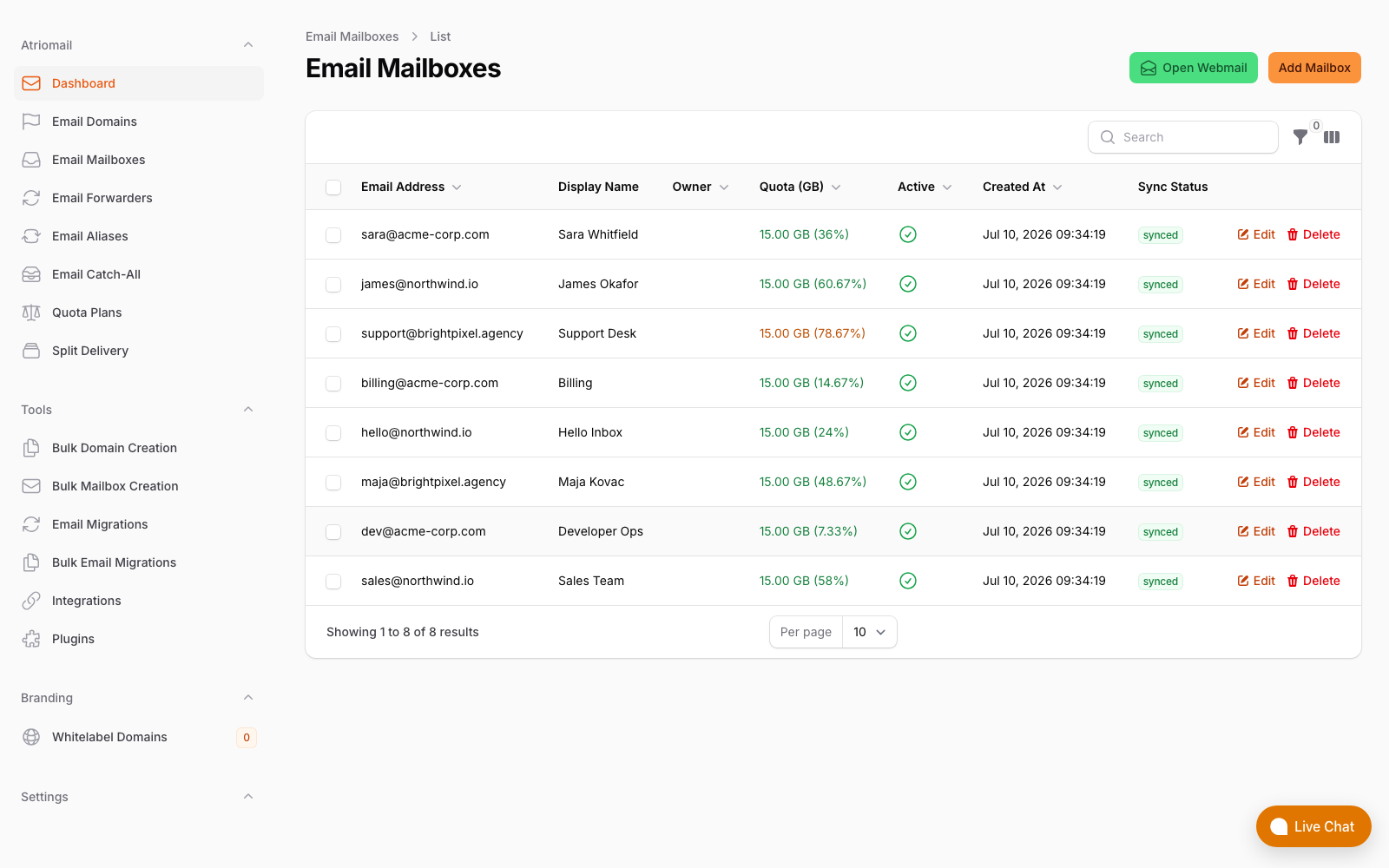
The Email Mailboxes list in the Atriomail control panel. Forward a copy lives on a mailbox's own page, reached with Edit on its row.
Changing the destination later is the same path: enter the new address and save. Stopping it is emptying the field and saving, which leaves the mailbox untouched and still billed. The full steps are in the Atriomail knowledge base article on forwarding a copy of a mailbox's mail, which is the article to send a client who wants to change the address themselves.
If you are standing up a new client rather than adjusting an existing one, create the mailboxes first and set the copies afterwards. Atriomail lets you add up to 500 domains in one step and create up to 500 mailboxes on one domain in one step, covered in the guide to bulk-adding domains and mailboxes, and Forward a copy is then a per-mailbox tidy-up on the handful of people who asked for it.
Forwarder, Alias or Forward a Copy
Atriomail has three ways to make mail land somewhere other than the obvious place, and picking the wrong one is how a billed mailbox quietly disappears. The distinction is worth having straight before a client call, and the vocabulary itself is unpacked in the email hosting terminology explainer.
| The job | Use | Why |
|---|---|---|
| An address with no mailbox of its own, passed straight on to someone else | Forwarder | Nothing is stored on the domain. Not billed, and it needs at least one mailbox on the same domain to exist. |
| A second name for mail that should land in a mailbox that already exists | Alias | Mail arrives in the real mailbox. Not billed, and the same one-mailbox-on-the-domain rule applies. |
| A mailbox that keeps its mail and also sends a copy elsewhere | Forward a copy | The mailbox stays, so storage, webmail, search and the nightly backup all stay with it. |
That last row is the one with money in it. A forwarder is not billed because there is nothing to bill: no mailbox, no 15 GB, no stored mail. When a client asks for "just a forward" on an address they already have a mailbox for, they are usually describing Forward a copy and reaching for the wrong word.
Where This Comes Up in a Client Book
Three situations account for most of it, and in each one the old answer cost you something.
The owner who lives in Gmail. They want sales@theircompany.com on the card and the letterhead, and they want it to show up where they already read. Forward a copy gives them that while the mailbox on the domain keeps accumulating the archive, which matters the day they leave, sell the business, or ask you for something from 2024. Because the mailbox still exists, it is still backed up every night and the last 30 nightly backups are available on the Restore Emails page. A forwarder has no mailbox of its own, so there is nothing on the platform to restore from.
The shared address somebody wants eyes on. An office manager who needs to see what arrives at info@ without being given the password to it. A copy to their own mailbox solves it, and the shared mailbox keeps the single authoritative copy for everyone else. This is a far safer answer than handing credentials around, which is the habit behind most of the incidents in the email security practices for hosting and IT managers.
The client mid-transition. Somebody who has agreed to move to the new address but has not built the habit yet. The copy keeps them comfortable in the inbox they know while the mailbox on the domain is already the system of record, and you can remove the copy later without touching the mailbox. Keeping those transitions visible across a book of clients is the usual pain of managing email for many clients at once.
What This Means for Your Business
Take the book this audience actually runs: 200 mailboxes across a spread of client domains. At Atriomail's wholesale price of $1.39 a mailbox, those cost you $278 a month. Priced to your clients at $5.00 a mailbox, they bill $1,000 a month, and the spread is $722 a month, before card fees, support time and any white-label fee. At 200 paid mailboxes white-label branding is included, so there is no branding fee in that number at all; it is only below 50 paid mailboxes that it would be $50 a month. The arithmetic is on the pricing page if you want to run it against your own resale price.
Now run the leak. Say 15 of those 200 clients are Gmail loyalists and, over a year, each one gets talked into "just a forwarder instead". Each conversion removes $5.00 of retail and $1.39 of wholesale, so $3.61 of margin, times 15 is $54.15 a month, or $649.80 over a year, on the same labelling. You did the same work for those clients, you still answer their support mail, and you are billing 185 mailboxes instead of 200. Forward a copy makes that conversation end with the mailbox still there.
The effect is sharper for a smaller reseller. White-label branding is included for accounts paying for 50 or more mailboxes, and below that it is $50 a month, with no setup fee, on the same monthly invoice as the mailboxes. A reseller sitting at 54 paid mailboxes who converts six of them to forwarders drops to 48, and the number of paid mailboxes on the renewal date is what decides, so the $50 starts on the next invoice. Six accommodations have then cost $21.66 of mailbox margin and a $50 branding line, which is a painful way to find out what the threshold does. What the branding covers either way is set out in the guide to what changes on your branded hostname.
None of this is an argument for refusing clients what they want. It is an argument for a panel setting instead of a deletion, and it is the sort of per-mailbox decision that usage-based email pricing makes visible: when you are billed per mailbox, every mailbox you give away is a line you can count. You can create an Atriomail account without a card and add a domain before you pay anything, and the mailboxes are billed from the first one.
Stop losing mailboxes to a preference. Add a domain, create the mailboxes, and set Forward a copy on the ones whose owners read elsewhere. White-label branding is included from 50 paid mailboxes and $50 a month below that, with no setup fee.
Limits to Know
- One address, and never the mailbox itself. Forward a copy sends to a single destination per mailbox. If two people need to see the same mail, the second one needs a different arrangement.
- Spam and bounce notices are not forwarded. Anything the spam filter marks, plus bounce notices, stays in the Atriomail mailbox. Tell a client who treats the copy as their only inbox, or they will eventually miss a bounce.
- Not while a domain is held for review or suspended. A forward cannot be set up in that state. An existing forward can always be removed.
- A switched-off mailbox receives and forwards nothing. The copy only runs while the mailbox itself is running.
- The copy leaves the platform. Once a message reaches the destination provider, it lives under that provider's rules. The Atriomail Message log shows what happened to mail the mailbox itself sent and received, including the receiving server's answer for mail it sent, but not what became of a copy forwarded on.
- The copy is not a backup. The Atriomail mailbox is backed up every night, with the last 30 nightly backups offered for restore, and restoring is included with every paid mailbox. A copy sitting in somebody's Gmail is not part of that.
- Support is during business hours. The live chat inside the signed-in Atriomail control panel is included with every account; an AI assistant answers first and people take over during business hours. That is worth knowing when you are writing your own client support process and deciding which questions you handle yourself.
Frequently Asked Questions
Does the mailbox still keep its mail?
Yes. That is the whole point of the setting. Every new message the mailbox receives is stored in the mailbox as usual, and a copy is sent to the one address you set. Nothing is moved out, and the mailbox keeps its 15 GB of storage, its webmail and its IMAP, POP3 and SMTP access.
Can I send copies to two addresses?
No. Forward a copy takes one address per mailbox. Entering a new address replaces the old one, and emptying the field stops the copying altogether.
Is Forward a copy billed separately?
No. It is a setting on a mailbox you are already paying $1.39 a month for, with 15 GB included. Atriomail does not bill domains, aliases, forwarders or catch-all addresses either, so the only thing on the invoice is mailboxes and any extra storage at $0.60 per 5 GB block.
What is the difference between Forward a copy and a forwarder?
A forwarder is an address on the domain that has no mailbox of its own: mail sent to it is passed straight on and nothing is kept. Forward a copy sits on an address that is already a mailbox, so the mail is both kept and copied. A forwarder also needs at least one mailbox on the same domain before it can exist at all.
Will my client see absolutely everything in their Gmail?
No, and it is worth saying so up front. Messages marked as spam are not forwarded, and neither are bounce notices. Everything else that arrives, including mail sent to the mailbox's aliases, is copied across.
Can I set it up on a brand-new domain?
Not while the domain is still held for review, and not while it is suspended. New domains in Atriomail go through an automated security check first; once the domain is through it and the mailbox exists, the field is there on the mailbox's page.
Recommended
- Aliases, Forwarders and Catch-Alls in Atriomail, Atriomail
- A Guide to Client Email Management, Atriomail
- Email Hosting Terminology Explained, Atriomail
- Multi-Client Email Management for Agencies, Atriomail
- How to Fix Forwarded Mail That Fails SPF and DMARC, Atriomail
- Restoring Deleted Emails, Atriomail
Latest from the blog
- Google Workspace API Usage Tiers: What Resellers Automating Client Email Must Do by February 2027 · Nov 26, 2026
- How to Retire a Client's Old Mail Server After an Email Migration · Nov 25, 2026
- When a Client's Domain Is Ready for Stricter DMARC: Atriomail's Grade and Guides · Nov 24, 2026
- AtrioDMARC vs EasyDMARC: An EasyDMARC Alternative for MSPs Who Host Client Email · Nov 23, 2026
- AtrioDMARC vs DMARC Advisor: A DMARC Advisor Alternative Billed Monthly per Domain · Nov 23, 2026