Message log ยท in the control panel

Did the email arrive? Answer in seconds, not in a ticket.

The Message log lists every message your mailboxes sent and received in the last 30 days, and what happened to each one: delivered, bounced, delayed or refused, with the receiving server's own answer. Your clients can look up their own mail too, so "did my email arrive?" stops landing in your inbox.

  • โœ“ 30 days of messages
  • โœ“ The receiving server's answer
  • โœ“ Your clients can check too
๐Ÿ”’ /admin/message-log โ— Live product
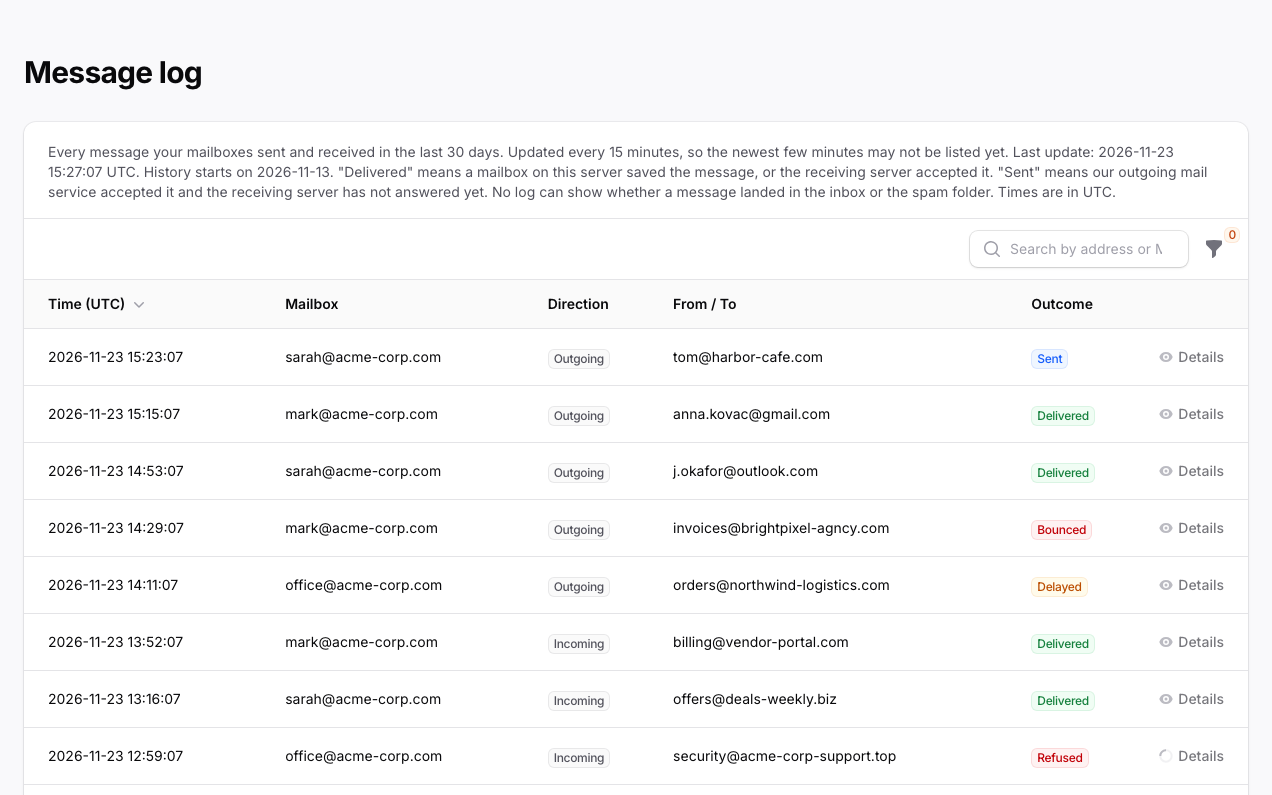
The Message log: emails sent and received by three mailboxes, each with its time, direction, address and outcome
30Days of sent and received mail
15Minutes between updates
7Outcomes, each in plain words
1List for every mailbox you manage
The tickets it answers

Every email support question starts with "did it arrive?"

Before the Message log, answering meant asking the client for screenshots, digging through server logs or guessing. Now the answer is one search away, for you and for your client.

They say they never got my email.

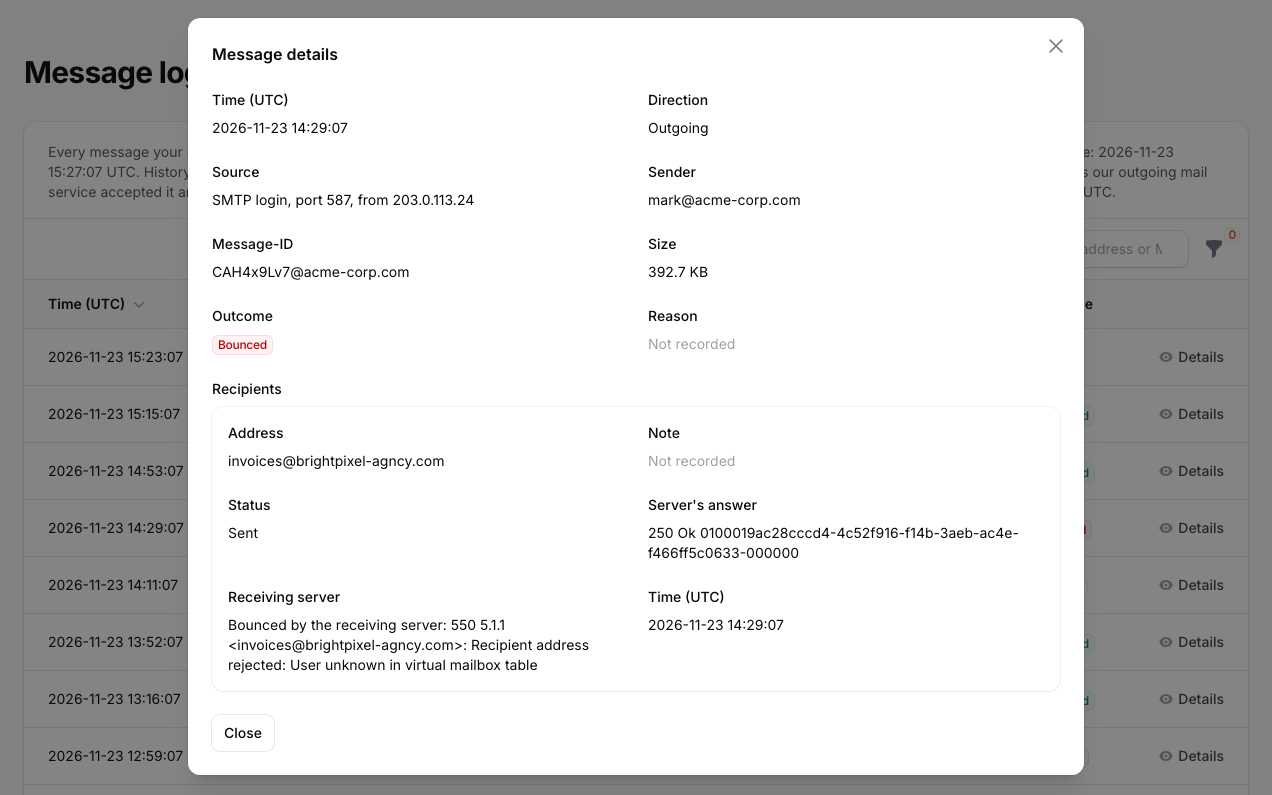
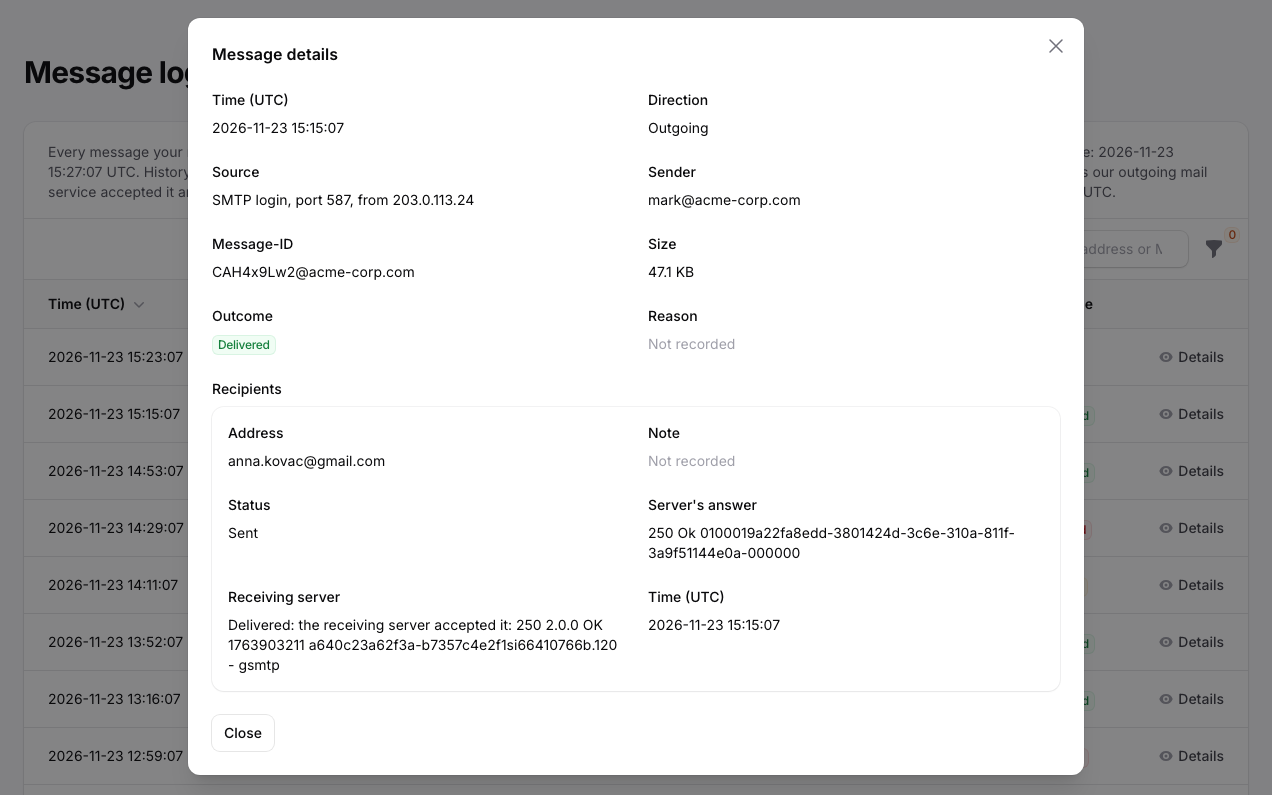
Open the message. Delivered means the receiving server accepted it, and its own answer is there, such as 250 2.0.0 OK. Bounced shows the reason the receiving server gave, such as 550 5.1.1 user unknown, which usually means a typo in the address.
Did our invoice go out at all?

Search by any part of the recipient's address or of the Message-ID, and filter by mailbox, outgoing or incoming, outcome and date. Sent means our outgoing mail service accepted it; the receiving server's answer follows at a later update.

Why didn't I get their reply?

For incoming mail, the details show our spam filter's verdict: passed, marked as spam, delayed or rejected, with its score, the score from which it rejects mail, and the rules that weighed most.

Was that sent from our office?

Every outgoing message shows how it was sent: from webmail, or a mail app's SMTP login with its port and IP address. Useful when a client asks who sent something from their mailbox.

Did the customer mark us as spam?

When a recipient reports a delivered message as spam, the log says so: Delivered, then reported as spam by the recipient. That is the moment to look at what the client is sending, and to whom.

It has been hours. Where is it?

Delayed means it has not been accepted yet and will be tried again. Expired means delivery kept failing until it was given up. The details show the server's answer, so you can tell a full mailbox from a wrong address or a server that is down.

Outcomes

Seven outcomes, each in plain words.

Every message shows one of these. For mail to other providers, Sent comes first, then the receiving server's answer for each recipient.

Delivered

Saved in a mailbox on our platform, or accepted by the receiving server. It does not say whether it landed in the inbox or the spam folder: no log can.

Sent

Our outgoing mail service accepted it and the receiving server has not answered yet. Its answer appears at a later update.

Delayed

Not delivered yet: a server asked to try again later, and its answer shows why.

Bounced

The receiving server turned it away, with its reason when it gave one, such as 550 5.1.1 user unknown.

Expired

Delivery kept failing until it was given up. The last answer shows what went wrong.

Queued

Waiting to be sent. A later update shows what happened next.

Refused

Not accepted. For incoming mail, the details say whether our spam filter rejected it, and why.

Their answer

For mail to other providers, the details add the receiving server's own answer for each recipient: accepted, bounced, delayed, or delivered and then reported as spam by the recipient.

How it looks

One list, then the details of any message.

Real screenshots of the Message log in the Atriomail control panel, shown with demo mailboxes.

Live product ยท captured November 2026
๐Ÿ”’ /admin/message-log โ— Live product
The Message log list with sent, delivered, bounced, delayed, refused and expired messages
โœ“ Every message the mailboxes you manage sent and received, newest first, with its time (UTC), the mailbox, the direction, who it was from or to, and the outcome.
For resellers and agencies

Your clients look up their own mail.

Anyone who manages a mailbox in the control panel sees its log, your clients included. With white-label they see it on your own hostname, under your product name. Each sees only the mailboxes they manage, and you see your clients' mailboxes as far as you manage them.

  • One list for every mailbox you manage, newest first
  • A Message log link on every row of the Mailboxes list opens that mailbox's messages
  • Search any part of an address or a Message-ID; filter by mailbox, direction, outcome and date
The details of a bounced message, with the receiving server's reason
The receiving server's reason, word for word.
Spam check and API

See why mail was refused. Show it in your own portal.

For mail a mailbox received, the details show our spam filter's verdict, its score and the score from which it rejects mail, so "why did their email never arrive?" has an answer. A message marked as spam or delayed normally scored below that line.

  • The same Message log through the API, one mailbox at a time, to any API key that can read that mailbox
  • The same 30 days and the same filters: dates, outgoing or incoming, outcome, an address or a Message-ID
  • Combine it with self-service restore: check whether it arrived, then bring it back if it was deleted
An incoming message refused by our spam filter, with its score and top rules
Our spam filter's verdict on an incoming message.
Good to know

The details, in plain words.

  • The last 30 days. The log started on 13 November 2026, so nothing before that date is listed.
  • Updated every 15 minutes. The newest few minutes may not be listed yet, and times are in UTC.
  • Delivered is not "in the inbox". No log can show whether a message landed in the inbox or the spam folder.
  • The receiving server's answer covers mail sent since 15 November 2026, to the addresses it was sent to (not copies forwarded on), and appears at the log's next update.
  • The spam check covers mail received since 15 November 2026, and not mail sent to an alias.
  • A domain moved to another account: its earlier history is not shown to either account.

Diagnosing a bounce? Our guide on how to read an email bounce message explains what each SMTP code means and what to do about it.

FAQ

Questions about the Message log.

What is the Atriomail Message log?

A list in the control panel of every message a mailbox sent or received in the last 30 days, for all the mailboxes you manage, newest first. Each message shows its time, the mailbox, whether it went out or came in, who it was from or to, and what happened to it.

Can I see whether an email was delivered or bounced?

Yes. For mail to other providers, the message first reads Sent, meaning our outgoing mail service accepted it, and then shows the receiving server's answer for each recipient: delivered, bounced with the server's reason when it gave one, delayed, or delivered and then reported as spam by the recipient. This covers mail sent since 15 November 2026.

Can the Message log show whether my email landed in spam?

No log can show whether a message landed in the inbox or the spam folder. Delivered means the receiving server accepted it. The log does show when a recipient later reports a delivered message as spam.

How far back does the Message log go?

The last 30 days, and nothing before 13 November 2026, when the log started. It is updated every 15 minutes, so the newest few minutes may not be listed yet.

Can my clients see their own Message log?

Yes. Anyone who manages a mailbox in the control panel sees its log, your clients included, on your branded hostname when you have white-label. Each sees only the mailboxes they manage.

Can I see why an incoming email was refused?

For mail a mailbox received since 15 November 2026, the details show our spam filter's verdict: passed, marked as spam, delayed or rejected, with its score, the score from which the filter rejects mail, and the rules that weighed most. Mail sent to an alias is not covered.

Is the Message log available through the API?

Yes, one mailbox at a time, to any API key that can read that mailbox, with the same 30 days and filters: dates, outgoing or incoming, outcome, an address or a Message-ID.

Stop guessing whether the email arrived.

Creating an account is free and needs no card. Each mailbox is $1.39 per month with 15 GB of storage, and its Message log is right there in the control panel.