AtrioDMARC · DMARC monitoring for resellers

Block fake email in your clients' names. Safely.

AtrioDMARC reads the DMARC reports mail providers such as Google and Microsoft send every day, and turns them into plain words: who sends email as each domain, what is fake, what to fix, and when it is safe to move from watching to blocking. It is included with every domain that has a paid mailbox, and $1.49 a month for a domain whose email is hosted anywhere else.

  • ✓ Included with a paid mailbox
  • ✓ $1.49 per domain hosted elsewhere
  • ✓ Reports under your brand
🔒 /admin/email-domains/…/dmarc ● Live product
Email protection for acme-corp.com: partly protected, 3,431 emails sent as the domain in the last 30 days, 93.9% recognised, and what to do next
$0Extra for a domain with a paid mailbox
$1.49A month per domain hosted anywhere else
30Sending services with step-by-step guides
A to FOne grade per domain, explained
Why it matters now

Gmail and Outlook.com now check DMARC. Most clients have never looked at theirs.

Gmail requires every bulk sender to publish a DMARC record (Google's email sender guidelines, in force since February 2024), and since May 2025 Outlook.com sends mail from high-volume domains without SPF, DKIM and DMARC to the junk folder (Microsoft's announcement of April 2025; both checked November 2026). Most small businesses publish a record once, leave it on "watch only" and never read what it reports.

A DMARC record nobody reads

  1. The record only watches, so fake invoices in your client's name still reach inboxes.
  2. The daily reports arrive as files of XML that nobody opens.
  3. Nobody knows whether the newsletter tool, the shop or the help desk sends email correctly.
  4. Tightening the policy is a guess, and a wrong guess sends real invoices to spam.
  5. When something breaks, your client calls you.

With AtrioDMARC

  1. Every sender of the domain is listed by name, with a plain label for each one.
  2. What to fix comes with a step-by-step guide for 30 named services.
  3. Ready for the next step? says when tightening is safe, and what it would have done to the last 30 days of mail.
  4. You publish the next step with a click on Cloudflare or Namecheap, or hand the new record to the client's IT person.
  5. A weekly summary, and an email when a new sender appears or one stops being recognised.
How it works

One switch, one record, then plain words.

In the control panel it is called Email protection, and every domain has a page for it. Nothing in DNS changes without your click, and switching monitoring on or off does not change how email is delivered.

  1. Switch it on

    Open the domain's Email protection page and switch monitoring on. For a domain with a paid mailbox it is included; anything else shows the price first.

  2. Publish one record

    Add the DMARC record the page shows, or click Publish the record when the domain's DNS is on a connected Cloudflare or Namecheap account. It keeps the domain's current policy.

  3. Read it in plain words

    Reports go to an address on your client's own domain, so no other company's name appears in its DNS. The first ones usually arrive within a day or two.

  4. Tighten when it is safe

    With enough data, the page says whether the domain can move from watching, to sending fake email to spam, to blocking it. Nothing is tightened without your click.

Inside AtrioDMARC

What you and your clients see.

Real screenshots of the Email protection pages in the Atriomail control panel, shown with demo domains and 28 days of demo reports.

Live product · captured November 2026
🔒 /admin/email-domains/…/dmarc ● Live product
Email protection for acme-corp.com: partly protected, three numbers for the last 30 days and what to do next
✓ The status in plain words, then three numbers for the last 7 or 30 days: emails sent as the domain, how many were recognised as its own, and how many were not.
What it does

DMARC in plain words, with the fix next to the problem.

The technical details (SPF, DKIM and the record itself) sit in a folded section for the IT person. Everything above it is written for the business owner.

Who sends as the domain

Every sender, most emails first, with a plain label for each one. Mail forwarded by people your client wrote to is recognised and labelled "Forwarded by your recipients, fine", and does not count against them.

Ready for the next step?

Once there is enough data, the page says whether the domain can move up a level, and what that step would have done to the last 30 days of mail: own emails sent to spam or back, and fake emails stopped.

A grade from A to F

Out of 100 points, with a plain list of what costs points: the protection level, weaker subdomains, mistakes in the sender list, a missing or mismatched signature. A is only a clean score, and the grade is a summary, not a guarantee.

Fake email, counted

How much fake email used the domain's name in the last 30 days, from how many unknown senders, and whether the current setting or the mail providers stopped it.

Show me how, for 30 services

A guide for each sender, covering 30 named services such as Google Workspace, Microsoft 365, Mailchimp, HubSpot, Zendesk and Shopify, plus the client's own mail server. Check again shows whether the records are in DNS now.

Add them for me

On a connected Cloudflare or Namecheap account, a guide adds its records after a confirmation. It never overwrites a record that is there and never creates a second SPF record. A key unique to the client's account at a service is copied by hand.

Send to my IT person

Emails the same steps and records to any address your client types, so whoever manages their DNS can do it. The address is not kept.

A weekly summary and alerts

Every Monday, a summary of every monitored domain you look after. An alert when a new sender starts sending as a domain, when a sender stops being recognised, or when less of the domain's email is recognised. Checked once a day.

Email sent to you

Whether email from other providers reaches the domain over a secure connection, from the delivery reports mail providers send each day, and whose problem it is when it does not. It speaks for the providers that send those reports.

For resellers and MSPs

Every client's domain on one page.

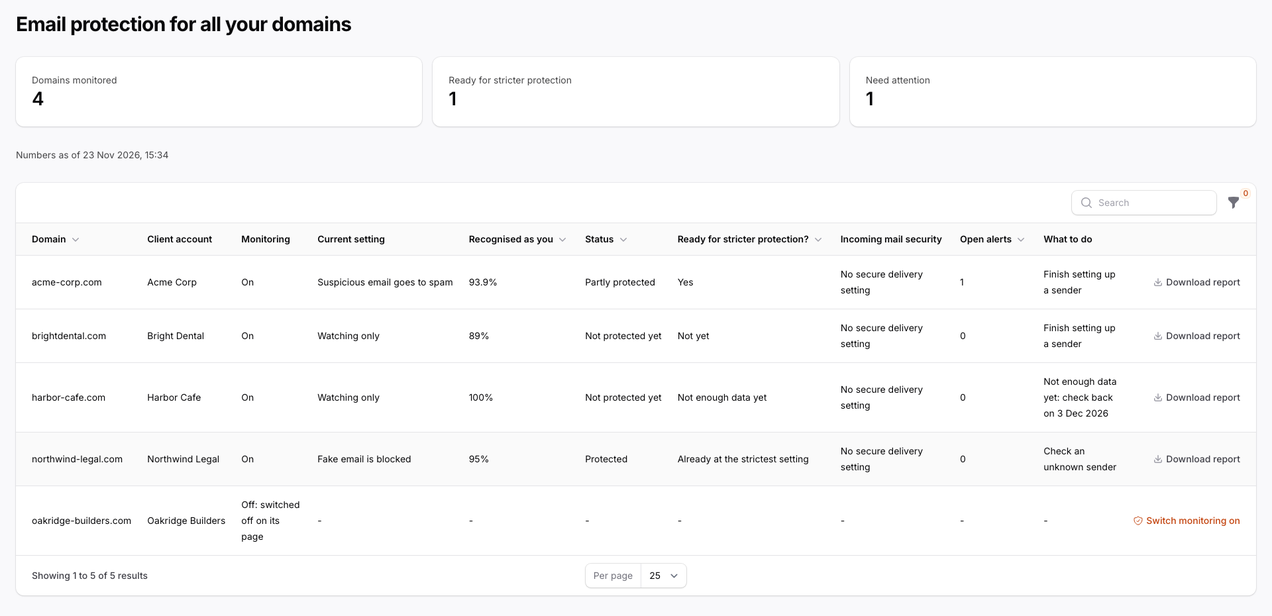
Email protection in the control panel menu lists every domain your account manages, your clients' domains included. You see at a glance which domains need attention, which are ready for stricter protection, and which have monitoring off.

  • Monitoring on or off (and why), the current setting, the share of email recognised and the status
  • Filters for "needs attention", "ready for stricter protection" and "monitoring off"
  • The security of incoming mail, open alerts and what to do next
  • Numbers refreshed once a day, with the time shown as "Numbers as of"
Email protection for all your domains: domains monitored, ready for stricter protection, need attention, and one row per client domain
One reseller, five client domains, each at a different step.
A report to hand to a client

A PDF your client understands, under your brand.

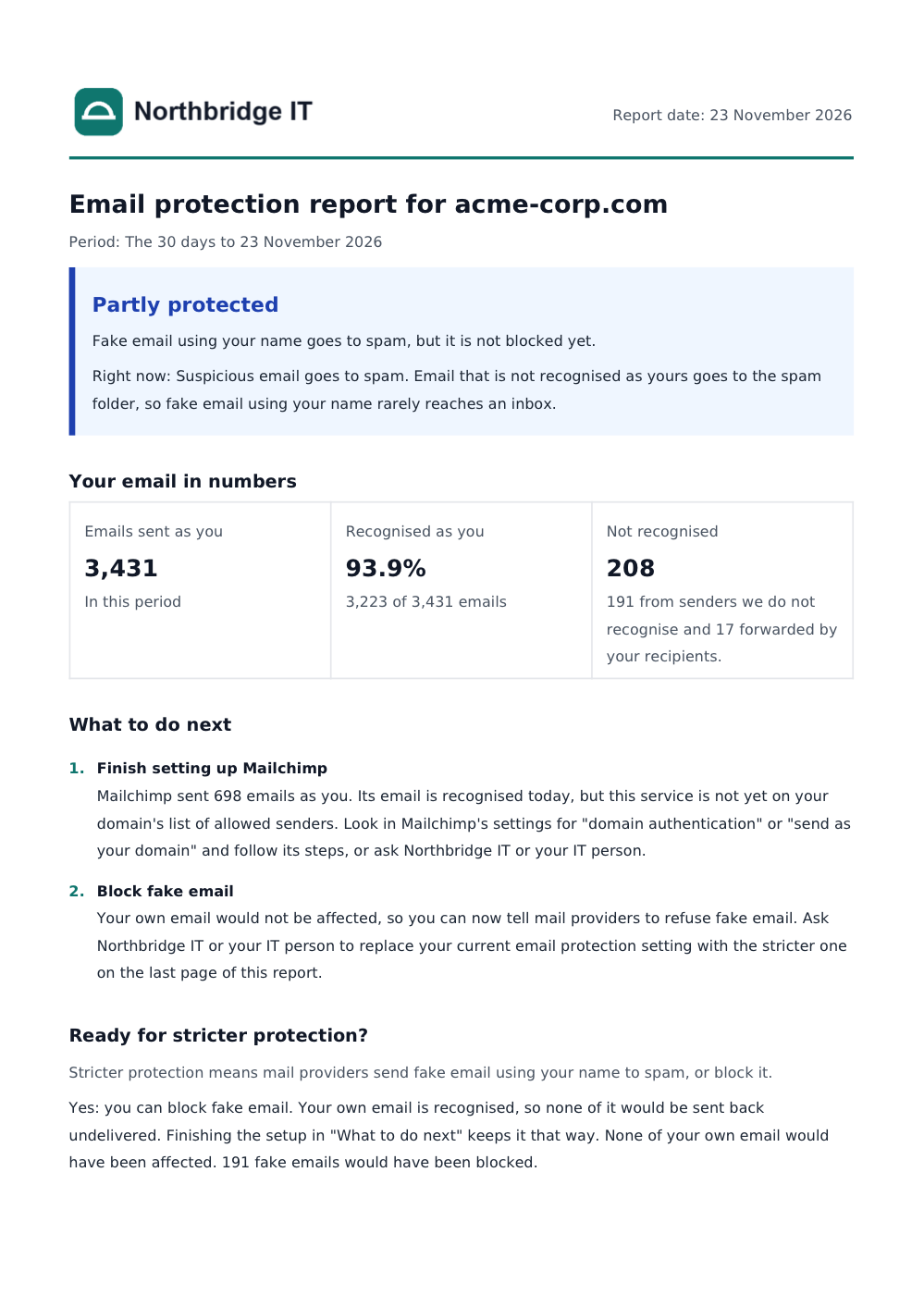
For each domain with monitoring on, Download report gives a PDF of the last 30 days in plain words. It carries your white-label name, logo and colour (or your company name, or a neutral title) and never ours. Send it with your monthly invoice and DMARC becomes a service your client can see.

  • The status first, then the numbers and the top senders
  • At most two next steps, and whether the domain is ready for stricter protection
  • The technical details on the last page, for the client's IT person
  • In English. Before there is enough data, it says so instead of showing empty numbers
The first page of a PDF email protection report for acme-corp.com, branded Northbridge IT, a demo reseller
The first page of a report for a demo reseller, Northbridge IT.
Under your brand

Your clients see their domain. You get the alerts.

Anyone who manages a domain in the control panel sees its Email protection page, your clients included. With white-label they see it on your own hostname, and the page never names Atriomail there. The weekly summary and the alerts go to the account at the top, so you hear about a problem first, and your clients never get them.

  • Monitoring included with a paid mailbox can be switched on by anyone who manages the domain
  • Paid monitoring is switched on only by the main account that pays, so a client cannot add a charge to your invoice
  • You decide what to charge your clients for it

White-label branding is included for accounts paying for 50 or more mailboxes. Below that it is $50 a month, with no setup fee. See pricing →

The readiness card and the grade, as a client sees them on their domain's Email protection page
What your client reads: one verdict, the reason, and the next step.
Pricing

One published price per domain. Nothing to quote.

No plans, no email volume tiers, no annual contract. It sits on the same monthly invoice as your mailboxes, and a reseller pays for its clients' domains.

Domain with a paid mailbox Included

DMARC monitoring

For a domain whose email is with us and that has a paid mailbox, at $1.39 per mailbox per month. If the domain's last paid mailbox goes, monitoring switches off. It never turns into a charge on its own.

Domain hosted elsewhere $1.49 per domain / month

DMARC monitoring

For a domain whose email stays with another provider, where nothing is charged until its record is found, and for a domain with us that has no paid mailbox, where the price is shown and confirmed first.

Sender list (SPF) $0.89 per domain / month

Keeping it short

Offered when a domain's sender list needs 9 or more of the 10 DNS look-ups mail providers allow, for a domain with a paid mailbox or a monitored domain hosted elsewhere. Nothing is charged before the domain uses the list we keep.

Secure delivery (MTA-STS) Free

Hosted for you

For a domain whose email is with us and whose mail servers all point at us. We set it up and look after it.

Prices in US dollars, on the account's usual monthly invoice. No charge for part of a month, and nothing refunded for a month already billed when you stop. Only the main account that pays, with an active subscription, can switch on a paid service.

Compare

AtrioDMARC next to the DMARC tools MSPs know.

The cheapest published price to monitor 1, 10 and 50 domains that send email, and what each plan includes. None of the four publishes an MSP price.

 AtrioDMARCEasyDMARCDMARC AdvisordmarcianPowerDMARC
1 domain Included with a paid mailbox. Otherwise $1.49 a month $35.99 a month billed yearly, or $44.99 monthly (DMARC Plus: 2 domains, 100,000 emails a month) €19 a month billed yearly (Basic, reporting only: 2 sending domains, 100,000 emails a month) $19.99 a month billed yearly, or $24 monthly (Basic: 2 domains, 100,000 emails a month) $6.42 a month billed yearly, or $8 monthly (Basic: 5 domains, 50,000 emails a month)
10 domains $14.90 a month if all 10 are hosted elsewhere. Included for each one with a paid mailbox Not published. Premium covers 4 domains; beyond that, a quote €499 a month billed yearly (Enterprise), or €199 if no more than 8 send email (Plus) $499 a month billed yearly (Enterprise), or $199 if no more than 8 are active (Plus) Not published. Basic covers 5 domains; beyond that, a quote
50 domains $74.50 a month if all 50 are hosted elsewhere Quote on request Quote on request Quote on request Quote on request
How the price is set Per domain, on your monthly invoice Plans by domains and email volume Plans by sending domains and email volume, billed yearly Plans by active domains and email volume Plans by domains and email volume
All clients in one view Yes, with filters, in the panel you already use for their email Yes, on the MSP plan Yes, in the MSP program MSP program; clients do not get their own logins Yes, in the partner program
Reports under your brand PDF with your white-label name, logo and colour Branded or co-branded, on MSP plans White-labelled sales materials; branded reports not listed Not published Yes, in the partner program
Hosted SPF (keeping the sender list short) $0.89 a month per domain Premium plan and above Management plans, from €199 a month Not offered Add-on on Basic, priced by sales
Hosted MTA-STS Free, for domains whose email is with us Premium plan and above Through sales, no published price Not listed Basic plan and above
API Included Enterprise and MSP plans Enterprise plan Enterprise plan Enterprise and partner plans
Report history 120 days 3 months (Plus), 1 year (Premium, MSP), up to 3 years (custom plans) 3 months (Basic) to over a year (Enterprise) 3 months (Basic) to unlimited (Enterprise) 1 year (Basic)
Failure (forensic) reports No: aggregate reports only, never message content Yes Yes Yes, Basic and above Yes

Competitor plans and prices from each company's own pricing pages (EasyDMARC, DMARC Advisor, dmarcian and PowerDMARC), checked 23 November 2026 and shown in their own currency; DMARC Advisor's prices are in euros, excluding VAT. "Billed yearly" means the price per month on a yearly plan. "Domains" means domains that send email; all four also allow domains that send none. Prices change, so check their pages before you decide.

Where they go further

They keep report history for a year or more on their higher plans; AtrioDMARC keeps 120 days. They also process failure (forensic) reports, which AtrioDMARC leaves out by design.

What they add on top

Dedicated DMARC companies sell extras such as hosted BIMI logos and threat intelligence. AtrioDMARC sticks to what a reseller needs to protect a client's domain and explain it.

Where AtrioDMARC is different

It lives in the panel where you already host your clients' email, it is included with every paid mailbox, and its per-domain price is published, so you can put it on your own price list today.

Domains hosted elsewhere

Monitor a client's domain wherever its email lives.

You can monitor a domain whose email is not with us, for your own account or for a client's, from DMARC for other domains in the control panel. The domain's email stays where it is and its delivery does not change. It is $1.49 per domain per month.

  • One DNS record to add, or Add it for me on a connected Cloudflare or Namecheap account
  • Monitoring starts once the record is found. Nothing is charged before that, and a record never found is removed after 14 days, uncharged
  • Its own Email protection page, a line in your list of domains, and the PDF report
  • An email when the domain's SPF, MX, DMARC or DKIM records change, checked once a night

One honest detail: for a domain hosted elsewhere, the record sends its reports to an address of ours, so that address appears in the domain's DNS. It is the one place a client could see it; the pages and emails carry your brand.

If the record goes missing, an email says so and monitoring continues for 3 days, then pauses until the record is back, and restarts by itself. A domain is not billed while it is paused, and after 30 days paused it is removed. Stop monitoring deletes the domain's reports and history.
Sender list (SPF)

Keep a long sender list under the limit.

A domain's sender list (SPF) may need no more than 10 DNS look-ups, or mail providers stop reading it. When a domain's list needs 9 or more, its Email protection page offers to keep it short for $0.89 per domain per month.

  • You replace the record once; from then on we keep the senders' addresses up to date, refreshing every 30 minutes
  • A change that looks wrong is held for review, and the last good list stays in use
  • Optionally, the record points to a name on your client's own domain, such as spf.yourdomain.com
  • Stopping freezes the list: email keeps working for now, but the list is never updated again, so email may start to fail as services change their addresses
Not every list can be kept short. Parts that cannot be turned into addresses stay in your client's own record, and a list that cannot be handled safely is refused, with the reason. Only the main account that pays can switch it on or off; a client sees a plain line and no price.
Secure delivery (MTA-STS)

Tell other providers to always deliver securely. Free.

For a domain whose email is with us and whose mail servers all point at us, the Email protection page offers to tell other email services to always use a secure connection when they send email to it. We set it up and look after it, and keep it up to date when the domain's mail servers change.

  • Two settings to add once, or Add them for me on a connected Cloudflare or Namecheap account
  • It starts in testing: for at least a week, other services only report problems and still deliver everything
  • Make it strict is offered only after a clean week of reports, and only on your click
  • A strict domain goes back to testing by itself if a mail server fails its certificate check or its mail servers change
Through the API, too. Your own portal or billing system can read every domain's protection, a domain's grade and senders, the records it needs and a link to its PDF report. It can switch monitoring on and off, publish the record or the next step on Cloudflare or Namecheap, register a domain hosted elsewhere and set up secure delivery. Every paid action must confirm the current price in the request.
Good to know

The details, in plain words.

  • Aggregate reports only. No message content is read. Report data is kept for 120 days, then deleted.
  • Checked once a day. Alerts, the weekly summary and the overview's numbers are not real time.
  • Advice waits for enough data: at least 14 days of reports from at least 2 mail providers, covering at least 100 emails. Setting up senders can start straight away.
  • Nothing is tightened by itself. The next step is published only on your click, and only when the page says that exact step is safe.
  • Add them for me works on connected Cloudflare and Namecheap accounts. Elsewhere the page shows the records to add.
  • The grade is a summary, not a guarantee. No setting stops every kind of fake email.
  • In English. The Email protection pages and the PDF report are in English.
  • Who can switch on what: anyone who manages a domain can switch on included monitoring; only the main account that pays, with an active subscription, can switch on a paid service.
  • Included monitoring follows the paid mailbox. It switches off when the domain's last paid mailbox goes or stops being paid for, comes back on when its mailboxes are paid for again, and never turns into a charge on its own.
  • Held or suspended domains: monitoring cannot be switched on while a domain is held for review or suspended.
FAQ

Questions about AtrioDMARC.

What is AtrioDMARC?

AtrioDMARC is DMARC monitoring built into the Atriomail control panel, where the page is called Email protection. It reads the daily DMARC reports mail providers send about a domain and shows, in plain words, who sends email as the domain, what is not recognised, what to fix and when it is safe to tighten the domain's DMARC policy.

How much does AtrioDMARC cost?

It is included with every domain that has a paid mailbox with us ($1.39 per mailbox per month). A domain whose email is hosted elsewhere, or a domain with us that has no paid mailbox, is $1.49 per domain per month. Keeping a domain's sender list (SPF) short is $0.89 per domain per month, and hosted secure delivery (MTA-STS) is free for domains whose email is with us. See all prices.

Can I monitor a domain whose email is not hosted with Atriomail?

Yes, for $1.49 per domain per month. The domain's email stays where it is and its delivery does not change. You add one DNS record, and monitoring starts once the record is found. Nothing is charged before that, and a domain whose record is never found is removed from the list after 14 days, uncharged.

Will switching on monitoring change how my client's email is delivered?

No. Switching monitoring on or off does not change how email is delivered, and nothing in DNS changes without your click. The new DMARC record keeps the domain's current policy.

When is it safe to move a domain to p=quarantine or p=reject?

The Email protection page waits for at least 14 days of reports from at least 2 mail providers, covering at least 100 emails. Then Ready for the next step? says whether the next level is safe and what it would have done to the last 30 days of mail: how many of the domain's own emails would have gone to spam or been sent back, and how many fake emails it would have stopped. The step is published only on your click. Our guide on moving a DMARC policy to p=reject explains the reasoning.

Can my clients see AtrioDMARC under my brand?

Anyone who manages the domain in the control panel sees its Email protection page, your clients included, on your branded hostname when you have white-label, and the page never names Atriomail there. The PDF report carries your white-label name, logo and colour. Weekly summaries and alerts go to you, not to your clients.

Does AtrioDMARC read the content of emails?

No. Only aggregate DMARC reports are used, with no message content, and report data is kept for 120 days, then deleted. If you want to read a raw report yourself, see how to read a DMARC aggregate report.

How is AtrioDMARC different from EasyDMARC or DMARC Advisor?

AtrioDMARC publishes one price per domain that a reseller can see and resell: included for a domain with a paid mailbox, $1.49 a month for any other domain. EasyDMARC and DMARC Advisor price their plans by domains and email volume and quote MSP prices on request. They keep report history longer on their higher plans and also process failure (forensic) reports, which AtrioDMARC does not. See the comparison.

Can I check a domain's DMARC record without an account?

Yes. The free DNS checker reads any domain's MX, SPF, DKIM and DMARC records and points out the SPF and DMARC mistakes that quietly stop mail being recognised, with a suggested fix. It only reads public DNS and never changes anything.

Turn DMARC into a service your clients can see.

Creating an account is free and needs no card. Monitoring is included with every domain that has a paid mailbox, at $1.39 per mailbox per month, and $1.49 a month for any other domain.