
A client signs up, you add their domain to Atriomail, and before you've even created a single mailbox you go to set up sales@theirdomain.com as an alias so the whole team can see it. It doesn't work. Not because something is broken, but because aliases, forwarders and catch-alls in Atriomail all share one prerequisite that trips up almost everyone the first time: the domain needs at least one paid mailbox on it before any of them can be created.
That rule, and the three free routing tools it gates, are the subject of this guide. None of them cost anything beyond the mailboxes you already pay for, but each does a different job, and using the wrong one for a given client request is how a "quick alias" turns into a support ticket a week later.
Table of Contents
- Key Takeaways
- Who This Is For
- What You Need Before You Start
- The Mailbox-on-the-Domain Rule
- Aliases: One Mailbox, Several Addresses
- Forwarders: Routing Mail to an Outside Address
- Catch-All: A Safety Net, Not a Default
- What This Means for Your Business
- Limits to Know
- Frequently Asked Questions
Key Takeaways
| Point | Detail |
|---|---|
| The one prerequisite | A domain needs at least one mailbox on it before an alias, forwarder or catch-all can be added; a mailbox on a different domain doesn't count |
| What each one does | An alias points several addresses at one mailbox; a forwarder sends mail on to an outside address; a catch-all routes every unmatched address on a domain to one mailbox |
| Cost | None of the three are billed; only mailboxes and any extra storage blocks appear on the invoice |
| Self-service | Clients billed through WHMCS or Blesta can add their own aliases and set their own catch-all from their client area |
| What Atriomail does for this | Gives a reseller three free, no-charge routing tools per domain, so department addresses and legacy forwards don't need a second mailbox purchased just to exist |
| What it doesn't do | No bulk tool for aliases, forwarders or catch-alls; each is still created one at a time, per domain, in the panel |
Mailboxes cost $1.39, routing costs nothing. Once a domain has one paid Atriomail mailbox on it, every alias, forwarder and catch-all you add to that same domain is free, with no limit on how many client domains you run this way. Creating an account is free and needs no card; mailboxes are billed from the first one.
Who This Is For
Resellers, agencies and MSPs setting up a new client domain in Atriomail, or cleaning up an existing one, who need department addresses like sales@ or support@, a forward to someone's personal inbox, or a safety net for mail sent to an address that was never explicitly created. It assumes you already have a domain added to Atriomail; if you're still onboarding the domain itself, the domain management and branding guide covers that step first, and the overview of what reseller email hosting actually involves is a useful starting point if this is the first client domain you're setting up this way.
What You Need Before You Start
- A domain already added to Atriomail, past the automated security check that runs on every new domain. If you haven't created an Atriomail account yet, it's free and needs no card, so there's nothing to lose by getting the domain ready before you sell the first mailbox.
- At least one paid mailbox created on that same domain. A mailbox on a different domain in the same account doesn't satisfy this; the mailbox and the alias, forwarder or catch-all have to share the exact domain.
- Panel admin access, or, if the client is billed through WHMCS or Blesta, access to that client's own area, since both let clients manage their own aliases and catch-all without you doing it for them.
- A clear idea of which tool fits the request. "I want sales@ and support@ to both land in one inbox" is an alias job; "forward anything sent here to my Gmail" is a forwarder job; "don't let typos bounce" is a catch-all job. Picking the wrong one is the most common mistake covered later in this guide.
The Mailbox-on-the-Domain Rule
Every alias, forwarder and catch-all in Atriomail needs somewhere to actually deliver mail once the routing rule fires, and that somewhere has to be a real mailbox that already exists on the same domain. Add a domain, try to create an alias before you've created a single mailbox on it, and there's nothing for the alias to point at yet. The fix isn't a setting to flip; it's creating the first mailbox on that domain.
This is easy to miss because it's a genuinely common order of operations to get backwards. A reseller onboarding a new client often thinks in terms of the client's org chart first: "they need sales@, support@ and billing@." But Atriomail's model starts from a real mailbox, usually the first person on the team, or a dedicated hello@ inbox, and builds the department addresses on top of it as aliases or a catch-all once that mailbox exists. Get the first mailbox created, and every alias, forwarder and catch-all after that is a two-minute task.
It's also worth knowing this rule travels with the domain, not the account. If a reseller manages fifty client domains and forty-nine of them already have mailboxes, the fiftieth still needs its own first mailbox before routing works, even though the other forty-nine are fully set up. There's no account-wide exception, which is a detail covered in more depth in the broader guide to managing client email across an account.
Already created the first mailbox on a domain? Aliases, forwarders and catch-alls are the next step, and none of them add to the bill. The knowledge base walks through each screen in the panel in more detail than fits here.
Aliases: One Mailbox, Several Addresses
An alias points one or more extra addresses at a single existing mailbox, so mail sent to any of them lands in the same inbox. Set up sales@theirdomain.com and billing@theirdomain.com as aliases pointing at a single "front desk" mailbox, and both addresses work immediately, with no second mailbox to buy and no extra line on the invoice, since aliases aren't billed at all.
In the panel, this lives under Email Aliases in the sidebar: open it, choose to add an alias, type the alias address, pick the mailbox it should land in, and save. The alias address itself doesn't need its own password or its own sign-in; anyone checking the underlying mailbox sees everything sent to every alias pointed at it, all in one place. That makes aliases the right tool when the goal is consolidation, several public-facing addresses funneling into one inbox someone actually checks, rather than routing mail somewhere entirely outside the domain.
Aliases are also the natural fit when a client wants to look bigger than a one-person inbox without actually running several mailboxes. A solo consultant can publish hello@, info@ and bookings@ on their website, all aliased to the one mailbox they already pay for, and a visitor has no way to tell there's only one person behind all three. The underlying economics of why this matters for a reseller's own margin are covered in the guide to how usage-based pricing works: aliases don't change what you're billed, so there's no reason to hold them back from a client who asks. For an agency whose onboarding process already walks new clients through getting branded email live, a step covered in the step-by-step guide to white-label email for agencies, aliases are usually the first bit of polish added once the core mailbox is working. The knowledge base's email forwarding and aliases article covers the exact field names on each of these screens if a full walkthrough is useful before you set the first one up for a client.
Forwarders: Routing Mail to an Outside Address
A forwarder does a different job: it passes mail sent to one address on to a destination address, including an address outside the domain entirely, like a personal Gmail account. This is the tool for "I still want mail sent to my old business address to reach me," or for a staff member who, for whatever reason, wants their work mail landing in an inbox they already check daily.
Setting one up follows the same pattern as an alias: open Email Forwarders in the panel, create a new forwarder, enter the source address on the domain and the destination address it should forward to, and save. A forwarder still needs a mailbox on the same domain to exist first, the same rule covered above, even though the mail ultimately ends up somewhere else entirely.
One behavior worth knowing before a client asks about it: a forwarded message shows the original sender's name followed by "via" your domain in the recipient's inbox, rather than arriving as if it were sent directly, and a reply goes back to the original sender, not to the forwarding address. That's a detail worth setting expectations on before a client forwards something important and the reply doesn't land where they assumed it would, the kind of small thing worth building into a documented client support process so it doesn't turn into an escalation the first time it happens. If a forward is going to Gmail or Google Workspace specifically, note that this is only about mail flowing forward through Atriomail; it has no bearing on whether mail already sitting in that outside account can be migrated the other way, which is a separate IMAP migration question entirely.
Catch-All: A Safety Net, Not a Default
A catch-all directs every address on a domain that doesn't match an existing mailbox or alias to one designated mailbox, instead of bouncing. Someone types jon@ instead of john@, or a form submission on an old website still points at an address that was retired two years ago; with a catch-all set, that mail lands somewhere instead of disappearing with a bounce message the sender may never read.
It's set up the same way as the others: open Email Catch-All in the panel, select the domain, choose which existing mailbox should receive everything unmatched, and save. The requirement is identical too: that destination mailbox has to already exist on the domain.
The honest caveat is that a catch-all is convenient precisely because nothing on the domain ever hard-bounces, and that's also why catch-alls tend to accumulate typos, outdated contacts someone forgot to update, and a meaningful share of spam sent to addresses that were never deliberately published anywhere. For specific, known addresses like sales@ or support@, an alias pointed directly at the right mailbox is usually the better call; save the catch-all for the genuine safety-net case of "we don't know every address that might be in use," not as the default way every new domain gets configured, a tradeoff worth weighing against the broader goal of a clean, professional-looking domain covered in email branding best practices for resellers. If a catch-all is already set up on a client domain and started filling with spam, that's a separate troubleshooting job, not a setup mistake to fix by removing the catch-all outright; a reseller running into that should budget time to review what's actually landing there before deciding what to change.
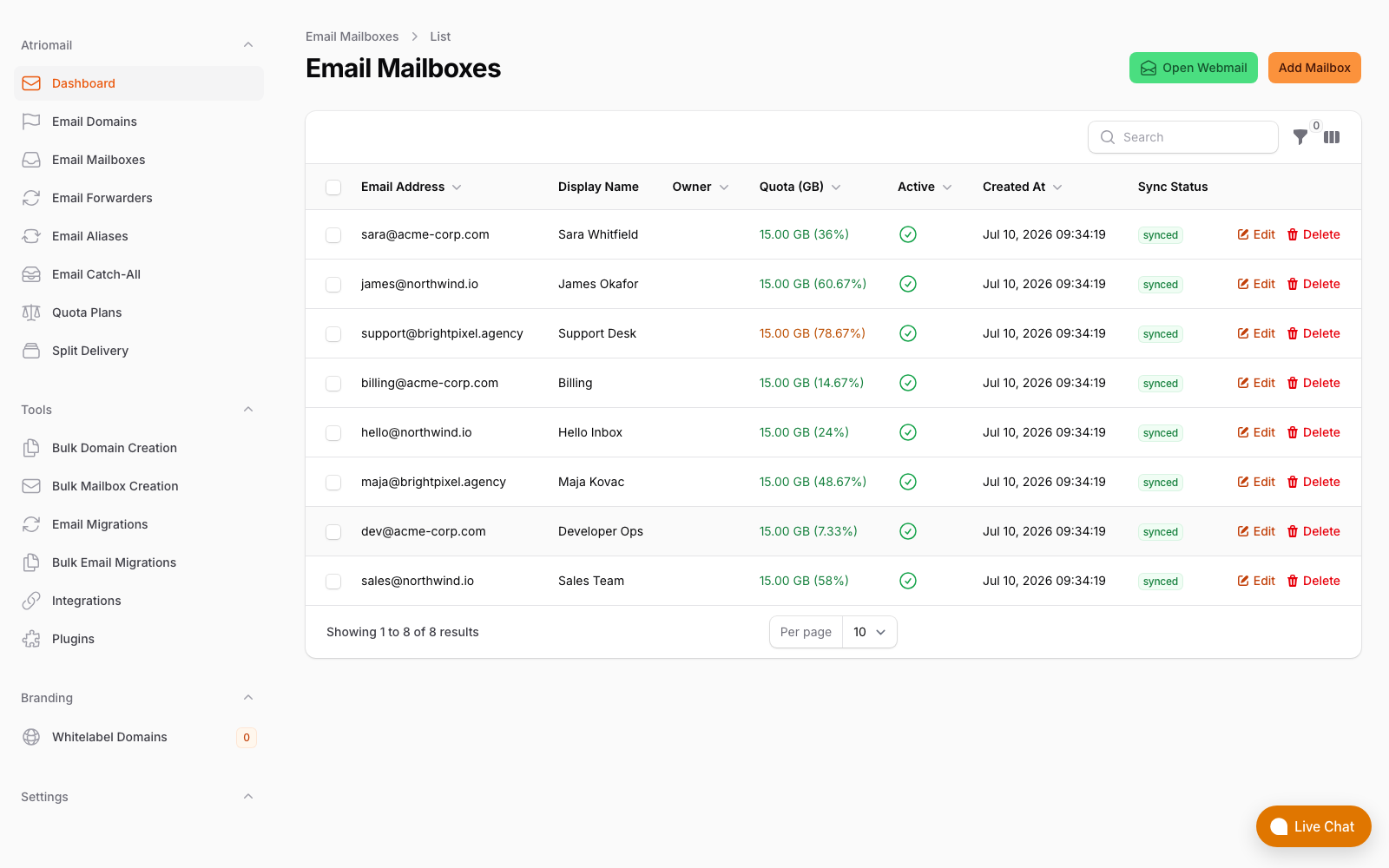
Email Forwarders, Email Aliases and Email Catch-All sit as their own items in the Atriomail panel sidebar, alongside Email Mailboxes, real panel, no mockup.
What This Means for Your Business
Take the standard 200-mailbox client book used throughout Atriomail's pricing examples: at $1.39 per mailbox per month, that's $278.00 a month wholesale (200 × $1.39). Billed at $5.00 per mailbox, you collect $1,000.00 from the client and keep $722.00 a month above wholesale, before card fees, support time and any white-label add-on fee. None of that changes because of aliases, forwarders or catch-alls, and that's exactly the point: they're free to add, on top of a book you're already billing for, which makes them close to pure margin protection rather than a cost center, the same margin logic the pricing page's reseller margin calculator walks through at different mailbox counts.
The practical value shows up in retention more than in the invoice. A client who gets sales@, support@ and billing@ working on their domain, at no extra charge, for the price of the one mailbox you'd have sold them anyway, sees a more complete-looking setup than a competitor who only hands over a single inbox and calls it done. And because clients billed through WHMCS or Blesta can add their own aliases and set their own catch-all from their own client area, that completeness doesn't have to generate a support ticket every time a client's org chart adds a new department address; it's a detail covered in more depth for agencies managing several clients at once in the guide to multi-client email management.
Work out what a 200-mailbox book is actually worth. Wholesale stays $1.39 per mailbox whether a client only ever uses one address or routes a dozen department addresses through aliases and a catch-all; routing itself never changes the bill.
Limits to Know
- The mailbox has to exist on the same domain first. A mailbox on a different domain in the same account doesn't satisfy the prerequisite for an alias, forwarder or catch-all.
- No bulk tool. Atriomail's bulk tools cover adding up to 500 domains, or up to 500 mailboxes on one domain, in a single step; aliases, forwarders and catch-alls aren't part of either tool and are still created one at a time, a detail covered in the guide to setting up branded email for agency clients.
- A catch-all has one destination. Every unmatched address on the domain lands in the same single mailbox; there's no way to route different unmatched patterns to different places.
- Forwarded mail shows "via" your domain, and replies go to the original sender. Set that expectation with a client before they rely on a forward for something time-sensitive.
- None of this is "unlimited" in the sense of being free-floating. Aliases, forwarders and catch-alls aren't billed, but they still require that first paid mailbox on the domain; there's no way to run routing-only addresses on a domain with no mailbox on it at all.
Frequently Asked Questions
Do aliases, forwarders and catch-alls cost extra in Atriomail?
No. Domains, aliases, forwarders and catch-all addresses aren't billed. Only the mailboxes you create, and any extra storage blocks you add to them, show up on the monthly invoice.
Why can't I add an alias or catch-all before creating a mailbox?
Every alias, forwarder and catch-all needs an existing mailbox on that same domain to deliver into. A mailbox on a different domain in the same account doesn't count; create the first mailbox on the domain in question, and every routing option becomes available for it immediately after.
What happens when someone replies to a forwarded message?
The reply goes back to the original sender, not to the forwarding address. The forwarded copy itself shows the original sender's name followed by "via" your domain in the recipient's inbox, so it's visibly a forward rather than a direct message.
Is a catch-all a good idea for every client domain?
Not automatically. A catch-all is genuinely useful as a safety net for addresses you didn't anticipate, but because nothing on the domain ever hard-bounces, catch-alls also tend to collect typos and unsolicited mail over time. For specific, known addresses like sales@ or support@, an alias pointed directly at the right mailbox is usually the cleaner choice.
Can clients manage their own aliases and catch-all without contacting me?
Yes, if they're billed through WHMCS or Blesta. The WHMCS client area includes Aliases and Catch-all pages alongside Mailboxes, and Blesta's client tabs include the same, so a client can add their own alias or set their own catch-all without a support ticket.
Can I bulk-create aliases or forwarders for many client domains at once?
No. Atriomail's bulk tools handle adding domains and mailboxes in batches, but aliases, forwarders and catch-alls aren't part of either bulk tool; each one is still created individually, per domain, in the panel.
Recommended
- Email Domain Management Guide: Streamline Setup and Branding
- Client Email Management: A Guide for Resellers
- Multi-Client Email Management for Agencies
- How to Set Up Branded Email for Agencies Easily
- Bulk-Adding Domains and Mailboxes in Atriomail
- Pricing and the Reseller Margin Calculator
Latest from the blog
- How to Set Up BIMI So a Client's Logo Shows Up in Gmail and Yahoo · Oct 12, 2026
- DreamHost Email vs Atriomail: What "Unlimited" Doesn't Cover for Resellers · Oct 10, 2026
- A Client's Email Account Was Compromised: Why a Password Reset Alone Doesn't Fix It · Oct 9, 2026
- How to Move a Client's DMARC Policy to p=reject Without Breaking Their Mail · Oct 7, 2026
- OVHcloud Email Pro: What a £1.39 Mailbox Actually Costs a Reseller in Dollars · Oct 6, 2026