
You've just taken on a client with 60 domains, or you're finally moving your existing book onto Atriomail, and the panel's "Add Domain" button is a one-at-a-time tool. Clicking it 60 times, waiting for each security check, then repeating the whole thing for every mailbox on every domain, is the kind of task that makes a reseller wonder whether the platform was built for accounts this size at all. Atriomail was: bulk domain creation and bulk mailbox creation exist specifically so an onboarding job that size is a single pasted list, not sixty individual page loads.
This guide covers exactly how both bulk tools work in Atriomail, what format they expect, the limits and caveats worth knowing before you paste in a client list, and where aliases, forwarders and catch-alls fit once the domains and mailboxes themselves exist.
Table of Contents
- Key Takeaways
- Who This Is For
- What You Need Before You Start
- How Bulk Domain Creation Works
- How Bulk Mailbox Creation Works
- Aliases, Forwarders and Catch-Alls After the Bulk Add
- What This Means for Your Business
- Limits to Know
- Frequently Asked Questions
Key Takeaways
| Point | Detail |
|---|---|
| Bulk domain creation | Up to 500 domains in one step, one domain per line, no CSV import |
| Bulk mailbox creation | Up to 500 mailboxes in one step, one username per line, but only for a single domain per batch |
| What it costs | Domains stay free; every mailbox you create is billed at $1.39/month with 15 GB included, whether created one at a time or in bulk |
| Where the tools live | Tools > Bulk Domain Creation and Tools > Bulk Mailbox Creation in the Atriomail panel |
| What Atriomail does for this | Turns a multi-hour, per-record onboarding job into a plain-text paste, without a spreadsheet import step to configure |
| What still needs a second step | Aliases, forwarders and catch-alls, which need at least one mailbox already created on that domain first |
Onboarding a client book this month? Every mailbox you create, one at a time or in bulk, runs at $1.39 per mailbox per month with 15 GB included, and domains themselves are never billed. Creating an Atriomail account is free and needs no card, though mailboxes are billed from the first one.
Who This Is For
Resellers, agencies and MSPs who are setting up more than a handful of domains or mailboxes at once, typically because you've won a new client with an existing book of domains, you're managing email across a growing client roster and adding several accounts in the same week, or you're migrating your own reseller business onto Atriomail from another host. If you're adding one domain for one new client, the regular Add Domain button in the panel is simpler and this guide won't change your workflow. It matters once that number climbs into the dozens.
What You Need Before You Start
- An Atriomail account. Creating one is free and needs no card; you can add domains before paying anything, though creating a mailbox starts billing on that mailbox.
- A plain-text list of domains, one per line. There's no CSV import for either bulk tool; both pages take plain text pasted or typed one entry per line.
- A plain-text list of usernames, one per line, for bulk mailbox creation. Each batch of mailboxes applies to a single domain, so a client with mailboxes spread across several domains needs one batch per domain.
- A decision on how you're billing this client. If you're pricing per mailbox, usage-based pricing for resellers is worth reading before you commit a client to a specific mailbox count; if you're provisioning through WHMCS instead of the panel directly, the module handles Create differently and this guide covers the panel's own bulk tools, not that flow.
- Familiarity with how a single domain is set up in Atriomail. If bulk creation is the first time you've added a domain at all, the domain management and branding guide covers the one-at-a-time flow this tool is speeding up.
- Only as many mailboxes as you intend to use. Every mailbox created, bulk or not, starts a $1.39/month charge from that point, so a batch of placeholder mailboxes nobody uses yet is still a bill nobody's asked you to send.
How Bulk Domain Creation Works
Bulk domain creation lives under Tools > Bulk Domain Creation in the panel, documented in the knowledge base's bulk operations article. You paste in a list of domains, one per line, up to 500 domains in a single operation, and the panel creates all of them in one pass. Each domain still goes through the same short automated security check a single domain would go through if you added it individually; bulk creation skips the repetitive clicking, not that check. Domains themselves are never billed, in bulk or otherwise, so adding 60 domains for a new client costs nothing until you start creating mailboxes on them.
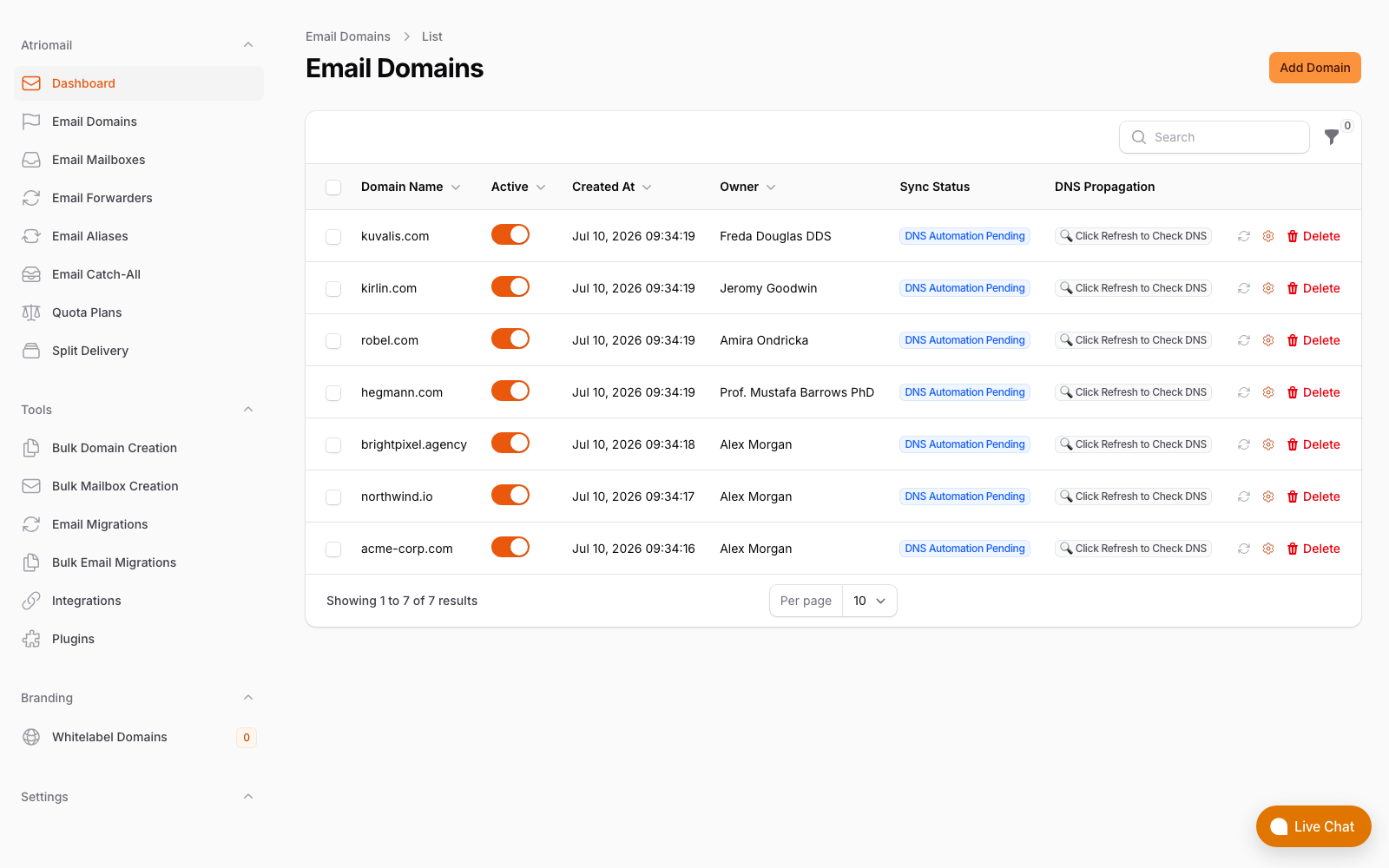
The Email Domains list after a batch add: seven domains created together, each showing its own DNS Automation Pending status until DNS is connected or configured by hand. The panel's Tools menu, including Bulk Domain Creation, is visible in the sidebar on the left.
Once domains exist, DNS is a separate step. On a connected Cloudflare or Namecheap account, Atriomail can write the mail records into a domain's zone once you add that domain and it clears the security check, covered in more depth in connecting Cloudflare and Namecheap for automatic mail DNS. For every other DNS host, each domain gets its own DNS Setup dialog listing the records to copy across by hand. Bulk domain creation doesn't change that part of the process either way; it only removes the repetition of creating the domain records themselves.
Sixty domains, one paste. Bulk domain creation takes a plain-text list, one domain per line, up to 500 at a time, and runs each one through the same automated security check a single domain gets.
How Bulk Mailbox Creation Works
Bulk mailbox creation lives under Tools > Bulk Mailbox Creation, one level down from bulk domains. You select a single domain, then paste in a list of usernames, one per line, up to 500 mailboxes in that batch. It's one domain per batch: a client with mailboxes across five domains needs five separate batches, not one combined list. Each mailbox created this way includes the standard 15 GB of storage and is billed at $1.39/month, exactly the same rate and allowance as a mailbox created one at a time through the regular Add Mailbox flow.
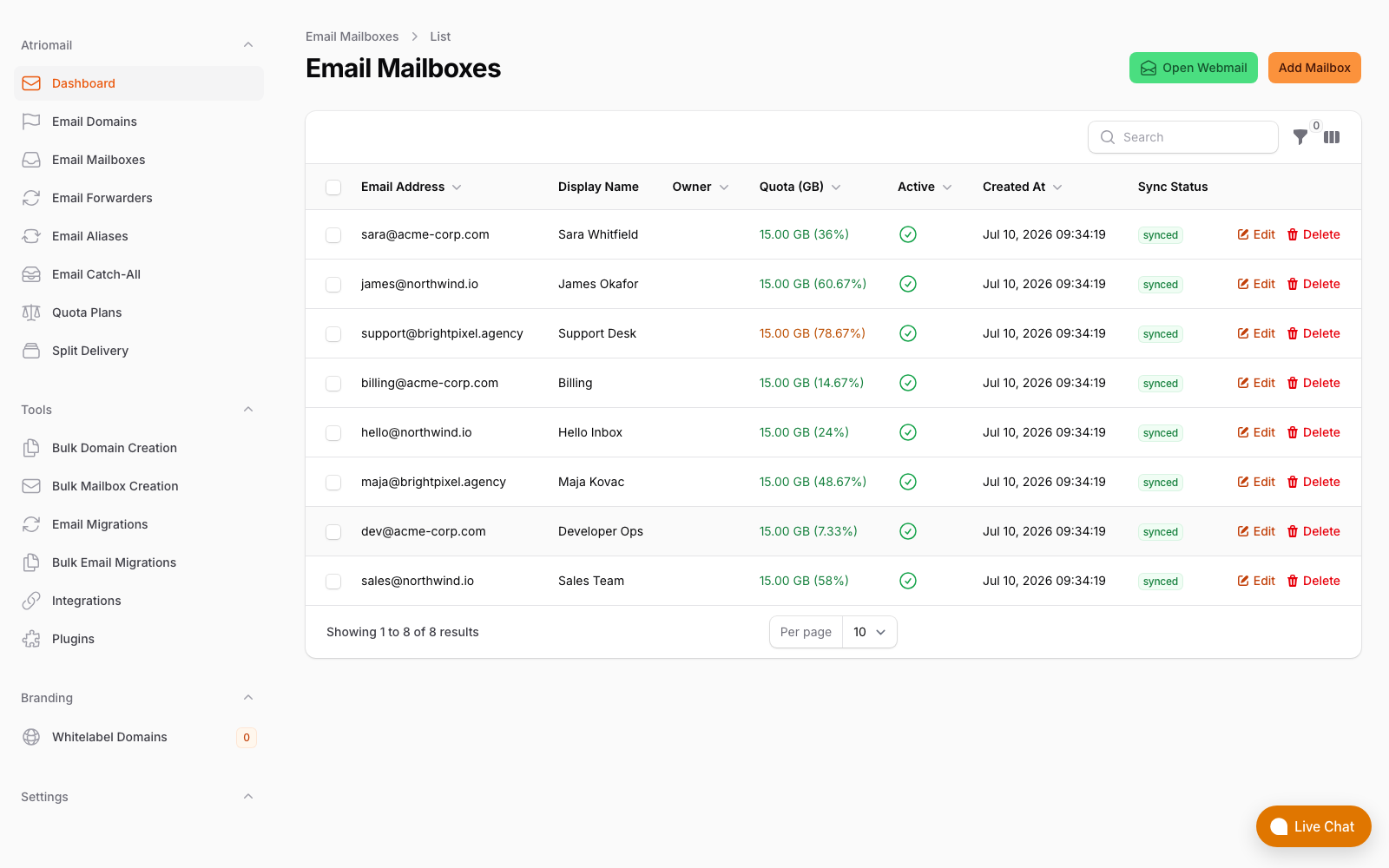
The Email Mailboxes list after mailboxes have been created across a handful of client domains. Bulk Mailbox Creation sits in the same Tools menu as bulk domains, shown in the sidebar.
Bulk mailbox creation is for empty mailboxes, not for moving in a client's existing mail. If the client is coming off another host with mail already sitting in their old inbox, create the mailboxes in Atriomail first, then run that separately through the built-in step-by-step migration process, which needs its own IMAP credentials per mailbox and works differently for large books. The two Atriomail tools are meant to work in sequence on a big onboarding job: bulk-create the empty mailboxes so the domain and addresses exist, then migrate mail into them, rather than trying to do both at once.
Choosing consistent mailbox naming across a large batch, especially department addresses shared across many client domains, is worth planning before you paste in usernames rather than after; email branding best practices for resellers covers naming and presentation choices that hold up once a client book gets this size.
Aliases, Forwarders and Catch-Alls After the Bulk Add
Aliases, forwarders and catch-all addresses, covered in the knowledge base's email forwarding and aliases article, are not part of either bulk tool, and there's a specific ordering rule behind that: a domain needs at least one mailbox on it before you can add an alias, a forwarder or a catch-all to that domain. A mailbox on a different domain doesn't satisfy this; it has to be a mailbox on the same domain you're setting the alias or catch-all up for. In practice, that means bulk-creating mailboxes first and adding aliases second, not the other way around, which is also the order most resellers naturally fall into: get the client's people onto real mailboxes, then layer department addresses like sales@ or support@ on top once at least one mailbox exists to route through.
None of the three carry a mailbox charge of their own. An alias points multiple addresses at one mailbox; a forwarder passes mail on to an outside address, arriving with the original sender's name followed by "via" your domain, with replies routing back to the original sender; a catch-all directs every unmatched address on a domain to one mailbox. Setting these up for a batch of newly onboarded domains is still a per-domain, per-item task in the panel today, so for a large client book it's worth budgeting time for this step separately from the bulk domain and mailbox creation itself, a workflow covered in more detail for agencies setting up branded email for their own clients in the panel.
What This Means for Your Business
Take a 200-mailbox client book, the kind of size where the one-at-a-time Add Domain and Add Mailbox buttons genuinely start to hurt. At $1.39 per mailbox per month, that book costs you $278.00 a month wholesale (200 × $1.39). Billed at $5.00 per mailbox, you collect $1,000.00 from the client and keep $722.00 a month above wholesale, before card fees, support time and any white-label add-on fee. Bulk creation doesn't change any of that math; the per-mailbox price and the margin are identical whether the Atriomail mailbox was created individually or as part of a 200-line paste, the same figures published on the pricing page either way. What it changes is the path from "we won the account" to "the client's mailboxes exist and are billable": one pasted list of 200 lines instead of 200 separate trips through the Add Domain and Add Mailbox forms.
That speed matters most in the specific moment a reseller actually feels it: the week you take over an existing client book, whether from a competing host or from your own manual setup on something else, and need every domain and mailbox to exist before you can even start the mail migration itself. Working out what that onboarding costs and what it's worth billing for is part of the broader question of what reseller email hosting is and how it's priced, but the bulk tools are specifically the part that keeps a large onboarding job from becoming its own line item of unpaid setup time.
Work out the margin on your next client book before you quote it. Wholesale stays $1.39 per mailbox whether you create mailboxes one at a time or five hundred at once; only your resale price changes what you keep.
Limits to Know
- 500 domains per bulk operation, 500 mailboxes per bulk operation. A book larger than that needs more than one batch.
- Bulk mailbox creation is one domain per batch. A client with mailboxes spread across several domains needs a separate batch per domain, not one combined list.
- No CSV import. Both bulk tools take plain text, one entry per line; there's no spreadsheet upload to map columns from.
- Every domain still runs the same security check. Bulk creation removes repetitive clicking, not that check, and it applies per domain regardless of batch size.
- Aliases, forwarders and catch-alls need a mailbox on that domain first. They're not part of either bulk tool and are still set up per item in the panel.
- Bulk mailbox creation makes empty mailboxes, not migrated ones. Moving a client's existing mail in is a separate step through the built-in migration tool.
Frequently Asked Questions
How many domains or mailboxes can I add at once?
Up to 500 domains in one bulk domain creation batch, and up to 500 mailboxes in one bulk mailbox creation batch. Mailbox batches only apply to a single domain at a time, so a client spread across several domains needs one batch per domain.
Does bulk creation cost more than adding domains and mailboxes one at a time?
No. Domains are never billed, and every Atriomail mailbox is $1.39 per month with 15 GB included, whether it was created individually or as part of a bulk batch. Bulk creation changes how fast you can set the accounts up, not what they cost.
Can I upload a spreadsheet instead of typing domains and usernames?
Not today. Both bulk tools take plain text, one entry per line, with no CSV import. If your client list already lives in a spreadsheet, exporting the domain or username column to plain text before pasting it in is the fastest path.
Can I bulk-create aliases or forwarders along with mailboxes?
No, aliases, forwarders and catch-alls aren't part of either bulk tool and are still added per item. They also require at least one mailbox to already exist on that domain, so the practical order is to bulk-create the mailboxes first and add any aliases or catch-alls afterward.
Does bulk mailbox creation move in a client's existing mail?
No, it creates empty mailboxes. Moving mail out of a client's old provider is a separate step through the built-in IMAP migration tool, which needs its own sign-in credentials per mailbox.
Can I bulk-create mailboxes through the WHMCS module or API instead of the panel?
This guide covers the panel's own bulk tools. WHMCS provisions one client's account and first mailbox per order rather than a bulk list, and the REST API creates domains and mailboxes individually per request; neither currently offers the same 500-at-a-time batch the panel's bulk tools do.
Recommended
- Multi-Client Email Management for Agencies
- The Agency Playbook: Step-by-Step Email Migrations with Atriomail
- Connecting Cloudflare and Namecheap for Automatic Mail DNS
- Email Domain Management: Setup and Branding Guide
- Usage-Based Email Pricing Explained
- Pricing and the Reseller Margin Calculator
Latest from the blog
- SPF PermError: How to Fix an SPF Record With Too Many DNS Lookups · Sep 24, 2026
- mailbox.org for Resellers: The Price Just Went Up, and the Brand Was Never Yours · Sep 22, 2026
- The White-Label Add-On: What Changes on Your Branded Hostname, and What Doesn't · Sep 21, 2026
- IceWarp Email Hosting for Resellers: Storage, Scale, and the White-Label Threshold · Sep 19, 2026
- Moving a Client's Mailboxes to Atriomail: How the Built-In IMAP Migration Works · Sep 18, 2026