
A client's domain moves to a new mail host, SPF cuts over cleanly, and a few days later a DMARC report or a raw header shows DKIM failing on outgoing mail that used to pass without anyone touching it. Depending on alignment, that alone can tip a clean sender into a client's spam folder, and it happens whether the domain just moved onto Atriomail, off it, or between two other hosts entirely. The frustrating part is that "DKIM is failing" isn't one problem, it's three different ones, each with its own specific wording in the header.
This post works through those three causes on general ground first, so it's useful however the mailboxes end up, then covers what the DKIM side of a migration looks like once a domain lands on Atriomail, including the record Atriomail generates for a domain and the old host's record you should deliberately leave alone for a while.
Table of Contents
- Before You Start
- Reading the DKIM Result in the Header
- Finding the Selector and Key the New Host Actually Signs With
- Publishing a Correct DKIM TXT Record
- Keeping the Old Selector Live During the Overlap
- Ruling Out a Body Hash Failure From Content Changed After Signing
- How to Verify It Worked
- Common Mistakes and How to Avoid Them
- Doing This on Atriomail
- Frequently Asked Questions
Key Takeaways
| What you see | What it actually means |
|---|---|
| dkim=permerror (no key for signature) | The selector or domain named in the signature doesn't match anything published in DNS, or nothing was ever published there at all. |
| dkim=neutral (invalid public key) | A record exists at the right name, but its value is broken, almost always a line break or missing characters from pasting a long key by hand. |
| dkim=fail (body hash did not verify) | Nothing is wrong in DNS. The message's content changed after it was signed, commonly a security gateway or disclaimer appending text afterward. |
| Deleting the old selector immediately | Mail already signed with the old key, but delivered after the record disappears, starts failing for no reason anyone can see in the new configuration. |
| What Atriomail does for this | Generates the domain's own DKIM record in the DNS Setup dialog, publishes it automatically on a connected Cloudflare or Namecheap account, and gives each domain an on-demand refresh check against the live record. |
DKIM has three distinct failure modes, not one. Atriomail generates the DKIM record a domain needs and can publish it automatically on a connected Cloudflare or Namecheap account, but which of the three problems below you're looking at determines whether that's even the fix you need.
Before You Start
- Admin access to the new mail host or migration tool, so you can see which selector and algorithm it actually signs with, rather than guessing from an old screenshot.
- Access to edit the domain's DNS zone, or a direct line to whoever holds it, since you'll likely be adding a record, not just reading one.
- A mailbox where you can view full, raw message headers, not a preview pane. Gmail's "Show original" or Outlook's message details will do.
dig,nslookup, or your DNS host's own TXT lookup tool, to check what's actually published rather than what you think you published.- A note of the old host's selector name before you change anything, so you know what to leave alone during the overlap window covered later.
Reading the DKIM Result in the Header
Every receiving server that checks DKIM writes its verdict into the Authentication-Results header, the same header a DMARC aggregate report summarizes in bulk, and the result code it carries isn't arbitrary. RFC 8601, the specification for that header, defines seven DKIM result codes in section 2.7.1: pass means the signature verified; fail means "the message was signed... but they failed the verification test(s)"; neutral covers a signature that "contained syntax errors or were not otherwise able to be processed"; and permerror means the message "could not be verified due to some error that is unrecoverable" (RFC 8601, rfc-editor.org, checked October 2026).
In practice, large receivers attach a short explanation in parentheses, and that explanation is what tells you which of the three causes you're dealing with:
dkim=permerror (no key for signature): the verifier read thed=domain ands=selector out of the signature, queried DNS for them, and got nothing back. Either the selector name is wrong, or no record was ever published.dkim=neutral (invalid public key): a record exists at that name, but the verifier couldn't parse the key inside it, almost always a formatting problem with the record's value, not a missing record.dkim=fail (body hash did not verify)ordkim=fail (bad signature): DNS is fine here. The verifier found a usable key and ran the check, and the check failed because the message itself doesn't match what was signed.
Those three map to three different fixes, which is why pattern-matching "DKIM is broken" straight to "edit DNS" sends you chasing the wrong problem about a third of the time. The next three sections take them roughly in the order to check them.
The exact wording in parentheses is the diagnosis. Before touching DNS, confirm which of the three results above you're actually looking at; the DKIM record Atriomail generates for a domain only fixes the first one.
Finding the Selector and Key the New Host Actually Signs With
DKIM signatures live in a header field of their own, DKIM-Signature, with tags defined in RFC 6376. The two that matter most for troubleshooting are d=, the signing domain, and s=, the selector, which together form the DNS name a verifier queries: selector._domainkey.domain (RFC 6376 section 3.6.2.1, rfc-editor.org, checked October 2026). A third tag, a=, names the algorithm, almost always rsa-sha256, though some newer platforms sign with ed25519-sha256 per RFC 8463.
Pull a recent outgoing message from the new host and read its raw headers, or check the new host's own admin panel, which usually states the selector it signs with directly. Then look up what's actually in DNS:
dig TXT selector._domainkey.example.com +shortIf that returns nothing, and the selector in the s= tag doesn't match what you just queried, you've confirmed the permerror (no key for signature) case: the new host is signing with a selector that was never published, or published under a different name. This is the single most common cause of DKIM breaking right after a migration, because the old host's selector (often default or a vendor-specific string) almost never matches the new one, a gap that's easy to miss even where DNS automation and deliverability is otherwise solid.
Publishing a Correct DKIM TXT Record
A DKIM key record lives at that same selector._domainkey.domain name, as a TXT record carrying tags separated by semicolons: v=DKIM1, which RFC 6376 requires to be "the first tag in the record," k=rsa (or the algorithm the host uses), and p=, the base64-encoded public key itself (RFC 6376 section 3.6.1, checked October 2026).
The public key is long enough that it often has to be split across multiple quoted strings inside one TXT record, since a single string in a DNS TXT record is limited to 255 characters. RFC 6376 section 3.6.2.2 is explicit that "strings in a TXT RR MUST be concatenated together before use with no intervening whitespace," which is exactly where most hand-added DKIM records break: copying a long key out of a host's admin panel and into a DNS editor is an easy place to pick up a stray line break or extra space, and that one character is the difference between a valid key and dkim=neutral (invalid public key). Some DNS hosts split a long value into multiple strings automatically; others require you to do it yourself. Either way, whatever ends up published, concatenated, has to equal the key exactly, the same precision the rest of a domain's records need in domain management and branding setup generally.
Keeping the Old Selector Live During the Overlap
Because the old and new selectors are different names in DNS, publishing the new one doesn't require touching the old one, and it's worth resisting the urge to tidy up DNS the same day you cut over. The UK's National Cyber Security Centre recommends rotating selectors periodically and, when doing so, to "keep the old DNS record live for a few days after making changes, to give the DNS time to update" (NCSC, ncsc.gov.uk, checked October 2026). The same logic applies in reverse during a migration: mail still queued, or retried by a slow downstream server, may still be signed with the old key days after cutover, and if that selector is already gone, those messages fail DKIM for no visible reason.
A safe overlap is a week to ten days past the point where the new signature is confirmed passing cleanly, longer if the domain queues or retries aggressively. There's no cost to leaving an unused selector published a little longer than necessary; the cost only shows up when it's removed too early, easy to lose track of once managing several client domains at once.
Ruling Out a Body Hash Failure From Content Changed After Signing
If the header reads dkim=fail (body hash did not verify), stop looking at DNS. DKIM's canonicalization rules, set by the c= tag and described in RFC 6376 section 3.4, control how much whitespace variation a signature tolerates: "relaxed" canonicalization absorbs line-ending and spacing differences that mail servers routinely introduce in transit, but neither canonicalization mode tolerates the message's actual content being altered after it was signed.
The same NCSC guidance makes the point from the sending side too: disclaimer or signature text must be applied "before it is signed with DKIM," and any outbound security gateway must be "configured in a way that does not break the DKIM signature" (NCSC, checked October 2026). The classic case is a corporate gateway or mailing list that rewrites links or appends a footer after signing, breaking the body hash only for recipients behind that gateway, a pattern that's confusing until you notice it's a subset failing, not everyone. A client reporting "some of my mail isn't arriving" is a vague ticket until you know which recipients specifically, the kind of triage a documented client support process speeds up.
How to Verify It Worked
Once a record is published or corrected, wait out its DNS TTL before testing, so you're not reading a cached answer. Then:
- Query the record directly with
dig TXT selector._domainkey.domain +shortand confirm the concatenated value matches the key exactly, with no stray characters. - Send a real test message to a mailbox where you can view full headers, and read the
Authentication-Resultsheader. It should readdkim=pass, notfail,neutralorpermerror. - Run the domain through Atriomail's free DNS checker at /dns-checker/, which reads a domain's public MX, SPF, DKIM and DMARC records without needing an account. Since it checks DKIM against the selector you type in, give it the new selector specifically; an unconfirmed result there just means the wrong selector was tried, not proof that no key exists.
If a test message still shows a problem after the TTL has passed, re-check the exact published value character by character rather than assuming the record is correct because you're confident you pasted it right once already, the same discipline that matters when confirming a fix to an over-budget SPF record.
Common Mistakes and How to Avoid Them
- Deleting the old selector the same day as cutover. Symptom: a handful of messages start failing DKIM two or three days later, with nothing in the new configuration having changed, because they were signed before the cutover but delivered after the old record disappeared.
- A line break or stray space inside the pasted public key. Symptom:
dkim=neutral (invalid public key)even though a record clearly exists at the right name, because the verifier can find the record but can't parse what's inside it. - Selector mismatch between what the host signs with and what's published. Symptom:
dkim=permerror (no key for signature)persists even after you're sure "a DKIM record" is live, because it's live under the wrong selector name entirely. - Testing before the TTL has expired. Symptom: a correct new record still shows as missing or wrong for a window after publishing, simply because a resolver somewhere is still holding the previous answer.
- A security gateway or disclaimer rewriting messages after signing. Symptom:
dkim=fail (body hash did not verify)for some recipients but not others, tied to whichever downstream system is modifying the message, not to anything in the sending domain's own DNS. - Two conflicting records at the same selector name. Symptom: inconsistent results across different receivers, the DKIM equivalent of the "only one SPF record is allowed" rule, but scoped to a specific selector rather than the whole domain.
Working through these before a domain goes live belongs in the same onboarding checklist as the reseller's email security playbook and proven email security protocols generally, especially on a bulk migration where one mismatched domain out of forty is easy to miss while the rest clear cleanly.
Doing This on Atriomail
When a domain is added to Atriomail, the panel generates that domain's own DKIM record, ready to copy from the DNS Setup dialog alongside its MX, SPF and DMARC records. On a connected Cloudflare or Namecheap account, Atriomail publishes that DKIM key automatically once the domain clears the security check; on every other DNS host, add it from that same dialog by hand. The built-in IMAP migration tool moves mail content only, not DNS, so the DKIM cutover is a separate step either way, and because writing the MX moves that domain's mail as soon as it clears the check, add the domain only once you're ready to switch it over.
The same overlap advice from earlier in this post applies here without exception: Atriomail doesn't touch, read or remove any other records at your DNS host, so the old selector can stay published for as long as you want during the transition. Atriomail's DNS troubleshooting guide covers the mechanics of getting the value in cleanly: copy the entire DKIM value from the DNS Setup dialog rather than retyping it, confirm no spaces or line breaks were introduced, replace an old value rather than duplicating it, and use the refresh icon on the domain's row in the Email Domains list to re-check the live record, since the panel's DNS status reflects the last check, not a live feed. Propagation can still take up to 48 hours to be visible everywhere, independent of anything Atriomail does on its end.
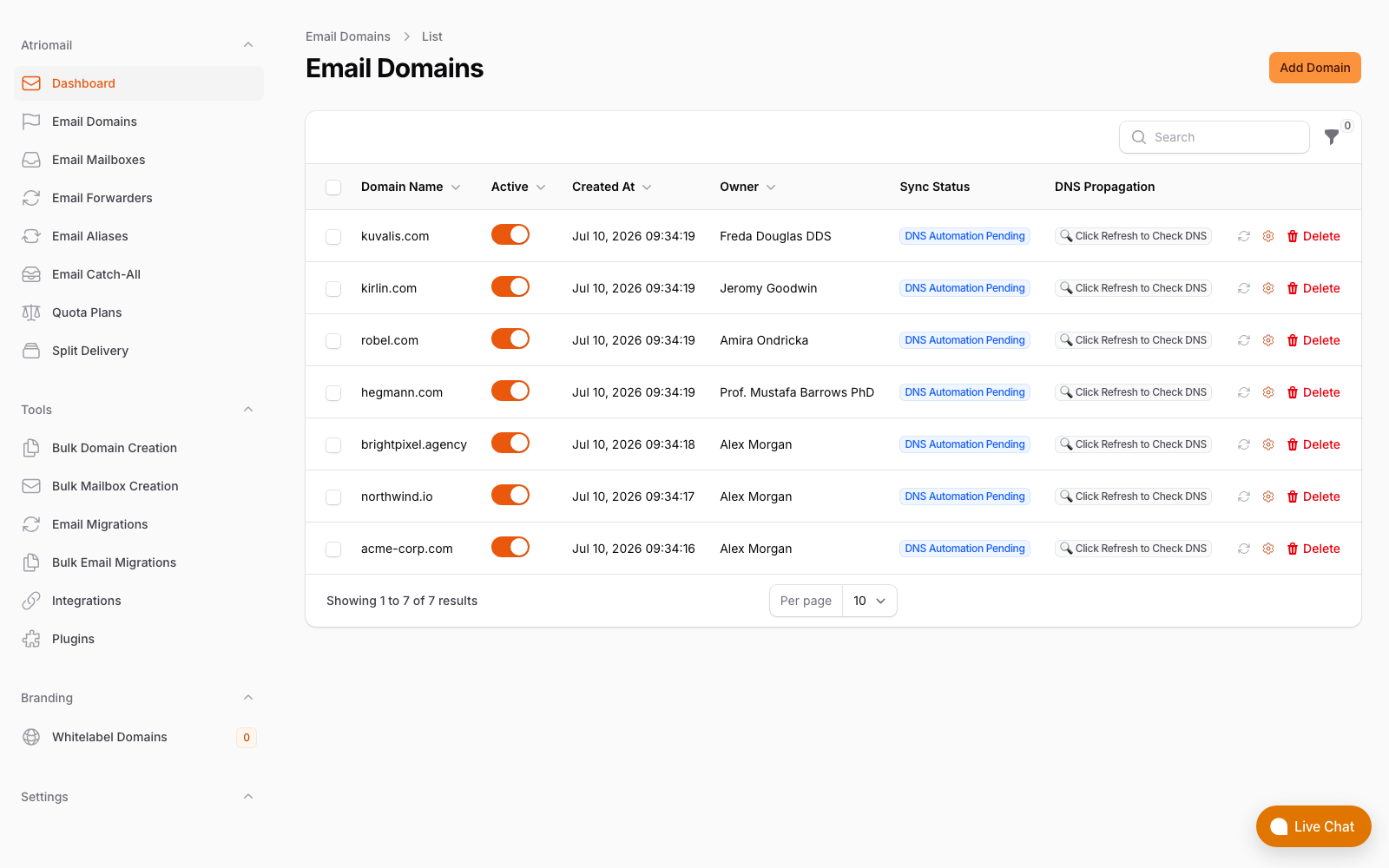
The Email Domains list, showing each domain's DNS sync status and the refresh check used to confirm a record after a change. Real panel, no mockup.
None of this changes based on how a domain's DKIM history looks: it's still $1.39 per mailbox with 15 GB included, regardless of how many old selectors are sitting unused in that domain's DNS. Create your account, add the domain, and work through the DNS Setup dialog once you've confirmed which of the three failure modes above you're actually dealing with.
Get the new key published before the old one disappears. Atriomail generates the DKIM record a domain needs and can publish it automatically on a connected Cloudflare or Namecheap account, but the overlap with whatever was there before is still yours to manage.
Frequently Asked Questions
Why does one receiving server show dkim=neutral while another shows permerror for the same record?
RFC 8601 defines the result codes, but leaves some interpretation to each verifier's own implementation, so wording can differ by receiver for what's fundamentally the same underlying problem. Treat the parenthetical explanation, not just the one-word result, as the actual diagnosis.
Do I need to remove my old email host's DKIM record once the new one is live?
Not immediately. Different selectors live at different DNS names, so the old and new records don't conflict with each other. Keep the old one published for a week or two past cutover, then remove it once you're confident nothing is still arriving signed with the old key.
Can DKIM fail even though the DNS record is published correctly?
Yes. A body hash or signature failure means the message's content changed after it was signed, usually by a security gateway, disclaimer or mailing list footer added downstream. That's not a DNS problem, and republishing the same correct record won't fix it.
Does Atriomail generate a new DKIM key when I migrate a client's domain here?
Yes. Adding the domain to Atriomail generates that domain's own DKIM record, shown in the DNS Setup dialog alongside the other mail records it needs.
Will Atriomail publish the new DKIM record automatically?
Only on a connected Cloudflare or Namecheap account, once the domain clears the security check. On any other DNS host, the record is added from the DNS Setup dialog by hand.
Can Atriomail's free DNS checker confirm my DKIM record is live?
It can, but only for the selector you type in, since it reads public DNS the same way any outside check would. If it comes back unconfirmed, try the exact selector the new host actually signs with before assuming no key is published at all.
Recommended
- Mastering DNS Automation to Boost Email Deliverability, Atriomail
- The Reseller's Email Security Playbook, Atriomail
- Email Domain Management: Setup and Branding Guide, Atriomail
- SPF PermError: How to Fix an SPF Record With Too Many DNS Lookups, Atriomail
- How to Fix an Autodiscover Record Still Pointing at the Old Mail Host, Atriomail
- How to Read a DMARC Aggregate Report, Atriomail
Latest from the blog
- How to Set Up BIMI So a Client's Logo Shows Up in Gmail and Yahoo · Oct 12, 2026
- DreamHost Email vs Atriomail: What "Unlimited" Doesn't Cover for Resellers · Oct 10, 2026
- A Client's Email Account Was Compromised: Why a Password Reset Alone Doesn't Fix It · Oct 9, 2026
- Aliases, Forwarders and Catch-Alls in Atriomail: The One Rule That Decides When They Work · Oct 8, 2026
- How to Move a Client's DMARC Policy to p=reject Without Breaking Their Mail · Oct 7, 2026