
A client calls because something's off: contacts are getting fake invoice emails, their own messages are landing in everyone's spam folder, or a vendor asks why they got a password-reset link nobody requested. The instinct is to reset the mailbox password and call it handled. That instinct is wrong often enough to be worth treating as a checklist, because on Atriomail and most hosted mail platforms, changing a password takes seconds, but does nothing about the forwarding rule, filter or connected app an attacker may have left behind, usually how they get back in before anyone's gone looking.
This post works through the cleanup in order: lock the account down, hunt for what the attacker left behind to regain access, work out what actually happened, then contain the fallout. It's useful on any platform, and closes with what this looks like on Atriomail specifically, including the one gap in its own defenses that's true everywhere else too.
Table of Contents
- Before You Start
- Lock the Account Down First
- Hunt for the Persistence Mechanism
- Work Out What Actually Happened
- Contain the Blast Radius
- How to Verify It Worked
- Common Mistakes and How to Avoid Them
- Doing This on Atriomail
- Frequently Asked Questions
Key Takeaways
| Point | Why it matters |
|---|---|
| A password reset doesn't end an existing session or app password | Both survive a password change by design on most platforms, so an attacker can stay in even after the "fix" is applied, unless sessions and app passwords are revoked separately. |
| Hidden forwarding rules are the usual persistence mechanism | A rule that forwards mail externally, often paired with one that deletes the same messages, keeps an attacker reading everything that arrives long after the password changes. |
| Delisting before fixing the cause just gets the domain relisted | Blocklists react to behavior, not apologies. Submitting a removal request while the account is still compromised is one of the most common reasons a domain lands right back on the list. |
| The mailbox is often a password-reset path into other accounts | A domain registrar, DNS host or banking tool that uses "forgot password" to this address is reachable by anyone who had access to it, not just the obvious inbox contents. |
| What Atriomail does for this | The Email Mailboxes list lets you reset a compromised mailbox's password immediately, and Email Forwarders, Email Aliases and Email Catch-All are reviewed separately since they're domain-level, not inside the mailbox itself. Two-factor authentication covers the Atriomail control panel, not webmail or mail-app sign-in. |
Before You Start
- Admin or owner-level access to the mailbox platform, not just the mailbox's own password, since you need sign-in history, inbox rules and connected apps.
- A way to reach the client, and anyone else affected, outside the compromised mailbox. A phone number or second email address; you can't trust this account to deliver a warning about itself.
- Whatever sign-in or audit log the platform provides: Microsoft Entra sign-in logs for Microsoft 365, the admin audit log for Google Workspace, or a hosting panel's own mail log, the kind of logging worth having in place generally as part of a reseller's standing security protocols, not just during an incident.
- A rough list of other accounts this mailbox could reset: the domain registrar, the DNS host, banking or invoicing tools, anything with "forgot password" pointed at this address.
- If the mailbox is on Atriomail, panel access to reset its password and review Email Forwarders, Email Aliases and Email Catch-All for the domain.
Lock the Account Down First
Do this before you investigate, not after. Every hour the account stays reachable is an hour an attacker can act on whatever access they already have.
Disable sign-in if the platform supports it, rather than only changing the password: Microsoft's own guidance for a compromised Microsoft 365 account calls disabling the account "preferred and highly recommended until you complete the investigation," with a password reset as the fallback (Microsoft Learn, "Respond to a compromised email account in Microsoft 365," checked October 2026). If you do reset the password, do it through the admin console or panel, not by emailing the new password to the account itself: "don't send the new password to the user through email, because the attacker could have access to the mailbox at this point" (Microsoft Learn, checked October 2026).
A password change alone isn't the end of it. Revoke active sessions and refresh tokens separately, since a session typically survives a reset until explicitly invalidated: Google's own guidance notes that suspending a user "resets the user's sign-in cookies and OAuth tokens" (Google Workspace Admin Help, "Identify and secure compromised accounts," checked October 2026). App passwords need the same separate handling: "app passwords aren't automatically revoked when you reset the password" (Microsoft Learn, checked October 2026), so delete the existing ones and create new ones. If multi-factor authentication wasn't already required, turn it on now and review enrolled devices for one the attacker may have added, the kind of baseline security essentials worth having before an incident, not during one.
A locked-down mailbox still needs a clean password somewhere. Every Atriomail mailbox gets its own password, set independently of the panel's own sign-in, so resetting one compromised mailbox never touches anyone else's on the same domain.
Hunt for the Persistence Mechanism
This is the step that separates a real cleanup from a password reset that just feels like one. Attackers who gain mailbox access routinely set up a way back in that survives the obvious fix, and Microsoft's list of common compromise symptoms leads with exactly this: "rules that automatically forward email to unknown addresses" and "rules that move messages to the Notes, Junk Email, or RSS Subscriptions folders" (Microsoft Learn, checked October 2026), the second kind existing specifically to keep a forwarded copy's confirmation message out of sight.
Check two separate places, since a rule in one doesn't mean the other is clean. Mailbox-level forwarding is distinct from inbox rules entirely: on Microsoft 365 it's the mailbox's own ForwardingSmtpAddress property, on Google Workspace it's under Settings > Forwarding and POP/IMAP. Inbox rules and filters, including hidden ones, are the second place, and most webmail interfaces don't surface every rule by default: Microsoft 365 lets an admin list all of them, hidden included, and inspect each one's RedirectTo, ForwardTo and ForwardAsAttachmentTo values (Microsoft Learn, checked October 2026); on Google Workspace the equivalent is the Filters and Blocked Addresses list, checked for anything forwarding externally, skipping the inbox, or deleting the message outright.
Also check delegate or shared-mailbox access another account may have been granted, and any third-party app given OAuth consent during the compromise window: Microsoft's remediation steps include reviewing "the list of applications with user consent" and removing anything that shouldn't be allowed (Microsoft Learn, checked October 2026). A consented app with mail-read access doesn't need a forwarding rule at all to keep reading everything that arrives.
If you manage the domain itself rather than just this one mailbox, the same hunt applies a level up: a domain-level forwarder, alias or catch-all set up outside the mailbox is a separate place mail can be quietly redirected, and it's worth checking even if the mailbox's own rules come back clean.
Work Out What Actually Happened
Before you consider the incident closed, find out what the access was used for. Check the Sent and Deleted Items folders first: Microsoft flags exactly this as a compromise symptom, "the Sent Items or Deleted Items folders contain suspicious messages," citing the classic "stuck in London, send money" example (Microsoft Learn, checked October 2026). A more common business-account version is a fake invoice or payment-detail change sent to a real vendor, deleted immediately so the owner never sees it went out.
Cross-reference sign-in logs for the incident window: unfamiliar IPs, impossible travel between two sign-in locations, or sign-ins outside normal hours. If the domain has DMARC reporting set up, the next aggregate report is worth a look too, since an unrecognized sending source is exactly the anomaly reading a DMARC aggregate report is built to surface.
If anything resembling a fraudulent payment request went out during the compromise, treat it as potential wire fraud, not just a cleanup item. The FBI's guidance here is specific and time-sensitive: contact the financial institution immediately to request a recall of the funds, and file a complaint at ic3.gov regardless of the dollar amount, since recovery odds drop sharply once funds leave the first receiving account (FBI, "Business Email Compromise," checked October 2026).
Contain the Blast Radius
A compromised mailbox is rarely just a mailbox problem:
Rotate anything this mailbox could reset. A registrar or DNS host login using "forgot password" to this address is reachable by anyone who had access to it, a documented path to domain hijacking: an attacker who controls the inbox can request a registrar password reset, approve a transfer, and redirect the domain's DNS (Network Solutions and Valimail security guidance, checked October 2026). Also a good moment to confirm the domain's DNS and domain setup reflects who should actually have access.
Notify affected contacts. The FTC's guidance on a hacked email account is direct here: tell your contacts, since anyone who received a message from the account during the compromise window needs to know to treat it as suspicious (FTC, "How To Recover Your Hacked Email or Social Media Account," checked October 2026). Across a reseller's whole book rather than one client, that notification belongs in whatever client support process already exists, not improvised per incident.
Check and, if needed, clear blocklist status. If the account was used to send spam, the sending domain or IP may already be listed. Spamhaus's DBL removal process is self-service: a domain owner looks it up at check.spamhaus.org and follows the instructions returned, and once approved, "it should only take a few minutes," though some receivers can lag up to 24 hours locally (Spamhaus, checked October 2026). Submit that request only after the account is locked down, since listing reacts to ongoing behavior, not a one-time penalty.
A single compromise inside a larger client book also raises the question of whether it's isolated. If you manage more than one client's mail, check whether the same credentials, device or phishing message reached any other account before considering this closed.
Containing the fallout doesn't require touching every mailbox on the domain. Resetting one Atriomail mailbox's password, and reviewing that domain's Email Forwarders, Email Aliases and Email Catch-All, doesn't change anything about the other mailboxes on the same domain unless you choose to touch them too.
How to Verify It Worked
- Re-check the sign-in log after lock-down and confirm no further sign-ins from the unfamiliar IP, location or device that showed up during the incident.
- Re-open the inbox rules and forwarding settings and confirm the list is empty, or contains only rules you personally recognize.
- Re-check the Sent folder a day or two later for anything suggesting the attacker still has a way to send as the account.
- Look the domain up against current blocklists, and separately run it through Atriomail's free DNS checker at /dns-checker/ to confirm its SPF, DKIM and DMARC records read the same as before, since a compromised inbox is also a path to a DNS host login and a quiet record change is easy to miss.
- Confirm multi-factor authentication is actually enrolled going forward, not just turned on as a policy setting.
Common Mistakes and How to Avoid Them
- Resetting the password and stopping there. Symptom: strange sending or missing mail continues on the "new" password, because an existing session or app password from before the reset never got revoked.
- Missing a hidden or disabled inbox rule. Symptom: suspicious activity stops for a few days then resumes, because a quiet forwarding rule was never found, only temporarily inactive or paired with a filter hiding its own confirmation messages.
- Requesting blocklist removal before the account is locked down. Symptom: the domain gets delisted, then relisted within a day or two, because the compromised account is still sending while the request is in flight.
- Treating it as a single-mailbox incident. Symptom: a second mailbox, or a different client entirely, shows the same signs days later, because the same reused credentials or phishing message reached more than one inbox.
- Not checking what else the mailbox could reset. Symptom: a registrar or DNS panel change surfaces weeks later with no obvious cause, traced back to a password-reset email sent to this mailbox while it was still compromised.
- Assuming an admin panel's own two-factor authentication covers every mailbox under it. Symptom: the platform's admin login is well protected, but a mailbox's own webmail or IMAP/SMTP sign-in isn't, so a reused or guessed mailbox password is still enough on its own.
Working this into a standing checklist, rather than reconstructing it during the next incident, is the same discipline behind the reseller's email security playbook and avoiding service interruptions with proven security protocols.
Doing This on Atriomail
If the compromised mailbox is on Atriomail, the lock-down step is direct: the Email Mailboxes list has an Edit action on every mailbox, where you set a new password. That takes effect for new sign-ins immediately and doesn't touch anything else on the domain, including other mailboxes belonging to the same client.
The persistence hunt looks different than on Microsoft 365 or Google Workspace, because the places to check are domain-level rather than buried inside the mailbox. Email Forwarders, Email Aliases and Email Catch-All each have their own page, separate from the mailbox list, and reviewing them for anything added that you don't recognize is the Atriomail equivalent of hunting for a hidden inbox rule: a different place to look, not a feature that makes the hunt unnecessary.
Two-factor authentication is required to sign in to the Atriomail control panel itself, with a code from an authenticator app or sent by email, but that protects the panel, not webmail or mail-app sign-in to an individual mailbox. For the mailbox credential itself, a rotated, unique password is the real defense, the same as on most hosted mail platforms. Incoming mail is filtered for spam, but that's a general filtering layer, not an account-compromise detector.
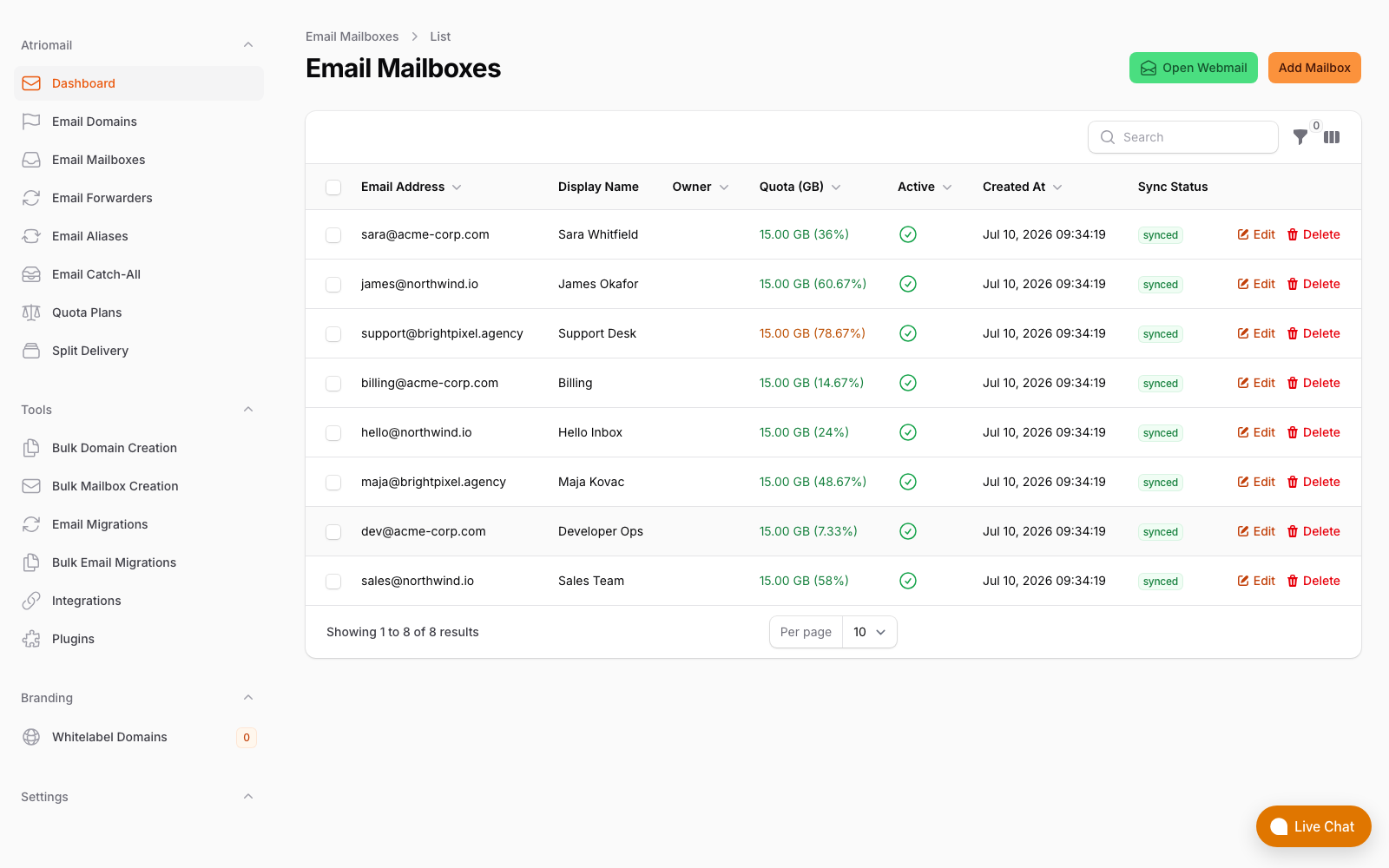
The Email Mailboxes list, where a compromised mailbox's password is reset. Email Forwarders, Email Aliases and Email Catch-All sit in the sidebar as their own pages. Real panel, no mockup.
None of this changes what a mailbox costs: it's still $1.39 per mailbox with 15 GB included, whether you're setting one up for the first time or cleaning one up after an incident. Create your account if you're moving a client off a platform where this kind of review isn't this direct.
The cleanup checklist above still applies in full. Resetting a mailbox's password in the Atriomail panel takes seconds; working through what else the account touched, and who else it may have reached, is still the part that actually closes the incident.
Frequently Asked Questions
What's the single most important first step after a mailbox is compromised?
Lock it down before you investigate: disable sign-in or reset the password out-of-band, then revoke active sessions and app passwords separately, since a password change alone doesn't end a session or app password that already exists.
How do I find a hidden forwarding rule an attacker left behind?
Check both the mailbox-level forwarding setting and the inbox rules list, including hidden ones, which most webmail interfaces don't show by default. Look for a rule forwarding or redirecting mail externally, often paired with one that deletes the same messages so the owner never sees the forwarded copies.
Should I tell the client's contacts, even if I'm not sure what was sent?
Yes. A short note is enough: the account was compromised during a specific window, and any unusual message or payment request from it during that time should be treated as suspicious. Waiting until the investigation is complete just extends the window for someone to act on a fraudulent message.
Can I reset a compromised mailbox's password directly in the Atriomail panel?
Yes. The Email Mailboxes list has an Edit action on every mailbox, which is where you set a new password, taking effect for new sign-ins immediately without touching anything else on the domain.
Does two-factor authentication on Atriomail protect the mailbox itself?
Not directly. Two-factor authentication is required for the Atriomail control panel, not webmail or mail-app sign-in, so for the mailbox credential itself a rotated, unique password is the real defense.
How long does it take to get a domain off a blocklist once the cause is fixed?
For Spamhaus's DBL, a self-service removal request is typically processed within a few minutes once approved, though some receivers lag up to 24 hours locally. Requesting removal before the account is actually locked down is the most common reason a domain gets relisted a day or two later.
Recommended
- The Reseller's Email Security Playbook, Atriomail
- Client Support Process for Email Resellers, Atriomail
- Avoid Service Interruptions With Proven Email Security Protocols, Atriomail
- How to Read a DMARC Aggregate Report, Atriomail
- How to Move a Client's DMARC Policy to p=reject Without Breaking Their Mail, Atriomail
- Aliases, Forwarders and Catch-Alls in Atriomail, Atriomail
Latest from the blog
- How to Set Up BIMI So a Client's Logo Shows Up in Gmail and Yahoo · Oct 12, 2026
- DreamHost Email vs Atriomail: What "Unlimited" Doesn't Cover for Resellers · Oct 10, 2026
- Aliases, Forwarders and Catch-Alls in Atriomail: The One Rule That Decides When They Work · Oct 8, 2026
- How to Move a Client's DMARC Policy to p=reject Without Breaking Their Mail · Oct 7, 2026
- OVHcloud Email Pro: What a £1.39 Mailbox Actually Costs a Reseller in Dollars · Oct 6, 2026