
If your agency already hosts client websites on DreamHost, you've probably noticed its "Unlimited" shared plans let you create email addresses with no cap on the count. That looks like free email for every client site you host, and for a one-person shop running a handful of accounts under one DreamHost login, it mostly is. The question that doesn't have an obvious answer is what happens once you're billing 20, 50 or 200 client mailboxes separately and need each one to show up as its own line item, not a feature buried inside your own hosting bill. That's the specific gap Atriomail is built to fill, and it's worth working through exactly where DreamHost's email product stops being "free" and starts being a real cost you can't itemize.
DreamHost also sells a standalone Professional Email product, separate from its "Unlimited" hosting bundle, priced per mailbox like Atriomail is. That makes a direct comparison possible: the same reseller problem, two different per-mailbox prices, and very different answers on whether either price point actually gets billed to the right client.
Table of Contents
- What DreamHost Professional Email Actually Costs
- What "Unlimited" Email Doesn't Cover When You Bill Clients
- No Built-In Migration Tool or API for Provisioning at Scale
- No White-Label Option for Client-Facing Branding
- DreamHost vs Atriomail for Resellers
- When DreamHost Makes Sense
- Where Atriomail Fits
- Frequently Asked Questions
Key Takeaways
| Point | Details |
|---|---|
| DreamHost's Professional Email runs $1.67-$1.99 per mailbox | $1.67/mo billed annually, $1.99/mo billed monthly, 25 GB per mailbox with no add-on past that cap (dreamhost.com, checked October 2026). |
| "Unlimited" means mailbox count, not billing | DreamHost's Unlimited hosting plans cap email by plan, not by number, and nothing in DreamHost itemizes one client's mailboxes as a separate recurring charge against another's. |
| Atriomail is $1.39 per mailbox with a WHMCS and Blesta module built for this | 15 GB included, and the WHMCS (v3.1.1) and Blesta (v2.1.0) modules put each client's mailboxes on their own invoice automatically when they order. |
| Atriomail's migration tool stops at Microsoft 365 | Microsoft no longer allows password sign-in over IMAP, so the built-in tool can't sign in to a Microsoft 365 or Exchange Online mailbox. That's a Microsoft restriction, not an Atriomail gap. |
Work out your own book before you switch anything. Atriomail charges $1.39 per mailbox with 15 GB included, billed monthly with no contract and no minimum. Creating an account costs nothing and needs no card; mailboxes are billed from the first one you create.
What DreamHost Professional Email Actually Costs
DreamHost sells email two ways. The first is bundled into its "Unlimited" shared hosting plans, where you can create as many mailboxes as you want at no extra line item, but each one still carries a 25 GB storage ceiling by default, and DreamHost's own Unlimited Policy states plainly that "the number of email addresses that can be created on an account is dependent on your chosen email or hosting plan" (dreamhost.com/legal/unlimited-policy/, checked October 2026). DreamHost's cheapest shared tier, Starter, includes no email at all; it has to be added separately.
The second way is the standalone product this comparison is really about: Professional Email, sold on its own, on any domain, whether or not you host anything else with DreamHost. It runs $1.99 per mailbox per month billed monthly, or $1.67 per mailbox per month billed annually, with 25 GB of storage per mailbox (dreamhost.com/products/email/, checked October 2026). There's no published way to buy more than 25 GB on a single mailbox; DreamHost's own help center documents the storage limit as adjustable only between 1 GB and 25 GB, not beyond it (help.dreamhost.com, checked October 2026). The standalone product is also excluded from DreamHost's general 30-day money-back guarantee, which applies to web hosting but not to Email Service specifically (dreamhost.com/legal/terms-of-service/, checked October 2026), and hosting plans only bundle a three-month trial of Professional Email rather than including it outright.
Against that, Atriomail's wholesale price is $1.39 per mailbox per month with 15 GB included, and extra storage is sold in 5 GB blocks at $0.60 each, up to 100 GB on a single mailbox. Neither price difference is dramatic on its own. What changes the picture is what each price actually buys once you're not the only person using the mailbox, covered in the next three sections. For context on how a per-mailbox wholesale number turns into a retail price you set yourself, this breakdown of usage-based email pricing walks through the arithmetic in more detail.
Planning to move 50 or more mailboxes? Atriomail's IMAP migration tool tests each mailbox's sign-in before it starts and can run as a dry run first. For a book that size, plan the cutover with us before you commit to a date.
What "Unlimited" Email Doesn't Cover When You Bill Clients
"Unlimited" on a DreamHost Unlimited hosting plan describes a count, not a billing structure. Every mailbox you create still lives inside one DreamHost account, under one login, on one invoice that DreamHost sends to you. There's no per-client sub-account, no way to cap one client's domain at a fixed number of mailboxes separately from another's, and nothing that turns "Client A has 12 mailboxes, Client B has 40" into two recurring charges you can hand to a billing system. If you're running more than a handful of client domains, that's a manual reconciliation job every month, by hand, forever.
Atriomail is built around the opposite assumption: that a reseller is billing many separate clients through a system they already run. When a client orders an Atriomail product through WHMCS, the module creates that client's own Atriomail account and domain, plus the first mailbox if the domain clears the standard security check during the order. Mailboxes and storage the client adds afterward in their own WHMCS client area bill as recurring charges there, at whatever price you've set on the product, the same way the rest of their hosting bill already works. The Blesta module does the equivalent job for Blesta-billed resellers, selling mailboxes and 5 GB storage blocks as configurable options you price yourself. Neither module is a workaround bolted onto a hosting panel that was never built for billing; it's the entire point of having one. (Changes made directly in the Atriomail panel, outside either module, don't sync back into WHMCS or Blesta billing on their own, which is worth knowing before you mix the two.)
No Built-In Migration Tool or API for Provisioning at Scale
Moving a client's existing mail onto DreamHost is a manual job. DreamHost's own email FAQ describes "several ways" to transfer mail in, pointing to backing up messages locally and re-importing them through an IMAP-compatible mail app, one mailbox at a time (help.dreamhost.com, checked October 2026); there's no built-in tool that signs in to the old mailbox and copies folders across for you. Automating any of this used to be possible through DreamHost's API, but DreamHost removed most of it: the commands that used to manage domains, mail, databases and users are gone, and the current API covers only DNS records and announcement lists (api.dreamhosters.com, checked October 2026). There's no official path to script mailbox creation or migration at all.
Atriomail's IMAP migration tool is built into the panel at no charge. It signs in to both the old and new mailbox and tests the password before it starts, so a wrong credential shows up in seconds instead of mid-transfer. A migration can run as a dry run first or be scheduled for later, and it keeps the original folder structure and message dates rather than starting the new mailbox empty. Bulk jobs list many mailboxes from the same old server in one go and track how many completed or failed, though every account still needs its own password and a book of any real size should be planned with the team first rather than run unsupervised; the panel's own migration-status tracking documents the states a job moves through (scheduled, running, completed, failed or cancelled, checked October 2026). On the provisioning side, the REST API covers domains, mailboxes, forwarders, catch-alls and migration jobs through a single API key, and the panel's own bulk tools can add up to 500 domains or 500 mailboxes on one domain in a single step. None of that extends to Microsoft 365, Exchange Online or Outlook.com mailboxes: Microsoft no longer allows password sign-in over IMAP, so moving a Microsoft 365 tenant needs a different route entirely. Talk to us before you quote that one.
No White-Label Option for Client-Facing Branding
Nothing in DreamHost's email documentation offers a way to put your own product name, logo or hostname on the webmail or admin experience a client sees. Mail is read at webmail.dreamhost.com, and account management happens inside DreamHost's own panel, under DreamHost's own name, regardless of whose domain the mailbox sits on. For an agency that has already built a brand its clients recognize, that's a visible seam: the client's website, support and invoices say one company, and their email panel says another.
Atriomail's white-label branding is a separate paid add-on, a one-time setup fee plus a monthly fee, not something bundled into the $1.39 base price. Once our team sets up a hostname you control the DNS for, the control panel on that hostname carries your product name and favicon, and the help center pages carry your logo. It's genuinely a separate decision from whether to host the mailbox at all, usually worth adding once a client book is large enough that the branding pays for itself, and the honest version of the answer includes what stays neutral regardless: raw message headers, the webmail interior, payment pages and system emails carry no branding. For agencies building out a full-service offering around this, setting up branded email as an agency and branding best practices for resellers both cover the decision in more depth.
DreamHost vs Atriomail for Resellers
Put side by side, on the dimensions that actually matter to someone billing a client book rather than running one mailbox:
| Dimension | DreamHost Professional Email | Atriomail |
|---|---|---|
| Price per mailbox | $1.67/mo annual, $1.99/mo monthly | $1.39/mo, no contract |
| Included storage | 25 GB, hard cap | 15 GB, expandable |
| Extra storage | Not available past 25 GB | $0.60 per 5 GB block, up to 100 GB |
| Per-client billing | One account, one invoice; no client-level separation | WHMCS and Blesta modules bill each client's mailboxes on their own invoice |
| WHMCS / Blesta module | None found | WHMCS v3.1.1 (WHMCS 9); Blesta v2.1.0 (Blesta 6.0+) |
| Built-in migration tool | None; manual IMAP export and re-import | Built into the panel, free, with dry run and scheduling |
| API for mailbox provisioning | Removed; current API covers DNS and announcements only | REST API covers domains, mailboxes, forwarders, catch-alls and migrations |
| White-label branding | Not offered | Paid add-on: your product name and favicon on your own hostname |
| Uptime guarantee | 100% uptime guarantee with service credits (hosting plans) | None published |
| Support hours | Ticket and email support 24/7; live chat on an extended daily schedule | Business hours only |
The uptime and support rows are worth sitting with rather than explaining away: DreamHost publishes a real guarantee with service credits for qualifying downtime, including email, and offers round-the-clock ticket support (dreamhost.com, checked October 2026). Atriomail publishes no uptime percentage or SLA, and support runs during business hours, not around the clock. If that specific guarantee matters more to you than per-client billing, this comparison alone shouldn't move you off DreamHost.
When DreamHost Makes Sense
DreamHost's email is a genuinely reasonable choice in a few situations:
- You already host client sites on a DreamHost Unlimited shared, VPS or dedicated plan, and the mailbox count per client is small enough that you're comfortable managing it as part of that same hosting relationship rather than billing it separately.
- You want DreamHost's published uptime guarantee and 24/7 ticket support backing the mailbox, and you're willing to trade per-client billing granularity for that.
- No single client needs more than 25 GB per mailbox, and you don't expect that to change.
- You're not running the book through WHMCS, Blesta or any billing system that needs a per-client mailbox count to reconcile against, so the lack of a module isn't a gap you'd ever hit.
If any of that describes your actual book, DreamHost's bundled or standalone email is a defensible call, and nothing here is an argument that it isn't.
Where Atriomail Fits
The decision changes once you're billing more than a few client domains and need the mailbox count on each one to turn into its own recurring charge, not a number buried in your own DreamHost invoice. Take a 200-mailbox book, a realistic size for a hosting reseller or MSP somewhere between a side project and a full-time business. At DreamHost's best available rate, $1.67 per mailbox billed annually, 200 mailboxes cost $334 a month, with no path to itemize which client owns which mailbox and nothing that syncs that cost against a client invoice automatically. At Atriomail's $1.39 per mailbox, the same 200 mailboxes cost $278 a month wholesale. Resold at $5 per mailbox, both sides bring in $1,000 a month in revenue; the margin is $722 a month on Atriomail and $666 a month on the DreamHost side, a $56-a-month difference before either side adds card fees, support time or, on Atriomail, the white-label add-on fee. The real gap isn't the $56: it's that the WHMCS or Blesta module turns that $722 into 200 individually billed line items without you touching a spreadsheet, while the DreamHost side still requires someone to manually reconcile 200 mailboxes against 200 client accounts every month, whatever that figure turns out to cost in actual hours.
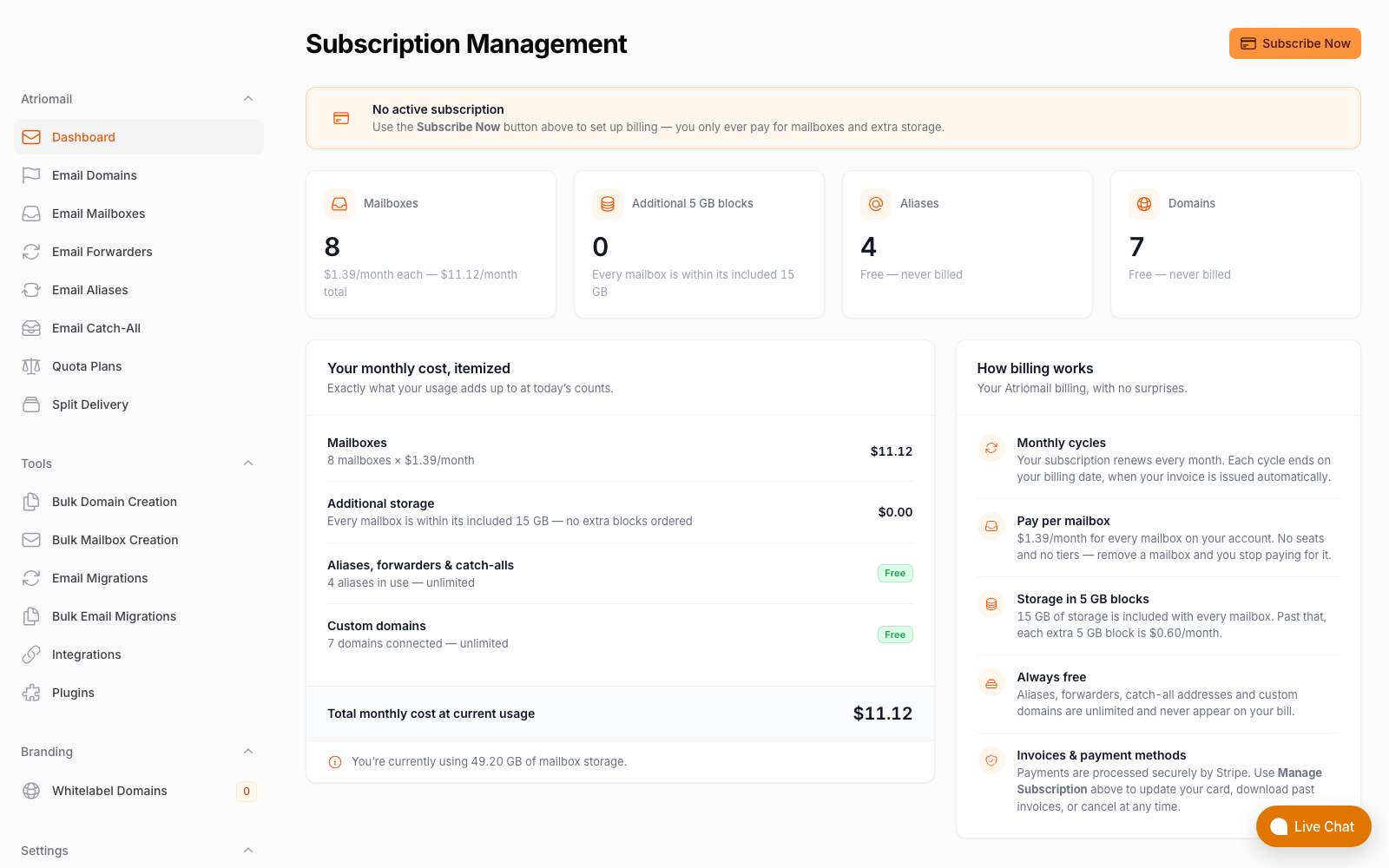
What Atriomail bills you, itemized, real panel, no mockup; your clients' invoices come from WHMCS or Blesta.
If your book is small enough to manage inside one DreamHost login by hand, staying put is reasonable. If you're past that point, already billing clients through WHMCS or Blesta, Atriomail's pricing and its provisioning modules were built for that transition; create an account to look at the panel before moving anything.
Run the 200-mailbox math for your own market. At $1.39 per mailbox with 15 GB included, a book run through the WHMCS or Blesta module puts each client's mailboxes on their own invoice, not buried inside yours.
Frequently Asked Questions
Can I bill Atriomail mailboxes automatically through WHMCS or Blesta?
Yes. The WHMCS module (version 3.1.1, for WHMCS 9) and the Blesta module (version 2.1.0, for Blesta 6.0 and later) both create the client's domain on order and the first mailbox once it clears the security check (in WHMCS, only during the order), then let the client add mailboxes, change passwords and manage aliases from their own client area. Mailboxes and storage added in WHMCS or Blesta bill as recurring charges there at your own prices; changes made directly in the Atriomail panel don't sync back into either billing system on their own.
What does the Atriomail white-label add-on cover?
It's a separate paid add-on, a one-time setup fee plus a monthly fee. Once our team sets up your hostname, the control panel on it carries your product name and favicon, and the help center pages carry your logo. Some layers stay neutral either way, including raw message headers, the webmail interior, payment pages and system emails.
Does Atriomail's migration tool move mail out of Microsoft 365 or Exchange Online?
No. Microsoft no longer allows password sign-in over IMAP, so the built-in tool can't sign in to a Microsoft 365 or Exchange Online mailbox. It does work with typical IMAP hosting mail, and with Gmail, Google Workspace, Yahoo and iCloud using an app password. Talk to us before quoting a Microsoft 365 move.
Is DreamHost's "unlimited" email actually unlimited?
Only the mailbox count, and only on DreamHost's Unlimited-tier hosting plans; DreamHost's own Unlimited Policy ties the number of addresses to whichever plan you're on (dreamhost.com, checked October 2026). Every mailbox still carries a 25 GB storage ceiling with no paid add-on to raise it, and DreamHost's cheaper Starter hosting plan includes no email at all; standalone Professional Email there is a separate $1.67-$1.99 per mailbox purchase.
What happens if a client needs more than 25 GB on a DreamHost mailbox?
Nothing, by design: DreamHost's own documentation caps every mailbox at 25 GB with no storage add-on past that limit (help.dreamhost.com, checked October 2026). On Atriomail, extra storage is sold in 5 GB blocks at $0.60 per block, up to 100 GB per mailbox.
Which is cheaper for a 200-mailbox book, DreamHost or Atriomail?
At DreamHost's best available rate, $1.67 per mailbox billed annually, 200 mailboxes cost $334 a month. At Atriomail's $1.39 per mailbox, the same 200 mailboxes cost $278 a month, about $56 a month less, before either side adds card fees, support time or, on Atriomail, the white-label add-on fee.
Recommended
- A Guide to White-Label Email for Agencies, Atriomail
- Multi-Client Email Management for Agencies, Atriomail
- The Agency Playbook: Step-by-Step Email Migrations with Atriomail
- Usage-Based Email Pricing Explained, Atriomail
- Pricing and the Reseller Margin Calculator, Atriomail
Latest from the blog
- How to Set Up BIMI So a Client's Logo Shows Up in Gmail and Yahoo · Oct 12, 2026
- A Client's Email Account Was Compromised: Why a Password Reset Alone Doesn't Fix It · Oct 9, 2026
- Aliases, Forwarders and Catch-Alls in Atriomail: The One Rule That Decides When They Work · Oct 8, 2026
- How to Move a Client's DMARC Policy to p=reject Without Breaking Their Mail · Oct 7, 2026
- OVHcloud Email Pro: What a £1.39 Mailbox Actually Costs a Reseller in Dollars · Oct 6, 2026