
A client asks why a competitor's mail shows a small logo next to the sender's name in Gmail, while their own mail from the same kind of inbox just shows a plain letter avatar. That's BIMI: Brand Indicators for Message Identification, a DNS-published logo that Gmail, Yahoo and a handful of other inbox providers will display next to a sender's name once a domain clears a specific set of authentication and certificate requirements. It's a genuine trust signal, not a webmail theme or a setting anyone flips on, and it's one of the few branding wins an agency can deliver for a client's email without touching the mailbox itself. Atriomail hosts the mailboxes and signs the outgoing mail that BIMI's authentication check depends on, but publishing the BIMI record itself is a task done at the domain's DNS host, on Atriomail or any other mail platform.
This post works through the actual sequence: building a logo file that passes the strict format Gmail and Yahoo both check, deciding whether a client's domain needs a paid certificate or can get by without one, publishing the record itself, and a DMARC detail that trips up almost everyone on a first attempt because the standard changed earlier this year. It closes with what this looks like for a domain hosted on Atriomail specifically, including the one DNS record type Atriomail's own automation doesn't touch.
Table of Contents
- Before You Start
- Build a BIMI-Compliant SVG Logo
- Decide Whether You Need a Verified Mark Certificate
- Confirm the DMARC Settings Gmail Actually Checks
- Publish the BIMI DNS Record
- How to Verify It Worked
- Common Mistakes and How to Avoid Them
- Doing This on Atriomail
- Frequently Asked Questions
Key Takeaways
| Point | Why it matters |
|---|---|
| BIMI needs DMARC at enforcement first | Gmail and Yahoo both ignore a BIMI record on a domain still sitting at p=none. The policy has to be quarantine or reject before the logo check even runs. |
| The logo file has its own strict format | SVG Tiny 1.2 PS profile only: no gradients, scripts, external references or embedded raster images, square, and within Gmail's size limits. |
| A certificate is required for some inboxes, not all | Yahoo and AOL will show a self-asserted logo with no certificate. Gmail requires a Verified Mark Certificate or Common Mark Certificate. |
| Gmail still checks for an explicit pct=100 | Even though the current DMARC standard removed the pct tag, Google's own setup guide requires it set to 100 for BIMI to validate. |
| What Atriomail does for this | Generates each domain's SPF, DKIM and DMARC records and can publish a first DMARC record automatically on a connected Cloudflare or Namecheap account, the authentication BIMI checks, but doesn't generate or publish the BIMI record itself; that's added directly at the DNS host. |
The logo is the last step, not the first. Atriomail generates the DMARC and DKIM records a domain needs for BIMI's authentication check and can publish a first DMARC record automatically on a connected Cloudflare or Namecheap account, but the BIMI record itself is something you add directly at the DNS host.
Before You Start
- The domain's DMARC record already at
p=quarantineorp=reject, notp=none. If it's still atp=none, work through moving a client's DMARC policy to enforcement first; BIMI checks fail outright on a monitoring-only record no matter how correct the BIMI record itself is. - Confirmation, from real aggregate report data, that SPF and DKIM actually align for every real sender on the domain, not just that authentication happens somewhere in the chain. Reading a DMARC aggregate report covers what to look for before trusting this.
- A decision on the certificate route: self-asserted, which works for Yahoo and AOL, or a paid Verified Mark Certificate or Common Mark Certificate, needed for Gmail. Covered in the next section.
- An HTTPS web server, TLS 1.2 or later, to host the logo file and, if going the certified route, the certificate file.
- Access to add a new TXT record at the domain's DNS zone, and a sense of the domain's broader setup if this is one of several client domains, the same discipline covered in setting up and branding client email domains.
Build a BIMI-Compliant SVG Logo
Both Gmail and Yahoo validate the logo file strictly; not anything with a .svg extension works. The required format is SVG Tiny 1.2 PS, the "Portable/Secure" profile, which drops almost everything a vector design tool adds by default: no <script> elements, no external references such as a linked stylesheet or raster image, no gradients or embedded fonts, and no CMYK colors (Google Workspace Admin Help's BIMI setup guide and Suped's BIMI documentation, both checked October 2026). The file needs a square aspect ratio, a viewBox set to the same width and height, and the root <svg> element carrying baseProfile="tiny-ps" version="1.2". Gmail's own guide calls for a minimum of 96x96 pixels, and most current implementation guides recommend keeping the finished file well under the roughly 32 KB ceiling some validators enforce.
A logo exported straight from Illustrator, Figma or most other design tools will fail this on the first try: default SVG exports routinely carry a gradient, an embedded raster preview or a <style> block, any one of which gets the file rejected. Strip the file down to flat, solid-color shapes with no external dependencies, then host the finished file at a stable HTTPS URL on the client's own domain or a subdomain you control.
A logo file is only half of what's checked. Gmail and Yahoo also need the domain's DMARC policy at enforcement before either one will show the logo your SVG defines, a prerequisite covered later in this guide and, for Atriomail-hosted domains, generated automatically on a connected Cloudflare or Namecheap account.
Decide Whether You Need a Verified Mark Certificate
The certificate decision depends entirely on which inboxes matter for this client. Yahoo Mail and AOL will show a self-asserted BIMI logo with no certificate at all, based only on a valid record and sending reputation (Suped's BIMI documentation, checked October 2026). Gmail will not: it requires either a Verified Mark Certificate (VMC) or a Common Mark Certificate (CMC), delivered as a PEM file referenced in the record's a= tag, and only a VMC adds the blue checkmark next to the sender's name (Google Workspace Admin Help, checked October 2026).
A VMC is tied to a live, registered trademark, verified by the certificate authority before issuing it, so a client without one cannot get a VMC no matter how recognizable the brand is to their own customers, a detail worth raising during any client branding conversation before promising BIMI as a quick win. A CMC is the alternative for that case, verifying ownership without requiring a registered trademark. DigiCert and Entrust are the only two CAs issuing VMCs as of 2026 (Suped's BIMI documentation, checked October 2026); treat the application as a paid, multi-step process with real lead time.
For a client who mostly cares about Gmail, the certificate isn't optional. For a client whose list is mostly Yahoo and AOL recipients, or who just wants something working before committing budget to a certificate, publish the self-asserted record first and add the certificate later; the DNS record only needs an edit, not a rebuild, once the certificate arrives.
Confirm the DMARC Settings Gmail Actually Checks
BIMI's authentication prerequisite is stricter than it looks, and it's the single most common reason a correctly published record still shows no logo. The domain's DMARC policy has to be p=quarantine or p=reject; a record still at p=none fails the check outright, which is exactly why moving a client's DMARC policy to enforcement has to happen first, not alongside BIMI.
Google's own BIMI setup guide adds a requirement that catches out anyone who enforced DMARC recently: the record's pct tag has to be set to 100 (Google Workspace Admin Help, checked October 2026). That's at odds with the current DMARC standard itself: RFC 9989, published in May 2026, removed the pct tag entirely and instructs domain owners to drop it from new records rather than set it to any value (RFC 9989, Appendix A.6, checked October 2026). Until Google updates its own tooling, a domain pursuing Gmail's logo display needs pct=100 present, even though the RFC that defines DMARC today says to omit it. Treat this as a BIMI-specific exception, not a reason to restore pct generally.
The domain's SPF and DKIM also need to actually align for the sending source you care about, not just pass in isolation; a sending service that passes SPF through a shared include but signs DKIM with its own domain still fails DMARC alignment, the same gap covered when fixing a DKIM signature that fails after a migration. Confirm alignment from real aggregate report data before publishing the BIMI record, not from assuming the mailbox provider handles it.
Publish the BIMI DNS Record
Once the logo is ready and the certificate decision is made, the record itself is simple. Publish a TXT record at the selector default._bimi.clientdomain.com, not just _bimi.clientdomain.com; the default. prefix is part of the selector, not optional. For a self-asserted logo:
v=BIMI1; l=https://assets.clientdomain.com/bimi/logo.svg; a=
And once a certificate is in place:
v=BIMI1; l=https://assets.clientdomain.com/bimi/logo.svg; a=https://assets.clientdomain.com/bimi/vmc.pem
(Google Workspace Admin Help and Suped's BIMI documentation, both checked October 2026.) The v= tag is always first and always exactly v=BIMI1, the l= tag is the logo's own HTTPS URL, and the a= tag is the certificate's HTTPS URL when one exists, left empty rather than omitted for a self-asserted record. Set the record's TTL to something reasonable, an hour is typical, and double-check the selector by eye: Google's own documentation warns that the number 1, the uppercase I and the lowercase l look nearly identical in most editors, and a typo stays invisible until you're debugging why no provider shows a logo.
How to Verify It Worked
- Query the live record with
dig TXT default._bimi.clientdomain.com +shortand confirm the value matches exactly what you published, including the full certificate URL if one is set. - Send a real test message to a Gmail and a Yahoo account you control, from a mailbox on the domain, and check the inbox list view rather than the opened message; that's where a BIMI logo actually renders, next to the sender's name.
- Give it real time before concluding it's broken. Google's own guide states a published record can take up to 48 hours to be reflected, and each provider caches sender information on top of that, so a logo that doesn't show within an hour isn't necessarily a failed record.
- Run the domain through Atriomail's free DNS checker at /dns-checker/ to confirm the MX, SPF, DKIM and DMARC records it actually checks are still well-formed. It doesn't read or validate the BIMI record itself, so a PASS there confirms the authentication foundation, not the logo.
Common Mistakes and How to Avoid Them
- Publishing the BIMI record before DMARC reaches enforcement. Symptom: the TXT record validates cleanly in every tool you check, but no inbox ever shows the logo, because the domain is still at
p=noneand BIMI's authentication check never gets that far. - Leaving
pctoff the DMARC record entirely after enforcing it. Symptom: Gmail specifically shows no logo even though Yahoo does, because Gmail's own validator still expects an explicitpct=100that the current DMARC standard otherwise says to omit. - Exporting the logo straight from a design tool. Symptom: the SVG looks correct when opened in a browser, but gets silently rejected because it carries a gradient, an embedded raster preview, or a
<style>block the Tiny PS profile doesn't allow. - Using the wrong selector. Symptom: a perfectly formed TXT value published at
_bimi.domain.cominstead ofdefault._bimi.domain.com, so no provider ever finds the record at all. - Assuming a Verified Mark Certificate ships quickly. Symptom: a client budgets for BIMI expecting Gmail's logo within days; the certificate authority's trademark verification alone can take weeks, longer if the trademark application itself isn't finalized yet.
- Testing inside the opened message instead of the inbox list. Symptom: someone concludes BIMI isn't working because the logo isn't visible inside an opened email, when that's never where providers display it.
Rolling this out across more than one client domain is where these mistakes compound fastest, the same scaling pressure covered in managing multi-client email at scale, and worth flagging to a client in advance through whatever client support process you already run.
Doing This on Atriomail
Atriomail's own DNS automation, covered in more detail in connecting Cloudflare and Namecheap for automatic mail DNS, writes a domain's MX, SPF and DMARC records, its autodiscover and autoconfig records, and its DKIM key once the domain clears the security check, on a connected Cloudflare or Namecheap account (confirmed in Atriomail's own DNS automation documentation at system.atriomail.com/kb/dns-automation/automatic-dns-setup, checked October 2026). The BIMI record isn't part of that list, on Cloudflare, Namecheap, or anywhere else: it isn't generated by Atriomail and it isn't one of the records shown in the DNS Setup dialog for every other host. Adding it is the same task described above regardless of where a client's mailboxes are hosted, done directly in the DNS zone.
Where Atriomail does help is the prerequisite BIMI actually checks: authentication. Every domain added to the panel gets its own SPF, DKIM and DMARC records generated and ready to copy, and on a connected Cloudflare or Namecheap account, Atriomail can publish a first DMARC record automatically once the domain clears its security check, though it leaves an existing SPF or DMARC record in place rather than overwriting it, so a domain already at p=none still needs the enforcement rollout above done by hand. Mailboxes hosted on Atriomail are DKIM-signed for the domain's own name once those records are set up, which is the alignment half of what BIMI's authentication check is actually verifying. The free DNS checker named earlier confirms a domain's MX, SPF, DKIM and DMARC records exist and are well-formed, which covers that authentication side of a BIMI rollout; it does not read or validate the BIMI record itself.
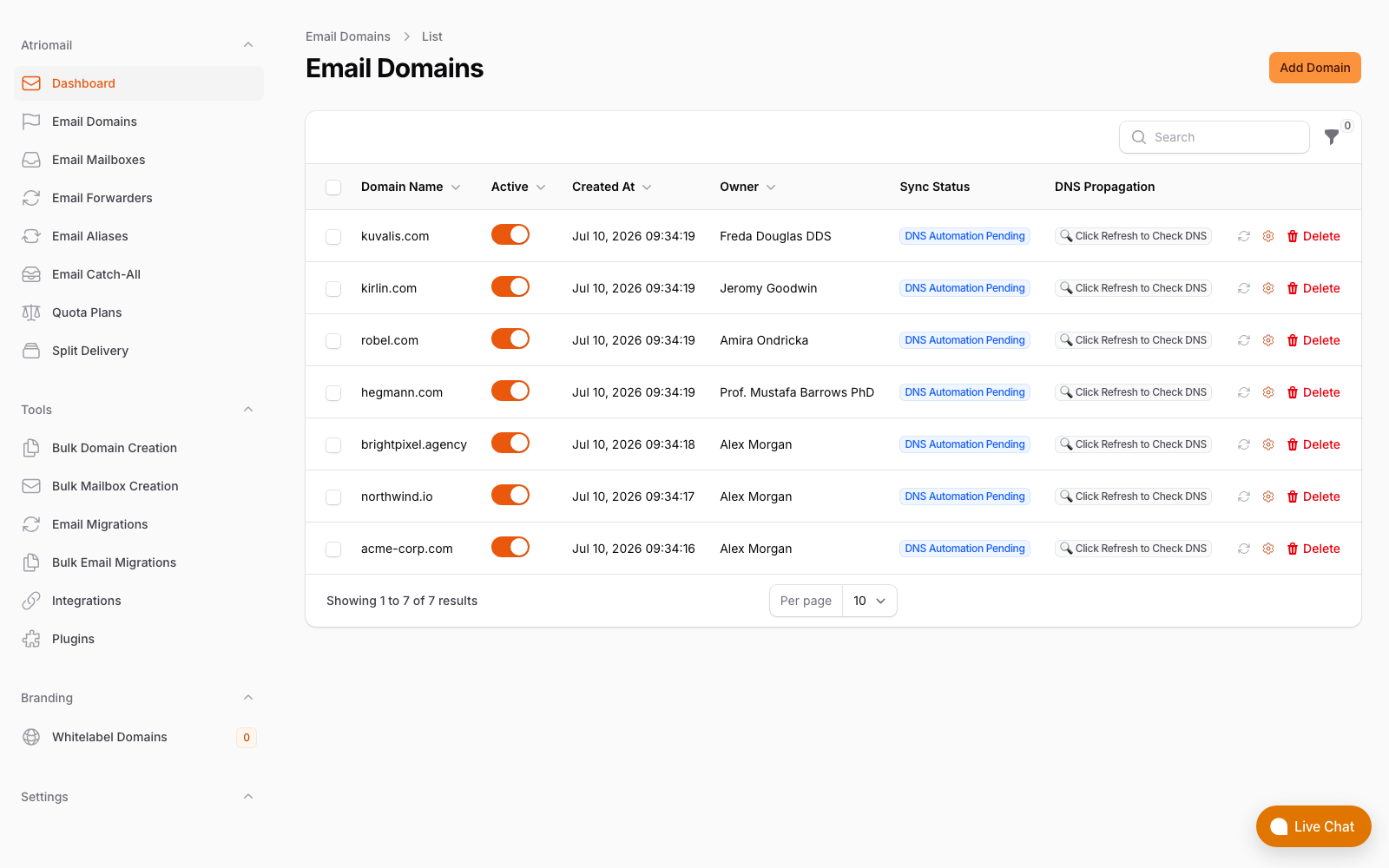
The Email Domains list, showing the DNS records Atriomail generates and syncs: SPF, DKIM and DMARC. BIMI isn't one of them. Real panel, no mockup.
None of this changes what a mailbox costs: a domain gets this same DNS Setup dialog and DKIM signing whether it's being prepared for BIMI or not, at $1.39 per mailbox with 15 GB included. Create your account, connect Cloudflare or Namecheap if that's where the domain lives, and work through the DMARC and certificate steps above before adding the BIMI record itself.
Authentication is ours, the logo is yours to add. Atriomail generates the SPF, DKIM and DMARC records a domain needs and signs its own mailboxes' outgoing mail for DMARC alignment, but the BIMI record itself is published directly at the DNS host, the same step whether or not that domain's mailboxes live on Atriomail.
Frequently Asked Questions
Does a client's domain need to be hosted on Atriomail to use BIMI?
No. BIMI is a DNS record published at the domain's own DNS host, independent of which platform hosts the mailboxes behind it. A domain can run BIMI whether its mail lives on Atriomail, another host, or nowhere yet, as long as the DMARC and certificate prerequisites are met.
Can Atriomail publish the BIMI record for me?
No. Atriomail's DNS automation generates, and on a connected Cloudflare or Namecheap account can publish, a domain's MX, SPF, DMARC, autodiscover, autoconfig and DKIM records. The BIMI record isn't part of that list on any DNS provider, so it's added directly at the DNS host the same way as every other record Atriomail doesn't automate.
Do I need a Verified Mark Certificate to show a logo in Gmail?
Yes, Gmail requires a Verified Mark Certificate or a Common Mark Certificate before it will display a BIMI logo. Yahoo and AOL will show a self-asserted logo with no certificate at all, so the answer depends on which inboxes matter most for that particular client.
Why does my BIMI record validate cleanly but no logo shows up in Gmail?
The most common cause is the DMARC record's pct tag. Google's own setup guide still requires pct=100 explicitly set, even though the current DMARC standard removed the tag entirely in 2026. The second most common cause is a domain still at p=none or missing the certificate Gmail requires.
Will enforcing DMARC for BIMI affect mail from an Atriomail mailbox on that domain?
It shouldn't. Atriomail signs outgoing mail with DKIM for the domain's own name once its records are set up, which is the alignment DMARC enforcement checks for. Confirm it with the free DNS checker and a batch of aggregate reports after the change rather than assuming it, the same as for any other sender on the domain.
How long does it take for a BIMI logo to actually appear after publishing the record?
Up to 48 hours for the DNS record itself to be read reliably, and each inbox provider caches sender information separately on top of that. There's no fixed guarantee from any provider, so don't promise a client an exact day.
Recommended
- How to Move a Client's DMARC Policy to p=reject Without Breaking Their Mail, Atriomail
- How to Read a DMARC Aggregate Report, Atriomail
- How to Fix a DKIM Signature That's Failing After an Email Migration, Atriomail
- Email Branding Best Practices for Resellers, Atriomail
- The Reseller's Email Security Playbook, Atriomail
- Managing Multi-Client Email at Scale, Atriomail
Latest from the blog
- DreamHost Email vs Atriomail: What "Unlimited" Doesn't Cover for Resellers · Oct 10, 2026
- A Client's Email Account Was Compromised: Why a Password Reset Alone Doesn't Fix It · Oct 9, 2026
- Aliases, Forwarders and Catch-Alls in Atriomail: The One Rule That Decides When They Work · Oct 8, 2026
- How to Move a Client's DMARC Policy to p=reject Without Breaking Their Mail · Oct 7, 2026
- OVHcloud Email Pro: What a £1.39 Mailbox Actually Costs a Reseller in Dollars · Oct 6, 2026