
A client's domain moves to a new mail platform, and suddenly mail that was passing SPF for years starts failing, or a DMARC report fills up with rows marked "permerror" instead of pass or fail. Nine times out of ten, nobody touched the sending side at all: the domain's SPF record quietly crossed the ten-lookup ceiling the day someone added one more marketing tool, and now every sender listed in it, including whatever you just set up on Atriomail, is judged against a check that can no longer be evaluated at all.
This is a domain-DNS problem, not a mailbox-hosting problem, so the fix below works the same way regardless of where the mailboxes end up. It also happens to be one of the first things worth checking before adding a client's domain to Atriomail or any other platform, because a record that's already at the limit has no room left for a new sender's line.
Table of Contents
- Before You Start
- What the 10-Lookup Limit Is, and Why One Extra Vendor Breaks Everything
- Counting Every DNS Lookup Your Current Record Actually Uses
- Fixing It: Cut, Replace and Flatten
- Merging Everything Into One Published Record
- How to Verify It Worked
- Common Mistakes and How to Avoid Them
- Doing This on Atriomail
- Frequently Asked Questions
Key Takeaways
| Point | Details |
|---|---|
| SPF stops counting at 10 DNS lookups | RFC 7208 requires an SPF check to return permerror once the include, a, mx, ptr and exists mechanisms, plus the redirect modifier, add up to more than 10 during evaluation. One sender over the line fails the whole check, not just the newest one. |
| A single include line can hide several lookups | A vendor's own SPF record can itself contain further includes, so "include:vendor.com" might cost one lookup or three depending on what that vendor publishes underneath it. |
| ip4, ip6 and all mechanisms are free | They're checked locally against the sending IP with no DNS query, so replacing a chained include with a vendor's own published ranges is one of the few fixes that lowers the count without removing a sender. |
| Atriomail's own SPF entry costs exactly one lookup | It resolves straight to Amazon SES's published IP ranges with no nested include, so adding it to an already-tight client record doesn't tip a domain that's close to the ceiling. |
One over-budget vendor can fail every sender on the domain. Atriomail's own SPF line resolves straight to Amazon SES's published IP ranges rather than a chain of further includes, so it always costs exactly one lookup once a client's domain is ready for it.
Before You Start
- Access to edit the domain's DNS zone, or a direct line to whoever holds it, since you'll be replacing the SPF TXT record, not just reading it.
- A copy of the domain's current SPF record pulled before you change anything, from the DNS host's dashboard or a plain TXT lookup, so you have an exact "before" to compare against if something breaks.
- A list of every service that actually sends as that domain today: the old host, the help desk, the invoicing tool, the marketing platform, and the mail platform it's moving to. The sender nobody remembers is exactly the one a rushed cleanup deletes by accident.
- A lower TTL on the SPF record, a day ahead if you can manage it. If the current TTL is an hour or more, a mistake in the new record sits live for that long before a correction can take effect everywhere.
What the 10-Lookup Limit Is, and Why One Extra Vendor Breaks Everything
RFC 7208, the SPF specification, caps how much DNS work a single SPF check is allowed to do. Section 4.6.4 requires implementations to "limit the total number of those terms to 10 during SPF evaluation, to avoid unreasonable load on the DNS" (RFC 7208, rfc-editor.org, checked September 2026). The mechanisms that count are include, a, mx, ptr and exists, plus the redirect modifier. mx carries its own inner limit too: resolving it must not query more than 10 address records. A second, separate ceiling: implementations "SHOULD limit void lookups to two", a void lookup being a DNS query that returns no data or NXDOMAIN, often because an include points at a vendor record that no longer exists.
What trips people up isn't the number, it's what happens past it. The specification doesn't say "stop counting the extra senders"; it says the whole evaluation returns permerror. A receiving server that sees a permerror generally treats the domain's authentication as broken across the board, not just for the sender that pushed the count past 10, which is why a marketing tool added in isolation can cost the CEO's newsletter its inbox placement. For a reseller juggling a hundred client domains, this belongs in the standard onboarding checklist alongside the reseller email security playbook, because it's invisible until the day it isn't.
A domain can be one sender away from permerror. Working out whether a client's domain has room for a new sender starts with knowing what its SPF record already spends; Atriomail's own entry adds exactly one lookup once that's confirmed.
Counting Every DNS Lookup Your Current Record Actually Uses
You can't eyeball an SPF record and know its real lookup count, because a single include line only shows you the top of the chain. To count it properly, list every counted mechanism in the record, then resolve each include target's own TXT record and count what's inside that too, recursively, until every branch ends in mechanisms that don't need a DNS query.
Here's what that looks like on an ordinary domain that's picked up senders over a few years: a bare a and mx from the original host, Google Workspace for staff mailboxes, Mailchimp for the newsletter, SendGrid for transactional receipts, and a help desk on Mailgun. Querying each vendor's own SPF record directly (checked September 2026) gives the real cost of each line:
| Mechanism | What it's for | DNS lookups it uses |
|---|---|---|
a |
Points to the domain's own mail server | 1 |
mx |
Points to the domain's own MX hosts | 1 |
include:_spf.google.com |
Staff still on Google Workspace | 1 (resolves straight to IP ranges, no nested include) |
include:servers.mcsv.net |
Newsletter sent through Mailchimp | 1 (a flat list of IP ranges) |
include:sendgrid.net |
Transactional receipts through SendGrid | 2 (the vendor's own record nests a second include) |
include:mailgun.org |
Help desk notifications through Mailgun | 3 (chains to two regional sub-records) |
| Total so far | 9 of 10 | |
Two things matter beyond the total. First, ip4, ip6 and all mechanisms never appear in the count, since they're matched locally with no DNS query, the lever the next section uses. Second, a lookup's cost can change on its own: Google's SPF record used to chain through three regional sub-records, and a direct query against it today resolves straight to IP ranges with none. Recount a record occasionally rather than treating one audit as permanent, the same discipline that keeps DNS automation and deliverability reliable for a client book.
Fixing It: Cut, Replace and Flatten
Once you know what the record actually spends, there are four ways to bring it back under 10, roughly in the order to try them:
- Remove anything not actually sending. This is usually the biggest win and the safest one: an old host's
aormxmechanism nobody has used since a migration two years ago, or a marketing tool the client cancelled and forgot to remove from DNS. Check against the sender list from before you started, not against memory. - Replace a chained include with the vendor's own IP ranges where they're published and stable. A vendor whose record resolves to a flat list of
ip4/ip6ranges, like Mailchimp's above, can sometimes be swapped in directly instead of referenced by include, dropping the DNS query entirely. The trade-off: the record no longer follows the vendor if ranges change, so save this for a smaller sender you'll remember to recheck, not the domain's primary mail flow. - Drop
ptroutright. The specification itself discourages it: it's slow, unreliable, and rarely the mechanism that's actually needed oncea,mxor anip4range already covers the same servers. - Consolidate multi-lookup vendors where you can. If a vendor like Mailgun costs three lookups because it chains to two regional sub-records, check whether that vendor publishes a narrower include for accounts only sending from one region; it's often cheaper than the default.
None of this is about cutting corners on domain management for the sake of a lower number. It's about making sure the record only pays for lookups a sender is actually using, the same discipline that keeps DNS configuration reliable as a client book grows past a handful of domains.
Merging Everything Into One Published Record
A domain may only have one SPF TXT record, full stop. A second one is treated as an error on its own, independent of either record's lookup count, so confirm there's exactly one and fold every mechanism you're keeping into it. Order doesn't affect evaluation; keep the qualifier at the end (~all or -all) unless tightening it is a deliberate, separate decision. A record can span multiple quoted strings inside one TXT value if it's long, but that's a length limit, not a lookup limit: every include, a, mx, ptr, exists and redirect inside it still counts the same way, however it's split. This matters most for a reseller running several client domains at once, where it's easy to lose track of which one already has a leftover record from an old provider, a problem multi-client email management tooling is built to catch before it ships.
How to Verify It Worked
Once the new record is published, wait out the old TTL before testing, so you're not reading a cached copy of the previous version. Two checks confirm the fix actually landed:
- Send a real test message to a mailbox where you can view full headers, and look for the
Authentication-ResultsorReceived-SPFheader. It should readspf=passrather thanpermerrorornone. - Run the domain through Atriomail's free DNS checker at /dns-checker/, which reads the domain's public MX, SPF, DKIM and DMARC records and flags anything malformed, including a record that doesn't parse cleanly. It works without an account and reads only what's already published.
If either check still shows a problem, recount the record by hand exactly as in the earlier table: a fix that looks right by eye can still have a miscounted nested include hiding in it.
Common Mistakes and How to Avoid Them
- Deleting an include that's still in use. Symptom: bounces or authentication failures start arriving specifically from that one vendor's mail a day or two after the cleanup ships, because it was quietly still sending client receipts or alerts.
- Leaving two SPF TXT records on the domain. Symptom: SPF still fails even though a manual count of each record individually shows well under 10 lookups, because the specification requires exactly one record and evaluators reject the second outright.
- Flattening a vendor's IP ranges and forgetting about it. Symptom: mail from that one sender stops passing months later with nothing in the domain's own DNS having changed, because the vendor rotated its ranges and the flattened list quietly went stale.
- Counting nested includes by eye instead of resolving them. Symptom: a record that looks like it has seven or eight lookups turns out to have eleven, because one of the includes chains to two more records underneath it, exactly like Mailgun's did above.
- Leaving a stale
aormxmechanism pointed at a decommissioned server. Symptom: that lookup can return NXDOMAIN, which counts against the separate two-void-lookup allowance and can push a record into permerror even while it's still under 10 counted terms. - Treating
~allversus-allas part of the fix. Symptom: none, since the qualifier doesn't touch the lookup count at all. Tighten it separately, once the count itself is under control, not mid-cleanup.
These are also worth building into whatever onboarding checklist already covers bringing a client book of domains onto a new platform in bulk, since a lookup-count problem on one domain in a batch is easy to miss when forty others are clearing their security checks cleanly at the same time. It sits alongside the wider set of email security protocols worth checking before a domain goes live for a client.
Doing This on Atriomail
When a domain is added to Atriomail, the panel generates the SPF, DKIM and DMARC records that domain needs to send through us, ready to copy from the DNS Setup dialog. On a connected Cloudflare or Namecheap account, Atriomail can write those records into the zone automatically once the domain clears the security check; on every other DNS host, they're added from that same dialog by hand. Atriomail's SPF include resolves directly to Amazon SES's published IP ranges with no nested include underneath it, so folding it into an existing record costs exactly one lookup, which is worth knowing before you add a domain that's already sitting close to the ceiling worked out earlier in this post.
What Atriomail doesn't do is audit the rest of that record for you. It generates its own line; whether the domain has room for it, and whether every other include still belongs there, is the cleanup covered above, worth finishing before the domain is added, particularly on Cloudflare or Namecheap where the automation writes straight into a zone that might already carry two SPF records or a vendor that stopped sending years ago. The Email Domains list shows each domain's DNS sync status with an on-demand refresh check, and the KB's DNS troubleshooting guide covers the same "only one SPF record is allowed" rule, alongside connecting Cloudflare or Namecheap for automatic DNS.
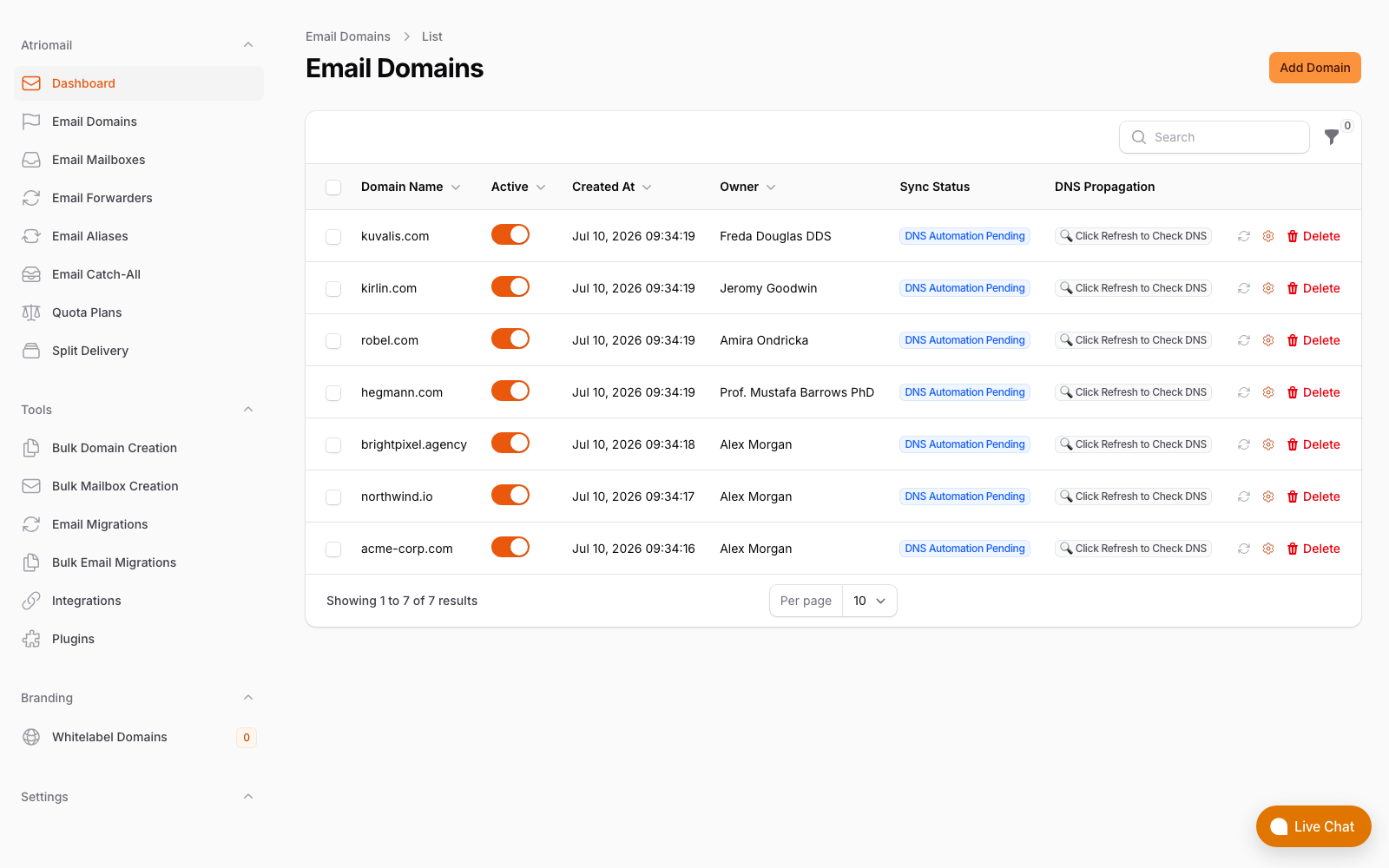
The Email Domains list, showing each domain's DNS sync status and the refresh check used to confirm records after a change. Real panel, no mockup.
Pricing doesn't change based on how tidy a domain's SPF record is: it's still $1.39 per mailbox with 15 GB included regardless of how many other senders share that domain's DNS, see the full pricing breakdown before planning an onboarding batch. What changes is how much of that onboarding gets spent explaining why last month's newsletter tool suddenly bounced, instead of just getting the domain live. Create your account, connect the domain, and work through the DNS Setup dialog once the cleanup above is done.
Fix the lookup budget before the domain goes live, not after. Atriomail's SPF entry is one clean lookup with no hidden chain behind it, and the DNS Setup dialog shows exactly what to add on any DNS host that isn't Cloudflare or Namecheap.
Frequently Asked Questions
What does an SPF permerror actually mean for mail that already worked?
Most receiving servers treat a permerror as a broken authentication check for the whole domain, not just for whichever sender happened to push the count over 10. Combined with DMARC, that can mean a sender that's been passing cleanly for years suddenly starts landing in spam or getting rejected, with nothing about that sender itself having changed.
Will removing an old include break mail from that vendor?
Yes, if that vendor is still actually sending. That's why the list of every current sender, gathered before you start, matters more than trying to recall it from memory while editing DNS.
Does switching from ~all to -all fix a permerror?
No. The qualifier at the end of the record has nothing to do with the lookup count. Tightening it is a separate, worthwhile decision to make deliberately once the count itself is back under 10, not a fix for the permerror on its own.
Does adding Atriomail's own SPF entry count toward my client's 10-lookup budget?
Yes, every include counts toward the limit regardless of who publishes it. Atriomail's resolves directly to Amazon SES's published IP ranges with no nested include, so it always costs exactly one lookup, which matters most on a domain that's already close to the ceiling.
Will Atriomail flatten or clean up a client's existing SPF record for me?
No. The panel generates the SPF, DKIM and DMARC records a domain needs for Atriomail, and can publish them automatically on a connected Cloudflare or Namecheap account, but it doesn't audit or edit a domain's other senders inside that same record. That cleanup is the work covered earlier in this post, and it's worth doing once, before or during onboarding.
How do I find out how many lookups a specific vendor's include actually costs?
Look up that include's own TXT record directly, through your DNS host's lookup tool or any public DNS query, and count what's inside it the same way as the worked example above. Some vendors publish a flat list of IP ranges that costs one lookup; others chain to a second or third record underneath, which costs more than the single include line suggests.
Recommended
- Mastering DNS Automation to Boost Email Deliverability, Atriomail
- Boost Your Email Deliverability With Automated DNS Validation, Atriomail
- Email Domain Management: Setup and Branding Guide, Atriomail
- Connecting Cloudflare and Namecheap for Automatic Mail DNS, Atriomail
- Bulk-Adding Domains and Mailboxes in Atriomail, Atriomail
- The Reseller's Email Security Playbook, Atriomail
Latest from the blog
- Bulk-Adding Domains and Mailboxes in Atriomail: The Client Book Onboarding Guide · Sep 23, 2026
- mailbox.org for Resellers: The Price Just Went Up, and the Brand Was Never Yours · Sep 22, 2026
- The White-Label Add-On: What Changes on Your Branded Hostname, and What Doesn't · Sep 21, 2026
- IceWarp Email Hosting for Resellers: Storage, Scale, and the White-Label Threshold · Sep 19, 2026
- Moving a Client's Mailboxes to Atriomail: How the Built-In IMAP Migration Works · Sep 18, 2026