
SmarterMail is a commercial mail server built specifically for hosting providers, ISPs, and MSPs who want to run their own email infrastructure. Unlike Linux-based open-source stacks such as Mailcow or iRedMail, SmarterMail is a paid product from SmarterTools: .NET-based, running on Windows and Linux, with a built-in webmail client, full-featured mobile sync, and annual licenses priced in tiers by mailbox count. It was designed from the start for multi-tenant hosting, not personal use.
Many hosting resellers running Windows stacks evaluate SmarterMail as an alternative to paying per-mailbox wholesale to a managed provider. The logic is appealing: one server, one license, unlimited clients, you set the price. The question is whether that logic survives contact with the full cost picture, and at what mailbox count the arithmetic actually flips in SmarterMail's favor.
This post works through the verified 2026 SmarterMail license pricing, the additional costs most SmarterMail evaluations skip, and the specific provisioning gaps that matter to resellers billing through WHMCS or Blesta.
Table of Contents
- What SmarterMail Is Built For
- SmarterMail License Pricing in 2026
- The Three Costs Most Evaluations Skip
- The Break-Even by Mailbox Count
- Provisioning Without a Native WHMCS Module
- DNS Automation: Per-Domain Manual Setup
- Where SmarterMail Genuinely Wins
- Where Atriomail Fits
- Frequently Asked Questions
Key Takeaways
| Factor | SmarterMail (self-hosted) | White-label hosting ($1.39/mailbox) |
|---|---|---|
| Cost at 50 mailboxes | ~$92/month (license + VPS server) | $69.50/month |
| Cost at 250 mailboxes | ~$125/month (license + VPS server) | $347.50/month |
| Spam filtering | Add-on, from ~$250/year extra | Included in platform |
| Native WHMCS/Blesta module | No (requires third-party automation) | Yes, included |
| Automatic DNS per domain | No (manual per domain) | Yes, 19 providers and panels |
| Infrastructure break-even | ~90 mailboxes (no admin time) | N/A |
| Break-even with 2 hrs/month admin time | ~220 mailboxes | N/A |
What SmarterMail Is Built For
SmarterMail is not a general-purpose server application that happens to do email. SmarterTools built it as a multi-tenant platform for companies that host email for other organizations: hosting providers, ISPs, MSPs, and enterprises running internal mail for hundreds or thousands of users. The feature set reflects this: domain-level administration, tenant isolation, abuse management tools, and per-domain quotas are all first-class concerns in the UI.
The Enterprise edition adds MAPI and EWS protocol support, which means Outlook for Windows and Mac can connect to SmarterMail using the same native protocol it uses with Exchange Server. Calendar, contacts, and push email all sync without plugins or workarounds. For clients who use Outlook desktop and refuse to configure IMAP manually, this is a real differentiator that IMAP-only platforms genuinely cannot match.
The Professional edition uses standard protocols: IMAP, POP3, CalDAV, and CardDAV. Mobile sync works well. Outlook works through IMAP. Most small-business clients will not notice the difference from MAPI unless they are heavy Outlook power users relying on shared calendars and delegated mailbox access.
It is worth naming the alternative class of platform here before diving into the cost math. White-label email hosting means you buy mailbox capacity wholesale from a managed provider, mark it up, and bill it under your own brand without running any server infrastructure yourself. The comparison between these two approaches is what the rest of this piece works through.
SmarterMail License Pricing in 2026
SmarterTools publishes their license pricing at smartertools.com/smartermail/pricing. Licenses are annual, priced by the maximum mailbox count on the server, and structured in tiers rather than per-mailbox. You buy the tier that covers your current count and upgrade when you exceed it.
SmarterMail Enterprise (MAPI/EWS + all features):
| Mailbox tier | Annual license | Monthly equivalent |
|---|---|---|
| 50 mailboxes | $700 | $58.33 |
| 250 mailboxes | $900 | $75.00 |
| 500 mailboxes | $1,200 | $100.00 |
| 1,000 mailboxes | $1,500 | $125.00 |
| 2,000 mailboxes | $1,800 | $150.00 |
| Unlimited | $2,200 | $183.33 |
SmarterMail Professional (IMAP/POP3/CalDAV/CardDAV, no MAPI/EWS):
| Mailbox tier | Annual license | Monthly equivalent |
|---|---|---|
| 50 mailboxes | $500 | $41.67 |
| 250 mailboxes | $650 | $54.17 |
| 500 mailboxes | $900 | $75.00 |
| 1,000 mailboxes | $1,300 | $108.33 |
| 2,000 mailboxes | $1,500 | $125.00 |
| Unlimited | $1,800 | $150.00 |
The tier structure means there is a large cost jump between tiers that does not scale linearly. Going from 250 to 500 mailboxes on the Enterprise edition costs $300 more per year ($25/month), while going from 500 to 1,000 costs another $300. The cost per mailbox actually drops sharply as the server fills up, which is the economic argument for SmarterMail at scale.
Note that spam filtering, anti-virus, and archiving are not included in any base tier. SmarterTools sells these as optional add-ons: Cyren Premium Anti-spam, Message Sniffer, and Cyren Zero-Hour Anti-Virus, with pricing that varies by mailbox tier and ranges from $250 to over $1,000 per year. Running a mail server without active spam filtering is not a realistic option for any hosting provider, so these add-ons are a real cost that belongs in any comparison, not a footnote.
The Three Costs Most Evaluations Skip
A SmarterMail license on its own does not produce a working mail server. Three additional cost categories appear in every deployment and rarely appear in evaluations:
The server. SmarterMail runs on a dedicated or virtual server. SmarterTools recommends at least 4 CPU cores and 8 GB RAM for a production deployment serving 100 or more active mailboxes, along with fast SSD storage. A virtual private server meeting those specs runs roughly $40 to $60 per month depending on the provider and whether you choose a Windows or Linux image. The server cost is fixed regardless of how many mailboxes you actually fill. The combination of this fixed floor with a per-tier license is what makes SmarterMail's economics sensitive to utilization.
Spam filtering add-ons. As noted, the base license includes only basic content filtering. Cyren Premium Anti-spam starts at approximately $250 per year for the lowest tier; costs for 250-mailbox deployments run higher. Budget at least $21 to $35 per month for effective spam and malware protection, and verify the current add-on pricing on SmarterTools' site before finalizing any estimate, as it varies by tier.
Admin time. A SmarterMail server needs ongoing attention: OS patches, application updates, disk monitoring, queue management when a domain starts sending to a spam trap, and the time to provision each new client domain manually. Even a well-configured server with low incident rates realistically consumes one to three hours of someone's time per month. At a conservative internal rate of $75 per hour, one hour per month adds $75 to the monthly total; three hours adds $225. This is the cost category that most SmarterMail evaluations omit entirely and that most dramatically shifts the break-even math.
The Break-Even by Mailbox Count
Putting the license, server, and anti-spam together (excluding admin time for the moment, to isolate the infrastructure comparison), the monthly cost picture looks like this at two representative scales:
At 50 mailboxes, white-label hosting at $1.39/mailbox is $22 per month cheaper than a SmarterMail Pro license plus a suitable server, and the SmarterMail bar does not yet include spam filtering or any admin time. Atriomail's cost is lower here because the SmarterMail server's fixed infrastructure floor has not been amortized across enough mailboxes.
At 250 mailboxes, the picture reverses: the SmarterMail Enterprise 250-mailbox tier plus a VPS runs about $125 per month against $347.50 for 250 mailboxes at $1.39. The infrastructure cost advantage for SmarterMail is $222.50 per month.
The crossover point on pure infrastructure (license + server, no spam filtering, no admin time) is approximately 90 mailboxes using the SmarterMail Enterprise 250-mailbox tier ($75/month license + $50 server = $125/month). At 90 mailboxes, Atriomail costs $125.10/month, essentially equal. Below 90 mailboxes, the managed per-mailbox model wins. Above it, SmarterMail's infrastructure is cheaper.
Add spam filtering ($21 to $35/month) and the crossover shifts to about 112 to 120 mailboxes. Add even one hour per month of admin time at $75/hour ($75/month) and it shifts to about 165 mailboxes. Add two hours per month and it reaches approximately 220 mailboxes. The self-hosted model only reliably saves money at meaningful scale, and only if admin time is kept genuinely low or is not counted at all.
For a deeper look at the general self-hosted vs. managed trade-off across different Linux-based stacks, the self-hosted email server vs. white-label hosting comparison covers the same math on the Mailcow/Hetzner side, where port 25 restrictions and IP reputation warm-up add complications not present in SmarterMail deployments on dedicated IPs.
Provisioning Without a Native WHMCS Module
SmarterTools does not publish a native WHMCS provisioning module. To automate mailbox creation, suspension, and termination through WHMCS, resellers need a third-party module, with HostBill being the most commonly referenced option. HostBill works, but it is a separate paid platform that adds another monthly subscription to the stack and a dependency to maintain.
The practical consequence for a small MSP is that onboarding a new client domain onto a SmarterMail server involves manual steps in the SmarterMail admin panel: create the domain, set quotas, create mailboxes, and then separately handle the billing record in WHMCS. When you add a new mailbox mid-month, the billing adjustment is also manual unless you have built or licensed automation to connect the two systems.
By contrast, automating email billing in WHMCS and Blesta through a managed white-label provider means the module handles provisioning, suspension and termination, and the mailboxes and storage a client orders in WHMCS or Blesta are billed there at your prices. Changes made in the Atriomail panel itself do not sync into that billing, so client changes belong in the billing system. The provisioning gap between self-hosted and managed hosting is not a minor inconvenience when you are managing 20 client domains, each with staff turnover that produces occasional add-and-remove requests.
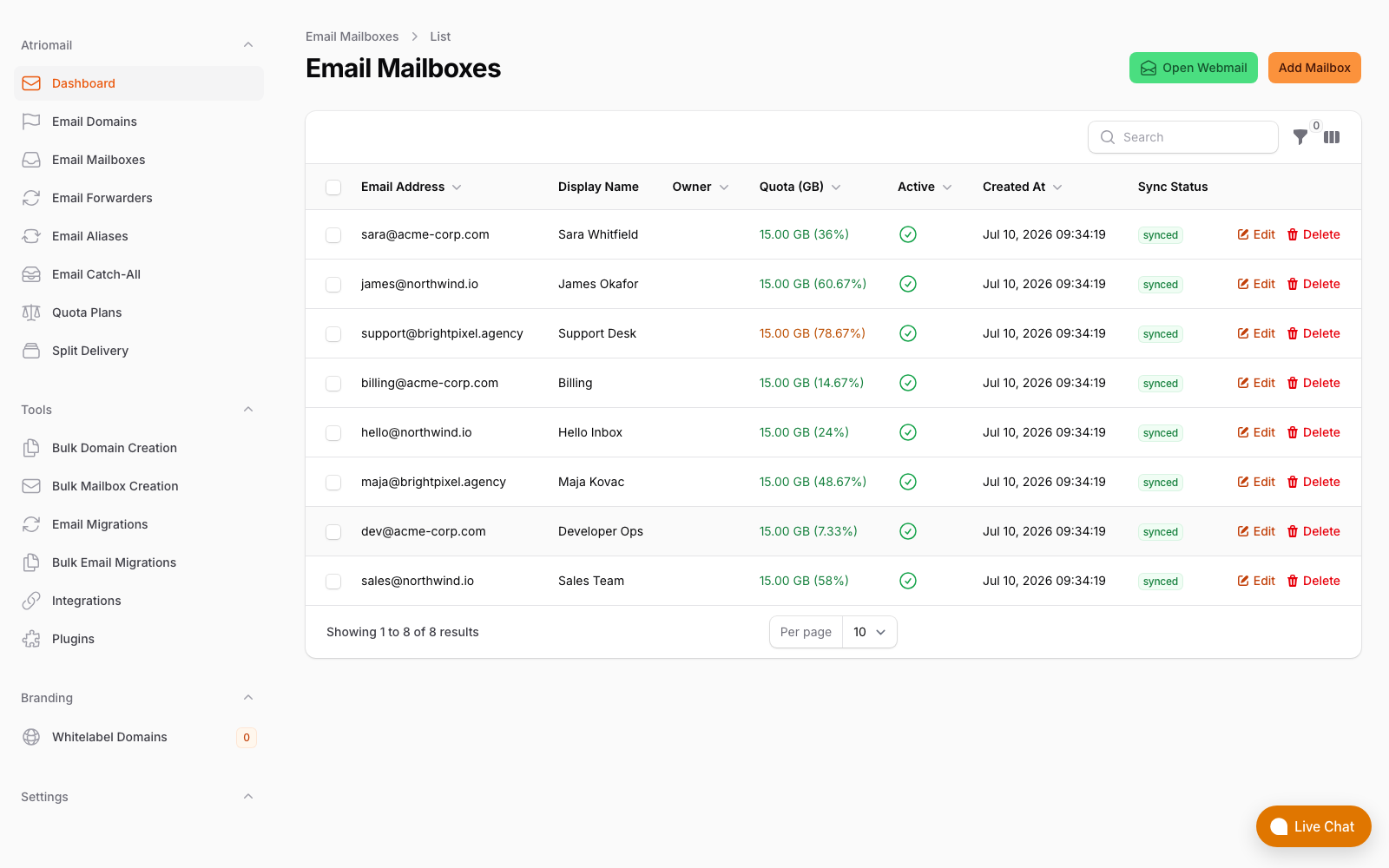
Mailbox provisioning in the Atriomail panel. Mailboxes that clients order through the WHMCS or Blesta module land here and are billed in that system; on SmarterMail you would manage these steps separately.
DNS Automation: Per-Domain Manual Setup
SmarterMail generates DKIM keys and shows the record values in the domain settings panel. Publishing those records to your DNS provider is a manual step, repeated for every domain you add. SmarterMail does not connect to external DNS providers to push records automatically. SPF, DMARC, and MTA-STS records are also entirely manual.
For a reseller managing five to ten domains, this is annoying but manageable. For a reseller managing 50 or more client domains across multiple DNS providers, manual DNS setup becomes a meaningful source of support tickets. A misconfigured SPF record that causes a client's outbound email to bounce is not a quick fix when you are also managing the underlying server.
This is one of the operational differences worth weighing honestly when the break-even math is close. The cost-effective email hosting comparison addresses this in more detail: the per-mailbox model bundles DNS automation as a feature of the platform rather than a recurring manual task. Managed platforms with automatic DNS publication across 15 DNS providers eliminate this category of ticket entirely.
Where SmarterMail Genuinely Wins
This comparison would not be honest without stating the cases where SmarterMail is the better answer:
- Large Windows-infrastructure shops at scale. If you already run Windows servers, have a Windows administrator on staff, and are managing 300 or more mailboxes on a single server, SmarterMail's infrastructure cost per mailbox is meaningfully lower than managed per-mailbox hosting, even after accounting for realistic admin time. The economics are real at this scale.
- Clients who require native Outlook sync via MAPI or EWS. IMAP works for most users, but some enterprise clients require shared calendar delegation, delegated mailbox access, or tasks synchronized through native Outlook. SmarterMail Enterprise is one of the few non-Exchange platforms that provides this through MAPI/EWS. Managed white-label platforms built on IMAP protocols cannot replicate this without separate CalDAV/CardDAV configuration, which some Outlook users find unacceptable.
- On-premises or data-sovereignty requirements. Some MSP clients in regulated industries require email data to remain on infrastructure they directly control, in a specific physical location, or under their own legal jurisdiction. SmarterMail on a dedicated server satisfies those requirements in a way a managed cloud platform cannot.
- Existing SmarterMail deployments with ample spare capacity. If you already run a licensed SmarterMail server that is half-full, adding new client domains costs effectively nothing in incremental infrastructure. The cost comparison in this post assumes you are starting fresh; for an existing deployment, the math is entirely different.
For resellers who do not fit any of the above criteria, the combination of the provisioning overhead, manual DNS setup per domain, no native WHMCS/Blesta module, separate spam-filter cost, and the sub-100-mailbox range where managed hosting is cheaper on pure infrastructure makes the self-hosted path harder to justify. The right trade-off depends on the reseller's exact client profile, existing infrastructure, and in-house technical capacity, which is precisely why working through the actual numbers matters more than a generic recommendation either way. The Atriomail pricing page and reseller margin calculator are a useful starting point for running the numbers against your own book.
Where Atriomail Fits
The break-even table above is the honest frame for this one, and it does not point one way. Past roughly 90 mailboxes ignoring admin time, or roughly 220 once you price two hours a month of it, SmarterMail on your own server is cheaper per mailbox and stays cheaper as you grow. A Windows shop at 250 mailboxes with an administrator already on staff should read that table and keep the licence.
Atriomail is the better answer below those thresholds, and for shops that would rather not run mail infrastructure at any size. The $1.39 per mailbox per month rate includes the pieces that are separate line items or manual work in the self-hosted column: spam filtering and antivirus rather than a roughly $250 per year add-on, native WHMCS and Blesta modules rather than third-party automation, and automatic per-domain SPF, DKIM and DMARC across 19 providers and panels rather than manual DNS on every new client.
The real comparison is not licence against subscription, it is whether the admin hours behind that break-even are hours you want to spend. The pricing page has a calculator for your own mailbox count.
Frequently Asked Questions
Related topics are covered in the full FAQ.
Does SmarterMail run on Linux?
Yes. SmarterMail was historically a Windows-only application, but SmarterTools added Linux support in more recent versions. Most long-running SmarterMail deployments are still on Windows, but fresh deployments can run on either operating system. The license pricing is the same regardless of the underlying OS.
Is the WHMCS module for a managed white-label provider included or a separate cost?
For Atriomail, the WHMCS and Blesta modules are included at no additional cost. There is no per-module license fee or platform subscription. Provisioning through WHMCS or Blesta is part of what the $1.39/mailbox/month price covers, alongside the hosted infrastructure, DNS automation, and IMAP migration tooling.
If my book grows past 250 mailboxes, does the math change?
Yes, substantially in SmarterMail's favor as volume grows. At 500 mailboxes on the Enterprise tier ($1,200/year = $100/month license) plus a $60/month server, total infrastructure is $160/month for 500 mailboxes, or $0.32/mailbox/month. Atriomail at the same count would be $695/month. The gap widens further at 1,000 mailboxes. The trade-off you are making at that scale is lower infrastructure cost in exchange for managing a production mail server and its associated operational overhead.
Can I migrate existing SmarterMail clients to a managed platform?
Yes. SmarterMail exposes standard IMAP, so existing mailboxes can be migrated using IMAP-to-IMAP tools. The process is the same as migrating from any IMAP server: authenticate the source account, copy folders and messages, update MX records, and retire the old mailbox after confirming delivery to the new server. Atriomail's built-in IMAP migration tool handles this without requiring access to the source server's admin panel, which matters when the source is a third-party SmarterMail host rather than your own server. The cPanel-specific comparison in cPanel email vs. white-label hosting covers the migration workflow in more detail for resellers moving off shared-hosting stacks, and the same sequence applies here.
Recommended
- Self-Hosted Email Server vs. White-Label Hosting: What MSPs Get Wrong About the Math, Atriomail
- cPanel Email vs. White-Label Email Hosting: The Real Cost for Hosting Resellers, Atriomail
- Automate Email Billing in WHMCS and Blesta: Best Practices for Resellers and MSPs, Atriomail
- What Is White-Label Email? Atriomail
- Cost-Effective Email Hosting: Why Pay-Per-Mailbox Pricing Wins for Resellers, Atriomail
- Pricing and the Reseller Margin Calculator, Atriomail
Latest from the blog
- How to Set Up BIMI So a Client's Logo Shows Up in Gmail and Yahoo · Oct 12, 2026
- DreamHost Email vs Atriomail: What "Unlimited" Doesn't Cover for Resellers · Oct 10, 2026
- A Client's Email Account Was Compromised: Why a Password Reset Alone Doesn't Fix It · Oct 9, 2026
- Aliases, Forwarders and Catch-Alls in Atriomail: The One Rule That Decides When They Work · Oct 8, 2026
- How to Move a Client's DMARC Policy to p=reject Without Breaking Their Mail · Oct 7, 2026