
When you bought a cPanel reseller hosting account, email came with it. Exim handles outbound mail. Dovecot handles IMAP and POP3. SpamAssassin does spam filtering. None of that costs you anything extra per mailbox, which is exactly why most hosting resellers never stop to ask whether cPanel email is actually the right way to serve the clients they bill every month.
The question is worth asking. "Free" is the per-mailbox cost, not the total cost. The real cost includes shared IP reputation you cannot fully control, per-domain DNS configuration you have to do manually for every client, and a billing model that makes it nearly impossible to charge for email as a separate line item at all. This post works through each of those in detail, and compares the picture against dedicated white-label email hosting at $1.39 per mailbox per month.
Table of Contents
- What cPanel's Email Stack Actually Is
- The Shared IP Problem
- DNS Configuration: Manual per Domain
- What You Cannot Bill
- What White-Label Email Hosting Changes
- The Margin Math
- When cPanel Email Is Fine
- Moving Clients Off cPanel Mail
- FAQ
Key Takeaways
| Point | Details |
|---|---|
| cPanel email costs $0 per mailbox but not $0 to operate | Shared IPs, manual DNS per domain, and support overhead add real costs that do not appear on your hosting invoice. |
| Shared IP blacklisting is the biggest risk for resellers | One compromised account on your server can get the sending IP listed on Spamhaus or Barracuda, affecting every client domain on the same server. |
| DKIM, SPF and DMARC are not auto-configured across all client domains | cPanel generates DKIM per domain, but each client's zone record has to be verified and DMARC requires manual addition. One missed domain means deliverability risk for that client. |
| cPanel has no native per-mailbox billing module for WHMCS | The cPanel module provisions full hosting accounts. If you want to bill separately for email at the mailbox level, you need a separate product and separate billing logic. |
| White-label email at $1.39/mailbox lets you build recurring margin cPanel cannot | You pay per mailbox wholesale and set your own retail price. On a 50-mailbox client billed at $4/mailbox, the monthly margin is $130.50 on a line item that barely exists in the cPanel model. |
What cPanel's Email Stack Actually Is
A standard cPanel/WHM installation ships with three components handling email:
- Exim as the mail transfer agent (MTA). Exim is the software that actually sends and receives SMTP traffic. It handles message queuing, retry logic, and routing between domains.
- Dovecot as the IMAP and POP3 server. Dovecot is what your clients' mail clients connect to when they check their inbox.
- SpamAssassin for inbound spam scoring. Messages are assigned a score based on headers, content, and sending reputation; messages above a threshold go to the spam folder or get rejected.
These are all solid, production-grade pieces of software. Exim in particular handles a significant share of global email traffic. The issue for resellers is not the software itself; it is the deployment model. On a shared reseller account, all your clients share the same server and, critically, the same outbound IP addresses.
The Exim Configuration Manager in WHM is the control surface for that shared mail infrastructure. Misconfiguring it can result in an open relay exposure, a delivery failure, or a complete blacklisting of the server IP. That configuration applies equally to all client domains on the server, not per-domain settings you can adjust per client.
The Shared IP Problem
Email reputation is primarily tracked at the IP address level. Gmail, Microsoft Exchange Online Protection, and most receiving servers score the sending IP when deciding how to handle an incoming message. On a shared cPanel hosting environment, every client domain sends through the same IP pool.
The practical risk: if one of your 30 client accounts gets their password compromised and a spammer sends 50,000 messages through it overnight, the sending IP can be listed on Spamhaus, Barracuda, or other RBLs within hours. Every other client domain on that server will start seeing delivery failures or spam-folder placement at recipient servers that check those blocklists, even though their accounts had nothing to do with the spam run.
Delisting takes time: typically 24 to 48 hours for automated removals from some lists, and manual requests for others. The clients affected during that window have legitimate email going to spam or bouncing. You carry the support burden.
The problem is structurally worse for resellers than for single-domain users. A reseller with 30 to 50 clients has 30 to 50 points of account compromise risk, all sharing the same IP consequence. The more clients on the same server, the more exposure, not less. This is not a reason to avoid reseller hosting altogether; it is a reason to separate email infrastructure from web hosting infrastructure, which is exactly the lesson the Namecheap outage in August 2026 illustrated at scale: co-located services share correlated failure domains.
Reverse DNS (PTR records) is the other shared-IP complication. A PTR record that does not match the HELO/EHLO string Exim presents on outbound connections is among the most common reasons mail from a cPanel server quietly gets downgraded by Gmail and Outlook. PTR is set at the server level by your upstream hosting provider, not per-domain by you, so this is another variable you do not control.
DNS Configuration: Manual per Domain
cPanel does generate a DKIM key automatically when you add a domain. The key is created and stored, but the DNS zone record that actually publishes it still needs to be verified per domain through WHM's Email Deliverability tool. If a client's domain uses external DNS (as many clients do, especially if they manage their own domain registrar settings), you need to hand them the DKIM TXT record value and confirm they have added it correctly before it takes effect.
SPF is similar: cPanel will generate a default SPF record, but the client's external DNS zone must be updated to include it, and the default often needs customization for clients who send from other services like marketing tools or CRMs.
DMARC is not auto-configured at all. A DMARC policy record at the client's domain is something you add manually if you add it at all. Without it, SPF and DKIM pass or fail silently from the recipient's perspective: there is no policy telling receiving servers what to do with messages that fail authentication.
For a single domain, that manual configuration process takes 10 to 20 minutes and is fairly straightforward. Across 30 or 40 client domains, each with different registrars and varying levels of client cooperation on DNS access, it becomes a significant recurring operational task. Any new client added to your reseller account goes through the same sequence. Deliverability for that client is degraded until every step is complete.
Dedicated white-label email hosting platforms with automated DNS validation publish SPF, DKIM and DMARC records automatically across a broad set of DNS providers at the point you add the domain. The setup step that took 15 minutes per client on cPanel becomes one click.
What You Cannot Bill
This is the largest practical difference between cPanel email and white-label hosting, and the one most resellers underestimate until they try to fix it.
The cPanel WHMCS module provisions hosting accounts: disk space, bandwidth, cPanel features. It does not provision individual mailboxes as a standalone product with per-seat pricing. If you want to offer email as a separate line item on your invoice, billed per mailbox at a price you control, you need to build separate product logic in WHMCS or Blesta, track which clients have how many mailboxes separately, and reconcile that against what actually exists on the server.
In practice, almost no hosting reseller does this. Instead, clients get email as part of their hosting package, often with no clear per-mailbox price in the client's mind and no standalone email line item on the invoice. That means when the client relationship ends, email stops. When the client needs more mailboxes, it is often a support request rather than a billable upgrade. When you want to raise prices, you are raising the hosting price, not an email price that the client evaluates separately.
White-label email hosting inverts this. The WHMCS and Blesta modules for dedicated email hosting platforms provision individual mailboxes as products. Each mailbox is a line item. Clients see a quantity on their invoice. Adding mailboxes is a self-service upgrade. The billing and the email infrastructure are in sync automatically, rather than tracked manually.
What White-Label Email Hosting Changes
The core difference is infrastructure separation. A dedicated email hosting platform runs its own SMTP, IMAP and spam-filtering infrastructure on IP addresses used only for email, not shared with web hosting workloads. The sending IP reputation belongs to email clients on that platform, not to whoever happens to share your cPanel server.
For a hosting reseller, the practical changes are:
- DNS is automatic on add. Add a client domain, the platform publishes SPF, DKIM and DMARC records automatically for all DNS providers it supports (Atriomail currently supports 19). No per-domain manual step.
- Per-mailbox billing is the default model. You pay $1.39 per mailbox per month at wholesale. You set the client's retail price. Each mailbox is a distinct billable unit in WHMCS or Blesta.
- Storage is per mailbox, not pooled. Each mailbox gets 15 GB included. Extra storage is $0.60 per additional 5 GB block. Clients who need more pay more; clients who do not need much are not subsidizing those who do.
- Migration from existing mail is free. Moving clients off Gmail, Google Workspace, cPanel or any IMAP server uses built-in IMAP migration that preserves folders and message dates.
- The branding add-on is optional. Clients see email on their own domain by default. If you want your own logo on the webmail login and admin panel, that is a separate add-on at $200 one-time plus $50 per month, which covers itself once you have roughly 36 mailboxes on the platform.
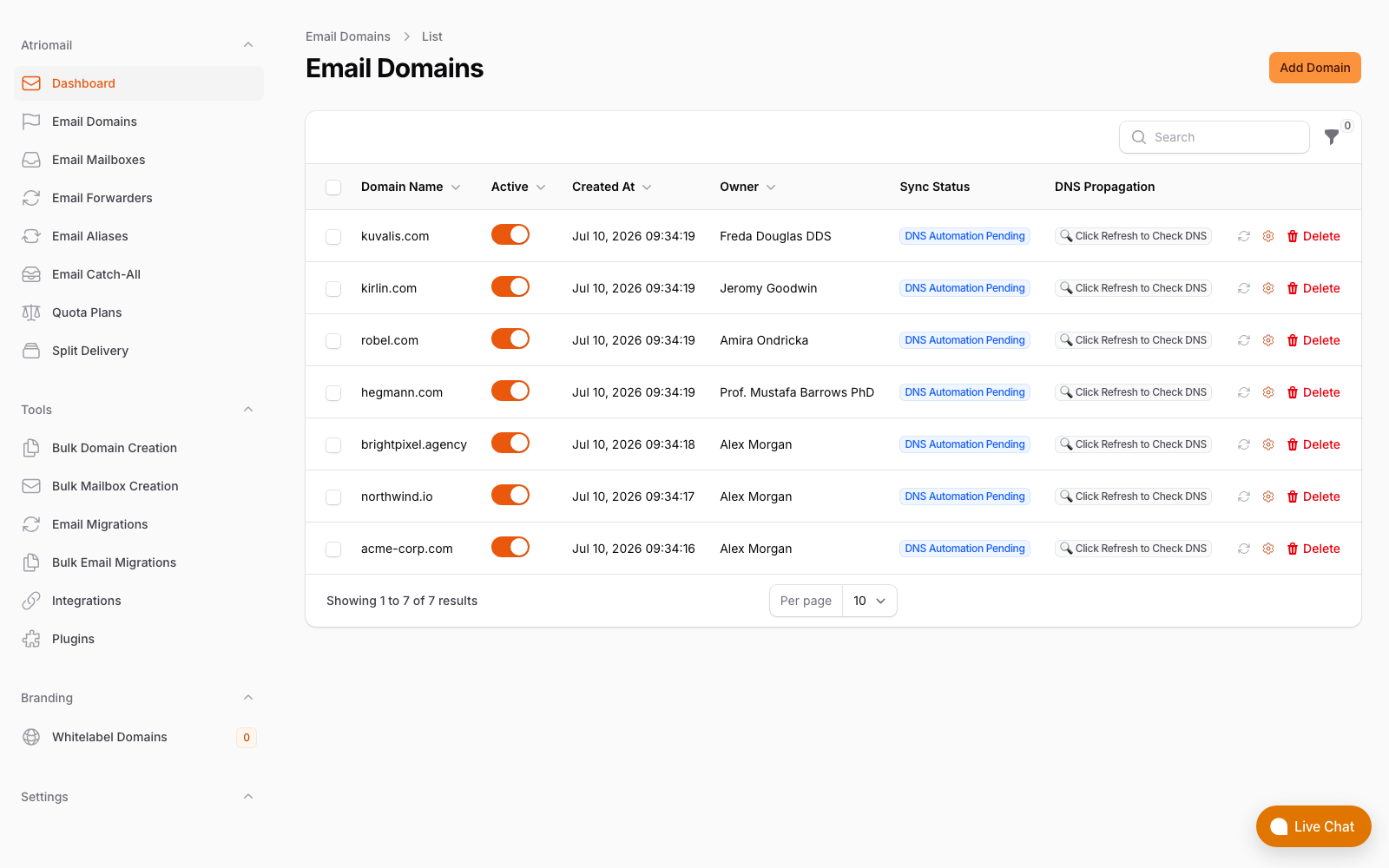
Per-domain DNS status visible at a glance in the admin panel, no per-client WHM session required.
The Margin Math
Take the same 50-mailbox client used throughout this series. On cPanel email, that client's mailboxes are part of their hosting account. Assume you bill them $20 per month for hosting that includes unlimited email. No email line item appears separately. Your margin on the email is whatever fraction of $20 you attribute to it, which is typically zero in practice because you cannot easily separate it.
On white-label email hosting, the same 50 mailboxes billed at $4 per mailbox produce:
| cPanel email (bundled with hosting) | White-label email hosting | |
|---|---|---|
| What you pay wholesale | $0 per mailbox (included in hosting plan) | 50 x $1.39 = $69.50/month |
| What the client pays for email | Usually $0 (bundled, no separate line item) | 50 x $4.00 = $200.00/month |
| Your recurring margin on email | $0/month | $200 - $69.50 = $130.50/month |
| Annualized | $0 | $1,566/year |
The $4/mailbox retail figure in this example is conservative. Many resellers price closer to $5 or $6 per mailbox, which is still well below Google Workspace Business Starter at $7/user/month retail. Clients who only need a professional mailbox, not Docs or Sheets, often find that straightforward to understand on their invoice. The per-mailbox pricing model is the reason: clients pay for what they actually have, not a block of storage they share with other users.
When cPanel Email Is Fine
Not every reseller situation calls for a dedicated email platform, and this comparison is not an argument that it always does.
cPanel email works well when:
- You have a small number of clients with very low mailbox counts. If you are hosting five clients who each need two or three mailboxes and are not billing for email separately at all, the operational overhead is manageable and the margin opportunity is not large enough to justify a new vendor relationship.
- Clients need hosting and email tightly coupled. Some clients want everything on one account at one vendor. If that is what they are paying for and email deliverability has not been a problem, there is no pressing reason to separate it.
- Email is not a revenue line item for you. If you genuinely treat email as a feature bundled into hosting rather than a billable service, the billing complexity of switching to per-mailbox pricing may outweigh the margin benefit at your current scale.
The calculus changes when you start accumulating clients, when deliverability complaints start appearing, or when you want to sell email to clients who do not buy hosting from you at all. At that point, cPanel email's structural constraints start working against the business.
Moving Clients Off cPanel Mail
Moving existing clients from cPanel email to a dedicated platform does not require the client to start with an empty inbox. IMAP-based migration copies existing mail, folders and message dates from the old server to the new mailbox, so clients arrive with their history intact.
The DNS cutover is the part that requires the most planning. While the migration is running, the old MX records still need to point at the cPanel server so incoming mail continues to arrive. Once migration is complete, you update the MX records to point at the new platform, and from that point forward all new mail arrives there. The old cPanel mailbox can remain as a holding area for a few days while any in-flight messages arrive and the TTL clears. A detailed walkthrough of the full sequence, including how to handle clients who manage their own DNS, is in the migration guide for agencies and resellers.
The result for the client is the same email address on the same domain, with the same folder structure, working in the same mail app. The only visible change is that their webmail URL changes, if they used cPanel webmail at all.
Frequently Asked Questions
More on pricing and setup in the full FAQ.
Can I run cPanel hosting and white-label email for the same clients?
Yes. Many resellers keep web hosting on cPanel/WHM and move email to a dedicated platform. The client's site stays on cPanel and their MX records point to the email platform instead of the cPanel server. The two services operate independently, which is one of the practical benefits: an issue on the web hosting side does not take down email, and vice versa.
What happens to clients who use cPanel webmail?
They switch to a different webmail URL. If you have the white-label branding add-on, that URL is your own domain. Without the add-on, it is the platform's webmail. Most clients who use webmail adapt without trouble; clients using desktop or mobile mail apps via IMAP connect to the new server settings and otherwise notice no change.
Does moving email off cPanel affect PHP mail functions on the same hosting account?
PHP mail() and wp_mail() on your cPanel hosting accounts send through Exim on the local server, not through the client's mailbox server. Moving hosted mailboxes to a dedicated platform does not affect PHP-generated email from websites on the same cPanel account. Those transactional messages continue to go through cPanel's Exim, or you configure them through a dedicated transactional relay like SMTP authentication to an external service, which is the recommended approach regardless.
Is white-label email more expensive than cPanel email per mailbox?
Per mailbox, yes: $1.39/mailbox versus $0 on cPanel. But cPanel email has no separate retail price you can charge clients, so the net comparison is $1.39 wholesale against $0 wholesale and $0 recurring margin. White-label email at $4 to $5 per mailbox retail produces $2.61 to $3.61 per mailbox margin over wholesale, which cPanel email structurally cannot replicate as a per-mailbox product.
Recommended
- What Is White-Label Email? Atriomail
- Automate Email Billing in WHMCS and Blesta, Atriomail
- Boost Email Deliverability with Automated DNS Validation, Atriomail
- Effortless Email Migration for Agencies and Resellers, Atriomail
- The Namecheap Outage: What Resellers Should Build Differently, Atriomail
- Pricing and the Reseller Margin Calculator, Atriomail
Latest from the blog
- How to Set Up BIMI So a Client's Logo Shows Up in Gmail and Yahoo · Oct 12, 2026
- DreamHost Email vs Atriomail: What "Unlimited" Doesn't Cover for Resellers · Oct 10, 2026
- A Client's Email Account Was Compromised: Why a Password Reset Alone Doesn't Fix It · Oct 9, 2026
- Aliases, Forwarders and Catch-Alls in Atriomail: The One Rule That Decides When They Work · Oct 8, 2026
- How to Move a Client's DMARC Policy to p=reject Without Breaking Their Mail · Oct 7, 2026