
If your agency already builds and hosts client websites on SiteGround, you've probably used the email bundled with every plan: create a mailbox, point MX at SiteGround, done. For one or two clients, that's genuinely convenient. The question without an obvious answer is what happens once you're running 20, 50 or 200 client mailboxes on that same shared hosting account and need each one to show up as a billable line item, not a free feature buried inside your own SiteGround invoice. That's the gap Atriomail is built to fill: mailboxes you buy wholesale and bill to each client on your own terms, not a side effect of where their website happens to live.
SiteGround doesn't sell email as its own product the way some hosts do. There's no standalone purchase, no per-mailbox price, no separate invoice line for it at all, which makes this comparison different from most: it's less about whose mailbox is cheaper and more about whether you can bill for email separately in the first place, and what Atriomail does differently when you need to.
Table of Contents
- What "Unlimited" Email Actually Means on SiteGround
- Can You Bill a Client for Email When SiteGround Doesn't Sell It?
- Migration and DNS: What Actually Moves With You
- White-Label on SiteGround Only Covers the Site Dashboard
- SiteGround vs Atriomail for Resellers
- When SiteGround Makes Sense
- Where Atriomail Fits
- Frequently Asked Questions
Key Takeaways
| Point | Details |
|---|---|
| SiteGround doesn't sell email as its own product | It's bundled free with web hosting plans, with no standalone purchase and no per-mailbox price to compare against anything. |
| "Unlimited" mailboxes share one pool and one send limit | Every mailbox on an account draws from a combined 10 GB email pool and a shared 400-800 messages-an-hour sending cap (SiteGround KB, checked October 2026). |
| Atriomail is $1.39 per mailbox, billed on its own | 15 GB included per mailbox, not shared, with the WHMCS and Blesta modules built to put each client's mailboxes on their own invoice. |
| No WHMCS, Blesta or per-client billing exists for SiteGround email | Because the email itself isn't a billable line item there, there's nothing to automate about billing it separately. |
Work out your own book before you switch anything. Atriomail charges $1.39 per mailbox with 15 GB included, billed monthly with no contract and no minimum. Creating an account costs nothing and needs no card; mailboxes are billed from the first one you create.
What "Unlimited" Email Actually Means on SiteGround
Every SiteGround shared hosting plan lets you create an unbounded number of email accounts on any domain hosted there, and SiteGround's own knowledge base confirms there's no hard cap on the count ("How many email accounts can I add?", checked October 2026). That's the "unlimited" part. What it doesn't put up front is that every mailbox you create pulls from one shared pool: all the email accounts combined on a single shared hosting or Ecommerce plan can use up to 10 GB of storage total, and individual mailboxes default to 2 GB on the entry-level StartUp plan, 4 GB on GrowBig, or 6 GB on GoGeek. That default can be raised, up to 10 GB on a single mailbox, but doing so uses up most or all of the account's shared 10 GB pool, since every mailbox on the account draws from that same combined total (SiteGround KB, "Acceptable Use of SiteGround's Email Service" and "How many email accounts can I add?", both checked October 2026).
In practice, a reseller hosting a 20-mailbox client on a GrowBig account isn't giving each address its own 4 GB; everyone on the account shares the same 10 GB, so the 21st address gets whatever's left, not a fresh allocation. Outgoing mail runs into a second shared limit: SiteGround caps sending at 400 messages an hour on StartUp, GrowBig and Ecommerce plans, or 800 an hour on GoGeek and Cloud, and that cap applies to the whole account, not per mailbox (SiteGround KB, checked October 2026). One busy client's mailbox can use the entire account's hourly sending allowance before any other mailbox on that account gets to send a message.
Atriomail's structure is the opposite: each mailbox gets its own 15 GB, independent of every other mailbox on the account, with extra storage sold in 5 GB blocks at $0.60 each, a detail covered in this breakdown of usage-based email pricing. One client filling their mailbox doesn't touch another client's quota or ability to send mail, since there's no account-wide pool or sending cap to share.
Can You Bill a Client for Email When SiteGround Doesn't Sell It?
Because email isn't a product on SiteGround, it isn't billed as one either. Every mailbox lives inside whichever hosting plan the domain sits on, under one SiteGround invoice, at one flat monthly or annual price. Nothing in Site Tools, SiteGround's control panel, turns "Client A has 15 mailboxes, Client B has 40" into two separate recurring charges, and the people handling client questions about it are stuck without the kind of defined support process a per-mailbox billing system would give them to work from. A search of the WHMCS Marketplace and SiteGround's own site found no SiteGround-specific hosting or email provisioning module at all (checked October 2026), so there's nothing to automate that reconciliation even if you wanted to build it yourself.
SiteGround does run its own Reseller Hosting program, built around the same GrowBig and GoGeek plans plus a Cloud tier starting at $100/month: one dashboard, one login, white-label Site Tools access on the GoGeek and Cloud tiers (siteground.com's reseller hosting program page, checked October 2026). But it's priced and structured around websites, not mailboxes. Whether a client's domain carries 2 mailboxes or 200, the plan's price doesn't change, and nothing on that invoice says how many belong to which client. That's a structurally different starting point from reseller email hosting built around per-mailbox billing in the first place.
Atriomail is built around the opposite assumption: that a reseller needs each client's email to turn into its own line item automatically. When a client orders through WHMCS, the module creates that client's own Atriomail account and domain, and creates the first mailbox if the domain clears the standard security check during the order; mailboxes and storage the client adds afterward in their own WHMCS client area bill as recurring charges there, at whatever price you've set. The Blesta module does the equivalent job for Blesta-billed resellers, selling mailboxes and 5 GB storage blocks as configurable options you price yourself. Running a book of any size through either one turns many separate client mailboxes into many separate invoices, automatically, instead of one flat hosting bill you have to reconcile by hand every month.
Migration and DNS: What Actually Moves With You
Bringing a client's existing mail onto SiteGround isn't automatic by default. SiteGround's own Email Migrator tool, under Site Tools > Email > Email Migrator, connects to the old mailbox over IMAP and copies messages across ("Transfer Email from Previous Host via Email Migrator", SiteGround KB, checked October 2026); moving mail the other way works through the same IMAP approach via a local mail client. DNS works the same conditional way most hosts handle it: MX, SPF and DKIM publish automatically only once a domain's nameservers already point at SiteGround, because Site Tools is writing directly into a zone it controls. A domain resolving at any other host needs those records added by hand, there. That's not far from how Atriomail's own DNS automation works either: records publish automatically only on a connected Cloudflare or Namecheap account, and every other DNS host gets the records to copy from the panel's own DNS Setup dialog instead.
Taking a client off a shared hosting mailbox? Atriomail's built-in IMAP migration signs in and tests both ends before it moves anything, and bulk jobs track each mailbox's progress as it runs. For 50 or more mailboxes in one move, plan the cutover with us first.
White-Label on SiteGround Only Covers the Site Dashboard
SiteGround's white-label option exists, but it's scoped narrowly: GoGeek and Cloud reseller plans include what SiteGround calls white-label Site Tools, which lets a client manage their own website without seeing SiteGround's name on that one dashboard (siteground.com's reseller hosting program page, checked October 2026). Nothing in that documentation extends the same branding to the email product. Webmail still opens through SiteGround's own interface, and the Email Migrator, mailbox-creation screens and everything else inside Site Tools' Email section still run under SiteGround's own name, regardless of whose Site Tools dashboard a client logs into to manage their website.
For an agency that has already built a brand its clients recognize, that's a visible seam right where a client actually spends time: reading and sending mail. Atriomail's white-label branding is a separate paid add-on, a one-time setup fee plus a monthly fee, not folded into the $1.39 base price. Once our team sets up a hostname you control the DNS for, the control panel on that hostname carries your product name and favicon, and the help center pages carry your logo. The honest version of that answer includes what stays neutral either way: raw message headers, the webmail interior, payment pages and system emails carry no branding on either side. A full guide to white-label email for agencies and setting it up step by step both cover the decision in more depth.
SiteGround vs Atriomail for Resellers
Put side by side, on the dimensions that actually matter to someone billing a client book rather than running one mailbox for one site:
| Dimension | SiteGround | Atriomail |
|---|---|---|
| How email is sold | Bundled free with web hosting; no standalone product | $1.39/mailbox/month, billed on its own |
| Per-mailbox storage | 2 GB / 4 GB / 6 GB by default, shared 10 GB account-wide pool | 15 GB per mailbox, not shared |
| Mailbox count | "Unlimited," bounded by the shared pool and a 400-800/hr account-wide sending cap | Up to 500 mailboxes added on a domain in one step, each billed and each with its own 15 GB |
| Per-client billing | One hosting invoice; no per-client itemization | WHMCS and Blesta modules bill each client's mailboxes on their own invoice |
| WHMCS / Blesta module | None found | WHMCS v3.1.1 (WHMCS 9); Blesta v2.1.0 (Blesta 6.0+) |
| Migration tool | Email Migrator, IMAP-based, built into Site Tools | Built into the panel, free, IMAP-based, with dry run and scheduling |
| White-label | Site Tools dashboard only (GoGeek/Cloud); not the email product | Paid add-on: your product name and favicon on your own hostname |
| Support / refund | 24/7 chat, phone and ticket; 30-day money-back on shared hosting | Business hours only; no refund beyond duplicate or unauthorized charges within 7 days |
The support and refund row is worth sitting with rather than explaining away: SiteGround really does offer round-the-clock chat, phone and ticket support, plus a 30-day money-back window on shared hosting (SiteGround's own refund policy page, checked October 2026). Atriomail publishes no uptime guarantee, support runs business hours only, and the only refunds are for duplicate or unauthorized charges reported within 7 days. If that combination matters more to you than itemizing email per client, this comparison alone shouldn't move you off SiteGround.
When SiteGround Makes Sense
- Every client whose site you host on SiteGround only needs a small number of mailboxes, well under the shared 10 GB pool, and you're comfortable treating email as a feature of the hosting relationship rather than a billed line item.
- You value SiteGround's 24/7 chat, phone and ticket support and its 30-day money-back window more than being able to itemize email separately per client.
- You're not running client billing through WHMCS or Blesta, so the absence of a provisioning module for email there is never a gap you'd actually hit.
- No client's domain lives anywhere other than your own SiteGround hosting account, so the fact that automatic DNS setup only works for domains already pointed at SiteGround never becomes a blocker.
If that's genuinely your book, staying on SiteGround's bundled email is a defensible call, and nothing here is an argument that it isn't.
Where Atriomail Fits
The decision changes once you're billing more client domains than you can track in your head, or a client asks what they're paying for email versus everything else on their invoice. SiteGround has no built-in answer, because the product was never built to give one: a GoGeek reseller plan costs a flat $44.99 a month after its 12-month promotional rate (siteground.com, checked October 2026), whether that account hosts 2 mailboxes or 200, and nothing on the bill says which client owns which address.
Take a 200-mailbox book, a realistic size for a reseller or MSP somewhere between a side project and a full-time business, the kind an agency plans a migration around rather than moving by hand. At Atriomail's $1.39 per mailbox, that book costs $278 a month wholesale. Resold at $5 per mailbox, that's $1,000 a month in revenue and $722 a month in margin, before card fees, support time and any white-label fee. The WHMCS or Blesta module turns that $722 into 200 individually billed line items without anyone touching a spreadsheet. On SiteGround, the same 200 mailboxes could technically exist inside one flat-priced account, sharing one 10 GB pool and one hourly sending cap, but nothing turns any part of that $44.99 bill into 200 separate client charges; someone still has to work out who owes what, by hand, every month.
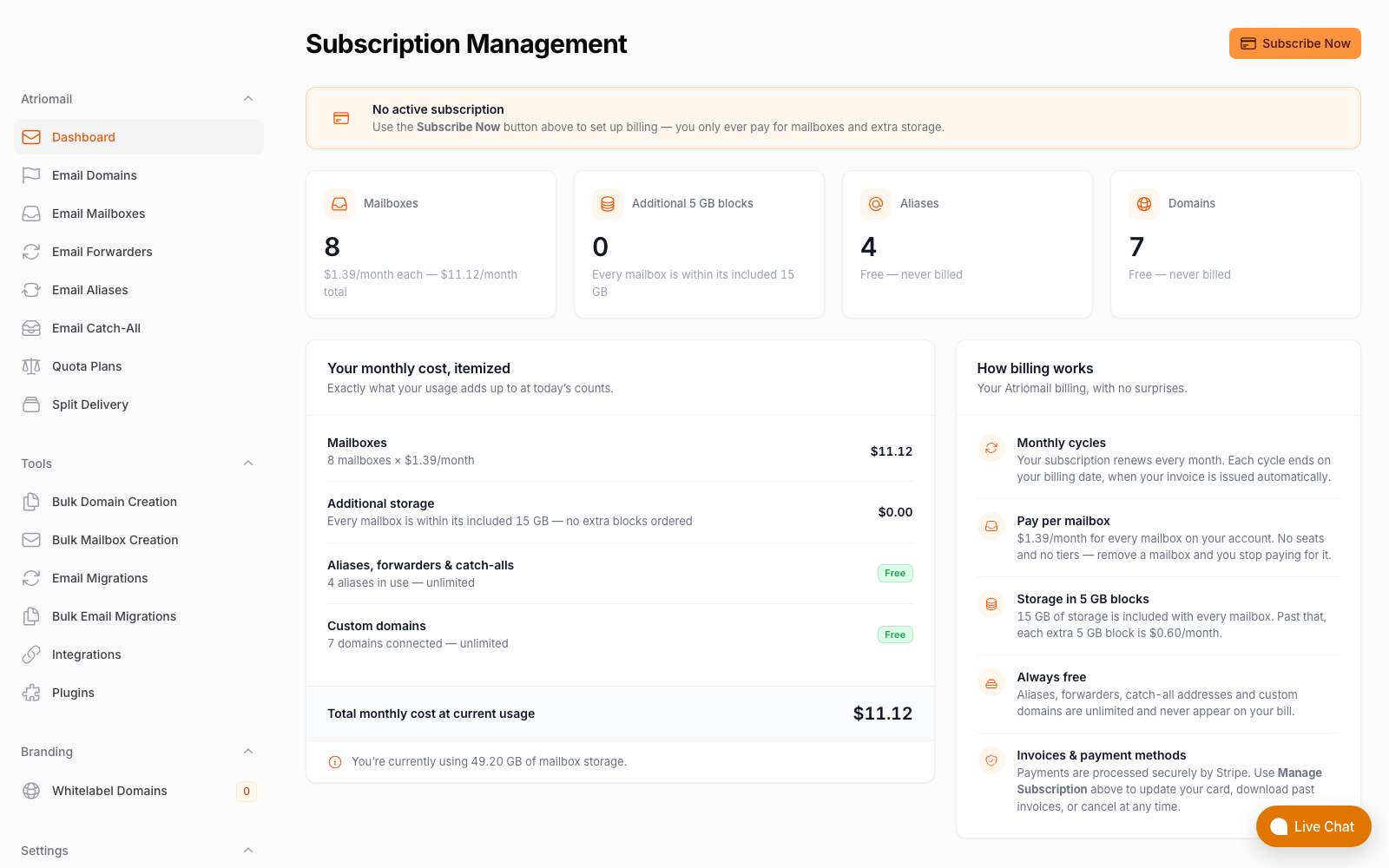
What Atriomail bills you, itemized, real panel, no mockup; your clients' invoices come from WHMCS or Blesta, built on top of this.
If your book is small enough to manage inside one SiteGround login by hand, staying put is reasonable. If you're past that point and already billing clients through WHMCS or Blesta, Atriomail's pricing and its provisioning modules were built for that transition; create an account to look at the panel before moving anything.
Run the 200-mailbox math for your own book. At $1.39 per mailbox with 15 GB included, the WHMCS and Blesta modules put each client's mailboxes on their own invoice, not buried inside one flat hosting bill.
Frequently Asked Questions
Can I bill Atriomail mailboxes automatically through WHMCS or Blesta?
Yes. The WHMCS module (version 3.1.1, for WHMCS 9) and the Blesta module (version 2.1.0, for Blesta 6.0 and later) both create the client's domain on order and the first mailbox once it clears the security check (in WHMCS, only during the order), then let the client add mailboxes, change passwords and manage aliases from their own client area. Mailboxes and storage added in WHMCS or Blesta bill as recurring charges there at your own prices; changes made directly in the Atriomail panel don't sync back into either billing system on their own.
What does the Atriomail white-label add-on cover?
It's a separate paid add-on, a one-time setup fee plus a monthly fee. Once our team sets up your hostname, the control panel on it carries your product name and favicon, and the help center pages carry your logo. Some layers stay neutral either way, including raw message headers, the webmail interior, payment pages and system emails.
Does Atriomail's migration tool work for moving mail off a SiteGround account?
Yes. SiteGround mailboxes work over standard IMAP, so Atriomail's built-in migration can sign in and copy mail across the same way it does for any typical hosting mailbox, as long as you have that mailbox's password. It tests the sign-in on both ends first, and a bulk job can list many mailboxes from one old server in a single run.
Is SiteGround's "unlimited" email account count actually unlimited?
Only the count. Every mailbox you create still draws from the same combined 10 GB pool shared by every other mailbox on that account, and SiteGround's own knowledge base sets individual mailbox size at 2 GB by default on StartUp, 4 GB on GrowBig and 6 GB on GoGeek (SiteGround KB, checked October 2026).
What happens if one client's mailboxes fill SiteGround's shared storage pool?
Every mailbox on that account is competing for what's left of the same 10 GB, not just the one that's full, because the limit applies to the whole account rather than per client (SiteGround KB, checked October 2026). On Atriomail, each mailbox's 15 GB belongs to that mailbox alone, so one client filling their mailbox doesn't touch another client's quota.
Which is cheaper for a 200-mailbox book, SiteGround or Atriomail?
SiteGround doesn't price per mailbox, so there isn't a direct per-mailbox comparison: a GoGeek reseller plan costs a flat $44.99 a month after its promotional rate, regardless of mailbox count, but gives you no way to bill any of those 200 mailboxes separately. At Atriomail's $1.39 per mailbox, 200 mailboxes cost $278 a month wholesale; resold at $5 per mailbox that's $722 a month in margin, itemized per client through the WHMCS or Blesta module.
Recommended
- A Guide to White-Label Email for Agencies, Atriomail
- Multi-Client Email Management for Agencies, Atriomail
- Usage-Based Email Pricing Explained, Atriomail
- Email Domain Management: Setup and Branding, Atriomail
- What Is Reseller Email Hosting?, Atriomail
- Pricing and the Reseller Margin Calculator, Atriomail
Latest from the blog
- How to Set Up BIMI So a Client's Logo Shows Up in Gmail and Yahoo · Oct 12, 2026
- DreamHost Email vs Atriomail: What "Unlimited" Doesn't Cover for Resellers · Oct 10, 2026
- A Client's Email Account Was Compromised: Why a Password Reset Alone Doesn't Fix It · Oct 9, 2026
- Aliases, Forwarders and Catch-Alls in Atriomail: The One Rule That Decides When They Work · Oct 8, 2026
- How to Move a Client's DMARC Policy to p=reject Without Breaking Their Mail · Oct 7, 2026