
A client calls to say their invoices are landing in a customer's Junk folder, with no bounce and nothing on the domain changed: same SPF record, same mail platform, same sending pattern as last month. What changed is the reputation of the shared IP that domain's mail goes out through, and a shared IP means one bad tenant on it can drag every other domain down too. On Atriomail, like most hosted email platforms, outgoing mail runs through shared sending infrastructure, Amazon SES, and each customer account is tracked as its own sending tenant, but the underlying infrastructure is still shared across every customer, not dedicated to one.
This guide diagnoses a mail-landing-in-Junk problem the same way regardless of platform: confirming it's a filtering problem rather than a delivery failure, checking the sending IP against public blocklists, reading the reputation dashboards Google and Microsoft publish, fixing the authentication alignment gap that trips up more domains than a missing record does, and reducing the sending behavior that got a domain flagged. The last section before the FAQ covers how the same fix plays out for a domain hosted on Atriomail specifically.
Table of Contents
- Before You Start
- Confirm It's a Filtering Problem, Not a Delivery Failure
- Check the Sending IP Against Public Blocklists
- Check Domain and IP Reputation in Postmaster Tools and SNDS
- Fix SPF, DKIM and DMARC Alignment
- Reduce Complaints and Warm Up Sending Volume
- How to Verify It Worked
- Common Mistakes and How to Avoid Them
- Doing This on Atriomail
- Frequently Asked Questions
Key Takeaways
| Point | Details |
|---|---|
| Landing in Junk is a filtering verdict, not a delivery failure | No bounce arrives because the receiving server accepted the message, then routed it away from the inbox afterward. Check the message's own headers before assuming a DNS record broke. |
| Public blocklists list IPs, not domains | On a shared sending IP, another tenant's bad behavior can get the whole IP listed, and every domain sending through it pays for it until that's fixed at the network level. |
| Gmail requires aligned SPF, DKIM and DMARC for bulk senders | Sending more than 5,000 messages a day to Gmail requires all three together, with the From: domain aligned to the SPF or DKIM domain, and a spam rate under 0.3 percent (Google's own sender guidelines, checked September 2026). |
| Atriomail tracks sending per account on shared infrastructure | Outgoing mail runs through shared Amazon SES infrastructure, and each account is its own SES sending tenant. Bulk and cold email are banned under the Acceptable Use Policy because every account shares that platform's reputation. |
A shared IP's reputation is only as good as its worst tenant. Atriomail's Acceptable Use Policy bans bulk and cold email outright, and each customer account is tracked as its own sending tenant inside Amazon SES.
Before You Start
- The exact sending IP the affected domain uses. Blocklists and reputation dashboards are checked per IP, not per domain.
- A message that landed in Junk, with full headers intact. Forwarding often strips the header the verdict lives in, so view it as "original" inside the recipient's own mailbox.
- Access to the domain's DNS zone, in case the fix is an SPF, DKIM or DMARC record rather than a blocklist entry.
- A Google Postmaster Tools account with the domain verified, and a Microsoft SNDS registration for the IP if known. Neither shows anything useful for a few days.
- A sense of what changed recently in sending volume or list hygiene, since the fix differs by whether this is a neighbor problem or the domain's own behavior.
Confirm It's a Filtering Problem, Not a Delivery Failure
Mail that never reaches an inbox fails in one of two different ways, and mixing them up wastes the rest of this guide. A hard failure produces a bounce within minutes, with an SMTP status code and a reason. A filtering problem produces no bounce: the receiving server accepted the message, then routed it to Junk based on its own scoring. If a bounce is sitting in the sending mailbox, that's a different problem with a different fix. If the message shows up in Junk, that's what the rest of this guide covers, whether the domain sends through Atriomail or anywhere else.
Open the message that landed in Junk directly inside the recipient's own mailbox and view its full source or original headers, not a forwarded copy, since forwarding rewrites the very headers that carry the verdict. Look for an Authentication-Results header and read what it reports for spf=, dkim= and dmarc=. If all three read pass, the domain's own authentication is fine and the problem sits with reputation, which the next two sections check. If any of them reads fail or none, that's worth fixing first, and reading a DMARC aggregate report is the fastest way to see the pattern across every recipient, not just the one message a client noticed. Write down what the client actually saw before troubleshooting further, a habit covered in more depth in the client support process for email resellers.
A clean Authentication-Results header doesn't rule out a reputation problem. Atriomail generates the SPF, DKIM and DMARC records a domain needs from the DNS Setup dialog, and can publish them automatically on a connected Cloudflare or Namecheap account.
Check the Sending IP Against Public Blocklists
Public blocklists operate on IP addresses, and several spam filters weigh a listing heavily even when nothing else about a message looks wrong. Spamhaus, one of the most widely consulted, runs several lists under one lookup: the SBL for IPs directly linked to spam sources, the XBL for IPs showing signs of compromise, the PBL for residential and dynamic ranges that shouldn't send directly to other mail servers, and the DBL for domains rather than IPs (Spamhaus FAQs, spamhaus.org, checked September 2026). A single lookup against the sending IP shows which of these, if any, it's on.
This is where a shared IP turns into a shared problem: an SBL or XBL listing on a shared pool usually traces back to another customer on it, not the domain in question. Removal happens at the network level: Spamhaus's own guidance is that SBL listings generally need the network owner or hosting provider to request delisting after confirming the issue is resolved, while PBL listings on a static IP running a legitimate mail server can be requested directly through Spamhaus's own removal form (Spamhaus FAQs, checked September 2026). Once accepted, removal typically processes within minutes, occasionally up to 24 hours. On a shared host, report the listing to the provider, part of the wider proven email security protocols a reseller checklist should already cover.
Check Domain and IP Reputation in Postmaster Tools and SNDS
A blocklist check only answers one question. Google and Microsoft each publish their own reputation view, and neither is optional if Gmail or Outlook.com is where the filtering happens.
Google Postmaster Tools covers a verified domain across eight dashboards, including Spam Rate, IP Reputation, Domain Reputation and Authentication (Gmail Help, support.google.com, checked September 2026). Domain Reputation and IP Reputation each report one of four ratings once Gmail has enough volume to judge: Bad, Low, Medium or High, moving from "history of spam volume, almost always flagged" to "very low spam, rarely marked as spam." Verifying the domain takes a DNS TXT record, the same proof-of-ownership step behind the wider domain management and branding checklist a reseller already runs.
Microsoft's Smart Network Data Services, or SNDS, covers Outlook.com recipients the way Postmaster Tools covers Gmail, but it's registered per IP rather than per domain, which matters for a shared-IP diagnosis. Signing up needs an outlook.com account, then a request to add the specific IP, which Microsoft verifies by confirming the requester controls it (Microsoft's SNDS sign-up portal, sendersupport.olc.protection.outlook.com, checked September 2026). Once verified, SNDS reports each IP as green, yellow or red, alongside complaint rate, bounce rate and spam trap hits, often the fastest way to confirm the problem is the IP itself: a domain's Postmaster Tools rating can look fine while the shared IP it sends through shows red in SNDS.
Neither dashboard updates in real time. Both need a few days of volume before a rating means anything, so a fix applied this morning won't show a changed rating this afternoon; that lag is normal, not a sign the fix failed, the same patience the wider practice of DNS automation and deliverability already runs on.
Fix SPF, DKIM and DMARC Alignment
Since February 2024, Google has required more than a passing SPF or DKIM check for higher-volume senders, and the rule is still in force in 2026. Every sender needs at minimum one of SPF or DKIM, but a sender pushing more than 5,000 messages a day to Gmail accounts must have SPF, DKIM and DMARC together, with the domain in the From: header aligned to either the SPF domain or the DKIM d= domain, and a spam rate under 0.3 percent, ideally under 0.1 percent (Gmail Help, support.google.com, checked September 2026).
Alignment is the part that quietly breaks on a shared platform. SPF and DKIM can both technically pass, and DMARC can still fail, if the domain SPF authorizes or DKIM signs for isn't the sending domain itself but a shared platform's own domain underneath it. Fixing this means confirming DKIM is signed under the sending domain's own name, not a generic platform default, and that SPF's aligned domain matches it. A DMARC record has to exist at all for this check to run; even a starting policy satisfies that. A domain close to SPF's 10-lookup ceiling is worth rechecking too, since a permerror breaks alignment the same way a missing record does. Atriomail's own DNS troubleshooting guide covers the same invalid-SPF and invalid-DKIM patterns, alongside connecting Cloudflare or Namecheap for automatic DNS.
Reduce Complaints and Warm Up Sending Volume
If the blocklist and reputation checks above come back clean and mail is still landing in Junk, the domain's own recent sending behavior is the remaining suspect. Complaint rate (a message marked as spam by an actual recipient) and spam trap hits (a message reaching an address that never should have received it, usually a sign of a stale or purchased list) both move a domain's reputation directly, and both show up in the same dashboards checked above.
The practical fix has three parts: pause any batch or backlog send until the numbers stabilize, since a burst of catch-up mail reads as a volume spike and can retrigger the problem; prune the list, removing hard-bounced addresses and anything long unopened, since mailing dead addresses racks up spam trap hits fast; then ramp volume back up gradually rather than resuming full pace, giving each receiving system a few days of clean sending to reassess. This is the same discipline behind multi-client email management, since a reputation problem on one domain is easy to miss while forty others send cleanly.
How to Verify It Worked
Reputation fixes take longer to confirm than a DNS record change, since blocklists and reputation dashboards both lag behind whatever was fixed. Three checks, in order:
- Re-run the blocklist lookup against the same IP a few hours after requesting delisting, and again the next day. An accepted removal typically processes within minutes to 24 hours, so an old listing still showing right after isn't necessarily a failed delisting.
- Watch the Postmaster Tools and SNDS trend over several days, not a single snapshot. A rating that was Bad or red yesterday won't jump straight to High or green the moment the cause is fixed.
- Send seed test messages to real Gmail, Outlook and Yahoo accounts you control, and check where they land, not just whether they arrived. A message that's delivered but sitting in Junk hasn't solved the problem yet.
Atriomail's free DNS checker at /dns-checker/ is worth running alongside these, but it answers a narrower question: it confirms a domain's public MX, SPF, DKIM and DMARC records exist and are well-formed. It doesn't check blocklist status or sending reputation, so a domain can pass every check there and still be filtered on reputation grounds.
Common Mistakes and How to Avoid Them
- Checking only the domain, never the sending IP. Symptom: SPF and DKIM pass, DMARC is aligned, and mail still lands in Junk.
- Assuming a delisting is instant. Symptom: a blocklist lookup still shows the old listing minutes after removal was accepted, since the change hasn't propagated everywhere yet.
- Sending a backlog of held mail right after the fix ships. Symptom: the domain gets flagged again within days, because the volume spike reads as suspicious again.
- Treating a passing SPF and DKIM as proof DMARC is fine. Symptom: a DMARC report keeps showing failing rows even though SPF and DKIM both read pass, because neither is aligned.
- Checking Spamhaus and stopping there. Symptom: the IP is clean on every blocklist lookup, but mail is still folder-filtered for Outlook.com recipients, since the problem only shows up in Microsoft's own SNDS data.
- Rewriting subject lines before checking reputation. Symptom: hours spent on copy changes with no improvement, since the cause was a shared IP neighbor's spam, not the message itself.
These are worth building into the wider reseller's email security playbook.
Doing This on Atriomail
Outgoing mail on Atriomail goes through Amazon SES, shared sending infrastructure rather than a dedicated IP per account. Each customer account is its own tenant inside SES, which lets sending be tracked account by account, but the underlying infrastructure is still shared across every Atriomail customer, not isolated to one. The Acceptable Use Policy exists because of that: bulk and cold email, meaning unsolicited mail or bought and rented lists, are banned outright, because every customer shares the platform's sending reputation, and one account's abuse would otherwise cost everyone else the reputation this guide just walked through repairing.
For every domain added to Atriomail, the panel generates SPF, DKIM and DMARC records signed for that domain's own name, ready to copy from the DNS Setup dialog, the alignment piece the earlier section covers. On a connected Cloudflare or Namecheap account, those records, plus MX, autodiscover and autoconfig, publish automatically once the domain clears the security check; on any other DNS host, they're added from that same dialog by hand. The Email Domains list shows each domain's DNS sync status directly, with a refresh button that re-checks the live records on demand.
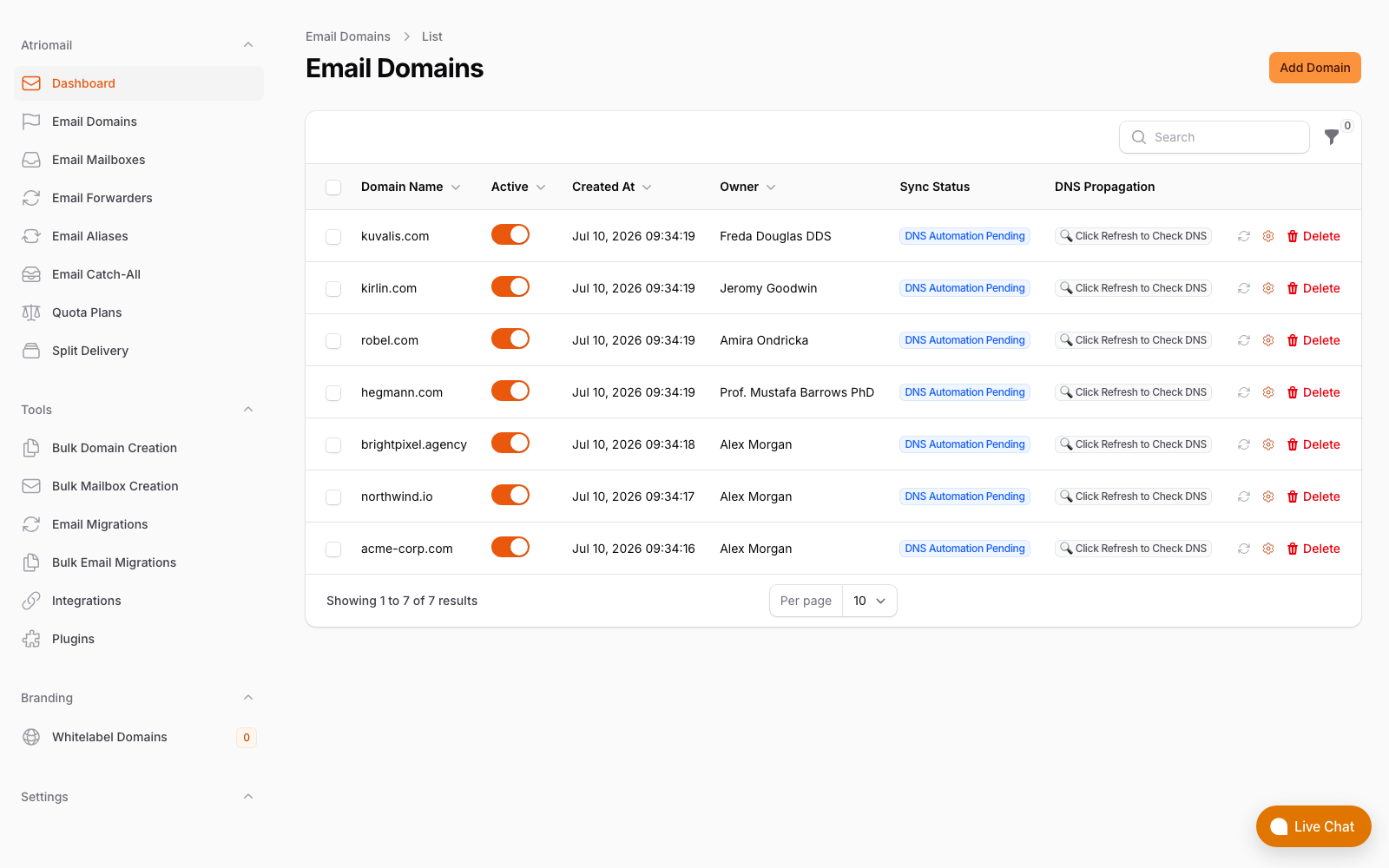
The Email Domains list, showing each domain's DNS sync status. Real panel, no mockup.
What Atriomail doesn't do is run a client's Postmaster Tools or SNDS registration, check a sending IP against public blocklists, or promise a deliverability outcome; there's no uptime or inbox-placement percentage on any plan, and support for a reputation problem like this is available during business hours, not around the clock. The diagnostic steps above apply the same way whether the domain sends through Atriomail or anywhere else. See the full pricing breakdown before planning a domain's move, and create your account once a domain's authentication and reputation are already in shape.
Shared infrastructure works because bad behavior isn't tolerated on it. Atriomail's Acceptable Use Policy bans bulk and cold email outright, and each customer account is tracked as its own sending tenant inside Amazon SES.
Frequently Asked Questions
How do I find out which IP a client's domain actually sends mail from?
Check the mail platform's account settings or ask the provider directly, since blocklists and reputation tools are checked per IP, not per domain.
Does a Spamhaus listing on my IP affect every domain I host on it?
Yes, on a shared IP. Spamhaus lists the IP address itself, so every domain sending through it is affected until the listing is resolved, regardless of whether that domain did anything wrong.
Can Atriomail's free DNS checker tell me if my sending IP is blocklisted?
No. It reads a domain's public MX, SPF, DKIM and DMARC records and confirms they exist and are well-formed. Checking an IP against a blocklist, or checking Postmaster Tools or SNDS reputation, is a separate step covered earlier in this guide.
Does Atriomail guarantee my clients' mail won't land in Junk?
No. There's no uptime or inbox-placement guarantee on any plan. Outgoing mail goes through shared Amazon SES infrastructure, with each customer account tracked as its own sending tenant, and the Acceptable Use Policy bans bulk and cold email outright because every account shares that platform's reputation.
My SPF and DKIM both pass. Why is DMARC still failing?
Because passing isn't the same as being aligned. DMARC requires the domain in the From: header to match the SPF or DKIM domain; a shared platform that signs mail for its own domain instead of the sending domain can pass both checks while still failing alignment.
How long does it take to get delisted once a blocklist removal request is accepted?
Spamhaus's own guidance is a few minutes in most cases, occasionally up to 24 hours. If the domain sends through a shared IP on someone else's platform, only that provider can request the delisting.
Recommended
- How to Read a DMARC Aggregate Report, Atriomail
- SPF PermError: How to Fix an SPF Record With Too Many DNS Lookups, Atriomail
- Avoid Service Interruptions With Proven Email Security Protocols, Atriomail
- The Reseller's Email Security Playbook, Atriomail
- Multi-Client Email Management for Agencies, Atriomail
- Connecting Cloudflare and Namecheap for Automatic Mail DNS, Atriomail
Latest from the blog
- How to Set Up BIMI So a Client's Logo Shows Up in Gmail and Yahoo · Oct 12, 2026
- DreamHost Email vs Atriomail: What "Unlimited" Doesn't Cover for Resellers · Oct 10, 2026
- A Client's Email Account Was Compromised: Why a Password Reset Alone Doesn't Fix It · Oct 9, 2026
- Aliases, Forwarders and Catch-Alls in Atriomail: The One Rule That Decides When They Work · Oct 8, 2026
- How to Move a Client's DMARC Policy to p=reject Without Breaking Their Mail · Oct 7, 2026