
If you bill clients through Blesta rather than WHMCS, adding email as a line item has meant one of two things until now: a manual process where you create the Atriomail account and domain by hand for every order, or skipping per-mailbox billing altogether and folding email into a flat hosting package. Neither scales past a handful of clients. The Atriomail Blesta module changes that: it connects Blesta's ordering and billing to Atriomail's provisioning, so a client order creates a real email domain and mailbox without you touching the Atriomail panel at all.
Atriomail is white-label email hosting priced at $1.39 per mailbox per month with 15 GB included; you set your own resale price and Atriomail charges you wholesale. The Blesta provisioning module, version 2.1.0, is built for Blesta 6.0 and later and has been downloadable from the Plugins page in the Atriomail control panel since September 28, 2026. This is the first guide to walk through exactly what it does, from the moment a client places an order to the moment you suspend, change, or cancel their service.
Table of Contents
- Key Takeaways
- Who This Is For
- What You Need Before You Start
- How Ordering Provisions the Client's Email
- What Clients See in Blesta
- Pricing Mailboxes and Storage Yourself
- Managing the Service After the Sale
- What This Means for Your Business
- Limits to Know
- Frequently Asked Questions
Key Takeaways
| Area | What to know |
|---|---|
| Module version | Version 2.1.0, free, requires Blesta 6.0 or later (verified on 6.0.2); download from the Plugins page in the Atriomail panel |
| What an order does | Creates the client's Atriomail account and email domain; creates the first mailbox once the domain clears Atriomail's automated security check |
| Service actions | Create, suspend, unsuspend, cancel (deletes the domain and its mailboxes), and option changes that set mailbox and storage limits |
| Why this matters for Blesta resellers | Until this module existed, billing Atriomail mailboxes per client through Blesta meant manual provisioning for every order; the module closes that loop so ordering, suspending, and cancelling an email service works the same way as any other Blesta product |
| Client tabs | Overview, Mailboxes, Aliases, Catch-all, DNS & mail setup, Migration |
| What Atriomail charges you | $1.39 per mailbox per month, 15 GB included; $0.60 per extra 5 GB block per month. You set your own retail price in Blesta. |
Get the module before your next client order. Creating an Atriomail account is free and needs no card; mailboxes are billed from the first one. The module is on the Plugins page once you're signed in.
Who This Is For
Small MSPs, agencies, and hosting resellers who already invoice clients through Blesta 6.0 or later and want to sell email as its own billable line item, priced and billed through the same system as the rest of what you charge clients for. If you're already managing email for a growing book of client domains and have been doing it on a billing platform other than WHMCS, this is the module that connects Atriomail to that workflow instead of requiring a parallel manual process. Whether you also want clients to see your own brand on the panel, rather than Atriomail's, is a separate decision; the guide to white-label email for agencies covers what that paid add-on changes.
What You Need Before You Start
- Blesta 6.0 or later, with admin access. Atriomail has verified the module on 6.0.2.
- An active Atriomail account with an API key that has the admin role. Creating an account at system.atriomail.com/admin/register is free and needs no card; mailboxes are billed from the first one.
- Blesta's cron running on schedule. The module sends the day-1 and day-3 DNS reminder emails and the live notice through Blesta's own cron, not a separate process.
- The module files, downloaded as
atriomail-blesta-2.1.0.zipfrom the Plugins page in the Atriomail control panel, which also shows its installation guide. It installs by uploading the module folder; no shell access is needed. - Your prices for mailboxes and 5 GB storage blocks. Installing the module creates the configurable options for both, with placeholder prices at Atriomail's wholesale rates; you replace those with what you want to charge. The module never reads a price.
How Ordering Provisions the Client's Email
When a client completes an order for your email product in Blesta, the module creates the client's Atriomail account and adds their email domain to the platform. The first mailbox is created automatically, but only once that domain clears Atriomail's automated security check, a short screening step every new domain goes through regardless of how it's added. Atriomail doesn't publish a fixed duration for that check, so a domain can take a little longer to go live on some orders than others.
Once the domain is verified, the client gets a live notice. If DNS isn't verified yet, they get reminder emails at the one-day and three-day marks, both sent through Blesta's cron. For a reseller taking on a client's whole existing domain book rather than one order at a time, the Atriomail panel also supports adding up to 500 domains in a single batch, which is a faster path than running 500 individual Blesta orders when you're onboarding a book that didn't come through Blesta order by order. The two aren't mutually exclusive: domains and mailboxes created through either path are billed the same way by Atriomail, at $1.39 per mailbox per month.
Domain setup itself, including what the automated security check looks for and how DNS is handled afterward, is covered in more depth in the guide to email domain management and branding.
Test the module on a domain you control before your first live order. Add that domain in the Atriomail panel first to see the security check and DNS setup flow for yourself, so you know what a client's order will actually trigger.
What Clients See in Blesta
Once a service is provisioned, the client's product page in Blesta has six tabs: Overview, Mailboxes, Aliases, Catch-all, DNS & mail setup, and Migration.
Mailboxes is where clients within your set limits add and remove mailboxes and change passwords. Aliases and Catch-all handle forwarding addresses and the domain's catch-all, the same mailbox-on-domain setup that applies everywhere on Atriomail. The DNS & mail setup tab lists the records the domain needs and checks them against what's actually published, but it does not publish them itself. Automatic publishing to the DNS zone is a separate, platform-wide feature: connecting a Cloudflare or Namecheap account to Atriomail is what turns it on, and it only works for domains already in that connected account. On any other DNS host, the client (or you) copy the records this tab lists by hand. The automatic DNS setup article in the knowledge base covers exactly which records that automation writes and which provider accounts qualify.
The Migration tab is where a client moves existing mail into their new Atriomail mailbox. It covers the same ground as migration anywhere else on the platform: mail from a server that accepts an IMAP password, such as typical cPanel, Plesk, or DirectAdmin hosting mail, plus Gmail and Google Workspace with an app password and Yahoo or iCloud with an app-specific password. It does not migrate Microsoft 365, Exchange Online, Outlook.com, Hotmail, or Live.com mailboxes, because Microsoft no longer allows password sign-in over IMAP; moving a Microsoft 365 tenant needs a different route; talk to us before you quote it. For a client book with more than a handful of mailboxes to move at once, the step-by-step agency migration playbook and Atriomail's own guide to checking migration status both cover what a job looks like while it's running.
When a client or your support team needs the full Atriomail panel rather than what these six tabs expose, Blesta can generate a single-use sign-in link: valid for 60 seconds, usable once, and it opens the Atriomail control panel directly. It does not sign the client into webmail.
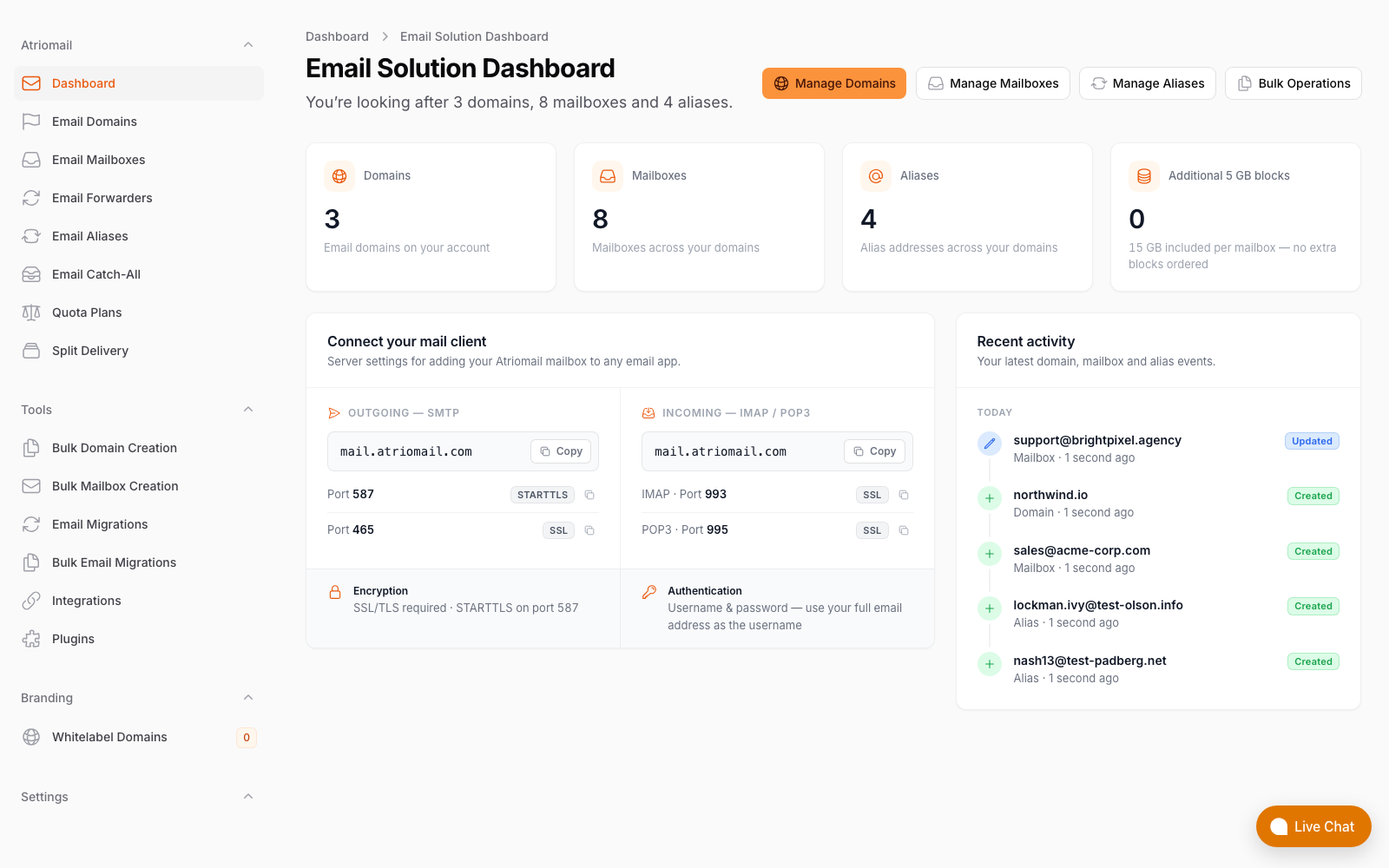
The Atriomail panel a client reaches through the single-use sign-in link from Blesta, showing verification progress and mail client settings.
Pricing Mailboxes and Storage Yourself
This is the part that works differently from the WHMCS module, and it's worth being upfront about. Mailboxes and 5 GB storage blocks are sold as Blesta configurable options. Installing the module creates them for you, with placeholder prices at Atriomail's wholesale rates so a package is never sold below cost by accident; you replace those with your own prices, and the module never reads what you set. What it does read are the quantities: when a client orders or changes them, the module sets the domain's mailbox and storage limits on Atriomail to match, and a downgrade below what the client already uses is refused.
What Atriomail charges you stays constant no matter how you price it on your end: $1.39 per mailbox per month, 15 GB included, and $0.60 for each extra 5 GB block. The gap between that wholesale number and what you set your Blesta configurable options to is the margin you keep. The Atriomail pricing page has a margin calculator for working that gap out at different mailbox counts, and the guide to how usage-based email pricing works for resellers walks through the same math across different storage tiers in more detail than fits here.
Managing the Service After the Sale
Suspending a service in Blesta deactivates the client's domain on Atriomail; unsuspending reactivates it. Cancelling deletes the domain along with its mailboxes and aliases, and that deletion is permanent, so if a client is moving to a different provider rather than closing the account outright, get their mail copied out with an IMAP migration tool before you cancel, not after. Option changes update the domain's mailbox and storage limits to match whatever the client's new configurable option quantities call for; a downgrade is refused if it would drop the limit below what the client is actually using, so a mailbox or storage block has to be removed first.
On the staff side, each service gets an Atriomail tab in Blesta with day-to-day tools: re-check verification, re-sync the service against what's actually on Atriomail, resend the client's welcome email, reset a mailbox password, and lock a compromised mailbox. That's a meaningful part of what running client email support at a reseller actually looks like day to day: most routine requests (a forgotten mailbox password, a stuck DNS check, a client who deleted their welcome email) get handled from that one tab without opening a ticket with Atriomail directly.
One boundary worth being explicit about: the sync only flows one way, from Blesta into Atriomail. If you add a mailbox directly in the Atriomail panel, or through the REST API, Atriomail bills you for it, but nothing updates automatically on the Blesta side. Keep provisioning inside Blesta for any client where Blesta is your billing record of truth.
What This Means for Your Business
On a 200-mailbox book priced at $5.00 per mailbox per month, you pay Atriomail $278.00 a month (200 times $1.39) and collect $1,000.00 from clients through your Blesta configurable options, leaving $722.00 a month above wholesale. That's before card fees, support time, and any white-label add-on fee. At 100 mailboxes the same math leaves $361.00 a month; at 50 mailboxes, $180.50 a month.
The part of that margin the module actually protects is the time it saves on the provisioning side. If creating an Atriomail account and domain by hand, then circling back to add the first mailbox once DNS clears, takes your team 10 minutes per order, the module removes that step for every Blesta order without you doing anything extra. Over a 200-mailbox book with regular new orders and option changes, that adds up faster than the per-mailbox margin alone suggests. For a reseller planning to put your own name on the panel clients and staff see, rather than Atriomail's, the guide to setting up branded email for agencies covers what the white-label add-on changes and when it's worth the extra monthly fee.
Bringing 50 or more client mailboxes onto Blesta billing at once? A book that size is easier to sequence with a plan than to order through one at a time. Get in touch before you start so we can walk through domain order, DNS cutover timing, and anything that might need special handling.
Limits to Know
- Blesta 6.0 or later is required. The module is built for 6.0 and verified on 6.0.2; it is not built for Blesta 5 or any earlier version.
- The DNS & mail setup tab displays and checks records; it does not publish them. Automatic publishing only happens when the domain's DNS is at a connected Cloudflare or Namecheap account. On any other DNS host, the records in that tab are added by hand.
- The Migration tab does not move Microsoft 365, Exchange Online, Outlook.com, Hotmail, or Live.com mailboxes. Microsoft no longer allows password sign-in over IMAP, so moving a Microsoft 365 tenant needs a different route; talk to us before you quote it.
- The single-use sign-in link opens the Atriomail control panel, not webmail. It's valid for 60 seconds and works once.
- Changes made directly in the Atriomail panel, or through the API, do not sync back into Blesta. For clients where Blesta is your billing record, keep provisioning inside Blesta.
- You set the prices on the mailbox and storage configurable options. Installing the module creates those options with placeholder prices at Atriomail's wholesale rates; replace them with your own. The module reads quantities, never prices.
- There is no Blesta Marketplace listing yet. The module is available only from the Plugins page in the Atriomail control panel.
- Support is available during business hours, not round the clock.
Frequently Asked Questions
Does the Blesta module publish DNS records automatically?
No. The DNS & mail setup tab shows the records a domain needs and checks whether they're correctly in place, but it doesn't write them for you. Automatic publishing is a separate platform feature that only works when the domain is in a connected Cloudflare or Namecheap account; on any other DNS host, you or the client copy the records from that tab by hand.
Can I migrate a client's mailboxes from Microsoft 365 through the Migration tab?
No. Microsoft no longer allows password sign-in over IMAP, which is what Atriomail's migration tool relies on, so a Microsoft 365, Exchange Online, Outlook.com, Hotmail, or Live.com mailbox can't be moved this way. Moving a Microsoft 365 tenant needs a different route; talk to us before you quote it to a client.
What happens when I cancel a service in Blesta?
Cancelling deletes the domain and all its mailboxes and aliases on Atriomail, and that deletion is permanent. If the client is moving elsewhere rather than closing their account for good, copy their mail out with an IMAP migration tool before you trigger the cancellation, not after.
Do I set the price for mailboxes and storage, or does Atriomail?
You do. Mailboxes and 5 GB storage blocks are sold as Blesta configurable options; installing the module creates them with placeholder prices at Atriomail's wholesale rates, you set your own, and the module never reads a price. Atriomail charges you $1.39 per mailbox per month with 15 GB included, and $0.60 per extra 5 GB block, regardless of what you charge the client.
Is the module on the Blesta Marketplace?
Not yet. It's available only from the Plugins page in the Atriomail control panel, which also includes the installation guide.
Can I use the REST API instead of the Blesta module?
Yes. The Atriomail REST API covers domains, mailboxes, forwarders, catch-alls, storage, customer accounts, IMAP migration jobs, DNS record checks, and single-use sign-in links, and any tool that can send HTTPS requests with a custom header can call it. Changes made through the API are reflected in Atriomail but don't create matching charges in Blesta. Use the module when Blesta is your billing system for email; use the API directly if you're building your own portal or need something the module's six tabs don't expose.
Recommended
- Multi-Client Email Management for Agencies
- How Usage-Based Email Pricing Works for Resellers
- Email Domain Management: Setup and Branding Guide
- Step-by-Step Email Migrations: The Agency Playbook
- Bulk-Adding Domains and Mailboxes in Atriomail
Latest from the blog
- How to Set Up BIMI So a Client's Logo Shows Up in Gmail and Yahoo · Oct 12, 2026
- DreamHost Email vs Atriomail: What "Unlimited" Doesn't Cover for Resellers · Oct 10, 2026
- A Client's Email Account Was Compromised: Why a Password Reset Alone Doesn't Fix It · Oct 9, 2026
- Aliases, Forwarders and Catch-Alls in Atriomail: The One Rule That Decides When They Work · Oct 8, 2026
- How to Move a Client's DMARC Policy to p=reject Without Breaking Their Mail · Oct 7, 2026