
If any client you manage is running email through Amazon WorkMail, you have a firm deadline: March 31, 2027. That is the day AWS permanently deletes every WorkMail account, mailbox, and message. New signups already closed on April 30, 2026, so the only thing left for MSPs and resellers is the migration.
This is the playbook: what WorkMail was, what it never gave resellers, how to move your clients cleanly before the deadline, and which destination actually produces recurring margin instead of a one-time project fee.
Table of Contents
- What Amazon WorkMail Was (and Why AWS-Native MSPs Used It)
- What WorkMail Never Offered Resellers
- The Shutdown Timeline
- What Happens to Client Data After March 31, 2027
- The Migration Playbook: Step by Step
- Choosing the Right Destination: Where the Margin Conversation Lives
- Is Self-Hosting on AWS Worth Considering?
- Where Atriomail Fits
- Frequently Asked Questions
Key Takeaways
| Point | Details |
|---|---|
| WorkMail is shutting down March 31, 2027 | New signups closed April 30, 2026. All email, contacts, and calendar data are permanently deleted after the EOL date with no grace period. |
| About seven months remain | AWS recommends starting 6 to 12 months before the deadline for larger migrations. For a 50-mailbox client, allow 4 to 12 weeks of planning and execution time. |
| WorkMail never had a reseller margin layer | No published partner discount, no white-label option, no WHMCS or Blesta module. Resellers earned $0/month recurring from a WorkMail client. |
| The migration is a revenue opportunity | Landing a 50-mailbox client on white-label email at $1.39/mailbox wholesale, billed at $5/mailbox retail, creates $180.50/month in recurring margin that the WorkMail relationship never produced. |
What Amazon WorkMail Was (and Why AWS-Native MSPs Used It)
Amazon WorkMail launched in 2015 as a managed business email and calendaring service built on AWS infrastructure. It supported IMAP, SMTP, ActiveSync, and MAPI over HTTPS, meaning clients could use Outlook, Apple Mail, or the built-in WorkMail web app without reconfiguring their email clients. At $4 per user per month with 50 GB of storage included, it priced below Microsoft 365 Business Basic ($6/user/month) and below Google Workspace Business Starter ($7/user/month).
For MSPs with deep AWS practices, WorkMail had one genuine advantage: it integrated with AWS Identity and Access Management (IAM), AWS Single Sign-On, and AWS Organizations. If a client already ran their infrastructure on AWS and wanted one fewer vendor in their stack, WorkMail was a reasonable choice. Provisioning happened through the AWS console or CLI, and the mailbox billed through the same AWS account as the rest of the client's infrastructure.
That AWS-native fit is also why WorkMail never built a serious layer for independent resellers.
What WorkMail Never Offered Resellers
For a 1-15 person MSP or hosting reseller who bills clients through WHMCS, Blesta, or a similar platform, WorkMail created a structural problem from the start. None of the following ever existed:
- No published reseller discount. WorkMail billed at $4/user/month retail through AWS accounts. There was no formal partner pricing tier, no volume discount published for resellers, and no AWS Marketplace reseller path with a separate wholesale rate. MSPs who provisioned WorkMail for clients paid the same price the client would have paid going directly to AWS.
- No white-label option. The WorkMail console and webmail interface both carried AWS branding. There was no mechanism to serve a client a login page under your own name, logo, or domain.
- No WHMCS or Blesta module. Provisioning WorkMail required AWS CLI or SDK access. There was no native WHMCS or Blesta module, which meant client onboarding and billing required custom scripting or manual provisioning. Most small MSPs never built the integration.
- No per-mailbox billing in your own system. AWS charged the account holder for every user-month. Marking up those charges on your own invoice required building the attribution yourself, and the billing relationship with AWS remained in your name or the client's, not abstracted the way a dedicated reseller platform is.
This pattern - retail pricing billed through a major provider, no white-label, no WHMCS module - is covered in more depth when looking at email hosting alternatives for hosting providers. It matters here because the shutdown forces a destination choice, and that choice has recurring margin consequences.
The Shutdown Timeline
AWS published the end-of-support notice in March 2026. The key dates, directly from the AWS WorkMail end-of-support documentation:
| Date | Event |
|---|---|
| April 30, 2026 | No new WorkMail organizations can be created. Existing organizations continue operating. |
| March 31, 2027 | All WorkMail accounts are closed. All email, contacts, calendars, and attachments are permanently deleted. |
From August 23, 2026, that leaves approximately seven months. AWS itself recommends beginning migration 6 to 12 months before the deadline for larger organizations. For a typical 50-mailbox client book, 4 to 12 weeks is a realistic execution window including planning, piloting, DNS cutover, and user confirmation. Starting now gives you time to handle one client at a time rather than running concurrent migrations under deadline pressure.
What Happens to Client Data After March 31, 2027
There is no softened version of this: AWS will permanently delete all WorkMail data after the EOL date. That means every email message, thread, and attachment; all contacts and address books; all calendar events and shared calendars; and the entire WorkMail organization configuration. No archive, no export window, no grace period has been announced. Clients who do not complete a migration will lose their email history entirely.
This is the detail most clients will not know about on their own. If you configured their AWS account or their email setup and they are still on WorkMail, the notification responsibility sits with you.
The Migration Playbook: Step by Step
WorkMail supports standard IMAP access, which means migration is straightforward for any provider that supports IMAP-to-IMAP copying. Here is the sequence that works reliably:
- Audit which clients have WorkMail. Pull a list of every AWS account you manage or have console access to. Any active WorkMail organization in those accounts is your migration responsibility. Check the AWS console under WorkMail in each region (WorkMail is available in us-east-1, eu-west-1, and us-west-2).
- Choose the destination before contacting the client. The destination shapes the DNS cutover plan and the cost conversation. Going to a client with "we need to move you somewhere, we're not sure where yet" creates anxiety; going with a specific recommendation and a clear timeline closes the conversation faster.
- Provision destination mailboxes first, before touching DNS. Create the new mailbox accounts with the exact same email addresses. Generate the IMAP receiving credentials. Confirm the new mailboxes are live and accessible before any DNS change.
- Run the initial IMAP migration while WorkMail is still live. WorkMail supports IMAP access, so a standard IMAP-to-IMAP copy works. The built-in IMAP migrator in Atriomail's admin panel connects to WorkMail as the source, copies all folders and message timestamps, and deposits them into the new mailbox. No downtime, no lost messages during the copy phase.
- Cut over DNS. Lower the domain's MX TTL to 300 seconds the day before the switch. When you are ready, update the MX records at the registrar or DNS provider to point to the new mail server. SPF, DKIM, and DMARC records update automatically on Atriomail for the 15 supported DNS providers, removing the manual DNS step that causes most post-cutover deliverability regressions.
- Run a delta sync after cutover. Run the IMAP migration a second time after DNS is pointed at the new server. This catches messages that arrived in WorkMail between the first copy and the MX switch, which can be up to a TTL's worth of mail.
- Confirm, then close the WorkMail organization. Once the client confirms everything looks correct, delete the WorkMail organization in the AWS console. This stops the AWS billing for that organization immediately, rather than letting it run until March 2027.
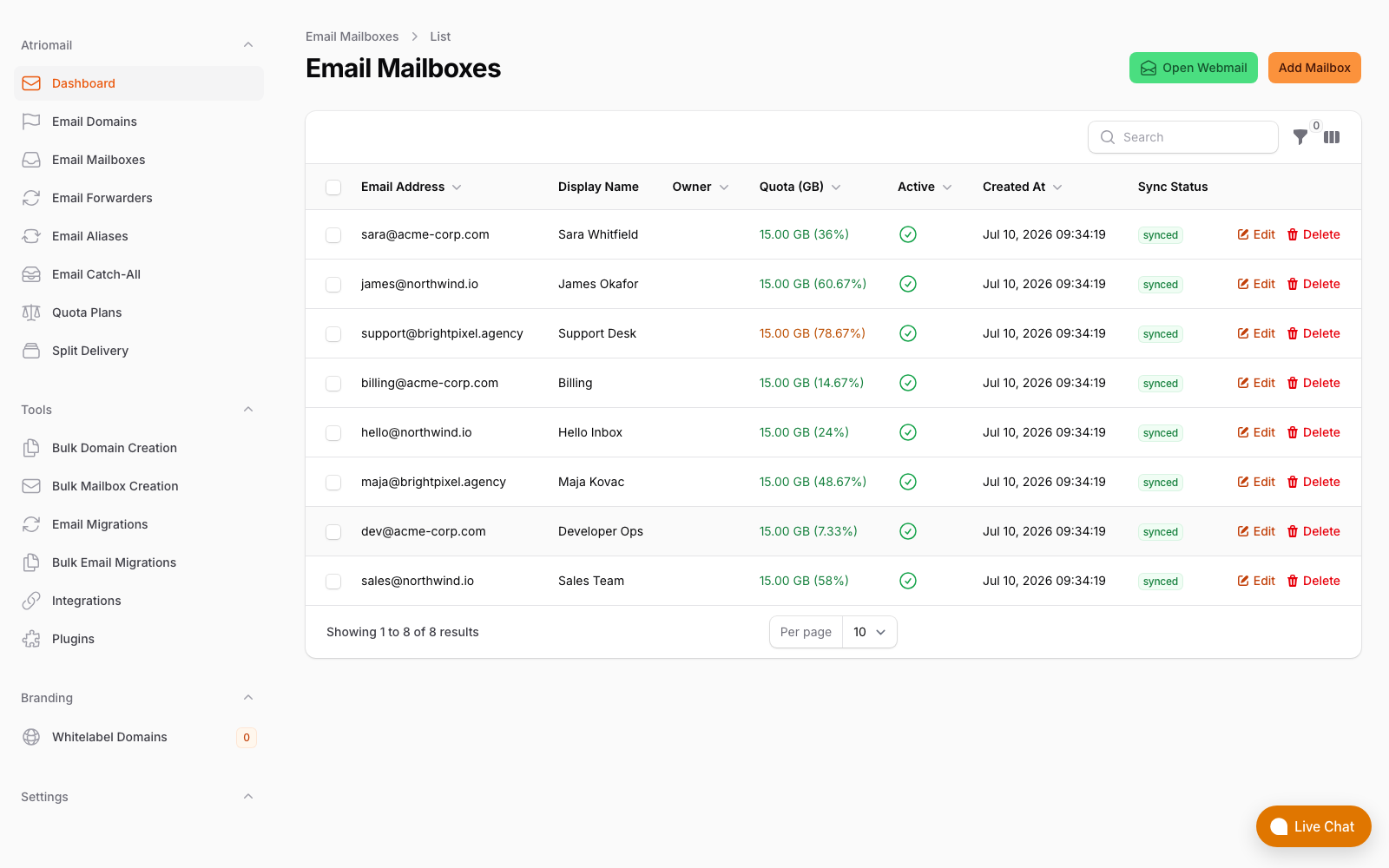
New destination mailboxes provisioned before DNS cutover, so clients never see an empty inbox on day one.
Choosing the Right Destination: Where the Margin Conversation Lives
AWS's own end-of-support page recommends migrating to Kopano Cloud, Microsoft 365, or Google Workspace. All three are technically valid destinations. But for an MSP or reseller who wants the migration to produce ongoing value, the billing structure matters as much as the technical fit.
The central question is simple: after you move this client, do you earn a recurring margin on their email line item?
| Migration destination | Your wholesale cost | What client pays | Your monthly margin (50 mailboxes) |
|---|---|---|---|
| Microsoft 365 Business Basic (pass-through, not CSP partner) | $300/month to Microsoft | $300/month direct to Microsoft | $0/month |
| Google Workspace Business Starter (non-partner) | $350/month to Google | $350/month direct to Google | $0/month |
| White-label email at $1.39/mailbox wholesale | $69.50/month | Your price, e.g. $5/mailbox = $250/month | $180.50/month |
The pass-through numbers for Microsoft 365 and Google Workspace assume you are not a formal reseller partner with either vendor. The Microsoft 365 CSP program does pay real margin, but the direct-bill bar is $1M in trailing revenue. What small MSPs actually qualify for is covered in detail in the Microsoft 365 CSP reseller vs. white-label email comparison.
White-label email at $1.39/mailbox wholesale is the straightforward path to owning that recurring line item. In practice: add the client's domain to your Atriomail account, provision mailboxes with the same addresses, run the IMAP migration from WorkMail, and bill the client whatever rate fits your market on the same invoice they already receive from you. No separate AWS receipt, no billing portal the client logs into independently. The billing setup for WHMCS and Blesta specifically is covered in automating email billing in WHMCS and Blesta.
For a fuller picture of what white-label email means in practice for small resellers and agencies, the guide to white-label email for agencies covers brand control, client ownership, and the provisioning workflow in more depth.
Is Self-Hosting on AWS Worth Considering?
MSPs who already manage AWS accounts will sometimes ask whether running Mailcow or iRedMail on an EC2 instance makes sense as a WorkMail replacement. It is technically possible, but the math rarely holds at small reseller scale for three reasons: port 25 is blocked by default on AWS EC2 and requires a lift request to AWS; IP reputation warming on a new sending IP takes 60 to 90 days during which deliverability is degraded; and admin time at $75/hour makes self-hosting more expensive than $1.39/mailbox for books under roughly 120 mailboxes. The full cost picture is in self-hosted email server vs. white-label hosting.
Where Atriomail Fits
Self-hosting on AWS answers the technical half of the question and leaves the commercial half exactly where WorkMail left it, which is at zero recurring margin plus a mail server you now operate yourself.
Atriomail is the destination that changes the second half. Free IMAP migration pulls existing mail, folders and message dates out of WorkMail before the March 2027 deletion date, so clients arrive with their history rather than an empty mailbox, and SPF, DKIM and DMARC are published automatically for each domain as it is added across 19 supported DNS providers and panels.
The commercial difference is the point of doing this now rather than in 2027. At $1.39 per mailbox per month wholesale with 15 GB included, a 50-mailbox client billed at $5 per mailbox produces $180.50 per month of recurring margin that the WorkMail relationship never paid you, on a migration you have to perform regardless of where those mailboxes land. With roughly seven months left, the choice of destination is the only part of this deadline still open. See the pricing page.
Frequently Asked Questions
More on migration, billing, and setup in the full FAQ.
Is there a fee to migrate out of WorkMail?
Not at most reputable email hosting providers. Atriomail includes IMAP migration for all accounts at no additional charge, including hands-on help with the migration sequence. The cost is your time to plan and run the cutover, not a per-mailbox migration fee.
What if the WorkMail organization is in the client's own AWS account, not mine?
You still need to reach them before March 2027. Many small business clients who were set up on WorkMail by an MSP are not tracking AWS service announcements independently. If you touched their email setup, the proactive notification call is the right move. It is also the natural moment to propose the destination and the migration.
Can I migrate calendar data from WorkMail as well?
IMAP migration moves email only. WorkMail calendar events and contacts can be exported individually as .ics and .vcf files from within the WorkMail web app before the shutdown. This step requires action from each end user. Add it to your migration checklist and do it before cutting DNS, not after.
What happens if a client does nothing before March 31, 2027?
AWS will permanently delete the WorkMail organization and all its data on that date. There is no announced archive option, no data-export grace period, and no retrieval path afterward. Every email, attachment, contact, and calendar entry in the organization is gone. AWS has been explicit about this in its end-of-support documentation.
Recommended
- Email Hosting Alternatives for Hosting Providers: A Comparison, Atriomail
- Microsoft 365 CSP Reseller Program vs. White-Label Email Hosting, Atriomail
- Self-Hosted Email Server vs. White-Label Hosting: What MSPs Get Wrong About the Math, Atriomail
- White-Label Email vs. Reselling Google Workspace: The Margin Math, Atriomail
- What Is White-Label Email? Atriomail
- Automate Email Billing in WHMCS and Blesta, Atriomail
Latest from the blog
- How to Set Up BIMI So a Client's Logo Shows Up in Gmail and Yahoo · Oct 12, 2026
- DreamHost Email vs Atriomail: What "Unlimited" Doesn't Cover for Resellers · Oct 10, 2026
- A Client's Email Account Was Compromised: Why a Password Reset Alone Doesn't Fix It · Oct 9, 2026
- Aliases, Forwarders and Catch-Alls in Atriomail: The One Rule That Decides When They Work · Oct 8, 2026
- How to Move a Client's DMARC Policy to p=reject Without Breaking Their Mail · Oct 7, 2026