
If you set a client up on Google Workspace, you probably did the work and Google kept the money. That's the quiet default for most small agencies, MSPs and hosting providers: unless you're formally enrolled as a Google partner, the client's Workspace subscription bills straight to their own Google account. You configured MX records once; Google collects a recurring fee from your client, forever, and you collect nothing from that line item again.
Here's what actually changes, in dollars, when you host that mailbox yourself instead.
Table of Contents
- Two Ways to Put Email in Front of a Client
- What Google Workspace Actually Costs in 2026
- What White-Label Email Hosting Actually Costs
- The Margin Math, Side by Side
- What You Give Up, Either Way
- Making the Switch Without Disrupting Anyone
- FAQ
Key Takeaways
| Point | Details |
|---|---|
| Most agency-resold Google Workspace earns $0/month recurring | Unless you're a formal Google reseller, the client's subscription and invoice relationship is with Google, not you. You did the setup; Google keeps the renewal. |
| White-label email hosting starts at $1.39/mailbox wholesale | 15 GB included, no contract, no seat minimum. You set the client's price, not a vendor. |
| A $5/mailbox markup nets about $3.61/mailbox/month | On a 50-mailbox client that's roughly $180/month, about $2,166/year, recurring, that Workspace resale doesn't produce, and the client still pays less than Workspace retail. |
| It's not a universal swap | If a client's real need is Docs, Sheets or Meet, Workspace remains the right tool. This comparison is specifically about the email line item. |
Two Ways to Put Email in Front of a Client
When a client needs professional email on their own domain, an agency or hosting provider usually ends up in one of two positions:
- Reselling or brokering a seat. You configure Google Workspace or Microsoft 365 for the client. In most small-agency setups, the subscription and the invoice both belong to the client's own Google or Microsoft account. You billed for the setup once; the recurring revenue on the mailbox itself belongs to the vendor.
- Hosting the mailbox yourself and billing it on your own invoice. You buy mailboxes wholesale from a host, set whatever price makes sense for your market, and put it on the same invoice as the rest of what you already bill the client for. The spread between wholesale and retail is yours, every month, for as long as the client stays. This second path is what white-label email actually means in practice.
The rest of this piece works through what each path is actually worth, using published 2026 pricing on both sides.
What Google Workspace Actually Costs in 2026
Google's published 2026 pricing runs as follows:
| Plan | Annual commitment | Flexible monthly | Pooled storage |
|---|---|---|---|
| Business Starter | $7.00/user/mo | $8.40/user/mo | 30 GB |
| Business Standard | $14.00/user/mo | $16.80/user/mo | 2 TB |
| Business Plus | $22.00/user/mo | $26.40/user/mo | 5 TB |
That's the retail price the client pays Google directly. The flexible monthly rate runs 20% above the annual-commitment rate at every tier, and canceling an annual plan early bills out the remaining term with no refund. Either way, unless you hold a formal Google partner or reseller agreement, that price and that billing relationship sit between Google and your client. Your involvement stops at setup.
What White-Label Email Hosting Actually Costs
Atriomail's wholesale price is $1.39 per mailbox per month, 15 GB included, with extra storage at $0.60 per additional 5 GB block and no upper limit. Domains, aliases, forwarders, catch-alls and IMAP migration are free and unlimited. There's no contract and no mailbox minimum: usage-based billing, month to month.
At that price, the client already gets professional email on their own domain (name@theirdomain.com), which is the part of "white-label" the client actually sees. Putting your own branding on the admin panel and webmail login, so the platform looks like your product rather than a vendor's, is a separate add-on: a $200 one-time setup fee plus $50/month. Most agencies don't need it to start. The math on when it's worth adding is simple: $50 divided by $1.39 is about 36 mailboxes, so once a book crosses roughly that size, the add-on has paid for itself in what it lets you charge for looking like your own platform.
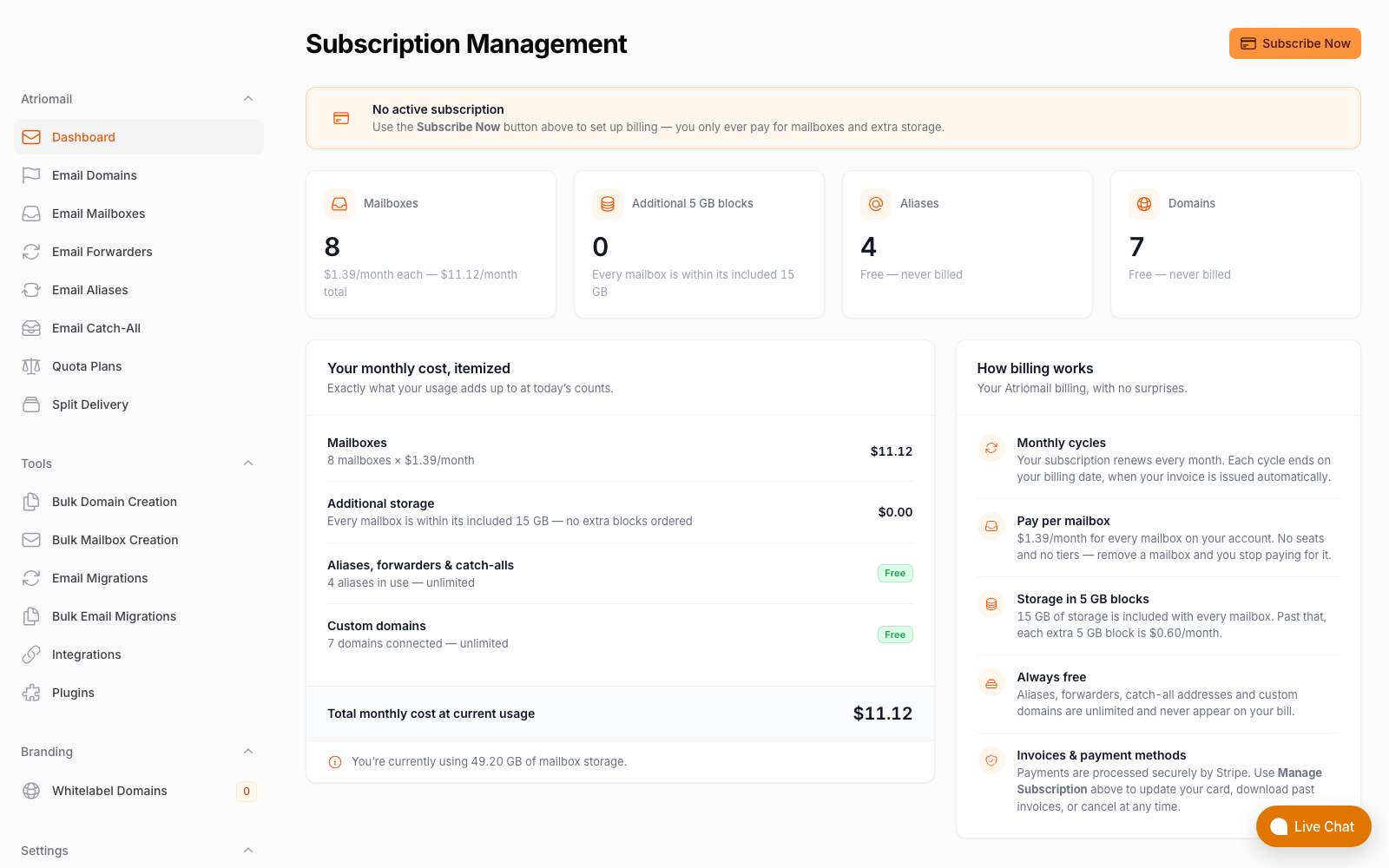
The actual billing screen a client's invoice is built from, real panel, no mockup.
The Margin Math, Side by Side
Take a client who needs 50 mailboxes, a realistic size for a small business account:
| Google Workspace resale (not a formal partner) | White-label email hosting | |
|---|---|---|
| What you pay wholesale | Nothing; you don't buy the seats | 50 × $1.39 = $69.50/month |
| What the client pays | $7.00-$8.40/user directly to Google | Whatever you set, e.g. $5.00/mailbox = $250/month |
| Your recurring margin | $0/month | $250 − $69.50 = $180.50/month |
| Annualized | $0 | ≈ $2,166/year |
The $5/mailbox figure is illustrative, not a rule: price to your own market. Even at that level, the client is paying noticeably less than Google Workspace Business Starter's retail rate, so it isn't a hard sell on price alone, and every dollar of the spread above $1.39 is margin that a brokered Workspace seat structurally cannot produce for you.
What You Give Up, Either Way
Neither path is free of trade-offs, and the honest version of this comparison says so:
- Reselling Google Workspace: you never own the brand, the pricing, or the renewal conversation. A Google price increase becomes something you have to explain to a client, not a decision you made.
- White-label email hosting: there's no Docs, Sheets, Slides or Meet bundled in. If a client's actual need is real-time document collaboration or a video-meeting platform, not just a mailbox, Google Workspace or Microsoft 365 is still the right tool for that client, full stop. This comparison is about the professional-email line item specifically, not a claim that mailbox hosting replaces a collaboration suite.
Making the Switch Without Disrupting Anyone
For clients where email is genuinely all they need, moving off a brokered Workspace or Microsoft 365 seat doesn't require downtime or a mailbox that starts empty:
- Migration is free and two-way. Built-in IMAP migration pulls existing mail from Gmail, Google Workspace, Microsoft 365, Yahoo or any IMAP server, preserving folders and dates.
- DNS is automated, not manual. SPF, DKIM and DMARC records publish automatically per domain across 15 supported DNS providers, so deliverability doesn't regress on day one the way a hand-configured cutover can.
- Billing plugs into what you already run. If clients are already invoiced through WHMCS or Blesta, the mailbox line item goes on the same invoice they already get instead of a separate Google receipt landing in their inbox every month, a detail covered in more depth in automating email billing in WHMCS and Blesta.
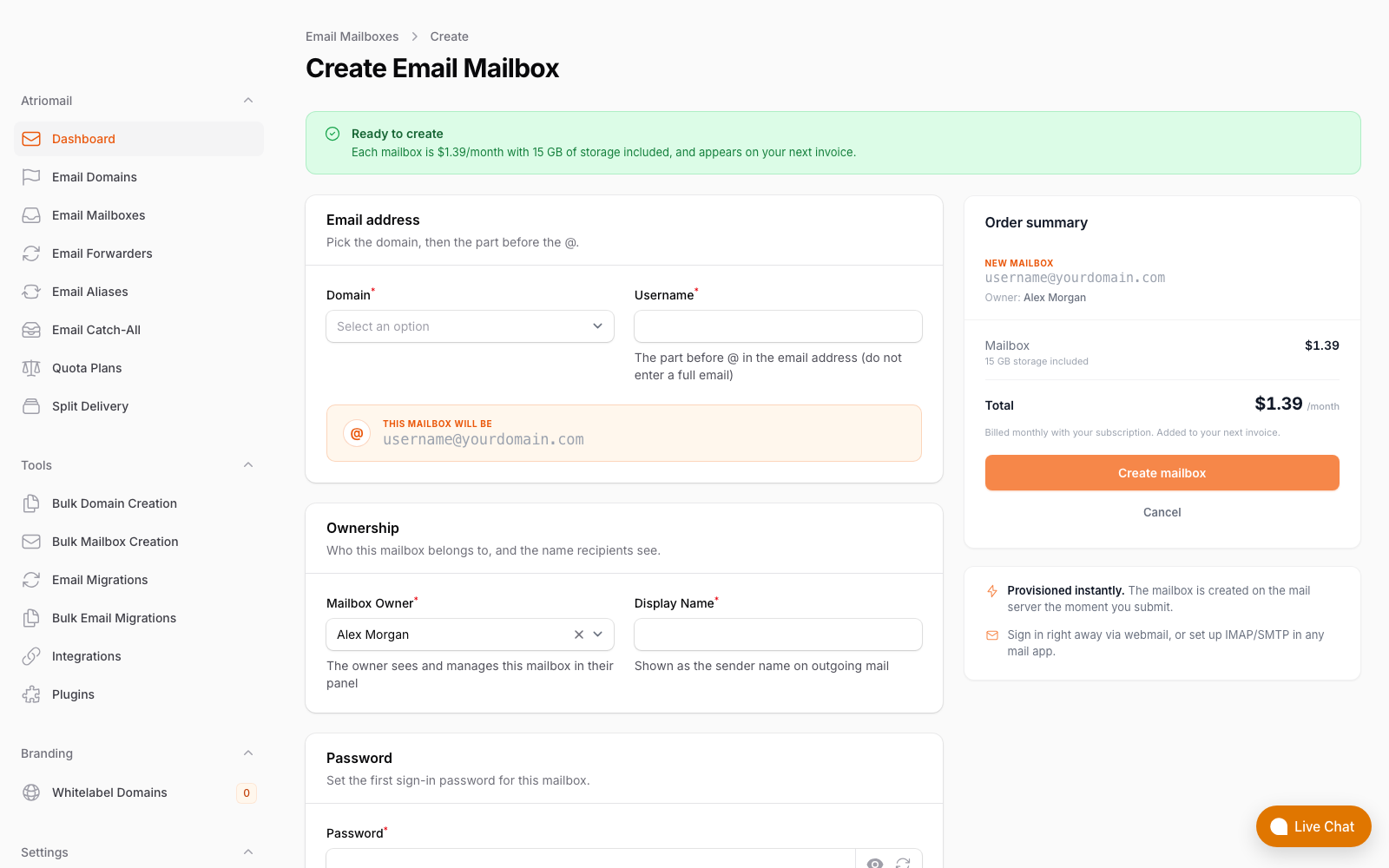
Provisioning a new mailbox in the panel, the same flow whether it's the first client you move or the fiftieth.
Frequently Asked Questions
More on migration, billing and setup in the full FAQ.
Do I have to move every client at once?
No. Most agencies pilot with one or two accounts, confirm deliverability and client experience hold up, then move the rest of the book on their own schedule. There's no minimum mailbox count to start.
What happens to mail already sitting in Gmail during migration?
It's preserved. The built-in IMAP migration copies existing folders and message dates rather than starting the client's mailbox empty.
Is $5/mailbox the right price to charge?
It's an example, not a rule. Some agencies price closer to Workspace retail and compete on service and single-invoice convenience; others price lower to win the account outright. Either way, wholesale stays $1.39, so the margin is whatever spread you decide to hold.
Do I need the white-label branding add-on to start?
No. The client already gets email on their own domain at the base $1.39/mailbox price. The paid add-on only changes whose logo appears on the webmail login and admin panel, and it's usually worth adding once a book passes roughly 36 mailboxes.
Recommended
- What Is White-Label Email? Atriomail
- A Guide to White-Label Email for Agencies, Atriomail
- Automate Email Billing in WHMCS and Blesta, Atriomail
- Pricing and the Reseller Margin Calculator, Atriomail
- About Atriomail, Atriomail
Latest from the blog
- How to Set Up BIMI So a Client's Logo Shows Up in Gmail and Yahoo · Oct 12, 2026
- DreamHost Email vs Atriomail: What "Unlimited" Doesn't Cover for Resellers · Oct 10, 2026
- A Client's Email Account Was Compromised: Why a Password Reset Alone Doesn't Fix It · Oct 9, 2026
- Aliases, Forwarders and Catch-Alls in Atriomail: The One Rule That Decides When They Work · Oct 8, 2026
- How to Move a Client's DMARC Policy to p=reject Without Breaking Their Mail · Oct 7, 2026