
On August 13, 2026, a cooling system failure at a data center in Phoenix, Arizona took more than 5,000 Namecheap servers offline. By the time the dust settled, according to Engadget and other outlets covering the incident, roughly 24 million registered domains had been affected and 1.4 million private email inboxes had gone dark. The outage lasted nearly an entire business day.
If you are a hosting reseller who keeps a book of 50 to 200 client domains, that kind of event is not an inconvenience. It is a simultaneous multi-client crisis delivered with no warning, no way to open a support ticket (the helpdesk was in the same building), and no clear timeline. This piece explains why the architecture that produced that blast radius is still common across the reseller market, and what to build instead.
Table of Contents
- What Actually Happened on August 13
- Key Takeaways
- The Failure Domain Problem
- Why Resellers Felt It Differently Than Individual Customers
- What Separated Email Infrastructure Actually Looks Like
- How Automatic DNS Publishing Changes the Risk Profile
- If Your Book Is Still on a Shared Host, What to Do
- FAQ
Key Takeaways
| Point | Details |
|---|---|
| The Namecheap outage knocked out 1.4 million email inboxes | A cooling failure in one Phoenix data center took down hosting, DNS and email simultaneously on August 13, 2026. |
| Co-located DNS was the real multiplier | Because Namecheap's authoritative nameservers lived in the same failure domain, sites hosted elsewhere also broke as long as their NS records pointed at Namecheap. |
| Resellers with 50+ client domains took proportionally larger hits | One outage meant dozens or hundreds of simultaneous support calls and email-delivery failures, all at once, with the helpdesk also offline. |
| Separated email infrastructure isolates the failure | When email runs on a dedicated platform independent of your web host, a hosting outage does not touch your clients' inboxes. Email delivery continues on separate infrastructure. |
| Automatic DNS publishing to your chosen provider removes the NS dependency | A white-label email platform that publishes SPF, DKIM, DMARC and MX records to the DNS provider you designate is not affected when a registrar's nameservers fail. |
What Actually Happened on August 13
The short version: chillers failed at the RadiusDC data center in Phoenix that Namecheap uses for core operations. Rather than let overheating hardware keep running, Namecheap's operations team deliberately shut down more than 5,000 servers, which is the right call to prevent data loss, but it meant nearly everything went dark at once.
The official Namecheap post-mortem confirmed the affected services: shared hosting, EasyWP, cPanel hosting, reseller hosting, VPS, private email and, critically, DNS. CEO Hillan Klein posted that customer services would begin restoration around 3:00 to 3:30 PM ET, in stages, not all at once. For an outage that started early in the morning, that meant the better part of a working day offline.
No data was lost. That matters, but it does not change the operational reality for anyone whose clients were waiting for email that morning.
The Failure Domain Problem
The detail that expanded the outage well beyond Namecheap's own customers is this: Namecheap's authoritative DNS nameservers, the ones that answer queries like "what is the MX record for thisdomain.com?", were running in the same Phoenix data center as everything else. When the data center went dark, those nameservers went dark too.
That created a second category of victim: sites and mailboxes that were not hosted at Namecheap at all, but whose domain's NS records pointed at Namecheap's nameservers. When a mail server or browser tried to look up an MX or A record for those domains, it queried Namecheap's nameservers and got silence. Delivery failed. Pages timed out.
This is what engineers call a "failure domain" problem. A failure domain is the set of systems that share a common single point of failure. When your registrar, your nameservers, your web host and your email host are all the same company, they are all in the same failure domain. One cooling failure takes all of them.
The Namecheap outage is not evidence that Namecheap is uniquely unreliable. It is evidence that concentrating services at a single provider creates correlated risk, regardless of which provider you use. The structural lesson applies to any host that co-locates its own nameservers with its own infrastructure in a single facility.
Why Resellers Felt It Differently Than Individual Customers
For an individual with one mailbox, the August 13 outage was frustrating. Email was down for most of a business day, which is a real problem, but it is one problem.
For a hosting reseller with 80 client domains all pointing at Namecheap's nameservers, the arithmetic is different: 80 simultaneous outages, 80 panicked clients calling or messaging, and a support helpdesk that was also in the same failed building. The clients who tried to email the reseller about their email being down got no response, because the reseller's own email was also using the same infrastructure.
That is the reseller-specific multiplier. The scale of a book does not protect you against correlated failures; it amplifies them. The larger the book, the more clients who all fail simultaneously when the shared dependency fails.
There is also a brand dimension. If 80 of your clients lose email for a day and they all experience it at once, the question they ask is not "why did Namecheap fail?" It is "why did my email hosting provider fail me?" That is the conversation a reseller has to have at scale with every client on the same infrastructure.
What Separated Email Infrastructure Actually Looks Like
The straightforward fix is to stop hosting email on the same platform as web hosting. That sounds obvious, but in practice many resellers end up there because their hosting control panel includes email as a default service, and it is easy to leave clients on it.
When email runs on a dedicated platform independent of the web host, the failure domains separate. A web hosting outage takes down web hosting. It does not touch the email platform, because the email platform is running on entirely different infrastructure, in different data centers, with different network paths. The MX records for your clients' domains point at the email platform's servers, not the web host's.
For a reseller, that means the morning of August 13, 2026 looks completely different: client sites may be down (web hosting issue), but client email is still receiving and sending normally, because email is on a platform that had nothing to do with the Phoenix cooling failure.
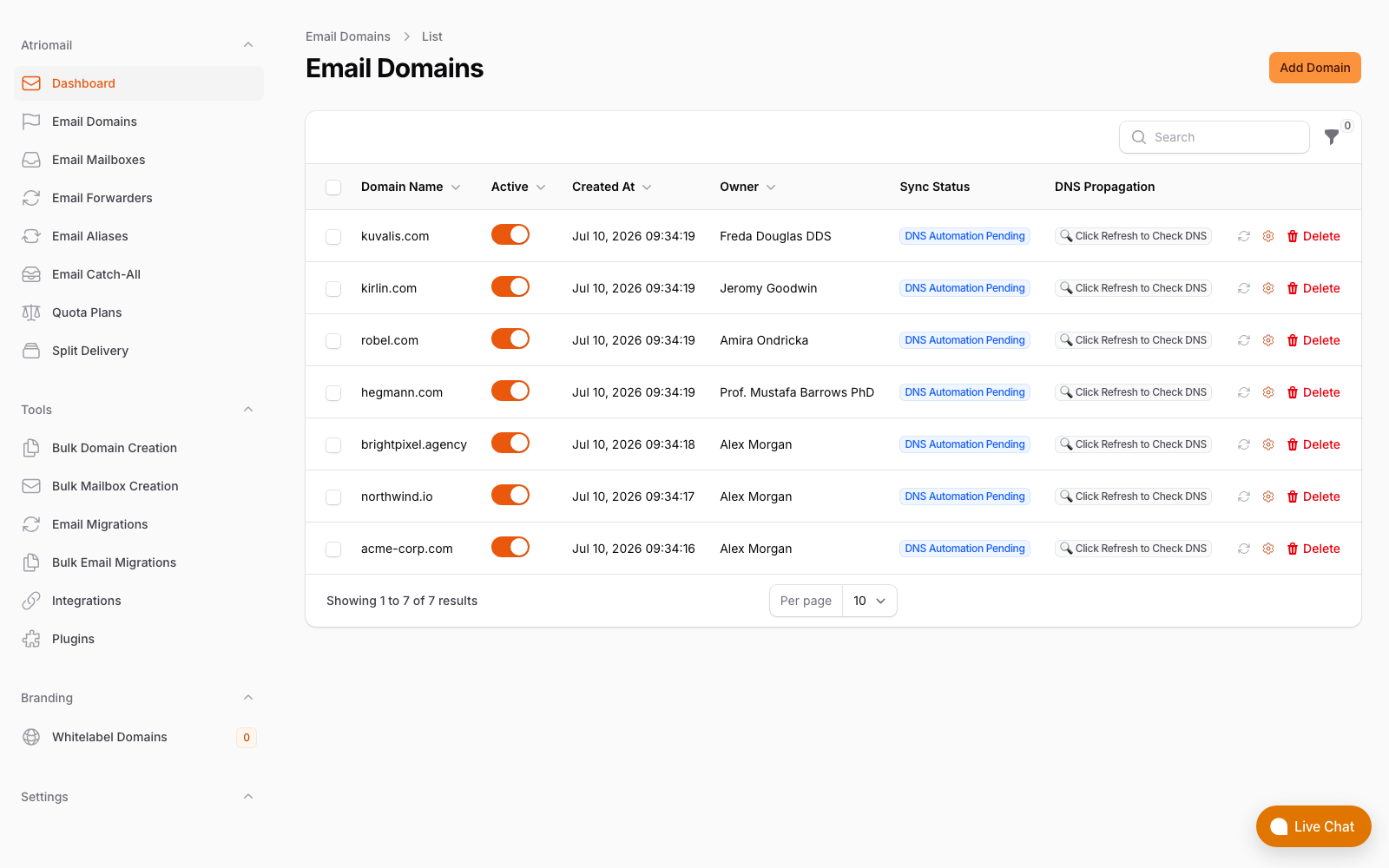
The domain DNS panel in Atriomail: each domain's mail-related DNS records are managed here and published to your DNS provider, independent of wherever the domain's web hosting lives.
This is also why white-label email as a product category exists as something distinct from "email included with hosting." The value is not just branding; it is that a purpose-built email platform is designed and operated independently, with its own redundancy and its own failure domain.
How Automatic DNS Publishing Changes the Risk Profile
There is a second layer of dependency that the Namecheap outage exposed: the nameservers themselves. Even if you move email to a separate platform, if your clients' domains are still using Namecheap's nameservers, a Namecheap NS failure prevents anyone from resolving those domains' MX records and delivery stalls.
The answer is DNS automation that publishes email records to the nameserver provider you designate, rather than locking you into any one registrar's infrastructure. Atriomail's DNS automation publishes SPF, DKIM, DMARC and MX records automatically across 15 supported DNS providers. You choose which nameserver provider to use for each client's domain. If that provider has an outage, you can update the NS delegation elsewhere and republish. No one provider becomes an irreplaceable dependency for email delivery across your whole book.
The contrast with the Namecheap scenario is concrete: if a reseller had been using Atriomail for email and had delegated DNS to a provider other than Namecheap, August 13 would not have affected email delivery at all for those clients. Web hosting might still have been down, but email delivery would have continued uninterrupted.
If Your Book Is Still on a Shared Host, What to Do
Most resellers do not arrive at a separated architecture on purpose. They end up co-located because the path of least resistance was leaving clients on the email that came bundled with the hosting plan. The fix is not complicated, but it does require a deliberate decision to make the move before the next outage, not after.
A practical starting point:
- Audit your current NS exposure. Check how many of your client domains are using the same registrar's nameservers. Concentration there is the first risk to address. If you find 60 client domains all pointing at one registrar's NS, that is 60 clients with a correlated failure risk.
- Move email to a dedicated platform before moving DNS. Provision the mailboxes on a dedicated email host, migrate existing mail using IMAP, then update MX records to point at the new platform. Clients do not lose existing mail; the migration process preserves folders and dates from the source server.
- Point MX records at your email platform via your DNS provider of choice. Once email is on a dedicated platform with automated DNS publishing, choose a nameserver provider that is not your web host. Cloudflare, AWS Route 53 and other major DNS providers are options with their own independent infrastructure and redundancy.
- Update your billing to reflect the change. If you are moving clients from bundled-with-hosting email to a separate line item, the billing in WHMCS or Blesta needs to reflect that. The WHMCS and Blesta integrations for a dedicated email platform handle this so mailboxes appear as their own billable service, not buried in a hosting bundle.
The migration itself does not have to happen all at once. Most resellers pilot with three to five client accounts first, confirm that deliverability holds up and that the client experience is stable, then move the rest of the book on a rolling schedule. There is no minimum mailbox count to start on a per-mailbox platform like Atriomail; usage-based billing at $1.39 per mailbox per month means the economics work at any scale from the first domain through the two-hundredth.
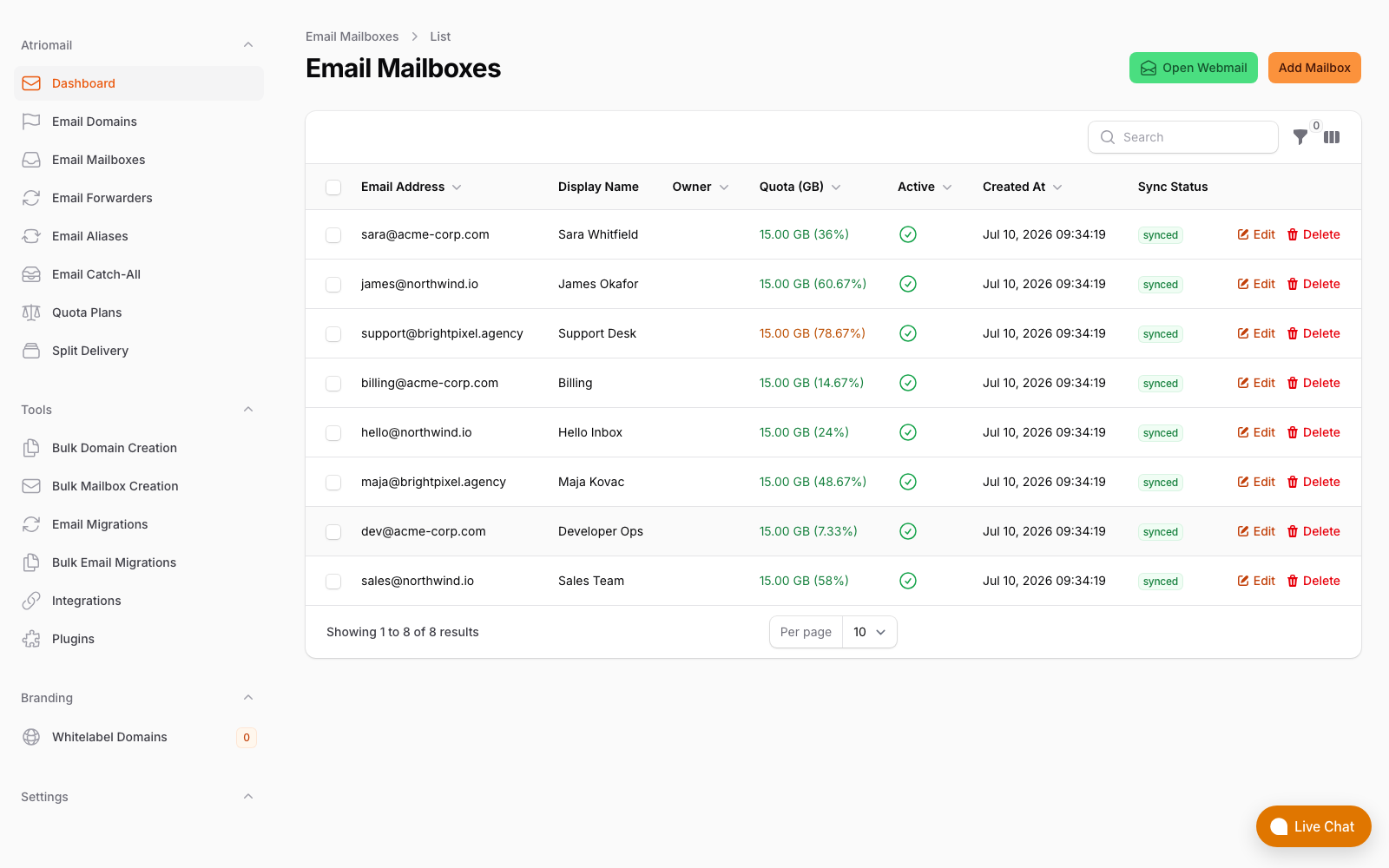
The mailboxes view in the Atriomail panel: all client domains and their mailboxes managed from one dashboard, with no dependency on any particular web hosting provider.
For context on how different types of email hosting compare on the infrastructure-separation question, the short version is that bundled hosting email, self-hosted mail servers and dedicated white-label platforms each have different failure domains. Bundled email shares the worst properties of shared hosting on this front. Self-hosted introduces other risks (deliverability, maintenance). A dedicated white-label platform is the option that actually addresses the co-location problem while keeping the economics workable at small scale.
Frequently Asked Questions
More on platform architecture and migration in the full FAQ.
What is a failure domain and why does it matter for resellers?
A failure domain is the set of systems that all go down together when a single component fails. For resellers, the risk is that registrar, nameservers, web hosting and email are all at the same provider, so a single data center problem takes all of them out simultaneously across every client domain that shares that provider.
If I move email to a separate platform, does that protect me against DNS outages?
Partially, but not completely on its own. Moving email to a separate platform means the email servers themselves are not affected by a web host outage. But if your clients' domains still point at a failed registrar's nameservers, no one can resolve the MX records for those domains and delivery stalls anyway. The full fix is to separate both: email on a dedicated platform, and DNS delegated to a nameserver provider that is independent of your web host.
What happens to existing mail when moving to a dedicated email platform?
Built-in IMAP migration copies folders, messages and dates from the source server before the cutover. Clients do not start with an empty mailbox. The typical sequence is: provision mailboxes on the new platform, run IMAP sync, update MX records, run a final sync to catch anything that arrived during the cutover window.
How many DNS providers does the automatic DNS publishing support?
Atriomail's automated DNS publishes SPF, DKIM, DMARC and MX records to 15 DNS providers. You choose the provider per domain, so you are not locked into any single nameserver infrastructure. If your current DNS provider has a problem, you can update the NS delegation and republish records to a different provider without touching the email platform configuration.
Recommended
- Automate DNS. Eliminate Email Setup Errors. (Atriomail)
- Master the Art of Email Migration Without Downtime or Headaches (Atriomail)
- 7 Types of Email Hosting Every Reseller Should Know (Atriomail)
- What Is White-Label Email? (Atriomail)
- GoDaddy Professional Email vs. White-Label Email Hosting (Atriomail)
- White-Label Email vs. Reselling Google Workspace: The Margin Math (Atriomail)
Latest from the blog
- How to Set Up BIMI So a Client's Logo Shows Up in Gmail and Yahoo · Oct 12, 2026
- DreamHost Email vs Atriomail: What "Unlimited" Doesn't Cover for Resellers · Oct 10, 2026
- A Client's Email Account Was Compromised: Why a Password Reset Alone Doesn't Fix It · Oct 9, 2026
- Aliases, Forwarders and Catch-Alls in Atriomail: The One Rule That Decides When They Work · Oct 8, 2026
- How to Move a Client's DMARC Policy to p=reject Without Breaking Their Mail · Oct 7, 2026