
A prospect tells you their current host "handles all the technical stuff," and that's usually where the conversation stalls, because you have no evidence and they have no reason to switch. Atriomail's free DNS checker turns that stall into a specific finding: paste in their domain, and in a few seconds you can see whether their MX, SPF, DKIM and DMARC records actually exist and are well-formed, no account, no sign-up, no cost. It's built to be used on any domain, not just ones already on Atriomail, which is exactly what makes it useful before a client has agreed to anything.
This guide covers both of the moments where the checker earns its keep for a reseller: auditing a prospect's domain before you pitch them, and confirming a client's records went live correctly once you've actually moved them onto Atriomail. It also covers what the public tool can't tell you, and where the panel and API pick up the rest.
Table of Contents
- Key Takeaways
- Who This Is For
- What You Need Before You Start
- What the Free DNS Checker Actually Checks
- Using It Before a Pitch: Auditing a Prospect's Domain
- Using It After a Migration, and What the Panel Checks That the Public Tool Can't
- What This Means for Your Business
- Limits to Know
- Frequently Asked Questions
Key Takeaways
| Point | Detail |
|---|---|
| What it is | A free tool at atriomail.com/dns-checker/ that checks any domain's MX, SPF, DKIM and DMARC records, no account needed |
| What it's good for | Auditing a prospect's current email setup before you pitch them, and independently confirming a migrated domain's records after cutover |
| The DKIM caveat | The public checker only reads DNS that's already published, so it checks DKIM against whatever selector you type in, not one it discovers on its own |
| What signing in adds | Inside the Atriomail panel, and through the API, you can check your own domains against their exact DKIM key and Amazon SES verification records |
| What Atriomail does for this | Gives a reseller a specific, checkable finding to open a sales conversation with, instead of a generic "we're cheaper" pitch |
| What it doesn't do | It checks authentication records, not deliverability or spam-filter outcomes, and it isn't a stand-in for testing aliases, forwarders or catch-alls |
Run the check before your next pitch call. Atriomail's DNS checker is free and needs no account, and gives a plain verdict on a domain's MX, SPF, DKIM and DMARC records in seconds. Creating an Atriomail account is also free, with mailboxes billed from the first one.
Who This Is For
Resellers, agencies and MSPs who either prospect new client domains or already manage a book of them, and want a fast, evidence-based way to show a gap in a prospect's current setup or confirm a domain's mail authentication after moving it onto Atriomail. If you're managing email across a growing client roster, the checker is also worth running periodically on domains you already host, since a client's DNS can drift after they add a new sending tool on their own. It isn't built for a consumer checking their own personal Gmail account.
What You Need Before You Start
- Just the domain name, for the basic public check. No Atriomail account is required to run it, though creating one is free and needs no card if you want the deeper panel-level check later.
- The domain's current DKIM selector, if you want that part of the result to mean anything. The public checker reads whatever selector you give it; without the right one, it can't confirm DKIM either way, even if a valid key is published.
- A signed-in Atriomail account or API key, if you want the deeper check. Checking a domain against its exact DKIM key and Amazon SES verification records only applies to domains already added to Atriomail.
- A way to note what you found. If you're using this before a sales call, a screenshot or a short written summary of the missing or broken records is what turns the check into a talking point.
What the Free DNS Checker Actually Checks
The public tool at /dns-checker/ asks for one thing: the domain to check. Enter it and Atriomail looks up that domain's MX records (where its mail is actually delivered), its SPF record (which servers are allowed to send as that domain, flagging problems like a duplicate SPF record or too many DNS lookups), its DKIM record for the selector you specify, and its DMARC record (whether a policy exists and is formatted correctly). The result comes back as a plain verdict rather than a wall of raw DNS output, with the exact record to add for anything that's missing or wrong, which matters if you're going to hand that result to a client who has never looked at a DNS zone in their life.
Because the tool reads public DNS only, it can't peek inside anyone's account to find a DKIM selector on its own; you have to know or find it and type it in. Atriomail also keeps this deliberately narrow on the privacy side: nothing is stored beyond the domain checked, the requesting IP address and the result, and only for 30 days, kept just long enough to stop the tool being abused for mass scanning. It isn't logging a running history of every domain you've ever checked.
One field, four records, no account. Atriomail's DNS checker takes a domain name and returns a plain-English verdict on its MX, SPF, DKIM and DMARC records, with the exact fix for anything missing.
Using It Before a Pitch: Auditing a Prospect's Domain
The most direct use for a reseller is also the simplest: before a call with a prospect, run their domain through the checker. A missing DMARC record is extremely common and costs nothing to point out, an open door into a conversation about why their current setup leaves their domain open to spoofing. A missing or broken SPF record is a stronger finding still, because it can mean mail sent from their own domain, even through their current host, is already at risk of landing in spam without anyone on their side noticing. If DKIM comes back unconfirmed, say so honestly rather than treating it as proof of a problem: without the right selector, the checker genuinely cannot tell you whether a valid key exists, so an unconfirmed DKIM result is a reason to ask, not a fact to pitch.
This is a different kind of opener than a price comparison, and it holds up better under scrutiny, since basic email security hygiene is something every prospect can verify themselves once you've pointed it out, the same instinct behind automated DNS validation as a deliverability practice rather than a one-time setup step. It's also worth running on domains you already manage, not just prospects: a client who adds a new marketing tool or CRM on their own can quietly break SPF by pushing it past its DNS lookup limit, and catching that during a routine check is cheaper for everyone than a client noticing their invoices are landing in spam.
Using It After a Migration, and What the Panel Checks That the Public Tool Can't
Once a domain has actually moved, whether through automatic DNS on a connected Cloudflare or Namecheap account or by copying records into a DNS Setup dialog by hand, the same public checker is a useful independent confirmation. Because it reads DNS the same way any outside mail server would, a clean result from /dns-checker/ tells you the cutover is visible to the rest of the internet, not just to Atriomail's own dashboard.
Inside the panel itself, and through the API, the check goes a level deeper for domains actually on Atriomail: instead of a generic DKIM lookup, it verifies the domain against its exact DKIM key and Amazon SES verification records, the specific values Atriomail generated for that domain rather than a general pattern. Each domain in the Email Domains list shows its own DNS status with a refresh button that re-checks the live records on demand, covered in the knowledge base's DNS troubleshooting article: that status is the result of the last check, not a live feed, so if you've just changed a record at the DNS host, you refresh it rather than assume the panel already knows.
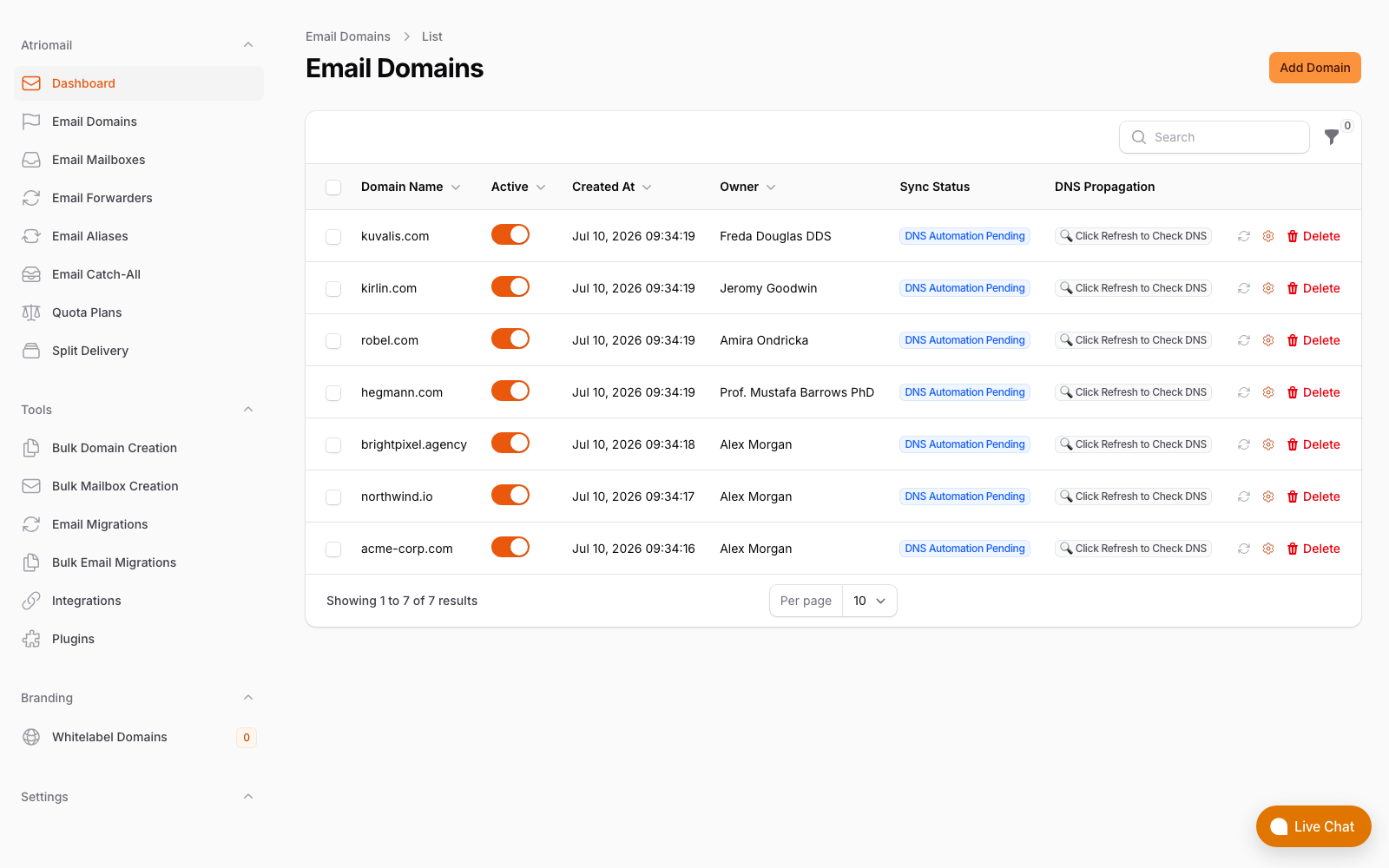
The Email Domains list: each row shows its DNS sync status and a refresh control to re-check that domain's records against Atriomail's own DKIM key and SES verification records on demand.
The two checks are complementary rather than redundant. The public tool is the one you'd hand a client as independent proof, since it's not Atriomail grading its own homework; the panel and API check is the one that actually matches records against what Atriomail generated for that specific domain, which is what you want before or after a cutover on a client migration you're running yourself.
What This Means for Your Business
The DNS checker itself isn't billed and doesn't require an Atriomail account, so it costs a reseller nothing to run on every prospect before a call. Its value shows up upstream of any invoice: "your DMARC record is missing, and here's the exact line to add" is a more credible opener than a generic pitch on price, and it's a finding the prospect can verify themselves in the same few seconds you did. Once a domain actually moves, the economics are the same as they are for every mailbox on Atriomail: at $1.39 per mailbox per month wholesale, a 200-mailbox client book costs $278.00 a month, and billed at $5.00 per mailbox, that's $1,000.00 collected and $722.00 a month kept above wholesale, before card fees, support time and any white-label add-on fee. The full pricing mechanics are covered separately, but the checker's job is earlier in the funnel: it's what gets a prospect from "our current host is fine" to a conversation worth having at all.
For resellers already running the paid white-label add-on, the same DNS checker still lives at the public atriomail.com address rather than under a branded hostname, so it's worth treating as your own sales tool rather than something to point a client toward directly if you'd rather they not see the Atriomail name at that stage of the relationship.
Turn one finding into a quote. A missing SPF or DMARC record is a concrete reason for a prospect to move; work out what their book is worth to you once they do.
Limits to Know
- DKIM depends on knowing the selector. If you don't have the right one, the public checker can't confirm DKIM either way, even if the client's provider actually has it configured correctly.
- It checks authentication records, not deliverability outcomes. A clean MX, SPF, DKIM and DMARC result doesn't tell you why a specific message landed in spam; it tells you the records themselves are present and well-formed.
- It doesn't touch aliases, forwarders or catch-alls. Those are separate features on a domain and aren't part of what this tool checks.
- Results aren't kept as a monitoring history. Atriomail stores the domain, the requesting IP address and the result for 30 days purely to prevent abuse, not as an ongoing log you can look back through.
- The deeper, exact-key check only applies to domains on Atriomail. The public tool can confirm a DKIM record exists for the selector you give it; matching that record against Atriomail's own generated key and SES verification records only works once the domain is actually onboarded.
- Support for interpreting a confusing result is available during business hours, not around the clock.
Frequently Asked Questions
Does a prospect find out I checked their domain?
No. The checker reads public DNS the same way any mail server on the internet already does, and nothing is installed on the domain or its DNS host. It isn't a notification service, so there's nothing sent to the domain owner.
Do I need an Atriomail account to check a client's domain?
No. The basic check at /dns-checker/ is free and public, with no sign-up required, for any domain, not just ones on Atriomail.
Why didn't the checker confirm DKIM even though the client says it's set up?
Because DKIM is checked against whatever selector you type in, and the tool reads public DNS only, so it has no way to discover a selector on its own. If you don't have the exact selector the client's provider uses, the checker can't confirm the record even when one genuinely exists.
Is this the same check Atriomail runs on my own onboarded domains?
Not exactly. Domains already on Atriomail get checked, in the panel and through the API, against their exact DKIM key and Amazon SES verification records, with a refresh button to re-check on demand. The public tool doesn't have access to that domain-specific detail, so it checks the general presence and format of the records instead.
Can I use this to prove a migration went through correctly?
It's a useful independent confirmation. A clean result from the public checker after a cutover shows the domain's MX, SPF, DKIM and DMARC records are visible and well-formed from outside Atriomail's own systems, which is worth having alongside the panel's own domain status.
Does the DNS checker explain why a client's mail is landing in spam?
No. It verifies whether the authentication records exist and are formatted correctly, not why a specific message was filtered. Missing or broken records are a common cause of deliverability problems, but a clean result doesn't guarantee every message lands in the inbox.
Recommended
- Boost Your Email Deliverability with Automated DNS Validation
- Connecting Cloudflare and Namecheap for Automatic Mail DNS
- The Agency Playbook: Step-by-Step Email Migrations with Atriomail
- Essential Security Protocols for Resellers Offering Email Services
- Usage-Based Email Pricing Explained
- Pricing and the Reseller Margin Calculator
Latest from the blog
- How to Set Up BIMI So a Client's Logo Shows Up in Gmail and Yahoo · Oct 12, 2026
- DreamHost Email vs Atriomail: What "Unlimited" Doesn't Cover for Resellers · Oct 10, 2026
- A Client's Email Account Was Compromised: Why a Password Reset Alone Doesn't Fix It · Oct 9, 2026
- Aliases, Forwarders and Catch-Alls in Atriomail: The One Rule That Decides When They Work · Oct 8, 2026
- How to Move a Client's DMARC Policy to p=reject Without Breaking Their Mail · Oct 7, 2026