
Most of the provisioning guides we write assume you're billing clients through WHMCS or Blesta, because most resellers are. But not every reseller runs one of those platforms, and some who do still want tighter control than a billing module gives them: a custom client portal, an in-house CRM that already owns the customer record, or an automation tool like n8n stitching Atriomail into a workflow that has nothing to do with invoicing. For that reseller, Atriomail has a REST API that covers the same provisioning Atriomail's WHMCS and Blesta modules handle, exposed as plain HTTPS requests instead of a pre-built plugin.
This guide covers what the Atriomail API actually lets you automate, how authentication and rate limits work, how single-use sign-in links let you drop a customer straight into their Atriomail panel from your own site, and the specific things the API does not do today, so you can decide whether it's the right integration path before you start writing code against it.
Table of Contents
- Key Takeaways
- Who This Is For
- What You Need Before You Start
- What the API Lets You Automate
- Provisioning Customers, Domains and Mailboxes
- Single-Use Sign-In Links and Migration Jobs
- What This Means for Your Business
- Limits to Know
- Frequently Asked Questions
Key Takeaways
| Point | Detail |
|---|---|
| What the API covers | Domains, mailboxes, forwarders, catch-alls, mailbox storage, customer accounts, IMAP migration jobs, DNS record checks and single-use sign-in links |
| Authentication | An API key sent in the X-API-KEY header, created in the panel, shown in full once, stored hashed afterward |
| Rate limit | Up to 30 requests per minute |
| Single-use sign-in links | Valid 60 seconds, one use, drop a customer straight into their Atriomail panel from your own portal or billing system |
| What Atriomail does for this | Lets a reseller provision and manage client domains and mailboxes directly from their own systems, without adopting WHMCS or Blesta just to automate Atriomail |
| What it doesn't do | No scoped or read-only keys, no webhooks, and no bulk mailbox endpoint; a key carries the full permissions of the account that created it |
Already have a billing system that isn't WHMCS or Blesta? The Atriomail REST API provisions domains, mailboxes and customer accounts directly, at the same $1.39 per mailbox price with 15 GB included. Creating an account is free and needs no card; mailboxes are billed from the first one.
Who This Is For
Resellers, agencies and MSPs who either don't bill through WHMCS or Blesta at all, or who do but want something the modules don't cover, like a customer-facing portal of your own, a per-domain mailbox cap set programmatically instead of by hand, or an automation flow in a tool like n8n that ties Atriomail provisioning into an existing CRM or support desk. If you already bill through WHMCS or Blesta and the module's Create, Suspend, Unsuspend, Terminate and Change Package actions cover what you need, the WHMCS module is the simpler path and this guide is not where to start. It matters once you're building something the module doesn't do, or running a billing stack neither module plugs into.
What You Need Before You Start
- An Atriomail account. Creating one is free and needs no card; you can add domains before paying anything, though creating a mailbox starts billing on that mailbox.
- An API key, created in the panel. It's shown in full once at creation time and stored hashed afterward, so save it somewhere your integration can read it; there's no way to retrieve the full value again later, only to regenerate it.
- A plan for storing that key securely. A key carries the full permissions of the account that created it, so treat it the way you'd treat an admin password, not a public identifier.
- Something that can send HTTPS requests with a custom header. A script in any language, a backend service, or a no-code automation tool with a generic HTTP request step, such as n8n's HTTP Request node, all work; nothing Atriomail-specific needs to be installed.
- A realistic sense of call volume. The API allows up to 30 requests per minute, which comfortably covers an onboarding flow or a periodic sync job, but isn't built for scripting hundreds of mailboxes into existence in one burst; the panel's own bulk domain and mailbox creation tools exist for that instead.
What the API Lets You Automate
The Atriomail REST API uses an API key sent in the X-API-KEY header, and it covers domains, mailboxes, forwarders, catch-alls, mailbox storage, customer accounts, IMAP migration jobs, DNS record checks and single-use sign-in links. That's a working list, not a claim that every panel action has an API equivalent: it's the set of operations a reseller actually automates, not a full mirror of everything a human can click through in the control panel.
API keys are created inside the panel and shown in full exactly once; after that, Atriomail stores only a hashed version, the same pattern you'd expect from any service that takes security seriously. A key can have an expiry date set on it, and you can switch it off or regenerate it at any point without touching the account it belongs to. Repeated failed authentication attempts against a key are temporarily locked out, which matters if you're debugging an integration and want to know why requests suddenly started failing. One detail worth planning around before you write any integration code: a key carries the full permissions of the account that created it. There's no concept today of a scoped key that can only create mailboxes, or a read-only key for a reporting dashboard; whoever holds the key can do anything that account can do.
Call volume is capped at 30 requests per minute. For most reseller workflows, provisioning a new client, syncing status on a schedule, checking a handful of domains, that ceiling is rarely the bottleneck. Where it matters is if you're tempted to treat the API as a bulk-import tool: it isn't one, and scripting a few hundred individual mailbox-creation calls in a short burst is both slower and less reliable than using the panel's bulk tools designed for exactly that job. The broader shift this reflects, provisioning triggered by your own systems rather than a person clicking through a panel, is the same shift covered more generally in how API integration changes brand control for resellers.
Wiring Atriomail into an existing CRM or support desk? Any tool that can send an HTTPS request with a custom header, including n8n's generic HTTP Request node, can call the Atriomail API directly, no dedicated connector required. Creating an account is free and needs no card; mailboxes are billed from the first one.
Provisioning Customers, Domains and Mailboxes
Through the API, a reseller can create customer accounts and domains owned by those customers, which is the piece that makes a custom multi-client portal possible in the first place: your own system stays the source of truth for who the customer is, while Atriomail handles the mailboxes underneath. One detail that matters for anyone writing integration code against this: retrying a customer creation call returns the existing account instead of throwing an error. That makes it safe to build an integration that retries on a timeout or a dropped connection without worrying about silently creating duplicate customer records every time a request has to be resent.
New domains go through the same automated security check whether they're added through the panel, the WHMCS and Blesta modules, or the API; the API simply reports each domain's provisioning state as it moves through screening, review, ready or rejected, so your integration can poll for the point a domain is actually usable rather than guessing. Atriomail doesn't publish a fixed duration for that check, so build your integration to poll politely rather than assume a fixed wait.
One capability specific to the API, and to the WHMCS module, is worth calling out on its own: per-domain caps on mailbox count and total storage. These aren't settable from the panel itself today, only through the API or the WHMCS module. If you're building a portal where each client has a contracted limit, say 25 mailboxes and 500 GB total, you set that cap through the API and Atriomail refuses requests that would exceed it. A cap can't be lowered below whatever the domain is already using, so shrinking a client's allowance after the fact means working from their current usage upward, not an arbitrary number you pick first. The underlying domain settings this touches, and the choices worth making before a domain goes live, are covered in more depth in the domain management and branding guide, which walks through the same setup from the panel side.
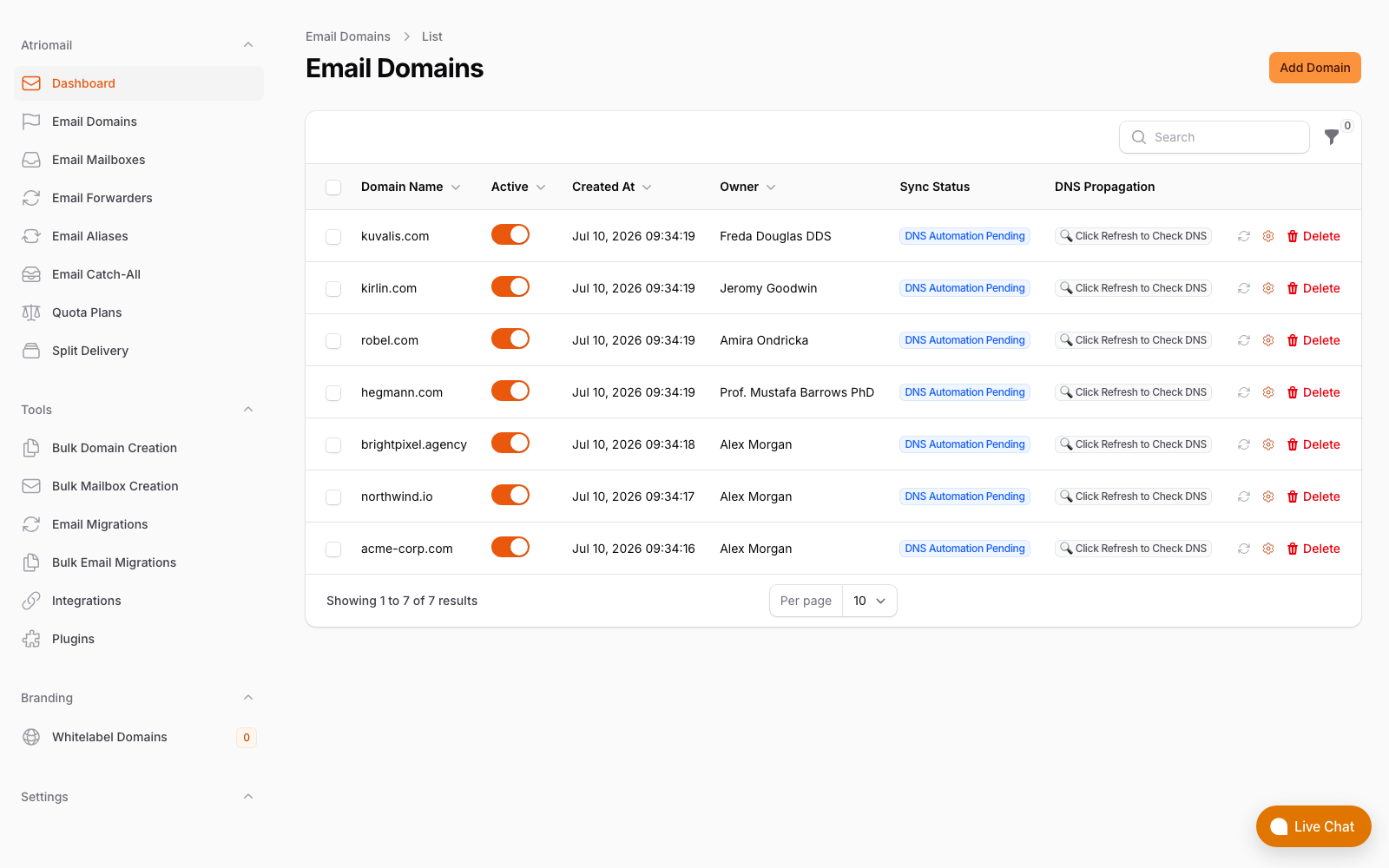
The Email Domains list in the panel. Domains and mailboxes created through the API appear here exactly as they would if you'd added them by hand, since the API and the panel operate on the same underlying account.
This is also where the API and WHMCS module genuinely diverge in what they're for. The WHMCS module ties provisioning to a WHMCS order and its product configuration; the API has no concept of an order at all; it just does what the request asks. That makes it a better fit for a reseller whose customer and billing relationship already lives somewhere else, whether that's a custom client-management system an agency already runs or a support platform that should be the one place staff look up a client's mailbox count.
Single-Use Sign-In Links and Migration Jobs
Your billing system or portal can request single-use sign-in links through the API: each one is valid for 60 seconds and works once, and it takes a customer straight into their own Atriomail panel without them needing a separate Atriomail username and password. This is not SAML or OpenID Connect, and it isn't a general-purpose single sign-on mechanism; it's a narrow, short-lived link generated on demand, the same underlying building block the WHMCS and Blesta modules use for their own "open your panel" buttons, just available directly to your own system instead of locked inside those modules. If you're building a portal where a client logs into your site and should be able to click through to manage their mailboxes, this is the piece that makes that work without you having to build or store any Atriomail credentials for them yourself.
IMAP migration jobs can also be created, updated, paused and removed through the API, using a password or app password for the source mailbox the same way a migration run through the panel would. That's useful if onboarding a client's existing mail is part of the same automated flow as creating their mailbox in the first place: create the mailbox, create the migration job, then let your integration poll the job rather than someone logging into the panel to babysit it. The panel's own migration status view, covered in the knowledge base's checking migration status article, tracks the same underlying states a migration job moves through, scheduled, running, completed, failed or cancelled, whether you're watching it by eye in the panel or polling it through the API from your own system. If a book of migrations is large enough that it needs planning rather than just scripting, that's the same large-book guidance covered in the step-by-step migration playbook: every account still needs its own sign-in credentials, API-driven or not. Single-use sign-in links are also useful outside a customer-facing portal: a support team working from a structured client support process can generate one to open a specific customer's panel while troubleshooting, without ever handling that customer's own Atriomail password.
What This Means for Your Business
Take the same 200-mailbox client book used throughout Atriomail's pricing examples. At $1.39 per mailbox per month, that book costs $278.00 a month wholesale (200 × $1.39). Billed at $5.00 per mailbox, you collect $1,000.00 from the client and keep $722.00 a month above wholesale, before card fees, support time and any white-label add-on fee. None of that changes depending on whether those 200 mailboxes were created by hand in the panel, through the WHMCS module, or through the API: the per-mailbox price in Atriomail is identical regardless of how a mailbox was provisioned, the same figures published on the pricing page either way, and the same usage-based pricing logic that applies to every mailbox on the account.
What the API changes is where that provisioning work happens. A reseller running a custom portal, or billing clients through a system neither the WHMCS nor the Blesta module plugs into, would otherwise be stuck doing Atriomail's side of onboarding by hand: log into the panel, add the domain, wait for the security check, add the mailboxes, set the caps, repeat for the next client. The API lets that sequence live in your own system instead, triggered the moment a client signs a contract in whatever tool you already use to manage that relationship. For an agency already describing its own white-label email operation to clients, that's the difference between "we'll set your mailboxes up within a day" and the setup happening automatically the moment the deal closes in your own system.
Work out the margin before you build the integration. Wholesale stays $1.39 per mailbox whether a mailbox is created by hand, through WHMCS or Blesta, or through the API; only your resale price changes what you keep.
Limits to Know
- A key carries the full permissions of the account that created it. There are no scoped or read-only keys today, so an integration that only needs to read data still holds a key that can change anything.
- No webhooks. Nothing pushes a notification when a mailbox, domain or migration job changes state; an integration has to poll for updates instead.
- No bulk mailbox endpoint. The API provisions domains and mailboxes one request at a time. For a large onboarding batch, the panel's own bulk domain and mailbox creation tools, covered in the client book onboarding guide, are the right tool, not a scripted loop of individual API calls.
- 30 requests per minute. Fine for provisioning and periodic syncing; plan around it if you're polling migration jobs or domain status frequently.
- Not SAML, OpenID Connect or enterprise SSO. Single-use sign-in links solve "get this one customer into their panel right now," not a general single sign-on setup.
- Per-domain caps are API or WHMCS-module only. They can't be set from the panel interface itself, and a cap can't be lowered below a domain's current usage.
Frequently Asked Questions
Do I need WHMCS or Blesta to use the Atriomail API?
No. The API works as a standalone integration point for any system that can send HTTPS requests with a custom header. WHMCS and Blesta each have their own purpose-built Atriomail module, but neither is required to use the API directly.
How do I get an API key?
API keys are created inside the Atriomail panel. The full key is shown once at creation time; after that, Atriomail stores only a hashed version, so save it securely when it's generated. A key can have an expiry date, and can be switched off or regenerated at any time.
Can I create a read-only key for my support team?
Not today. Every API key carries the full permissions of the account that created it; there's no scoped or read-only key type. Treat any key you generate as equivalent to full account access.
Does the API support webhooks so I know when something changes?
No. There's no webhook support for mailbox, domain, quota or migration events. An integration needs to poll the relevant endpoint to find out whether something has changed.
What's the API's rate limit?
Up to 30 requests per minute. That covers typical provisioning and status-checking workloads, but it's not designed for scripting large batches of mailboxes in one burst; the panel's bulk creation tools exist for that instead.
Can single-use sign-in links replace a full single sign-on setup?
No. A single-use sign-in link is valid for 60 seconds and works once, meant for dropping a specific customer into their panel on demand. It isn't SAML, OpenID Connect or any form of enterprise SSO.
Recommended
- Bulk-Adding Domains and Mailboxes in Atriomail
- Multi-Client Email Management for Agencies
- A Guide to White-Label Email for Agencies
- The Agency Playbook: Step-by-Step Email Migrations with Atriomail
- What Is Reseller Email Hosting?
- Pricing and the Reseller Margin Calculator
Latest from the blog
- How to Set Up BIMI So a Client's Logo Shows Up in Gmail and Yahoo · Oct 12, 2026
- DreamHost Email vs Atriomail: What "Unlimited" Doesn't Cover for Resellers · Oct 10, 2026
- A Client's Email Account Was Compromised: Why a Password Reset Alone Doesn't Fix It · Oct 9, 2026
- Aliases, Forwarders and Catch-Alls in Atriomail: The One Rule That Decides When They Work · Oct 8, 2026
- How to Move a Client's DMARC Policy to p=reject Without Breaking Their Mail · Oct 7, 2026