
A client with five mailboxes forgives small mistakes. A client with 200 doesn't: a DNS record copied wrong gets copied wrong 200 times, a migration started before anyone collected every account's password stalls halfway through, and a domain added before you meant to cut over can move a company's live mail on the spot. Agencies and hosting providers land a client this size more often than a steady trickle of five-mailbox signups would suggest, usually because an existing host is being retired, a reseller book changed hands, or a client has simply outgrown whatever setup they started with.
Atriomail is built to take a client that size through in a handful of batch steps rather than two hundred individual ones, but which steps happen in which order genuinely changes the outcome. This is the checklist worth working through before the first of those 200 mailboxes gets created: what each domain's DNS host means for how its records get published, what the automated security check does and when, how a migration this size actually gets planned instead of just started, and where the bulk tools and per-domain caps live so the book stays inside the limits you set for it.
Table of Contents
- Key Takeaways
- Who This Is For
- What You Need Before You Start
- Confirm the Domains' DNS Situation First
- Add the Domains and Clear the Security Check
- Decide How the Migration Will Run
- Create the Mailboxes and Set the Caps
- What This Means for Your Business
- Limits to Know
- Frequently Asked Questions
Key Takeaways
| Check | What decides it | What Atriomail does |
|---|---|---|
| Each domain's DNS host | Only Cloudflare and Namecheap get mail records written automatically | Every other host needs the records copied by hand from that domain's DNS Setup dialog |
| Connection order | The DNS provider has to be connected and its domains imported before a domain is added in Atriomail | Adding a domain first and connecting DNS afterward skips the automatic path |
| When mail actually cuts over | On a connected account, Atriomail writes the MX record as soon as a domain clears its security check | Add the domain only once you're ready to switch that domain's mail, not earlier |
| How big a batch can go in at once | The bulk tools accept plain text only, one entry per line | Up to 500 domains, or up to 500 mailboxes on one domain, in a single step |
| Migrating the client's existing mail | Each source mailbox needs its own password; Microsoft 365 and Exchange Online can't sign in over IMAP at all | Bulk migration tracks a whole book in one job; a book this size should be planned with Atriomail's team first |
| Keeping the book inside its limits | Per-domain mailbox and storage caps aren't set in the panel | Set through the REST API or the WHMCS module, with a request over the cap refused automatically |
See the real panel before you commit to a client this size. Creating an Atriomail account is free and needs no card, and you can add domains and test the bulk tools before paying anything; mailboxes are billed from the first one you create.
Who This Is For
Resellers, agencies and MSPs who already have an Atriomail account and are about to bring on a client at the upper end of a typical book, somewhere from a hundred mailboxes up, not someone creating their very first mailbox. If this is your first client on Atriomail, the overview of what reseller email hosting involves is a better starting point; if you're already running several smaller client domains and this is the one that's meaningfully bigger than the rest, the guide to managing email across several agency clients covers the operational side once this one joins the book.
What You Need Before You Start
- An Atriomail account, with the client's domain or domains decided. Creating one is free and needs no card.
- Each domain's current DNS host identified. Whether it's Cloudflare, Namecheap or something else changes the entire first step below.
- The exact list of mailbox usernames to create, as plain text, one per line. The bulk mailbox tool doesn't accept a CSV or a spreadsheet.
- If the client's mail is moving from an old host, each source account's own password (or app password, for Gmail, Google Workspace, Yahoo or iCloud), and confirmation the source isn't Microsoft 365, Exchange Online or Outlook.com, which the built-in migration tool can't sign in to.
- If you're billing through WHMCS, an API key with the admin role, a WHMCS 9 install, and the product's default mailbox and storage limits raised from their defaults, which otherwise cap a new client at 5 mailboxes and 15 GB.
- Your own resale price decided before you quote the client, since Atriomail charges you the same $1.39 per mailbox whether the book is 20 mailboxes or 200; the margin calculator on the pricing page is a fast way to test a number before the call.
Confirm the Domains' DNS Situation First
The single biggest thing that changes how a 200-mailbox onboarding goes is which DNS host each of the client's domains actually uses. Atriomail writes a domain's mail records, MX, SPF, DMARC, autodiscover and autoconfig plus the DKIM key, automatically, but only for domains in a connected Cloudflare or Namecheap account, and only once that domain has already been imported into Atriomail from the connected provider. The order matters: connect the provider, let Atriomail import its domain list, then add the domain. Adding the domain first and connecting DNS afterward skips the automatic path, and the domain is left showing DNS Automation Pending until someone adds the records by hand. The guide to connecting Cloudflare and Namecheap for automatic mail DNS covers that connection flow step by step.
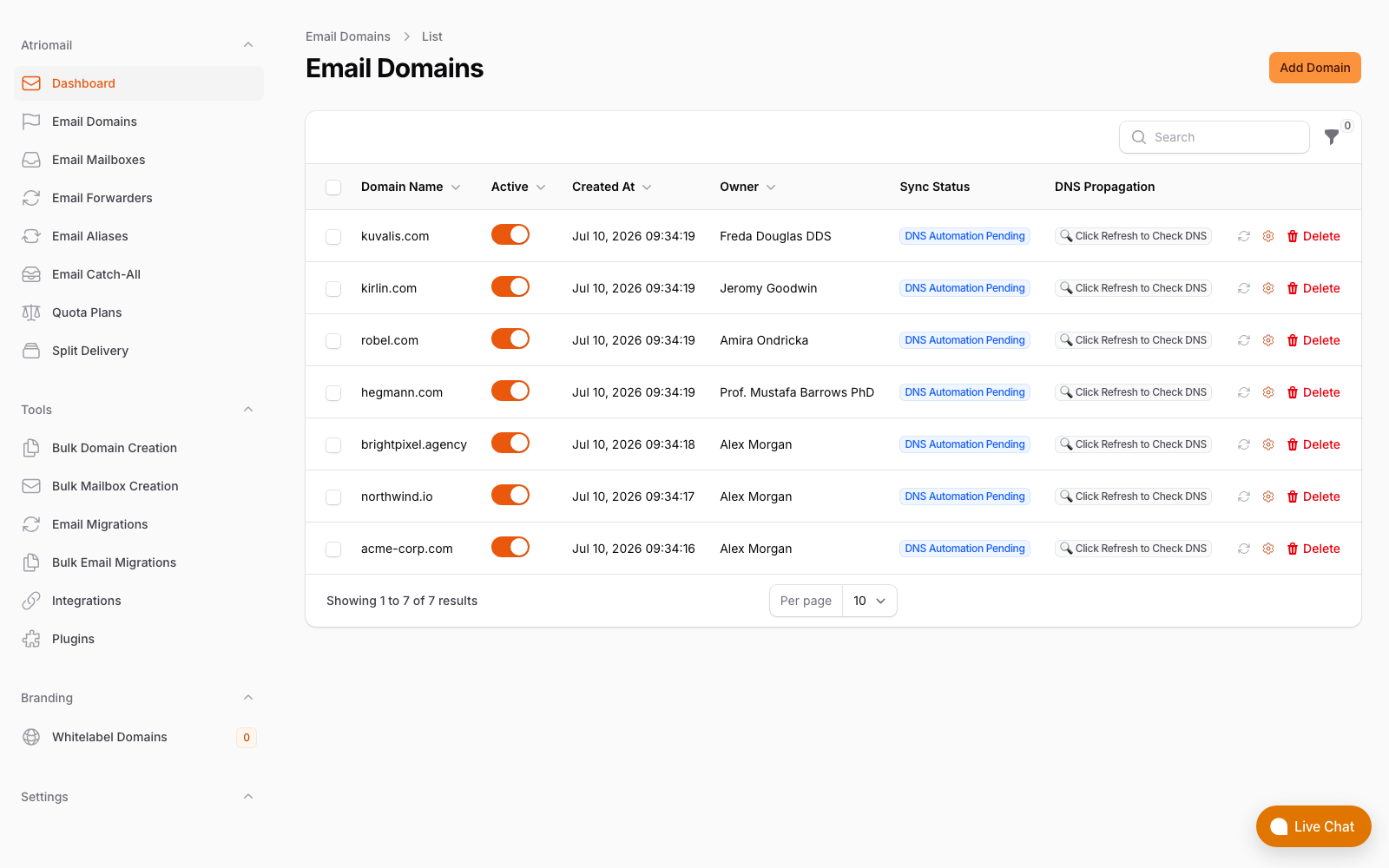
The Email Domains list, real panel, no mockup: every domain here shows DNS Automation Pending until it's imported from a connected Cloudflare or Namecheap account, or its records are added by hand.
For every other DNS host, which covers most registrar-managed DNS and most control-panel DNS, each domain's DNS Setup dialog in Atriomail lists the exact MX, SPF, DMARC, DKIM and Amazon SES verification records to add, each with a copy button. At 200 mailboxes split across a handful of domains, that's a handful of manual record-copying sessions to schedule in before onboarding day, not something to discover while a client is already waiting on their first mailbox. The domain management and branding guide covers adding and organizing domains in more depth, and the knowledge base's guide to automatic DNS setup walks through both the connected and manual paths screen by screen.
There's one more consequence worth planning around specifically: on a connected account, Atriomail writes the MX record as soon as the domain clears its security check, which moves that domain's mail immediately. If this client is migrating off an existing host, add the domain in Atriomail only once you're actually ready to cut that domain's mail over, not while you're still testing or waiting on the migration to finish.
Know which path each domain takes before onboarding day. Automatic DNS in Atriomail covers Cloudflare and Namecheap; every other host uses the DNS Setup dialog's copy-button records instead.
Add the Domains and Clear the Security Check
Once each domain's DNS path is settled, adding the domains themselves is a batch operation, not 200 individual clicks. The panel's Bulk Domain Creation tool, under Tools in the sidebar, takes a plain text list of domains, one per line, up to 500 in a single step, the same mechanics covered in more depth in the guide to bulk-adding domains and mailboxes in Atriomail. For a single-domain client with 200 mailboxes, this step is one domain, not a batch at all; for a client spread across several domains, a handful of lines covers the whole book in one pass.
Every domain, bulk-added or not, goes through the same short automated security check before it can be used. Bulk creation skips the repeated clicking, not the check itself, so a batch of domains clears at whatever pace the check runs, not instantly. Domains themselves are never billed by Atriomail, so adding every domain the client owns costs nothing until mailboxes start getting created on them, useful if the client's real domain count is still being confirmed.
Decide How the Migration Will Run
If this client's mail already exists somewhere else, migration is the step most likely to go wrong at this scale if it isn't planned before mailboxes get created. Atriomail's bulk migration tool lists many mailboxes from the same old server in a single job and tracks how many completed or failed, but every account still needs its own password, or app password for Gmail, Google Workspace, Yahoo or iCloud; there's no single credential that unlocks a whole book at once. For a source server that's typical cPanel, Plesk or DirectAdmin hosting, that's 200 passwords to collect before the job can start, which is itself the main scheduling constraint, not anything Atriomail's side of the job does slowly.
If the source is Microsoft 365, Exchange Online, Outlook.com, Hotmail or Live.com, the built-in migration tool can't sign in to it at all. Microsoft no longer allows password sign-in over IMAP, so moving a Microsoft 365 tenant needs a different route; talk to Atriomail's team before you quote a client on that timeline. For everything else, a single mailbox's migration can run as a dry run first to confirm the sign-in works, or get scheduled for later, and the panel tracks each job through its states, the same ones covered in the knowledge base's guide to checking migration status. The guide to bulk-migrating a client's mailboxes without losing mail and the step-by-step migration playbook both cover the mechanics of running a job this size in more depth than fits here.
A book of 200 mailboxes is large enough that Atriomail asks for it to be planned with the team first, rather than queued up and started cold. That's a scheduling conversation, not a technical blocker, and it's worth starting before you've promised the client a cutover date.
Create the Mailboxes and Set the Caps
With the domain's DNS path settled and a migration plan in place if one's needed, creating the mailboxes themselves is the same bulk operation as the domains: Bulk Mailbox Creation, one domain per batch, up to 500 usernames pasted in as plain text. A 200-mailbox client on a single domain fits in one batch; a client spread across domains needs one batch per domain, selected before the list gets pasted in. Each mailbox created this way is billed exactly the same as one created individually, $1.39 a month with 15 GB included, so there's no bulk discount and no bulk markup, only less clicking.
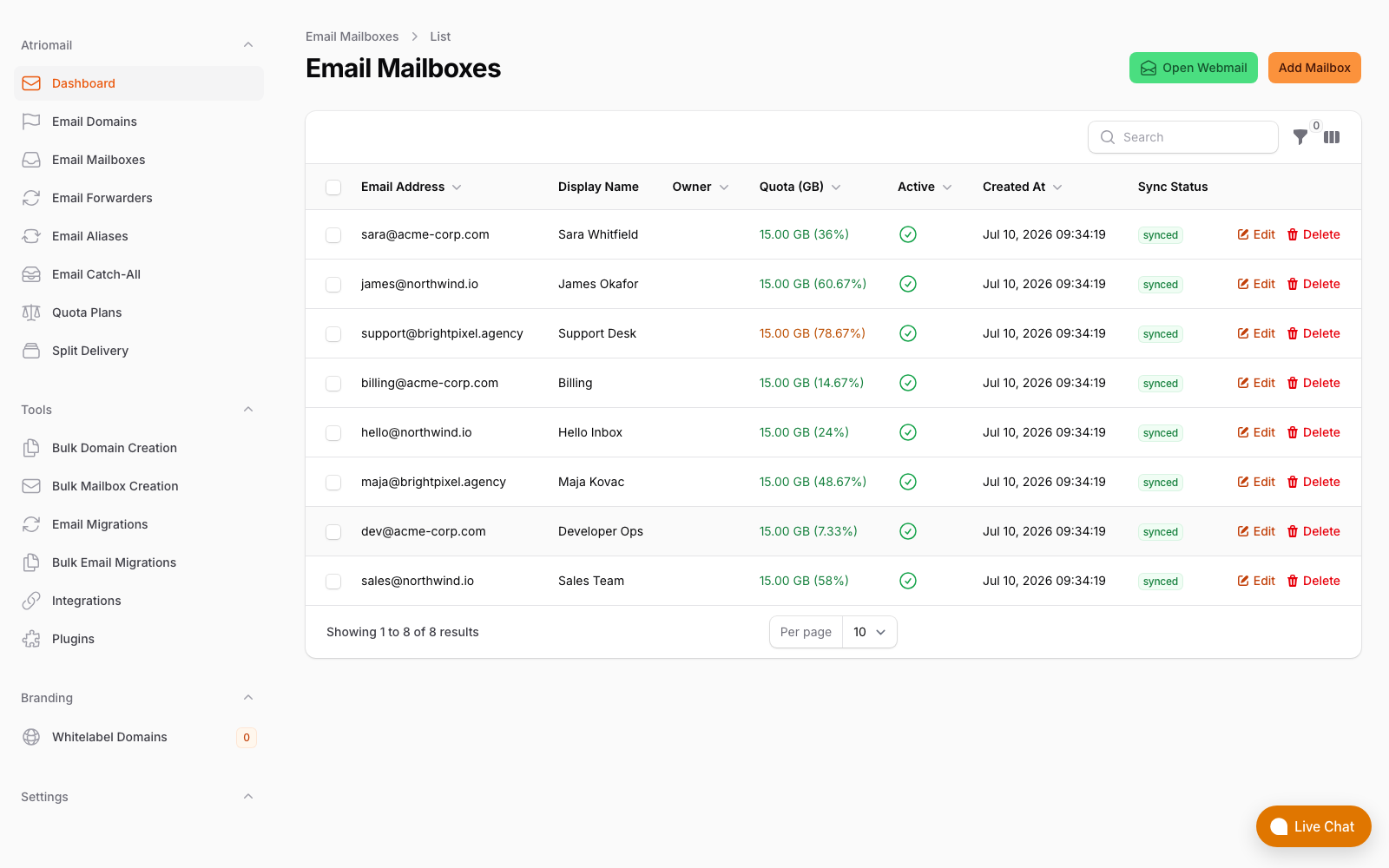
The Email Mailboxes list, real panel, no mockup: quota usage and sync status for every mailbox on the account, the same view a 200-mailbox batch lands in once it's created.
A book this size is also where capping a client's own ability to add mailboxes or storage starts to matter, so the account can't quietly grow past what was quoted. Per-domain caps on mailbox count and total storage aren't set in the panel itself; they're set through the REST API or the WHMCS provisioning module, and once set, a request over the cap is refused automatically, while the cap itself can't be lowered below whatever the domain is already using. The guide to aliases, forwarders and catch-alls covers the one ordering rule that applies once mailboxes exist: a domain needs at least one paid mailbox on it before any alias, forwarder or catch-all can be added, which only matters at this scale if department addresses like support@ or billing@ are part of the plan.
One more thing worth knowing before the batch finishes: some accounts are asked to verify their identity, for example once an account reaches 10 mailboxes, as an ordinary part of onboarding a book this size, not something specific to any one client.
What This Means for Your Business
The standard 200-mailbox book costs $278.00 a month wholesale at Atriomail's $1.39 per mailbox. Billed at $5.00 per mailbox, that's $1,000.00 collected from the client and $722.00 a month kept above wholesale, before card fees, support time and any white-label add-on fee. That number doesn't move whether the 200 mailboxes land in one bulk batch or get created one at a time over a month; the mechanics of usage-based pricing and the margin math at different book sizes both work from the same $1.39 wholesale figure this one does.
What does change the margin, at this scale specifically, is everything this checklist covers that isn't the per-mailbox price: a DNS mistake on a domain without automatic records means redoing manual work 200 mailboxes' worth of client complaints later rather than once, and a migration started without collecting every password up front stalls mid-book instead of finishing on schedule. The time those mistakes cost doesn't show up on the Atriomail invoice, but it comes straight out of the margin the mailbox price was supposed to protect.
Moving 50 or more mailboxes as part of this onboarding? A book that size should be planned with Atriomail's team before you commit a client to a cutover date, not queued up and started cold.
Limits to Know
- Automatic DNS only covers Cloudflare and Namecheap. On any other host, including Route 53 or DNSimple, add the records from the DNS Setup dialog by hand.
- The bulk tools cap at 500 per step, plain text only. There's no CSV import for either bulk domain or bulk mailbox creation.
- Migration moves mail only. Contacts, calendars, tasks, mail rules and signatures don't come across and have to be recreated separately.
- Microsoft 365, Exchange Online, Outlook.com, Hotmail and Live.com aren't migration sources. Microsoft no longer allows password sign-in over IMAP, so those need a different route entirely; talk to the team before quoting a timeline.
- Per-domain caps live in the API and WHMCS module, not the panel. A reseller managing accounts by hand in the panel doesn't have a built-in way to cap one domain's growth.
- Support runs during business hours, not around the clock. Worth setting that expectation with the client directly if onboarding day runs into an evening, a detail covered in the guide to building a client support process.
Frequently Asked Questions
Can I create all 200 mailboxes in one step?
If they're all on one domain, yes: Bulk Mailbox Creation accepts up to 500 usernames pasted in as plain text in a single batch. If the client's mailboxes are spread across several domains, it's one batch per domain, since the tool creates mailboxes on one domain at a time.
Does adding a domain immediately move the client's mail?
Only on a connected Cloudflare or Namecheap account, where the MX record is written as soon as the domain clears its security check. On every other DNS host, the records sit in the DNS Setup dialog until someone copies them in by hand, so nothing cuts over automatically.
Can Atriomail migrate a client off Microsoft 365?
Not with the built-in tool. Microsoft no longer allows password sign-in over IMAP, so moving a Microsoft 365 or Exchange Online tenant needs a different route; talk to the team before you quote it.
Who do I talk to before migrating a large book?
Atriomail's own team. A book of 50 mailboxes or more should be planned before it's started, not queued up cold, since every account needs its own password collected in advance.
Can I stop a client's book from growing past what was quoted?
Yes, but not from the panel. Per-domain caps on mailbox count and total storage are set through the REST API or the WHMCS module; a request over the cap is refused, and the cap can't be lowered below what's already in use.
Will I need to verify my identity to onboard a client this size?
Some accounts are asked to, for example once an account reaches 10 mailboxes, as a standard part of account verification, not something specific to any one client or domain.
Recommended
- What Is Reseller Email Hosting?
- Multi-Client Email Management for Agencies
- Bulk-Adding Domains and Mailboxes in Atriomail
- Connecting Cloudflare and Namecheap for Automatic Mail DNS
- The Agency Playbook: Step-by-Step Email Migrations
- Pricing and the Reseller Margin Calculator
Latest from the blog
- How to Rotate a DKIM Key Without Breaking Mail That's Already Signed · Oct 21, 2026
- Microsoft Cut CSP Partner Margins on Exchange Online: What It Does to Your Resale Price · Oct 20, 2026
- How to Fix Forwarded Mail That's Failing SPF and Breaking DMARC · Oct 19, 2026
- Hostinger Retires cPanel Reseller Hosting: What Happens to the Client Email You Bill · Oct 17, 2026
- How to Set Up MTA-STS So a Client's Mail Can't Be Downgraded to Plaintext · Oct 16, 2026