
A client's domain probably already has SPF, DKIM and DMARC doing their job: proving a message really came from where it claims to. None of those three records say anything about what happens to the message in transit between mail servers. Inbound SMTP mostly relies on opportunistic STARTTLS, and "opportunistic" is the operative word: if the receiving server can't present a valid certificate, or something on the network path strips the STARTTLS offer out of the conversation, the sending server is generally allowed to fall back to plain, unencrypted delivery rather than refuse outright. MTA-STS, defined in RFC 8461, closes that specific gap. Once published and set to enforce, a compliant sender has to refuse the connection instead of silently downgrading it. Atriomail hosts the mailboxes behind a domain and signs its outgoing mail, but the domain's incoming side, the MX records and whatever sits in front of them, is where MTA-STS actually lives, true whether the mailboxes behind it are on Atriomail or anywhere else.
This post works through the actual rollout: writing and hosting the policy file, publishing the two DNS records that go with it, watching TLS reporting before trusting the result, and moving from a safe testing mode to enforce without creating a mail outage nobody can explain to a client. It ends with what this looks like for a domain whose mailboxes live on Atriomail specifically, including the one piece Atriomail's own DNS automation doesn't handle here.
Table of Contents
- Before You Start
- Publish the MTA-STS Policy File
- Publish the MTA-STS DNS Record
- Set Up TLS Reporting Before You Enforce Anything
- Move From Testing to Enforce
- How to Verify It Worked
- Common Mistakes and How to Avoid Them
- Doing This on Atriomail
- Frequently Asked Questions
Key Takeaways
| Point | Why it matters |
|---|---|
| MTA-STS is three separate pieces, not one record | An HTTPS policy file, a DNS TXT record pointing at it, and in practice a TLS-RPT record too, or you're rolling this out blind. |
Always start in testing mode |
Google's own setup guidance recommends testing before enforce. In enforce mode, a certificate problem blocks delivery outright instead of just degrading it. |
| A cached policy survives an outage, for better and worse | RFC 8461 requires senders to keep using the last valid cached policy until it expires, even if your HTTPS endpoint goes down later. A mistake published with confidence lingers the same way. |
| The policy file fails silently | A redirect, the wrong content type, or a bad certificate on the policy host, and the whole thing is simply never read. Nothing in your own browser will tell you that. |
| What Atriomail does for this | Doesn't generate or publish the MTA-STS or TLS-RPT records on any DNS provider, but mail delivered to the mailboxes it hosts moves over encrypted connections, and the MX hostname already shown in that domain's DNS Setup dialog is what belongs in the policy's mx: line. |
Three records, one careful rollout. Atriomail generates, and on a connected Cloudflare or Namecheap account can publish, a domain's MX, SPF, DMARC, autodiscover, autoconfig and DKIM records, the authentication and routing a client's mail already needs. MTA-STS and TLS reporting are a separate, transport-layer step you add at the DNS host yourself, regardless of where the mailboxes behind that domain actually live.
Before You Start
- SPF, DKIM and ideally DMARC already working on the domain. MTA-STS doesn't depend on them technically, but it's a transport-security layer on top of authentication you should already have solid; moving a client's DMARC policy to enforcement is the higher-priority project if that part isn't done yet.
- A subdomain you can serve over HTTPS with a valid, publicly trusted certificate. A self-signed certificate will fail the fetch every time, silently.
- The exact, complete list of hostnames your domain's MX records currently point to, including any secondary or backup MX. Missing one breaks mail from that specific route once you enforce.
- Access to add TXT records at two specific names in the domain's DNS zone, plus a way to host a static file at a third. All three are detailed below.
- Somewhere to actually receive TLS-RPT reports, even if it's just a dedicated mailbox alias for now. The reports arrive as compressed attachments, not something to read by eye in a shared inbox.
- At least a week or two of patience before moving to enforce. Rushing this step is where a security improvement turns into a mail outage.
Publish the MTA-STS Policy File
The policy itself lives at a fixed, non-negotiable location: https://mta-sts.clientdomain.com/.well-known/mta-sts.txt, served from a subdomain literally named mta-sts, over a connection with a currently valid certificate. Per RFC 8461, the fetch rules have no tolerance for shortcuts: HTTP redirects must not be followed, so a stray "naked domain to www" redirect on that subdomain means the file is never actually read, even though it loads fine in your own browser. HTTP caching must not be used, and only a plain 200 response counts. The file should be served as text/plain.
The file's contents are four fields, each on its own line:
version: STSv1
mode: testing
mx: mail.clientdomain.com
max_age: 86400
version is always literally STSv1. mode is one of none, testing or enforce; always start with testing, which is also what Google Workspace's own current setup guidance recommends before any domain moves to enforcement. mx needs one line per valid MX hostname the domain actually uses; list every one your domain's DNS setup currently points to, since a hostname missing from this list fails the check even when the connection to it is genuinely secure. max_age is in seconds, capped at 31,557,600 by the spec (roughly a year); during testing, a short value such as 86400 (one day) is worth starting with, since a mistake published with a long max_age lingers in other senders' caches well past the point you've noticed and fixed it.
Publish the MTA-STS DNS Record
Separately from the HTTPS file, publish a TXT record at _mta-sts.clientdomain.com (note the underscore, a different name from the mta-sts.clientdomain.com host serving the file itself, and a mix-up worth double-checking):
_mta-sts.clientdomain.com. IN TXT "v=STSv1; id=20261016000000Z;"
The v= tag is always STSv1, first. The id= tag is a short string, 1 to 32 alphanumeric characters, whose only job is to tell a sender with a cached policy whether anything changed, without forcing a refetch on every message. A timestamp-style string, as in the example, is the common convention. The part that catches people out: bump this id value every time you edit the policy file's contents, including a mode change, not only when you first publish it. Senders key their cache on this value, the same attention to exact record syntax that any DNS-based mail standard rewards and punishes in equal measure.
Set Up TLS Reporting Before You Enforce Anything
TLS-RPT, defined separately in RFC 8460, is what actually tells you whether moving to enforce would break anything, instead of finding out from a client's phone call. Publish a second TXT record at _smtp._tls.clientdomain.com:
_smtp._tls.clientdomain.com. IN TXT "v=TLSRPTv1; rua=mailto:tls-reports@clientdomain.com;"
The rua= tag accepts either a mailto: address or an https: endpoint, and can list more than one, comma-separated. Participating large receivers, Google among them, send periodic reports summarizing successful and failed TLS negotiations from their side when delivering to your domain: exactly the visibility needed before trusting an enforce rollout. Google's own documentation is upfront that adoption is uneven industry-wide: "you might not receive many reports until TLS reporting is more widely used by mail providers," so a quiet reports inbox for the first few days isn't on its own a sign nothing is working. Point the address at a dedicated alias; the reports land as compressed JSON attachments meant for a tool to parse, not for a person to read directly, a similar discipline to reading a DMARC aggregate report without guessing at the fields.
Get the hostname list right before anything else moves. Every valid MX hostname for the domain has to appear in the policy's mx: line exactly, or legitimate mail starts failing once enforce is live. For an Atriomail-hosted domain, that hostname is already sitting in the panel's own DNS Setup dialog.
Move From Testing to Enforce
Give the TLS-RPT reports a real observation window, at least a week or two, before touching the mode field. Once the reports are clean, or failures in them are specific and already explained (a client's legacy server needs a certificate renewal, say), change mode: testing to mode: enforce and bump the DNS record's id value in the same change, so caches pick it up rather than continuing to apply the old policy for whatever the previous max_age said.
Enforce mode is the entire point of doing this, and it's unforgiving by design: RFC 8461 requires a compliant sender to refuse delivery over a connection that fails certificate validation or doesn't match one of the listed MX hostnames, rather than falling back to plaintext. A problem that used to be invisible, a quietly expired certificate degrading silently to an unencrypted connection, now visibly blocks mail instead. That's the improvement, but the certificate on that mail server now matters in a way it didn't before, and renewing it on schedule stops being optional. The same RFC's caching rule cuts both ways: a sender that already has your policy cached keeps honoring it even through a temporary outage of your own HTTPS endpoint, which protects a rollout already committed to, but also means an enforce decision you later regret doesn't undo itself until that cached max_age runs out.
How to Verify It Worked
- Query the DNS record with
dig TXT _mta-sts.clientdomain.com +shortand confirm the value matches what you published,idincluded. - Fetch the policy file the same way a sender would, with
curl -i https://mta-sts.clientdomain.com/.well-known/mta-sts.txt, checking for a plain 200 response, no redirect, and the four fields reading back exactly as written. A browser will happily follow a redirect a sender must refuse, so don't trust a browser check alone. - Give TLS-RPT real time. Reports typically arrive once a day from providers that send them at all, and adoption is still uneven industry-wide, so an empty reports inbox after a few hours isn't a sign of failure.
- Run the domain through Atriomail's free DNS checker at /dns-checker/ to confirm the MX, SPF, DKIM and DMARC records it actually checks are still well-formed. It doesn't read or validate the MTA-STS or TLS-RPT records themselves, so a PASS there confirms the authentication and routing foundation, not the transport-security layer you just added on top of it.
Common Mistakes and How to Avoid Them
- A self-signed or expired certificate on the
mta-stssubdomain. Symptom: everything looks published and correct, but TLS-RPT shows no adoption at all, because the HTTPS fetch itself fails before anyone reads the fields inside the file. - An incomplete
mx:list. Symptom: mail from one specific sending source starts bouncing or deferring with a TLS-related error right after moving to enforce, because that one legitimate MX hostname was never added to the policy. - Jumping straight to
enforceon day one. Symptom: a client's mail from a particular sender quietly stops arriving, because a certificate problem nobody caught during testing is now a hard block instead of a silent downgrade. - Forgetting to bump the
idtag when the policy file changes. Symptom: an urgent fix to themx:list or mode doesn't seem to take effect for some senders, still applying the previous cached version for whatevermax_ageit specified. - Confusing the two DNS names. Symptom: the TXT record at
_mta-sts.domain.comis published correctly, but the HTTPS file atmta-sts.domain.com(no underscore) was never set up, or vice versa; both have to exist, and they're easy to conflate. - Treating a redirect as harmless because it works in a browser. Symptom: TLS-RPT shows essentially zero adoption even weeks in, because a redirect on the policy host is something a browser follows invisibly but a policy-fetching sender must refuse.
Rolling this out across a full client book compounds every one of these, the same way any multi-client email change does, and it's worth flagging to the client in advance through whatever client support process already covers DNS changes, the same discipline in the reseller's email security playbook.
Doing This on Atriomail
Atriomail's own DNS automation, covered in more detail in connecting Cloudflare and Namecheap for automatic mail DNS, generates a domain's MX, SPF and DMARC records, its autodiscover and autoconfig records, and its DKIM key, and on a connected Cloudflare or Namecheap account can publish them once the domain clears the security check (confirmed in Atriomail's own documentation at system.atriomail.com/kb/dns-automation/automatic-dns-setup, checked October 2026). MTA-STS and TLS-RPT aren't part of that list, on Cloudflare, Namecheap, or anywhere else: Atriomail doesn't generate either record and doesn't host the mta-sts policy file for you. Setting this up for an Atriomail-hosted domain is the same task described above, done directly at the domain's DNS host, the same as on any other platform.
What Atriomail's panel does give you here is the one detail that's easy to get wrong: the actual MX hostname to put in the policy's mx: line. That's whatever hostname the domain's own DNS Setup dialog already shows. For a reseller using the white-label add-on, that hostname can be the reseller's own branded mail hostname once it's set up and resolving correctly, so a white-label customer's MTA-STS policy lists the hostname their clients' mail actually arrives at. Mail delivered into mailboxes Atriomail hosts already moves over encrypted connections either way: outgoing mail is handed to Amazon SES over an encrypted connection, and the recommended mail-app settings use TLS-encrypted IMAP on port 993 and STARTTLS on SMTP port 587. MTA-STS doesn't change that; it means a domain owner can now require every other sender to use the same kind of connection, with a policy that lives in the domain's own DNS zone rather than inside the panel.
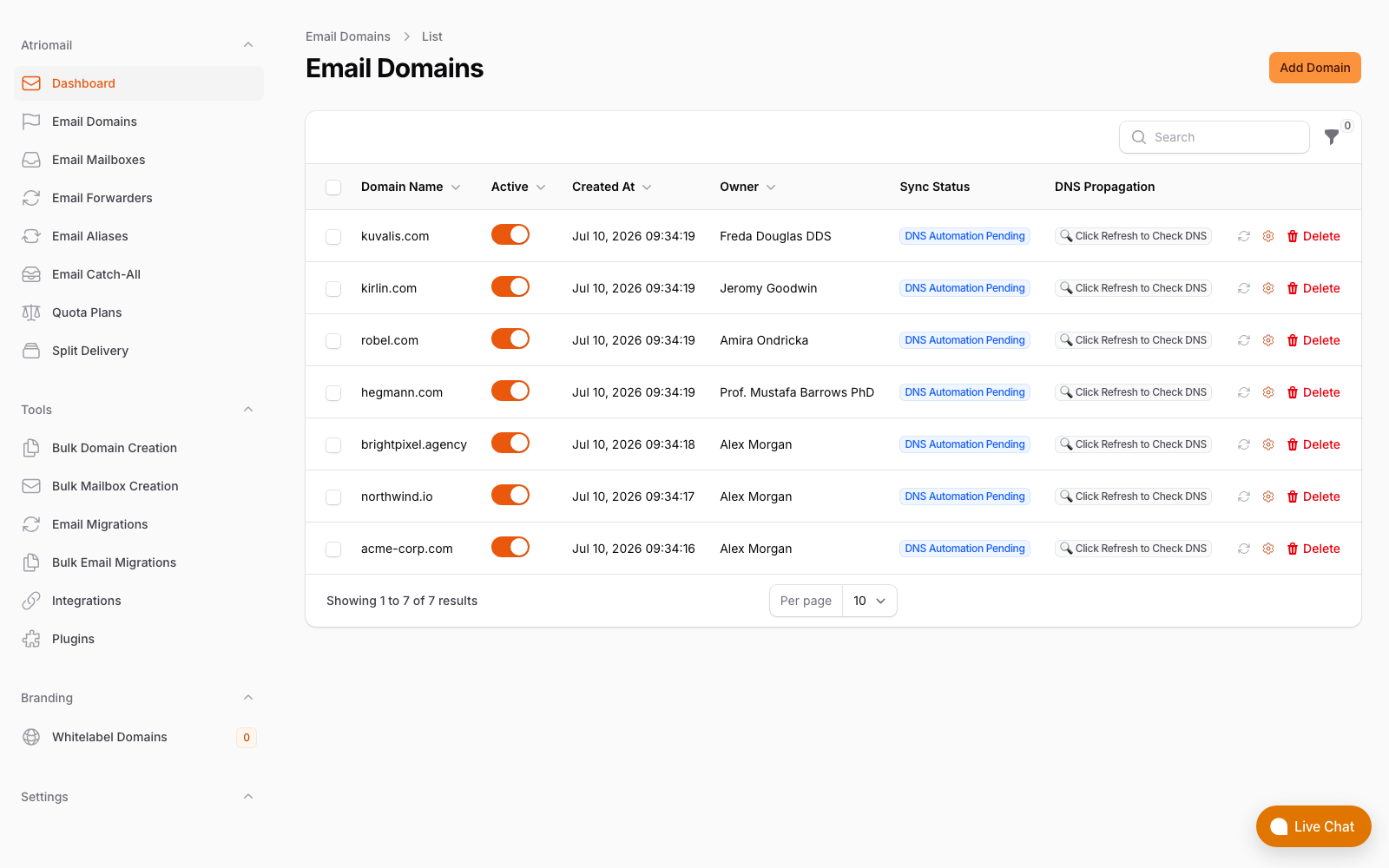
The Email Domains list, showing the DNS records Atriomail generates and syncs: MX, SPF, DKIM and DMARC. MTA-STS and TLS-RPT aren't among them. Real panel, no mockup.
None of this changes what a mailbox costs: a domain gets the same DNS Setup dialog and DKIM signing whether or not it's being prepared for MTA-STS, at $1.39 per mailbox with 15 GB included. Create your account, connect Cloudflare or Namecheap if that's where the domain's zone lives, and work through the policy file, the two DNS records and the testing window above before ever touching mode: enforce.
Encryption and authentication are two different jobs. Atriomail signs a domain's outgoing mail for DMARC alignment and moves mail over encrypted connections by default, but the MTA-STS and TLS-RPT records that let a domain demand the same of everyone sending to it are published directly at the DNS host, the same step whether or not that domain's mailboxes live on Atriomail.
Frequently Asked Questions
Does MTA-STS replace SPF, DKIM or DMARC?
No. SPF, DKIM and DMARC are about proving who actually sent a message. MTA-STS is about how that message travels between servers, requiring a valid, encrypted connection instead of allowing a silent fallback to plaintext. A domain typically needs both layers, not one instead of the other.
What happens if the policy file becomes unreachable after I'm already enforcing?
Per RFC 8461, a sender that already has a valid cached copy of your policy keeps applying it even if a later fetch fails, right up until that cached copy's max_age expires. A brief outage of your policy host doesn't instantly undo an enforce rollout that's already live, but it's not a reason to let the HTTPS endpoint go unmonitored either.
Can I set up MTA-STS for a domain whose mailboxes are hosted on Atriomail?
Yes. It's the same process described in this guide: a policy file hosted on a mta-sts subdomain you control, plus two DNS TXT records at the domain's DNS host. Atriomail doesn't publish either record for you, but the MX hostname to list in the policy is the one already showing in that domain's DNS Setup dialog in the panel.
Does Atriomail publish the MTA-STS or TLS-RPT records automatically?
No. Atriomail's automatic DNS setup, available on a connected Cloudflare or Namecheap account, covers MX, SPF, DMARC, autodiscover, autoconfig and the domain's DKIM key. MTA-STS and TLS-RPT aren't part of that list on any DNS provider, so both are added directly at the DNS host the same way as any other record Atriomail doesn't automate.
Do I need a certificate specifically for MTA-STS, or does the mail server already have one?
Two separate certificates are involved: one for the mta-sts subdomain serving the policy file over HTTPS, and the mail server's own certificate, which has to be valid, non-expired and carry a matching hostname for the TLS connection itself. A mail server already using STARTTLS typically has the second one; the first, the policy-file host's certificate, is usually new infrastructure to set up.
How quickly will senders actually start respecting a new MTA-STS policy?
There's no fixed timeline. Compliant senders are expected to refresh a cached policy roughly once a day, so adoption builds gradually rather than switching on everywhere at once, which is exactly why the testing period and TLS-RPT reports matter before trusting a result either way.
Recommended
- How to Move a Client's DMARC Policy to p=reject Without Breaking Their Mail, Atriomail
- How to Set Up BIMI So a Client's Logo Shows Up in Gmail and Yahoo, Atriomail
- How to Read a DMARC Aggregate Report, Atriomail
- Mastering DNS Automation to Boost Email Deliverability, Atriomail
- The Reseller's Email Security Playbook, Atriomail
- Managing Multi-Client Email at Scale, Atriomail
Latest from the blog
- How to Rotate a DKIM Key Without Breaking Mail That's Already Signed · Oct 21, 2026
- Microsoft Cut CSP Partner Margins on Exchange Online: What It Does to Your Resale Price · Oct 20, 2026
- How to Fix Forwarded Mail That's Failing SPF and Breaking DMARC · Oct 19, 2026
- What to Check Before Onboarding a 200-Mailbox Client in Atriomail · Oct 18, 2026
- Hostinger Retires cPanel Reseller Hosting: What Happens to the Client Email You Bill · Oct 17, 2026