
When a hosting reseller or MSP wins a new client, the first practical question is often what happens to all their old email. A client on a cPanel server, a Plesk host or a Google Workspace account may have years of correspondence filed into folders. Starting with an empty inbox is not an option for most business clients.
Atriomail includes IMAP migration at no additional charge. You pay only for the mailboxes you create at $1.39 per mailbox per month, and the migration itself runs inside the panel with nothing added to the bill. This guide walks through which source servers work, what to prepare before the first job, how to handle Gmail and Google Workspace accounts that require app passwords, how bulk jobs work, and the limits to know before quoting a migration. Create your Atriomail account before starting so you can follow along in the panel.
Table of Contents
- Key Takeaways
- Who This Is For
- What You Need Before You Start
- How Atriomail's IMAP Migration Tool Works
- Migrating from Typical Hosting Mail
- Migrating from Gmail or Google Workspace
- Running a Bulk Migration for Many Mailboxes
- What This Means for Your Business
- Limits to Know
- Frequently Asked Questions
Key Takeaways
| Topic | What to know |
|---|---|
| Migration cost | Atriomail includes migration at no charge. You pay only for the mailboxes you provision at $1.39 per mailbox per month. |
| Which source servers work | Any server that accepts IMAP sign-in with a password: cPanel, Plesk and DirectAdmin hosting mail, Gmail and Google Workspace (app password required), Yahoo and iCloud (app-specific password required). |
| What moves | Mail and folders, with original message dates preserved. Calendars and contacts do not transfer. |
| Destination setup | The destination mailbox in Atriomail must exist before migration starts. For a single account, the panel tests both source and destination credentials before copying anything. |
| Microsoft 365 and Exchange Online | Microsoft no longer allows password sign-in over IMAP. Moving a Microsoft 365 tenant needs a different route; talk to us before quoting it. |
| Bulk jobs | List many accounts from the same old server in one job. Every account needs its own password. Plan large books with the Atriomail team before starting. |
Ready to run your first migration? Creating an Atriomail account is free and no card needed to create your account. Mailboxes are billed from the first one at $1.39 per month.
Who This Is For
This guide is for small MSPs, hosting resellers and agencies who manage 20 to 200 client domains through WHMCS or a similar billing system and need to move those clients' mailboxes to a new provider. If you are migrating clients off a shared hosting server, off a legacy cPanel install, or off a Google Workspace account the client no longer needs the full suite for, the Atriomail migration tool handles the inbox move so you can focus on timing the cutover. Patterns for managing email across many client domains are covered in a separate guide.
What You Need Before You Start
Before running any migration in Atriomail, four things must be in place:
- An Atriomail account with at least one verified domain. New domains go through a short automated security check before mail is active.
- A mailbox on the destination domain. Atriomail requires at least one active mailbox on a domain before a migration job can be created for that domain. Create each destination mailbox first, then start the migration.
- IMAP access on the source server. The source account must accept sign-in over IMAP with a password. For Gmail and Google Workspace that means an app password; for Yahoo and iCloud that means an app-specific password from the provider. For Microsoft 365 and Exchange Online, IMAP password sign-in is no longer available. The knowledge base article on migrating email lists which providers work and what gets moved.
- The credentials for each account to migrate. For a single mailbox you need one username and password. For a bulk job covering many accounts on the same old server, every account needs its own password in the job list.
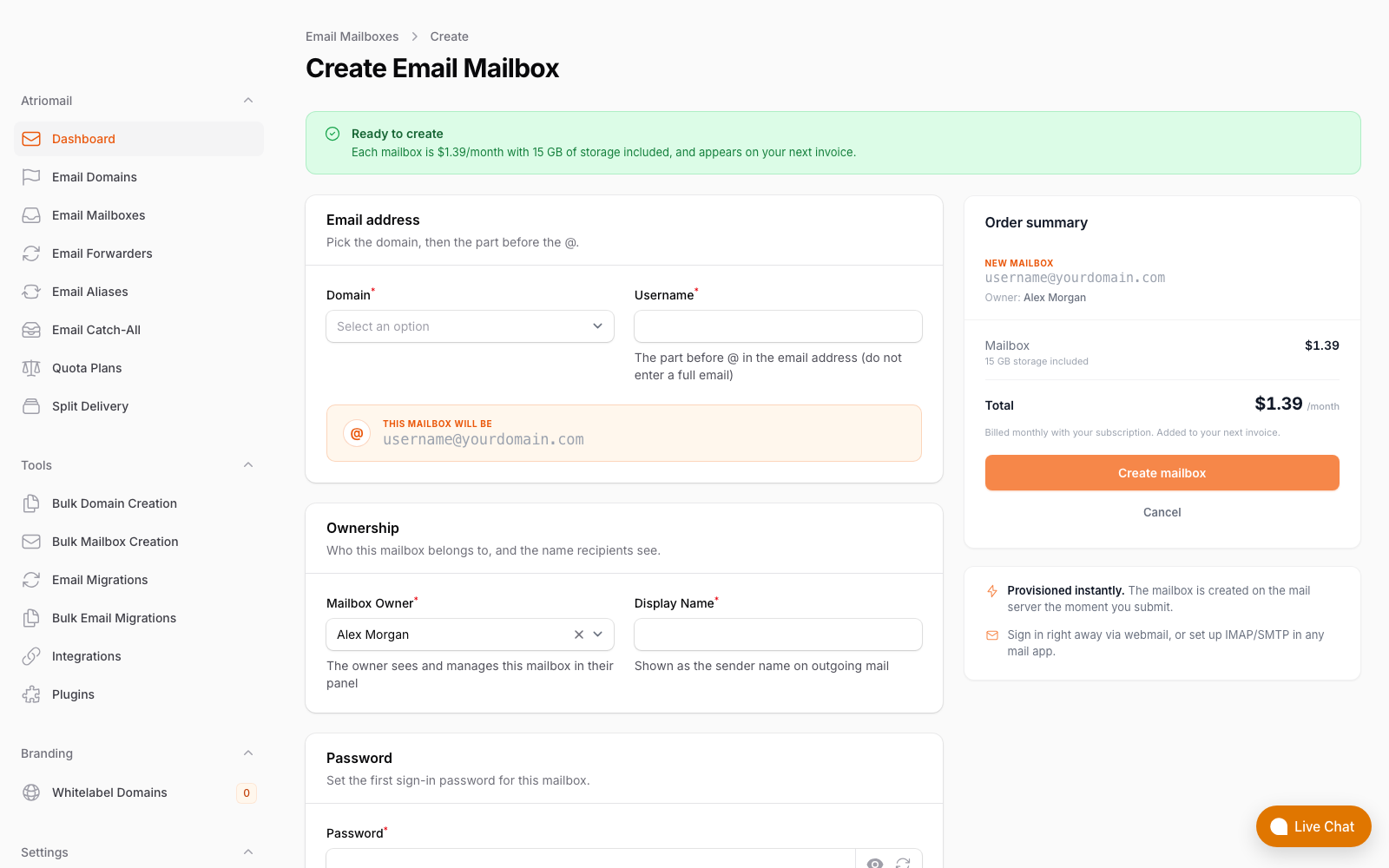
Each destination mailbox must be created in the Atriomail panel before migration begins. Real panel screenshot, no mockup.
How Atriomail's IMAP Migration Tool Works
The migration tool is at Tools, then Email Migrations, in the Atriomail control panel. Each job connects to the source server using a standard IMAP sign-in and copies mail folder by folder into the destination Atriomail mailbox.
For a single-mailbox migration, Atriomail tests the sign-in credentials on both the source and the destination before copying a single message. A wrong password on either side shows up immediately. This catches the most common setup error before a partial copy has started.
Every message copies with its original date preserved, so the client's inbox timeline looks exactly as it did on the old server. Folder names carry over as well.
You can run a dry run first to confirm the source sign-in works and check the scope of the job, or schedule the job to start at a later time. Once running, the panel tracks progress and reports whether the job is running, paused, completed or failed. The migration status guide explains what each status indicator means in practice. If a job stalls or fails, the migration troubleshooting guide lists the most common errors and their causes.
The DNS cutover is separate from the migration job itself. Atriomail starts copying mail as soon as you create the job; you control when to switch the MX record. The standard approach is to run the migration while the old server is still live, confirm the mail has copied, and switch the MX only when the client is ready. Incoming mail continues to arrive at the old server until the MX changes.
Track every job from one place. The Atriomail panel shows each migration's status, message count and any errors in the Tools section. Open the migration status guide to understand what each status means.
Migrating from Typical Hosting Mail
For clients whose mail lives on a standard hosting server running cPanel, Plesk or DirectAdmin, the migration setup is straightforward. The source IMAP server address is usually mail.theirdomain.com or the hosting provider's shared mail hostname. Enter it in the migration form alongside the mailbox username and password, and Atriomail handles the copy.
Before switching the MX, confirm the domain's DNS records are in order on the Atriomail side. On a connected Cloudflare or Namecheap account, Atriomail publishes the MX, SPF, DKIM and DMARC records automatically once the domain clears its security check. For every other DNS host, those records are available in the DNS Setup dialog to copy and add manually. The full sequencing for both cases is in the guide to connecting Cloudflare and Namecheap for automatic DNS.
One timing point matters on connected Cloudflare and Namecheap accounts: Atriomail writes the MX record as soon as the domain passes its security check, which moves mail delivery immediately. On those providers, add the domain in Atriomail only when you and the client are ready to switch. If you want to run the migration before the cutover, keep the domain on a DNS host that is not connected to Atriomail during the migration phase, copy the records manually from the DNS Setup dialog, then connect and switch together when the time is right.
For a full account of how to stage the cutover across multiple clients without disrupting active mail delivery, the agency playbook for email migrations walks through the sequencing in detail.
Migrating from Gmail or Google Workspace
Gmail and Google Workspace accounts can be migrated to Atriomail using an app password. An app password is a 16-character code that Google generates for a specific application in place of the account's main login password. It lets Atriomail sign in over IMAP without requiring the account holder to share their real credentials.
Two conditions must be met before an app password can be created:
- 2-Step Verification must be active on the Google account. Google requires 2SV before the app passwords option appears in account settings. If the account does not have 2SV on, the option is not shown.
- The Workspace admin must allow app passwords for the organization. A Google Workspace admin can block app password creation across the whole organization, either intentionally as a security policy or as a side effect of a broader setting. Before quoting a Google Workspace migration job, confirm with the client that their Workspace admin has not blocked app passwords. If app passwords are blocked, the admin needs to allow them in the Workspace admin console before migration can proceed.
Once the client has an app password (generated under Security, then App passwords, in their Google Account settings), use that 16-character code as the password in the Atriomail migration form. The IMAP server address is imap.gmail.com for both Gmail and Google Workspace accounts; it is not the client's own domain name.
For more on what the client's setup looks like after migrating to Atriomail, the white-label email guide for agencies covers the account structure and what clients see on their own domain. If a client currently uses Cloudflare Email Routing to forward messages from their domain rather than hosting a real mailbox, the comparison between Cloudflare Email Routing and white-label email hosting explains the difference and why forwarding is not a migration source.
Running a Bulk Migration for Many Mailboxes
When a client moves an entire domain, or when you are moving a group of clients off the same legacy hosting server, a bulk migration job in Atriomail lets you list many source accounts in a single operation. The job processes one source server at a time, and every account in the list needs its own IMAP password. You cannot combine mailboxes from different source servers in one bulk job.
The panel tracks completion per account: it shows how many accounts in the job have finished and how many have failed, so you can see at a glance which accounts need attention. A failed account does not stop the rest of the job from continuing.
For books with 50 or more mailboxes, plan the job with the Atriomail team before starting. Some source servers impose IMAP rate limits or session caps that affect how bulk jobs should be structured. Reaching out through the contact page before starting a large job is the recommended approach.
What This Means for Your Business
Every client migrated to Atriomail becomes a recurring line on your own invoice. The margin calculator on the pricing page works through any resale price you choose. At $5 per mailbox on a 200-mailbox book, the wholesale cost is $278 per month at $1.39 per mailbox, billed at $1,000 per month, for a margin of $722 per month before card fees, support time and any white-label fee. That margin sits in your billing system, not a vendor's account.
The migration itself takes nothing out of that margin: Atriomail includes it at no charge. Your cost is the time to gather credentials, set up the jobs and confirm delivery before switching the MX records. If your team spends 10 minutes per account gathering passwords and running the job, 20 accounts is around three hours of staff time. That is the reseller's own estimate to make based on how their workflow runs.
On the per-mailbox pricing model, there is no minimum seat count and no annual commitment. You add clients one job at a time, and billing starts on the first mailbox you create in each account. Once clients are migrated and their mail is live, the guide to setting up branded email for agencies covers what the client-facing panel experience looks like and how to present it under your own brand.
Moving 50 or more mailboxes? Plan the job with the Atriomail team first. Large bulk migrations benefit from discussing source server rate limits and sequencing before the first job runs.
Limits to Know
These are the real constraints on Atriomail's built-in migration tool. Knowing them lets you quote accurately and set correct expectations with clients before any job starts.
- Mail and folders only. Migration copies email and preserves folder structure. Calendars, contacts and tasks do not transfer. Clients who need their contacts or calendar entries from the old server must export those separately before closing the source account.
- IMAP password sign-in required. The source server must accept a standard IMAP login with a password. Servers that have IMAP disabled or that require OAuth-only authentication will not work.
- Microsoft 365, Exchange Online, Outlook.com, Hotmail and Live.com are not supported by this tool. Microsoft no longer allows password sign-in over IMAP. Moving a Microsoft 365 tenant needs a different route than Atriomail's built-in migration; reach out through the contact page before quoting a Microsoft migration job to a client.
- Google Workspace admin restrictions. A Workspace admin can block app passwords organization-wide. Confirm with the client that their admin has not done so before starting.
- One password per account in bulk jobs. There is no shared admin credential that unlocks all mailboxes on a shared hosting server or Google Workspace org. Every account in a bulk job needs its own password in the list.
- Large books need advance planning. For 50 or more mailboxes, plan the job with the Atriomail team first. Never expect hundreds of mailboxes to migrate in parallel overnight without any prior coordination.
- DNS cutover timing on connected accounts. On connected Cloudflare and Namecheap accounts, Atriomail writes the MX record as soon as a domain clears its security check, which switches mail delivery immediately. Add the domain in Atriomail only when ready to cut over. For all other DNS hosts, copy the records from the DNS Setup dialog manually; the automatic DNS setup article in the knowledge base covers both paths.
- Support is during business hours. If a migration job runs overnight and encounters an error, the Atriomail support team is available the next business day.
Frequently Asked Questions
Does Atriomail charge for IMAP migration?
No. Migration is included at no charge in Atriomail. You pay for the mailboxes you create at $1.39 per mailbox per month, and mailboxes are billed from the first one. The migration job itself adds nothing to the bill.
Can I migrate mailboxes from Microsoft 365 or Exchange Online?
Atriomail's built-in tool cannot access Microsoft 365 or Exchange Online mailboxes. Microsoft no longer allows password sign-in over IMAP, so moving a Microsoft 365 tenant needs a different route than the IMAP migration tool. Talk to the Atriomail team before quoting that job to a client.
What happens to the mail on the old server after migration?
Atriomail copies the mail; it does not delete anything from the source. The client's mail stays on the old server until it is removed or the old account is closed. Back up and export from the old server before cancelling any services, because account data is deleted on cancellation from Atriomail's side as well.
How do I migrate from Gmail or Google Workspace?
Use an app password. The account holder must have 2-Step Verification active in their Google Account settings, and the Google Workspace admin must not have blocked app passwords. Once the 16-character app password is created under Security in Google Account settings, use it in the Atriomail migration form with imap.gmail.com as the source IMAP address.
How does Atriomail track migration progress?
The panel shows each job's current status (running, paused, completed or failed) and how many messages have been copied. For bulk jobs with many accounts, it tracks per-account completion so you can see which accounts have finished and which need attention. Open Tools, then Email Migrations in the Atriomail panel to see all active and past jobs.
Does migration work for Yahoo or iCloud accounts?
Yes. Yahoo and iCloud accounts require an app-specific password from the provider rather than the account's main password. Once the account holder generates that password in their Yahoo or Apple account settings, enter it in the Atriomail migration form like any other IMAP password.
Recommended
- The Agency Playbook: Step-by-Step Email Migrations with Atriomail
- Managing Email Across Client Domains, Atriomail
- Connecting Cloudflare and Namecheap for Automatic Mail DNS in Atriomail
- Email Domain Management: Setup and Branding Guide, Atriomail
- A Guide to White-Label Email for Agencies, Atriomail
- Atriomail Pricing and Reseller Margin Calculator
Latest from the blog
- IceWarp Email Hosting for Resellers: Storage, Scale, and the White-Label Threshold · Sep 19, 2026
- Zoho Workplace vs. White-Label Email Hosting: The $3/User Decision for MSPs · Sep 17, 2026
- Connecting Cloudflare and Namecheap for Automatic Mail DNS in Atriomail · Sep 16, 2026
- MailEnable for Hosting Resellers: Free License, Manual Billing, and the Break-Even · Sep 15, 2026
- Selling Email in WHMCS: How the Atriomail Provisioning Module Works · Sep 14, 2026