
MXRoute comes up regularly in web hosting forums and budget email discussions as a way to serve unlimited domains and email accounts from one low-cost plan. The pitch is simple: pay for a pool of storage, provision as many domains and mailboxes as you want, and the cost per mailbox drops toward something that looks like a fraction of what Google Workspace charges. For an MSP or hosting reseller evaluating options, that framing is worth examining closely, because the storage pool model introduces tradeoffs that a per-mailbox pricing table doesn't show you.
This piece covers what MXRoute's reseller plans actually include, where the per-GB model works in your favor, and where it starts working against you once client accounts grow.
Table of Contents
- What MXRoute Is
- Reseller Plan Pricing
- The Shared Storage Model Explained
- White-Label Reality: What Clients See
- WHMCS Integration: DirectAdmin API
- DNS Per Domain: Still Manual
- The Math at Different Scales
- When MXRoute Makes Sense
- Where Atriomail Fits
- Frequently Asked Questions
Key Takeaways
| Point | Details |
|---|---|
| Reseller plans sell you a shared storage pool, not per-mailbox capacity | All client accounts draw from one bucket (75 GB, 150 GB, or 200 GB). One heavy user compresses what every other client has available unless you manually cap per-account limits. |
| WHMCS integration exists but uses the DirectAdmin API | Account provisioning, suspension and termination automate correctly. Per-domain DNS publishing to external providers does not, because that is not part of any DirectAdmin-style integration. |
| White-label is real but partial | You can brand the control panel with your logo, colors, and a custom URL, and hide MXRoute's name. The underlying infrastructure, webmail system, and mail servers remain MXRoute's. |
| The per-GB cost advantage reverses above roughly 8-10 GB average mailbox usage | At light usage, the pool model can undercut per-mailbox pricing. Once clients accumulate active business email, the pool fills faster than the pricing implies, and the effective per-mailbox cost converges with or exceeds dedicated-storage alternatives. |
What MXRoute Is
MXRoute is an independent email hosting service that has operated since 2013, built around the idea that professional email on custom domains should not cost what Google Workspace charges. Its standard plans sell storage capacity (10 GB to 1 TB) with unlimited domains and unlimited email accounts attached to that capacity. The business model is straightforward: one flat fee per storage tier, unlimited accounts, and the assumption that most customers do not actually use their full allocated space.
The reseller tier extends this model with added control panel branding features and a WHMCS provisioning hook, positioning MXRoute as a platform resellers can offer to their own clients rather than just a service they use themselves. It is not a white-label email platform built for the MSP market from the ground up, and understanding that distinction matters before you commit a book of client accounts to it.
Reseller Plan Pricing
MXRoute offers three dedicated reseller tiers, documented at docs.mxroute.com:
| Plan | Shared Storage Pool | Price |
|---|---|---|
| Reseller 75 | 75 GB | $30/quarter ($120/year, ~$10/month) |
| Reseller 150 | 150 GB | $15/month (~$180/year) |
| Reseller 200 | 200 GB | $25/month ($300/year) |
All three tiers include unlimited domains and unlimited email accounts. The storage is a shared pool: every mailbox you provision across every client account draws from the same bucket. MXRoute's reseller control panel lets you set per-customer storage limits to prevent a single large client from consuming the pool, but the total capacity is fixed at the tier you purchase.
For reference, Atriomail's wholesale price is $1.39 per mailbox per month, with 15 GB of storage dedicated to that mailbox, not shared across a pool. Extra storage is $0.60 per additional 5 GB block, tracked per mailbox.
The Shared Storage Model Explained
The pool model is what makes MXRoute's per-account cost look so low. With unlimited accounts sharing 150 GB, a reseller with 30 client mailboxes has an effective average of 5 GB per mailbox at that tier. With 100 mailboxes, the effective average drops to 1.5 GB. MXRoute's pricing assumes that in practice, most mailboxes hold far less than their nominal allocation.
That assumption holds for some use cases and breaks for others. A developer managing personal domains, a startup founder with two company addresses, or a nonprofit with a handful of staff all fit the pattern. Business clients who receive and keep a meaningful volume of email do not.
For an MSP managing 50 small-business clients, the math depends entirely on client behavior:
- If the average mailbox holds 2-3 GB of stored email, 150 GB covers 50-75 mailboxes comfortably.
- If the average mailbox holds 6-8 GB (a reasonable figure for an active business user after 18 months), 150 GB covers 19-25 mailboxes before the pool runs out.
- When the pool fills, new mail either bounces or existing mail needs to be deleted, unless you upgrade to the next tier.
The monitoring burden this creates is not zero. A shared storage pool across multiple client accounts requires periodic review of aggregate usage, proactive capacity upgrades before clients notice degraded service, and manual investigation when a single large account silently consumes more than its share. The per-mailbox pricing model that most purpose-built reseller platforms use is less dramatic on paper but substantially easier to operate: each client's storage is tracked and billed individually, overages are clear, and no client's growth affects any other's.
White-Label Reality: What Clients See
MXRoute's reseller plans include what they describe as white-label capabilities: custom branding (your logo, colors, and custom links) in the control panel, a custom control panel URL so clients log in at a domain that looks like your service rather than MXRoute's, and the option to suppress MXRoute's name from the client-facing interface.
What this means in practice is that clients can be kept unaware that MXRoute is involved. The control panel looks like your product. The login URL is yours. The webmail link goes to MXRoute's webmail interface served under a subdomain you configure.
What does not change is the underlying infrastructure. The mail servers, storage systems, spam filtering, and webmail application all run on MXRoute's shared hosting environment. Your agency does not own or operate an independent mail infrastructure; you are reselling access to MXRoute's capacity with a branded skin. For most MSP clients, who evaluate email hosting by whether it works reliably, not by what company operates the servers, this is perfectly adequate. It becomes a consideration only if a client directly asks about hosting location, data residency, or wants a service level agreement that your agency can actually stand behind.
Compare that to the full white-label model for agencies, where the platform is purpose-built for resale, includes your branding at every touchpoint including the billing interface and admin panel, and your agency's relationship with the infrastructure provider is a wholesale one, not a subhosting one.
WHMCS Integration: DirectAdmin API
MXRoute has a WHMCS integration documented in its support knowledge base. The integration connects WHMCS to MXRoute's control panel via a DirectAdmin-style API, using your MXRoute reseller credentials as the authentication method.
The WHMCS module handles the standard account lifecycle correctly: new orders provision a client email account automatically, suspensions and unsuspensions propagate correctly, and terminations remove the account. Password changes initiated from the WHMCS client area also work through the API.
This covers the provisioning side of billing automation adequately: a client who purchases email hosting through your WHMCS-powered store gets their account created without manual intervention. Where the integration stops is at the billing model: because MXRoute pricing is per storage pool rather than per mailbox, you can provision accounts automatically but tracking per-mailbox usage for individual client invoicing requires your own logic on top of the API, or a flat-fee per-client billing structure that forgoes the granularity that per-mailbox invoicing provides.
The Reseller 200 plan has no native Blesta module documented. MSPs running Blesta would need a custom integration or manual provisioning.
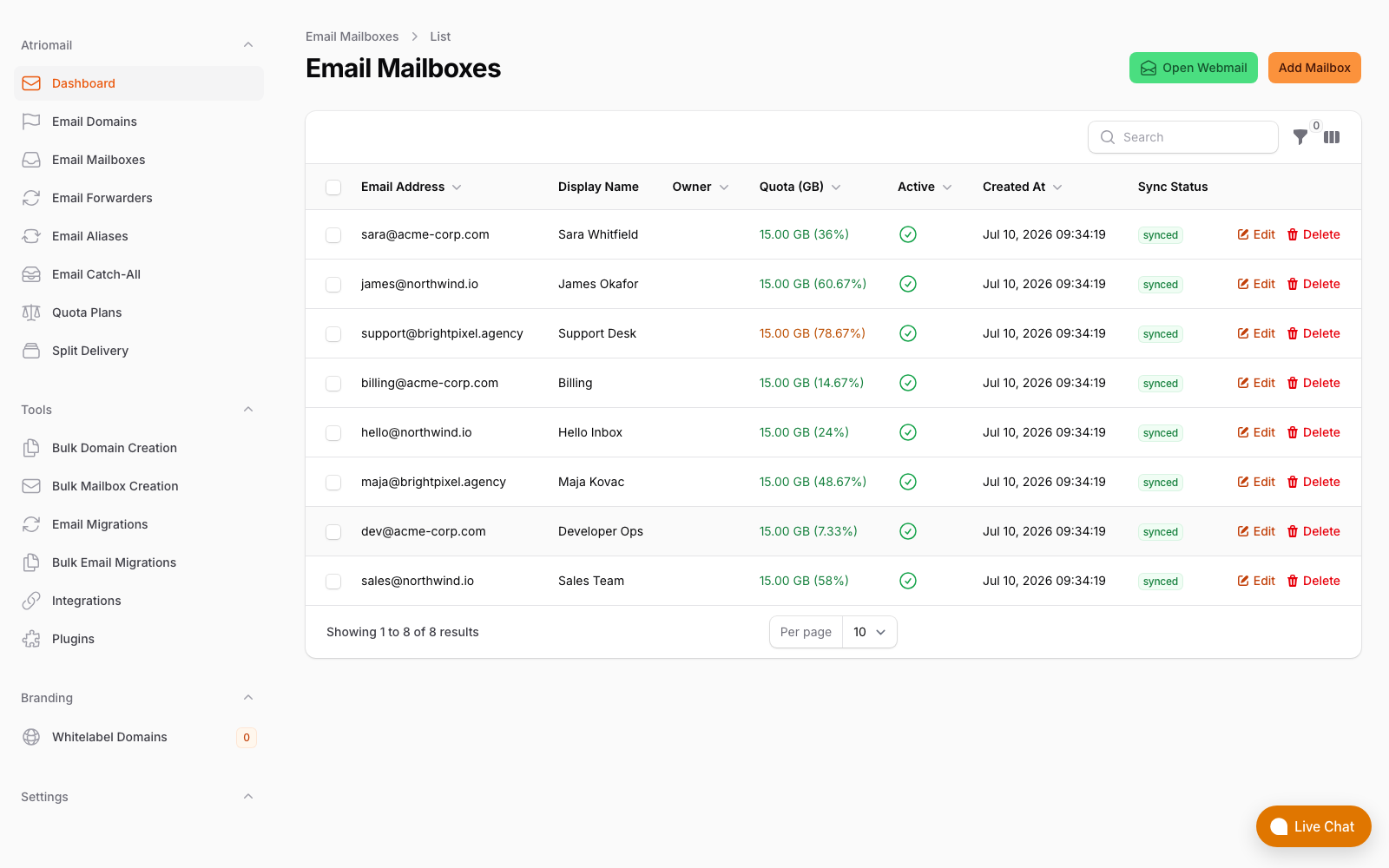
Per-mailbox storage tracking in the Atriomail panel. Each client's usage is itemized individually, not drawn from a shared pool.
DNS Per Domain: Still Manual
When a reseller adds a new domain to MXRoute's platform, the control panel generates the DNS configuration records that need to be applied at that domain's DNS provider: MX records pointing to MXRoute's mail servers, SPF and DKIM records for outbound authentication, and, optionally, DMARC. These records are correct and complete. The step of actually applying them is not automated.
A reseller or their client must log into the DNS provider (Cloudflare, Route 53, the domain registrar, or wherever the domain's zone is managed) and add each record manually. For a two-domain account, this is ten minutes of copy-and-paste. For a 50-domain account spread across multiple registrars and DNS providers, it is a recurring operational task that adds up across every new client onboarding, every domain migration, and every DKIM rotation.
Purpose-built reseller platforms address this differently. Atriomail, for example, publishes SPF, DKIM, and DMARC automatically across 15 integrated DNS providers the moment a domain is added to the platform, with no manual step required. The DNS records are correct on day one, which matters for deliverability on a newly provisioned domain. MXRoute's setup is standard for shared hosting panels; the automation gap is not unique to MXRoute but it is a real cost for MSPs who manage many client domains.
The manual DNS requirement is also why the DirectAdmin reseller model and MXRoute share a similar operational profile: both rely on the reseller to handle DNS per domain as part of client onboarding, rather than delegating it to the platform.
The Math at Different Scales
The honest version of the per-mailbox comparison depends on how much storage clients actually use, not just what the pool nominally offers. Here is the math at three realistic MSP scales, using a conservative 4 GB average stored per active business mailbox:
| Scale | MXRoute plan needed | MXRoute cost | Atriomail cost |
|---|---|---|---|
| 20 mailboxes (4 GB avg = 80 GB) | Reseller 150 | $15/month | $27.80/month |
| 50 mailboxes (4 GB avg = 200 GB) | Reseller 200 | $25/month | $69.50/month |
| 100 mailboxes (4 GB avg = 400 GB) | Two Reseller 200s or large standard plan | $50+/month | $139/month |
On pure storage cost, MXRoute is cheaper at every scale in the table above, assuming the 4 GB average holds. The comparison shifts when you add what per-mailbox pricing buys: 15 GB of dedicated storage per mailbox (so clients don't hit limits after 18 months of accumulation), per-mailbox usage tracking for clean client invoicing, and automated DNS provisioning that removes a recurring onboarding task from the reseller's queue.
The number worth keeping in mind: an MSP billing 50 mailboxes at $5 each generates $250/month in client revenue. The $44.50/month difference in wholesale cost (MXRoute vs Atriomail at this scale) is real. Whether it is worth the operational tradeoffs depends on how much your time costs and how predictable your clients' storage growth is.
If you bill yourself at $75/hour and spend 20 extra minutes per new client domain on manual DNS setup, each onboarding costs an additional $25 in internal labor. At 5 new domains per month, that is $125/month in overhead that narrows the MXRoute cost advantage considerably. The cPanel shared hosting model produces the same dynamic: the hosting cost looks low, but the per-domain manual configuration work accumulates into a real operating cost that the billing rate doesn't reflect.
When MXRoute Makes Sense for Resellers
The storage pool model works well in specific situations that do not match the typical MSP client profile:
- Technical clients who manage their own DNS. If the client's developer or IT staff handles DNS records directly, the manual setup step moves off the MSP's plate entirely. MXRoute's reliability and cost profile make it a reasonable choice for this segment.
- Very light email use. Clients who exchange a few dozen emails per week and never accumulate a backlog will rarely pressure the storage pool. For an MSP with five or ten such accounts, the Reseller 75 at $10/month is hard to beat on pure cost.
- Personal or project domains. Developers managing their own portfolio domains, or agencies that need professional email for internal tooling rather than active client communication, fit MXRoute's original customer profile well.
- Accounts under 20 mailboxes total. Below this threshold, the operational overhead of manual DNS and pool monitoring is manageable, and the cost advantage over per-mailbox pricing is meaningful enough to justify the tradeoff.
Where MXRoute becomes harder to operate is the scenario that most growing MSPs are actually in: 10 to 20 active client accounts, each with 3 to 10 mailboxes, active business email users who accumulate months of correspondence, and new client onboardings arriving regularly. The shared pool fills faster than expected, DNS setup adds friction to every onboarding, and the absence of per-mailbox usage data makes client invoicing opaque. That is when the migration to a purpose-built reseller platform typically becomes worth the switching cost.
Where Atriomail Fits
The pool model is the crux. It is genuinely cheaper while average usage stays light, and it becomes a rationing problem the moment one client's mailbox grows.
Atriomail sells capacity per mailbox rather than per account, so there is no shared bucket to police: every mailbox carries its own 15 GB at $1.39 per month, and storage beyond that is $0.60 per additional 5 GB block on the mailbox that needs it. One heavy user costs you that user's storage, not everyone else's headroom, and you never have to set manual per-account caps to protect the rest of the book.
The DNS gap closes too. Because the integration is not DirectAdmin-shaped, per-domain DNS publishing is part of the platform rather than outside it: SPF, DKIM and DMARC are written automatically across 19 supported DNS providers and panels when a domain is added. White-label here is included from 50 paid mailboxes, $50 a month below that, and puts your product name on the control panel. The pricing page shows the per-mailbox maths at your own client count.
Frequently Asked Questions
More on platform selection, billing, and migration in the full FAQ.
Does MXRoute have a Blesta module?
MXRoute's documented WHMCS integration uses the DirectAdmin API module in WHMCS. No native Blesta module is listed in MXRoute's documentation. MSPs on Blesta would need to use their custom API credentials for manual provisioning or build a custom integration.
What happens when the MXRoute storage pool fills up?
When the shared pool reaches capacity, new incoming mail may be rejected and outbound sending can fail, depending on how the server handles the quota condition. MXRoute's reseller panel allows you to set per-account limits to prevent one client from exhausting the pool, but monitoring aggregate usage and upgrading tiers before the pool fills is the reseller's responsibility.
Can MXRoute clients use their own domain for webmail?
Yes. The reseller control panel supports a custom webmail URL so clients access webmail at a subdomain you configure, such as mail.youragency.com, rather than at an MXRoute-branded address. The webmail application itself is MXRoute's, served under your domain.
How does DKIM setup work for each domain on MXRoute?
MXRoute generates DKIM keys per domain and provides the required DNS records in the control panel. The reseller or client must add those records manually to the domain's DNS zone at Cloudflare, a registrar, or wherever the domain is managed. There is no automated publishing to external DNS providers. Every new domain added to the platform requires this manual step before outbound email is DKIM-signed.
Recommended
- Cost-Effective Email Hosting: Why Per-Mailbox Pricing Wins for Resellers, Atriomail
- Automate Email Billing in WHMCS and Blesta: Best Practices for Resellers, Atriomail
- DirectAdmin Email vs. White-Label Email Hosting, Atriomail
- cPanel Email vs. White-Label Email Hosting, Atriomail
- Self-Hosted Email Server vs. White-Label Hosting, Atriomail
- Pricing and the Reseller Margin Calculator, Atriomail
Latest from the blog
- How to Rotate a DKIM Key Without Breaking Mail That's Already Signed · Oct 21, 2026
- Microsoft Cut CSP Partner Margins on Exchange Online: What It Does to Your Resale Price · Oct 20, 2026
- How to Fix Forwarded Mail That's Failing SPF and Breaking DMARC · Oct 19, 2026
- What to Check Before Onboarding a 200-Mailbox Client in Atriomail · Oct 18, 2026
- Hostinger Retires cPanel Reseller Hosting: What Happens to the Client Email You Bill · Oct 17, 2026