
Google launched Gmail Live on September 3, 2026, a voice AI feature that lets users hold real-time conversations with a Gemini assistant about their inbox. Users can ask it to find emails, summarize threads, and search by topic, all by speaking on their phone, with a live transcript linking back to source messages. It rolled out first on iOS and Android in English for consumer Google AI subscribers. Google Workspace business customers: not yet. The official status is "coming soon."
For MSPs and hosting resellers, this is less a feature announcement and more an audit trigger. Google is now running two parallel billing tracks inside the same Gmail app: Workspace plan AI features that clients already pay for, and a new Google AI subscription layer that Gmail Live requires on top of that. Before clients start asking why their inbox does not have a voice assistant, or before you need to explain a bill that adds a third party to their Google costs, it is worth understanding exactly what Gmail Live is, who pays for it, and which clients you are managing have no business being on Workspace at all.
Table of Contents
- What Gmail Live Actually Is
- Google's AI Subscription Tiers and Their Prices
- The Two Billing Layers Inside a Workspace Account
- The Email-Only Client Problem
- The Client Segmentation Checklist
- Margin Math: Workspace vs White-Label Email
- Frequently Asked Questions
Key Takeaways
| Point | Details |
|---|---|
| Gmail Live requires a separate Google AI subscription | Not included in any Workspace Business plan. Gmail Live requires Google AI Plus at $7.99/month, AI Pro at $19.99/month, or AI Ultra at $99.99/month per user, billed separately by Google. |
| Gmail Live is not yet available to Workspace business customers | As of its September 3, 2026 launch, Gmail Live is available only to consumer Google AI subscribers. Google Workspace business accounts are listed as "coming soon." |
| Workspace already includes Gemini text AI at every tier | Email drafting, summarization, and Gemini app access are already in every Business plan. Gmail Live voice is a separate product on a separate billing track. |
| Email-only clients get no value from Workspace's AI direction | A client on Business Starter at $7/user/month who only uses email is paying for a collaboration platform they do not use, and Gmail Live makes that mismatch more expensive, not less. |
| White-label email sits outside Google's pricing trajectory | At $1.39/mailbox/month, the price does not change when Google launches another AI tier. MSPs earn recurring margin instead of routing subscription revenue to Google. |
What Gmail Live Actually Is
Gmail Live is a voice AI feature built on Gemini. You open the Gmail app on your phone, launch Gmail Live, and speak to it. You can ask "do I have any unread messages from the logistics team this week?" or "summarize that thread about the contract renewal" and Gemini responds verbally and shows a transcript with links back to the source emails. The conversation is continuous: you can ask follow-up questions without repeating context, and the app stays active throughout.
Two companion features launched the same day. Docs Live is a voice co-writer for Google Docs that draws context from Gmail, Drive, Chat, and the web, letting users draft summaries and proposals by speaking. Keep Live converts voice input into organized notes and lists, interpreting "stream of consciousness" dictation into structured content. Gmail Live and Keep Live require Google AI Plus ($7.99/month) at minimum. Docs Live requires Google AI Pro ($19.99/month) or higher.
All three features run on iOS and Android in English worldwide. None are available on desktop. And none are available to Google Workspace business accounts as of September 3, 2026, when they launched. Google listed business availability as "coming soon."
The important thing to understand about Gmail Live is what it is structurally: a consumer AI subscription feature that happens to work inside the Gmail app. It is not a Workspace upgrade. It is not a feature that travels with a Business Starter seat. It lives on a separate billing track, and when it arrives for Workspace accounts, it will add a cost on top of whatever your clients already pay Google.
Google's AI Subscription Tiers and Their Prices
Google overhauled its AI subscriptions at Google I/O 2026 into three consumer tiers:
| Tier | Monthly price | Gmail Live | Docs Live | Keep Live | Storage |
|---|---|---|---|---|---|
| Google AI Plus | $7.99/month | Yes | No | Yes | 200 GB |
| Google AI Pro | $19.99/month | Yes | Yes | Yes | 5 TB |
| Google AI Ultra | $99.99/month | Yes | Yes | Yes | 20 TB |
These are subscriptions at google.com, separate from any Google Workspace plan. A client on Workspace Business Starter who wants Gmail Live when it arrives for business accounts would need to add a Google AI Plus subscription on top of the $7/user/month annual Workspace cost. That brings the per-user total to $14.99/month, before touching their Workspace plan tier at all.
This is structurally the same dynamic that appeared on the Microsoft side when Microsoft 365 Copilot arrived at $30/user/month on top of qualifying base plans. Both platforms are adding AI subscription layers on top of the base email cost. The difference is that Microsoft's Copilot is a Workspace add-on billed through the same CSP channel, while Google's AI subscriptions are consumer products billed directly by Google with no reseller track.
The Two Billing Layers Inside a Workspace Account
Before Gmail Live existed, managing a Workspace client's email meant one billing relationship: the client's Workspace plan. Now there are two separate tracks inside the same app, and understanding the distinction matters for any MSP conversation about AI features.
Layer 1: Workspace plan AI features (already included). Gemini text features ship with every Workspace Business tier. Business Starter ($7/user/month annual) includes Gemini in Gmail for drafting and summarization, plus standard Gemini app access. Business Standard ($14/user/month) and Business Plus ($22/user/month) extend Gemini access across Docs, Sheets, Slides, and Meet, with higher usage limits. These features are already active; no extra purchase is required.
Layer 2: Google AI subscription features (separate purchase). Gmail Live, Docs Live, and Keep Live run on Google's consumer AI subscription platform. This is a different product, a different billing relationship, and a different login track from Workspace. When it becomes available for business accounts, it will require a Google AI subscription per user in addition to the Workspace plan.
For clients, this creates genuine confusion. They are already paying for Workspace, they know Google has AI in Gmail, and they will hear about Gmail Live from Google's own marketing. The answer to "why can't I use it?" is not simple: "You have Gemini in Gmail, but Gmail Live is a different product on a different subscription, and it is not available for business accounts yet." That is a conversation MSPs should be ready to have, and it is a conversation that is much easier to avoid entirely for clients who should not be on Workspace in the first place.
The case for leaving Google's platform altogether is not new. The argument for resellers breaking from big-provider email has always been about control, margin, and predictability. Gmail Live makes the predictability argument sharper: your clients' email costs are now subject to Google's AI product roadmap, and you have no input into that roadmap and no margin from it.
The Email-Only Client Problem
An email-only client is one who has professional email on their own domain but does not use Google Docs, Sheets, Slides, or Meet in any meaningful way. They are on Workspace because that is how they got @theirdomain.com email set up, not because they need a collaboration suite. They do not know what pooled storage means. They have never opened Gemini in Docs. The AI in their Workspace plan is invisible to them.
These clients are typically on Business Starter at $7/user/month. From a usage standpoint, they are paying for a platform built for document collaboration, video meetings, and shared storage, and using exactly one feature of it: email. The gap between what they pay for and what they use has always existed. Gmail Live widens it.
When Gmail Live arrives for Workspace accounts, the gap becomes visible. Google's own marketing will describe a voice AI assistant for Gmail. The client will see it, want to try it, and discover they need to add another subscription on top of what they already pay. An email-only client is being presented with the choice to spend more on a platform they already under-use.
From an MSP's position: you are managing a client relationship that generates zero recurring margin on the email itself (the Workspace subscription goes straight to Google), and you are now being drawn into conversations about a consumer AI subscription product that also generates zero margin for you. The white-label email model is the alternative, and for email-only clients it is the right answer, not a compromise.
The Client Segmentation Checklist
Before Gmail Live rolls out for Workspace business accounts, run a quick audit of your Workspace client list. Three questions per account:
1. Does this client actively use Google Docs, Sheets, Slides, or Meet?
Not occasionally as a file viewer; regularly as a working tool. If the answer is yes, they are a Workspace user and Workspace is the right product. If the answer is no or rarely, they are an email client on a collaboration platform.
2. Is their storage use meaningful?
Business Starter pools 30 GB across all users. Most email-only clients will never approach that limit. If a client is consistently under 2 GB of storage and not growing, the storage argument for Workspace does not hold.
3. Have they asked about any Workspace feature other than email in the past twelve months?
If the only support tickets, calls, or questions from this client have been about email, mail setup, MX records, or forwarding, they are an email-only client by their own behavior, regardless of what plan they are on.
Clients who answer no to all three are email-only clients. They belong on a platform priced for email, not a collaboration suite with an expanding AI subscription layer attached. The same segmentation logic applies on the Microsoft side for clients on Exchange Online Plan 1 who have never needed anything beyond a mailbox.
The right time to move these clients is before they get a Google marketing email about Gmail Live, not after. A proactive conversation about switching to white-label email is positioned as a cost optimization and a service upgrade. A reactive conversation after the client has already tried and failed to activate Gmail Live is a support problem.
Margin Math: Workspace vs White-Label Email
For email-only clients, here is what the two paths look like on a 25-mailbox account, a realistic size for a small business client:
| Google Workspace Business Starter | White-label email hosting | |
|---|---|---|
| What you pay wholesale | Nothing; client bills Google directly | 25 × $1.39 = $34.75/month |
| What client pays | 25 × $7.00 = $175/month to Google | Whatever you set, e.g., $5/mailbox = $125/month |
| Your recurring margin | $0/month | $125 - $34.75 = $90.25/month |
| Annualized | $0 | $1,083/year |
| If client adds Gmail Live (AI Plus) | +$7.99/user to Google = +$199.75/month; your margin stays $0 | Not applicable; platform does not change |
The Gmail Live row is the important one. If a Workspace email-only client adds Google AI Plus, that is $199.75/month more going directly to Google for 25 users. None of it passes through the MSP's billing. There is no reseller track for Google AI subscriptions, no margin, and no way to put it on your own invoice. You are supporting the client's billing conversation with a third party that is not you.
White-label email operates on a completely different model. The wholesale price of $1.39/mailbox/month is the only number that matters for your cost. You set the client price, you put it on your own invoice, and the margin is the spread between the two. When Google launches the next AI tier, that price does not change. The platform does not prompt your clients to upgrade; it just handles email.
For MSPs running WHMCS or Blesta, this is the billing model that actually integrates cleanly: per-mailbox line items on the same invoice as everything else, automated provisioning, no third-party subscription to explain. The WHMCS and Blesta billing automation guide covers the provisioning setup in detail. The per-mailbox pricing model is what makes it work at any scale.
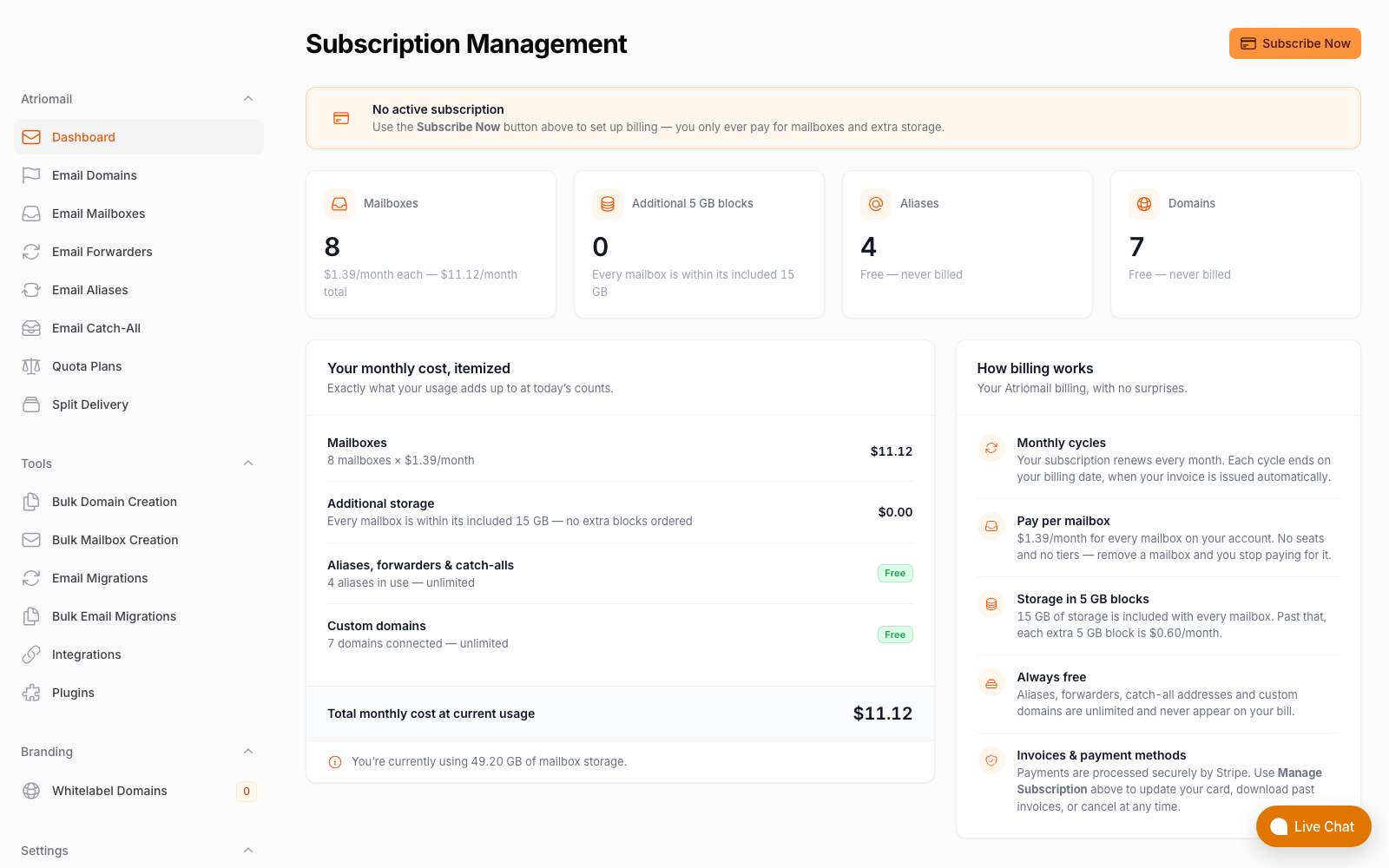
The billing screen a reseller's invoice is built from: one line per mailbox, one price, no AI subscription layer. Real panel, no mockup.
Frequently Asked Questions
More on migration, billing and setup in the full FAQ.
Do Workspace clients already have Gemini in Gmail?
Yes. Gemini text features, including email drafting, summarization, and access to the Gemini AI app, are included in every Workspace Business plan. Business Starter ($7/user/month) has limited Gemini access. Business Standard ($14/user/month) and Plus ($22/user/month) get broader access across the full suite. These features do not require any additional purchase. Gmail Live voice features are a separate product on a separate subscription track and are not yet available to Workspace business accounts.
Will Gmail Live cost extra for Workspace accounts?
Google has not published business pricing for Gmail Live. On the consumer side, it requires a Google AI Plus subscription at $7.99/month or higher. Whether Google will bundle it into existing Workspace plans, require the AI subscription on top, or create a new Workspace AI tier when it launches for business accounts has not been announced as of September 4, 2026.
Can MSPs earn margin on Google AI subscriptions?
No. Google AI subscriptions (AI Plus, AI Pro, AI Ultra) are consumer products billed directly by Google to the user. There is no reseller channel, no partner margin, and no way to include them on an MSP's own invoice. If a client subscribes, it is a separate billing relationship between that client and Google that you cannot mark up or consolidate.
What is the right move for email-only clients before Gmail Live arrives for Workspace?
Audit which clients actually use Workspace collaboration features versus just email. For clients who answer no to Docs, Sheets, Meet, and meaningful storage use, moving to white-label email hosting eliminates their exposure to Google's AI pricing roadmap and gives you recurring margin instead of zero. The migration itself is free, two-way via IMAP, and does not require downtime.
Recommended
- White-Label Email vs. Reselling Google Workspace: The Margin Math, Atriomail
- Microsoft 365 Copilot Pricing for MSPs: The $30/User AI Add-On, Atriomail
- Break Free from Big Email: Why Resellers Leave Google and Microsoft, Atriomail
- Why Per-Mailbox Pricing Wins for Resellers, Atriomail
- Pricing and the Reseller Margin Calculator, Atriomail
Latest from the blog
- How to Rotate a DKIM Key Without Breaking Mail That's Already Signed · Oct 21, 2026
- Microsoft Cut CSP Partner Margins on Exchange Online: What It Does to Your Resale Price · Oct 20, 2026
- How to Fix Forwarded Mail That's Failing SPF and Breaking DMARC · Oct 19, 2026
- What to Check Before Onboarding a 200-Mailbox Client in Atriomail · Oct 18, 2026
- Hostinger Retires cPanel Reseller Hosting: What Happens to the Client Email You Bill · Oct 17, 2026