
A client calls and asks about Copilot. They saw an ad, read something on LinkedIn, and want to know if they should add it to their Microsoft 365 subscription. Your answer determines whether their monthly email bill stays where it is or grows by a factor of ten.
Microsoft 365 Copilot is a real AI productivity tool with a real price tag. The difficulty for MSPs is that the pricing is not just an add-on cost; it has a base-plan requirement that many email-only clients do not currently meet. Understanding that structure lets you have a much cleaner conversation about who Copilot actually serves and, for the accounts that do not fit, what the right path is.
Table of Contents
- What Microsoft 365 Copilot Does (and Doesn't Do for Email)
- What Copilot Actually Costs in 2026
- The Plan 1 Problem: Why Email-Only Clients Face a Double Upgrade
- Which Clients Actually Get Value from Copilot
- Identifying Email-Only Clients in Your Book
- The Alternative Path for Email-Only Clients
- Frequently Asked Questions
Key Takeaways
| Point | Detail |
|---|---|
| Copilot costs $30/user/month as an annual add-on | Applied on top of a qualifying base plan: Business Standard, Business Premium, E3, or E5. It is not sold as a standalone product. |
| Exchange Online Plan 1 does not qualify | Email-only clients on Plan 1 must first upgrade to at least Business Standard, adding $8.50/user before the Copilot price even begins. |
| Full upgrade path from Plan 1 to Copilot: $42.50/user/month | Business Standard ($12.50) plus Copilot ($30), compared to Plan 1 at $4/user/month. A 10.6x increase for the same email experience plus AI features. |
| Copilot ROI requires heavy writing and document production | Clients drafting 10 or more hours of text per week have realistic cases for Copilot. Small businesses using email for communication rarely meet this threshold. |
| White-label email at $1.39/mailbox covers email-only clients without AI pressure | Full IMAP, webmail, automated SPF/DKIM/DMARC, WHMCS/Blesta billing. No base-plan requirements, no AI add-on upsell. Margin of $180.50/month on 50 mailboxes at $5 billed. |
What Microsoft 365 Copilot Does (and Doesn't Do for Email)
Microsoft 365 Copilot is an AI assistant embedded across the Microsoft 365 application suite. In Outlook, it can draft replies based on a short prompt, summarize long email threads, flag action items from a conversation, and suggest responses to received messages. In Word, it drafts documents from bullet points. In Teams, it generates meeting notes and summaries. In Excel, it writes formulas and analyzes spreadsheet data.
What Copilot is not: a better email server. It does not change how mail is routed, stored, or authenticated. It does not reduce spam. It does not improve deliverability or DNS configuration. It does not lower the cost of the mailbox. It is an AI reasoning layer sitting on top of the existing Microsoft 365 infrastructure, and it requires that infrastructure to be present before it can function.
For an MSP, this is the first framing question when a client asks about Copilot: does this client's day involve enough document drafting, email composition, and meeting summarization to benefit from AI assistance? Or are they primarily receiving mail, sending short replies, and using their domain address as a professional contact point?
The answer to that question determines whether Copilot is a sensible upgrade or an expensive solution looking for a problem. It also determines whether this client's email infrastructure should stay on Microsoft 365 at all.
What Copilot Actually Costs in 2026
Microsoft 365 Copilot is priced at $30 per user per month on an annual commitment for the business add-on tier. This is the published standard price; promotional rates offered during the product's earlier rollout have been phased toward this figure through 2026. Copilot is not a standalone product and cannot be purchased without a qualifying base plan already in place.
The qualifying base plans are:
| Base plan | Annual price per user/month | What it includes |
|---|---|---|
| Microsoft 365 Business Standard | $12.50 | Email, Teams, Office apps, 1 TB OneDrive |
| Microsoft 365 Business Premium | $22.00 | Business Standard plus advanced security |
| Microsoft 365 E3 | $36.00 | Enterprise suite, compliance tools |
| Microsoft 365 E5 | $54.75 | E3 plus advanced security and analytics |
Add Copilot to each of those and the monthly per-user cost becomes $42.50, $52.00, $66.00, and $84.75 respectively. For the typical small business account an MSP serves, the relevant tier is Business Standard plus Copilot at $42.50/user/month.
The Plan 1 Problem: Why Email-Only Clients Face a Double Upgrade
Exchange Online Plan 1 at $4/user/month is the standard choice for MSPs whose clients need professional email on their domain but no collaboration suite. As covered in the Exchange Online Plan 1 comparison for MSPs, it delivers a 50 GB mailbox, full IMAP/POP3/SMTP access, spam filtering, and webmail. It does not include Teams, desktop Office apps, or OneDrive. It is deliberately stripped-down email infrastructure.
Exchange Online Plan 1 is also not a qualifying base plan for Microsoft 365 Copilot.
A client currently on Plan 1 who asks to add Copilot is not simply adding $30/user to their bill. They are asking for a two-step upgrade:
- Migrate from Plan 1 to Business Standard, gaining Teams, SharePoint, 1 TB OneDrive per user, and desktop Office apps they may never open. Cost increase: +$8.50/user/month.
- Add Copilot on top of Business Standard. Cost: +$30/user/month.
Total increase: +$38.50/user/month, from $4.00 to $42.50. For a 50-user client currently paying $200/month for email, this upgrade brings the monthly bill to $2,125. That is a 10.6x increase to get AI-assisted email drafting.
The clients who are enthusiastic about Copilot after hearing about it in the news often do not know this structure exists. Part of the MSP's value in this conversation is explaining that the $30/month figure they read about is not the whole story.
Which Clients Actually Get Value from Copilot
The Microsoft 365 Copilot pricing makes economic sense for clients where the AI features genuinely reduce labor time. The categories where that tends to hold:
- Heavy document producers. Consultants, lawyers, marketing teams, and finance staff who draft 10 or more hours of text per week. At $30/user/month, a user who saves 30 minutes of writing time per day recouped the cost within the month at any reasonable hourly rate.
- Meeting-intensive Teams users. Teams with frequent meetings who would use AI meeting notes and action-item extraction. The Copilot meeting-summary feature only functions in Teams and only for users who have Copilot licensed.
- High-volume email processors. Customer support staff, sales teams, or anyone managing a shared inbox who would use AI to triage and draft replies at volume.
- Finance and operations users on Excel. AI formula generation and data-analysis features are in Excel; this requires a Copilot license and is genuinely time-saving for spreadsheet-heavy roles.
The clients where Copilot does not deliver value at $30/user/month:
- Small business owners who send 10 to 20 emails a day and need a professional domain address for client communication.
- Service businesses, tradespeople, local retailers, and similar accounts where email is a communication channel and not a production workload.
- Clients who ask about Copilot after reading an ad or news item rather than because they have identified a productivity bottleneck.
Most small business email clients in a typical MSP book fall into the second category. For these accounts, the right question is not whether Copilot is good, but whether the Microsoft 365 platform is the right home for their email at all.
Identifying Email-Only Clients in Your Book
The Copilot conversation is a useful forcing function for a segmentation exercise most MSPs have not done formally. Going through your current email client accounts and asking a simple set of questions surfaces which clients are genuinely M365 power users and which are paying for infrastructure they only use for email.
Signals that a client is email-only, not a Copilot candidate:
- They are already on Exchange Online Plan 1. They chose the stripped-down tier deliberately, often to keep costs down, and have never asked about Teams or Office apps.
- Their Microsoft 365 logins are almost exclusively Outlook Web Access. No Teams usage, no SharePoint access, no OneDrive activity.
- Their mailboxes are small relative to the quota. A client with 15 users averaging 3 GB of storage used per mailbox is not producing high email volume.
- Their Copilot inquiry came from outside: an ad, a family member, a news article. They cannot articulate a specific task they want Copilot to help with.
Clients who show the opposite signals, heavy Teams usage, large mailboxes, document collaboration through SharePoint, are genuine M365 accounts. Serving them through a Microsoft 365 CSP reseller arrangement makes sense, even with the thin and not-publicly-published indirect margins, because these clients have a genuine dependency on the Microsoft suite that is not replaceable with standalone email.
The email-only segment, once identified, is a different story.
The Alternative Path for Email-Only Clients
For clients in the email-only segment who ask about Copilot, the honest response is: Copilot costs $38.50/user/month more than you are currently paying, it requires a plan upgrade that adds tools you do not use, and for the email volume your team actually processes, the time saved would not justify the cost.
That conversation also opens a follow-on question: if a client only needs professional email on their domain, is Exchange Online Plan 1 at $4/user/month through a distributor chain the right product for them, or is there a more direct path that produces better margin for you and lower or comparable cost for them?
White-label email hosting at $1.39/mailbox/month includes a 15 GB mailbox, webmail, IMAP/POP3/SMTP access, spam filtering, antivirus, and automatic SPF/DKIM/DMARC publication per domain. Migrations are free and two-way via IMAP. Billing integrates into WHMCS and Blesta natively, so the email line item goes on the same invoice the client already receives rather than appearing as a separate Microsoft receipt.
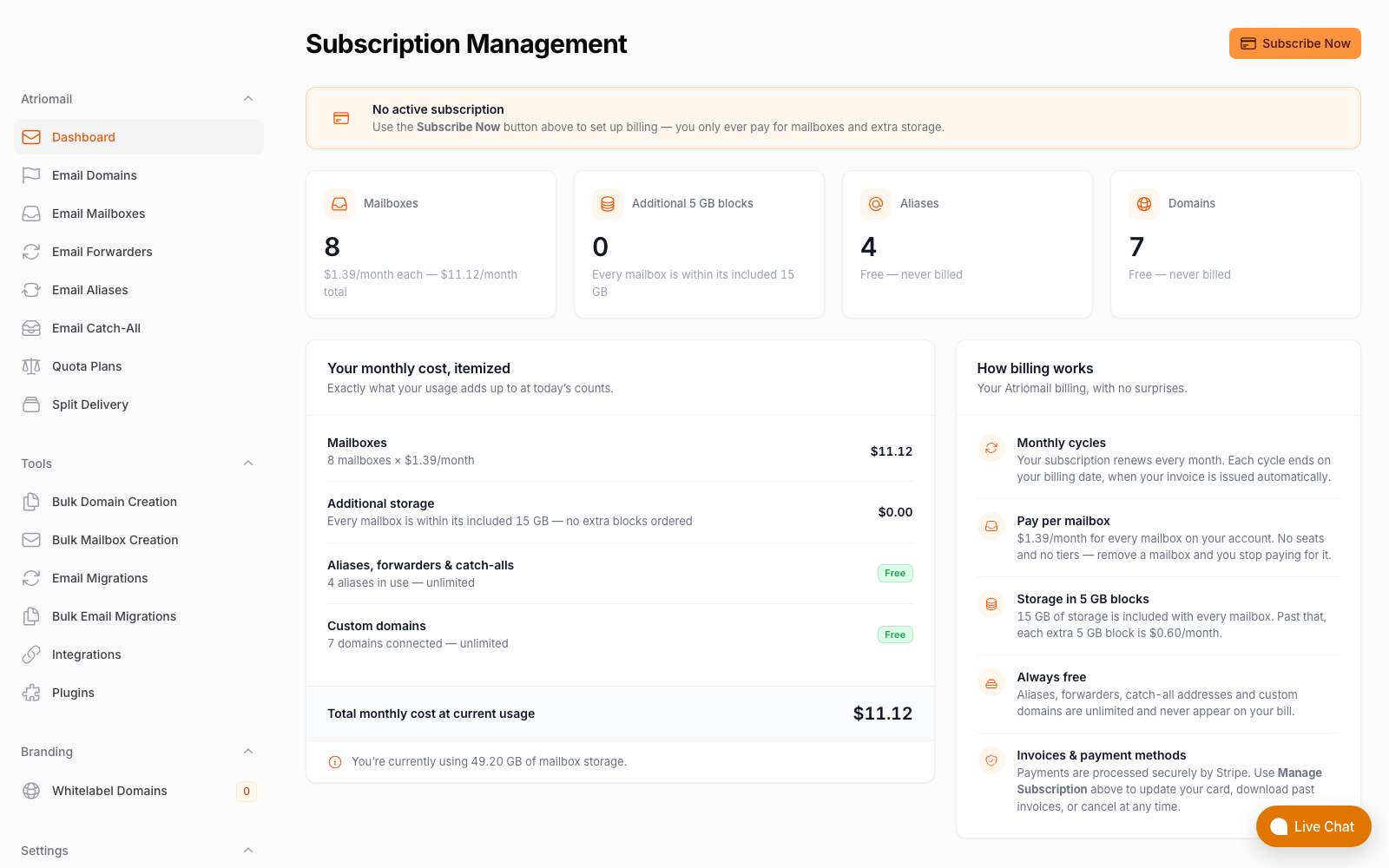
The billing screen that generates the client invoice, a real panel capture, not a mockup.
The margin difference compared to CSP indirect reselling is significant. Microsoft does not publish CSP indirect reseller margins for Exchange Online; they are negotiated through distributors and are widely reported as thin. White-label hosting at $1.39/mailbox wholesale with a $5/mailbox retail price produces $3.61/mailbox in recurring monthly margin regardless of seat count.
| Exchange Online Plan 1 (CSP indirect) | White-label email hosting | |
|---|---|---|
| Wholesale cost (50 seats) | Not published; distributor-negotiated | 50 x $1.39 = $69.50/month |
| Client-facing price | Typically passed through near retail ($4/user) | Whatever you set, e.g. $5.00/mailbox = $250/month |
| Your recurring margin | Thin; typically reported under 10% on email-only seats | $250 - $69.50 = $180.50/month |
| Annualized | Minimal on email-only accounts | ~$2,166/year per 50-mailbox client |
The client also saves money at retail. A client currently paying $4/user/month through a CSP arrangement would pay $5/mailbox under white-label billing, a slight increase, or you can price more aggressively if you are competing on cost. Either way, the client gets the same professional email they have now with no AI features they would not use, and you convert a thin-margin M365 pass-through into a meaningful email revenue line.
The WHMCS and Blesta billing automation that supports this transition is already in place. Native modules handle mailbox provisioning so that a new domain or a new user does not require a manual ticket. The DNS side is equally automated: white-label hosting publishes SPF, DKIM, and DMARC records automatically across 15 supported DNS providers on domain add, so deliverability does not regress on the day of migration.
For clients where the move makes sense, the migration itself is free. Built-in IMAP migration pulls existing mail from Exchange Online, Gmail, or any IMAP source, preserving folder structure and message timestamps. The client's mailbox does not start empty, and the cutover window is a DNS change, not a data-loss event.
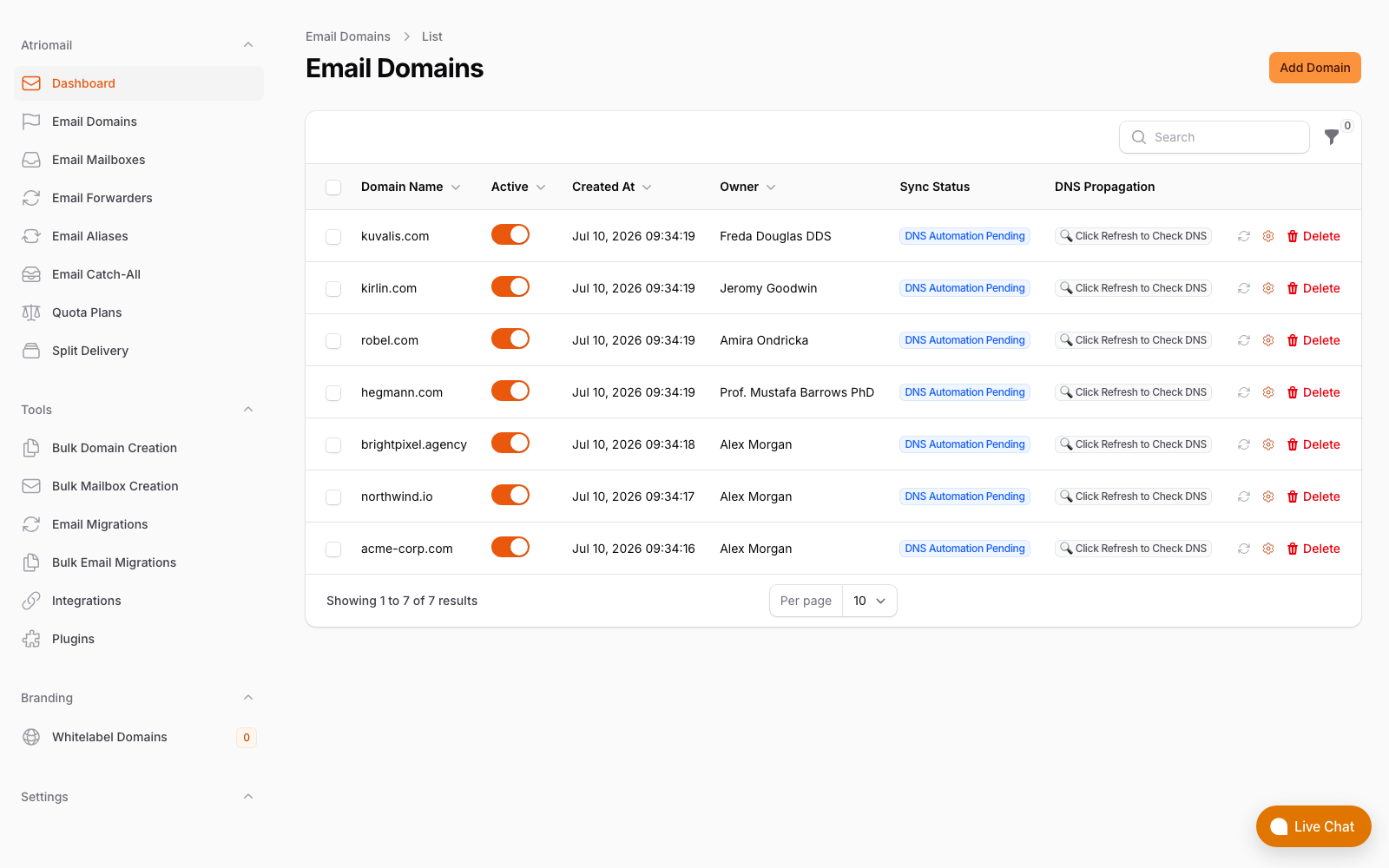
The domains panel showing automatic DNS record publication across all hosted domains.
Frequently Asked Questions
More on migration, billing and setup in the full FAQ.
Can I add Copilot directly to a client's Exchange Online Plan 1 subscription?
No. Exchange Online Plan 1 is not a qualifying base plan for Microsoft 365 Copilot. The client must first be migrated to at least Microsoft 365 Business Standard ($12.50/user/month annual), which includes Teams, SharePoint, and Office apps. Only then can Copilot ($30/user/month) be added. The total all-in cost becomes $42.50/user/month, compared to $4/user/month for Plan 1 alone.
Is there a cheaper tier of Copilot for small businesses?
Microsoft has offered promotional pricing during Copilot's rollout, including a Copilot Business rate around $18 to $21/user/month for organizations under 300 users. These promotional rates are not permanent and are being phased toward the standard $30/user/month add-on price. The qualifying base plan requirement applies regardless of which Copilot pricing tier is offered at the time.
What does Copilot actually add in Outlook specifically?
In Outlook, Copilot can draft new messages from a short prompt, suggest replies to incoming messages, summarize long email threads, and flag key action items from a conversation. These features require a licensed Copilot seat on the account. They are not available on Exchange Online Plan 1, Exchange Online Plan 2, or any plan that does not include a qualifying Microsoft 365 base license alongside the Copilot add-on.
At what point should I move an email-only client off of Exchange Online Plan 1?
The segmentation test is simpler than a mailbox count: does this client use Teams, SharePoint, or desktop Office apps? If not, they are on a platform that charges for infrastructure they do not use, through a reseller margin structure that does not create meaningful recurring income for you. An email-only client with 10 mailboxes on white-label hosting at $5/mailbox produces $36.10/month in recurring margin at $1.39 wholesale. Ten Plan 1 seats at thin CSP indirect margin produce a fraction of that. The math improves with every additional mailbox.
Recommended
- Exchange Online Plan 1 vs. White-Label Email Hosting: The Email-Only Decision for MSPs, Atriomail
- Microsoft 365 CSP Reseller Program vs. White-Label Email Hosting, Atriomail
- White-Label Email vs. Reselling Google Workspace: The Margin Math, Atriomail
- Automate Email Billing in WHMCS and Blesta, Atriomail
- Pricing and the Reseller Margin Calculator, Atriomail
Latest from the blog
- How to Rotate a DKIM Key Without Breaking Mail That's Already Signed · Oct 21, 2026
- Microsoft Cut CSP Partner Margins on Exchange Online: What It Does to Your Resale Price · Oct 20, 2026
- How to Fix Forwarded Mail That's Failing SPF and Breaking DMARC · Oct 19, 2026
- What to Check Before Onboarding a 200-Mailbox Client in Atriomail · Oct 18, 2026
- Hostinger Retires cPanel Reseller Hosting: What Happens to the Client Email You Bill · Oct 17, 2026