
If you already invoice clients through WHMCS, adding a per-mailbox email product should not mean logging in to a second system for every order, upgrade, or cancellation. The Atriomail WHMCS provisioning module handles those events automatically: from creating the client's email domain and first mailbox at order time, to adding recurring charges when the client self-serves more mailboxes from the client area.
Atriomail is a white-label email hosting platform priced at $1.39 per mailbox per month with 15 GB included. You set your own resale price, Atriomail charges you, and your clients get professional email on their own domain. The provisioning module (version 3.1.1, built for WHMCS 9) is where that billing loop closes for resellers already running WHMCS. Creating an account is free and needs no card; the module download is in the Plugins page once you are signed in.
Table of Contents
- Key Takeaways
- Who This Is For
- What You Need Before You Start
- How the Module Provisions a New Service
- What Clients See in the WHMCS Client Area
- How Billing Flows Between WHMCS and Atriomail
- Your Admin View: The Service Tab
- What This Means for Your Business
- Limits to Know
- Frequently Asked Questions
Key Takeaways
| Area | What to know |
|---|---|
| Module version | Version 3.1.1, requires WHMCS 9; download from the Plugins page in the Atriomail panel, no shell access needed |
| What Create does | Creates the client's Atriomail account and email domain; creates the first mailbox if the domain passes the automated security check during the order |
| Supported service actions | Create, Suspend, Unsuspend, Terminate, Change Package, Test Connection |
| Default product limits | 5 mailboxes, 15 GB base storage; raise both before assigning the product to a client with a larger account |
| Client area pages | Dashboard, Mailboxes, Aliases, Catch-all, My Domains |
| Billing sync direction | Mailboxes and storage added through the WHMCS client area create recurring charges at your retail price; changes made in the Atriomail panel or via the API do not |
| What Atriomail charges you | $1.39 per mailbox per month, 15 GB included; $0.60 per extra 5 GB block per month |
Get the module and start billing email from WHMCS today. Creating an Atriomail account is free and needs no card; mailboxes are billed from the first one. The module download is in the Plugins page once you are signed in.
Who This Is For
Small MSPs, agencies, and hosting resellers who already invoice clients through WHMCS and want to add professional email hosting as a billable line item, without running a separate provisioning workflow for every order and upgrade. If you are managing email for 20 or more client domains and want it on the same invoice as the rest of what you bill, this module is the integration that connects Atriomail to your existing billing system.
What You Need Before You Start
- WHMCS 9 with admin access. Earlier versions are not supported.
- An active Atriomail account. Creating one at system.atriomail.com/admin/register is free and needs no card. Mailboxes are billed from the first one.
- The module files downloaded from the Plugins page in the Atriomail control panel. Installation is done by uploading the files to WHMCS; no shell access is required.
- A WHMCS product configured as a Hosting Account or Reseller Account type. The module does not attach to other product types.
- Your retail pricing set on the product: a per-mailbox price and a per-5-GB-storage-block price. The module generates storage add-on options in 5 GB steps up to 100 GB for every currency and billing cycle you have configured.
How the Module Provisions a New Service
When a client completes an order for your email product in WHMCS, the module fires a Create call to the Atriomail API. Three things happen in sequence: an Atriomail customer account is created for the client (or the existing account is returned if the same email address is already registered), the email domain is added to the Atriomail platform, and the first mailbox is created if and only if the domain passes the automated security check during the order.
The security check is worth understanding before you take your first large order. Every new domain in Atriomail goes through a short automated screening process. The provisioning state comes back as one of four values: screening, review, ready, or rejected. A domain that lands in review may need additional time before it moves to ready and the first mailbox appears. Atriomail does not publish a duration for this check. The panel and the API both report the current state for each domain, so you can track anything that is taking longer than expected from the admin tab in WHMCS.
Once the domain reaches ready, the client receives a reminder email at one day and three days if their DNS has not been verified yet. A confirmation goes out when the domain is verified and the service goes live. Both of those notifications depend on the WHMCS daily cron running on schedule.
One configuration note: the WHMCS product must be a Hosting Account or Reseller Account type. If you have an existing product in another category, create a new product rather than changing the type on a live service; WHMCS handles upgrades differently across product types.
The module download is waiting in the Plugins page of your Atriomail panel. Add a domain in the panel to confirm it passes the security check before your first client order, so you know what to expect. Mailboxes are billed from the first one; no card is needed to create the account.
What Clients See in the WHMCS Client Area
Once the service is provisioned, the client's product page in WHMCS includes five sections: Dashboard, Mailboxes, Aliases, Catch-all, and My Domains.
The Dashboard is where most clients land first. It shows setup progress, the MX, SPF, and Amazon SES verification records the domain needs (each with a copy button), domain verification status, IMAP and SMTP settings for mail app setup, and a usage summary. The Dashboard displays these records; it does not publish them automatically. On Cloudflare and Namecheap, connecting your Atriomail account means records are written into the zone when a domain is added and passes the security check. If a client's domain is at Cloudflare, the Cloudflare Email Routing comparison explains why Cloudflare's forwarding-only service is not the same as hosting mailboxes there. For any other DNS host, the client copies the records from the Dashboard; the email domain setup guide covers what to expect per provider.
The Mailboxes tab lets the client add or delete mailboxes, change mailbox passwords, and add or remove 5 GB storage blocks, within the limits you set on the product. The Aliases tab manages forwarders and aliases on the domain. Catch-all configures a catch-all address for unmatched recipients on the domain. My Domains shows every Atriomail service the client has, across all products, on one page, which is useful when the same WHMCS client has more than one email domain with you.
When a client needs to go beyond what the WHMCS client area exposes, the client area generates a single-use sign-in link. Valid for 60 seconds and single-use, it opens the full Atriomail control panel for that account, where they can manage mailboxes, check DNS status, set up migrations, and configure account-level settings. It does not sign them into webmail.
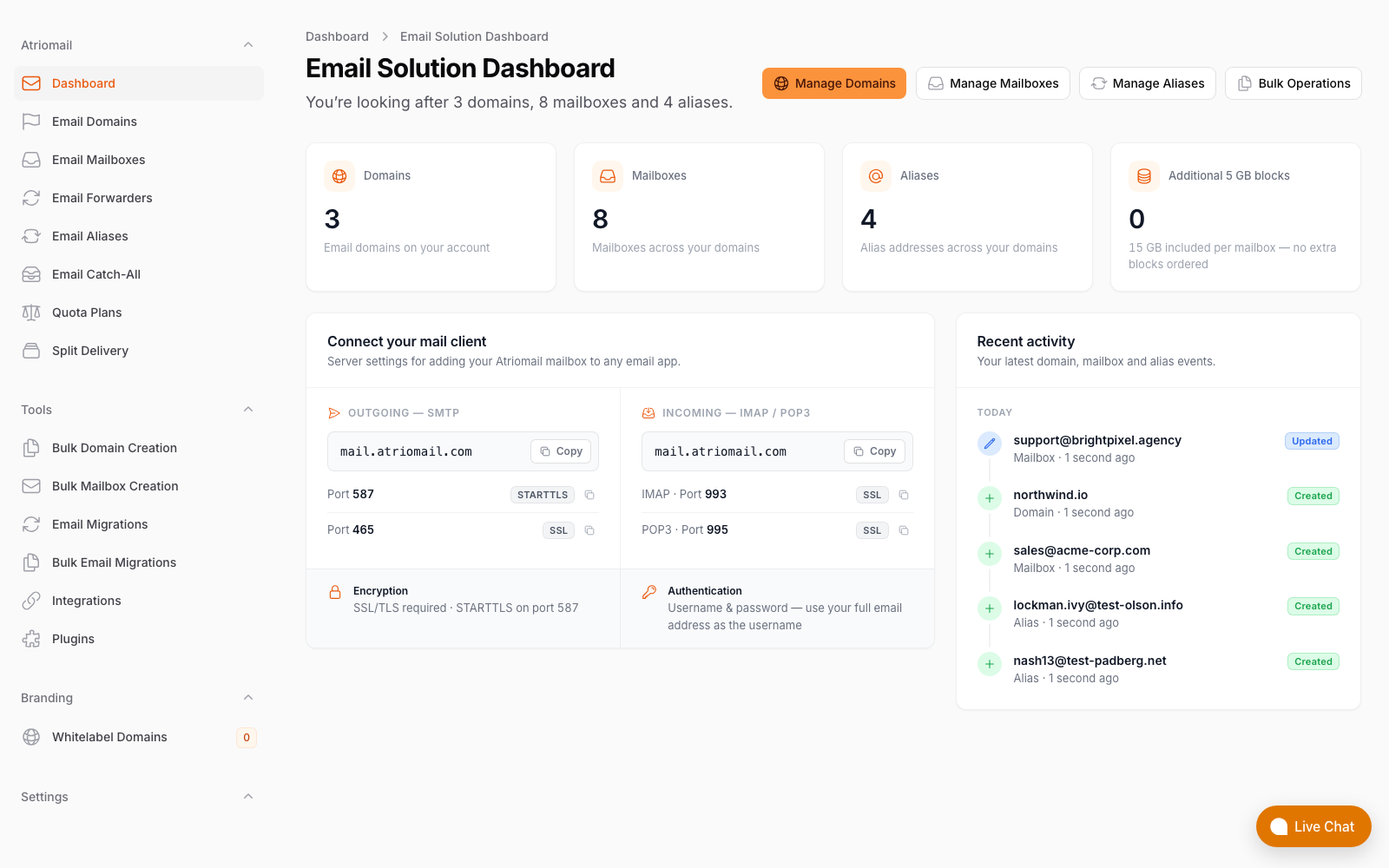
The Atriomail panel that clients reach via the single-use sign-in link from the WHMCS client area, showing verification progress and connection settings.
How Billing Flows Between WHMCS and Atriomail
The billing model runs in two parallel lanes: what Atriomail charges you, and what WHMCS charges your client.
On the Atriomail side, you pay $1.39 per mailbox per month, 15 GB included. Extra storage is $0.60 per 5 GB block per month, billed on the size you set rather than actual usage. No setup fees, no contract, no mailbox minimum. The Atriomail pricing page has a margin calculator; the guide to usage-based email pricing for resellers covers the full cost structure across different mailbox counts and storage tiers.
On the WHMCS side, when a client uses the Mailboxes tab to add a mailbox or a storage block, the module creates a recurring charge at your retail price. That is the core mechanism: you set the per-mailbox price and per-5-GB price on the product, and every client self-service action inside WHMCS builds the invoice from those prices automatically. The recurring charges created by the module are titled "AtrioMail mailboxes" in WHMCS.
One boundary to be explicit about: the sync is one-way, and it only covers actions taken inside the WHMCS client area. If a mailbox is added directly in the Atriomail panel, or through the REST API, Atriomail will bill you for it, but no corresponding recurring charge is created in WHMCS. For clients where WHMCS is the billing record of truth, keep provisioning inside the WHMCS client area, or reconcile the difference manually on the next invoice cycle. The guide to setting up branded email for agencies covers provisioning workflows in more detail for different client types.
Default product limits on a fresh install are 5 mailboxes and 15 GB. Raise both before assigning the product to any client with a larger account. Change Package to a smaller tier is refused if the client is already over the new limit. The module generates storage add-on options in 5 GB steps up to 100 GB, for every currency and billing cycle you have configured, so you do not need to create those options manually.
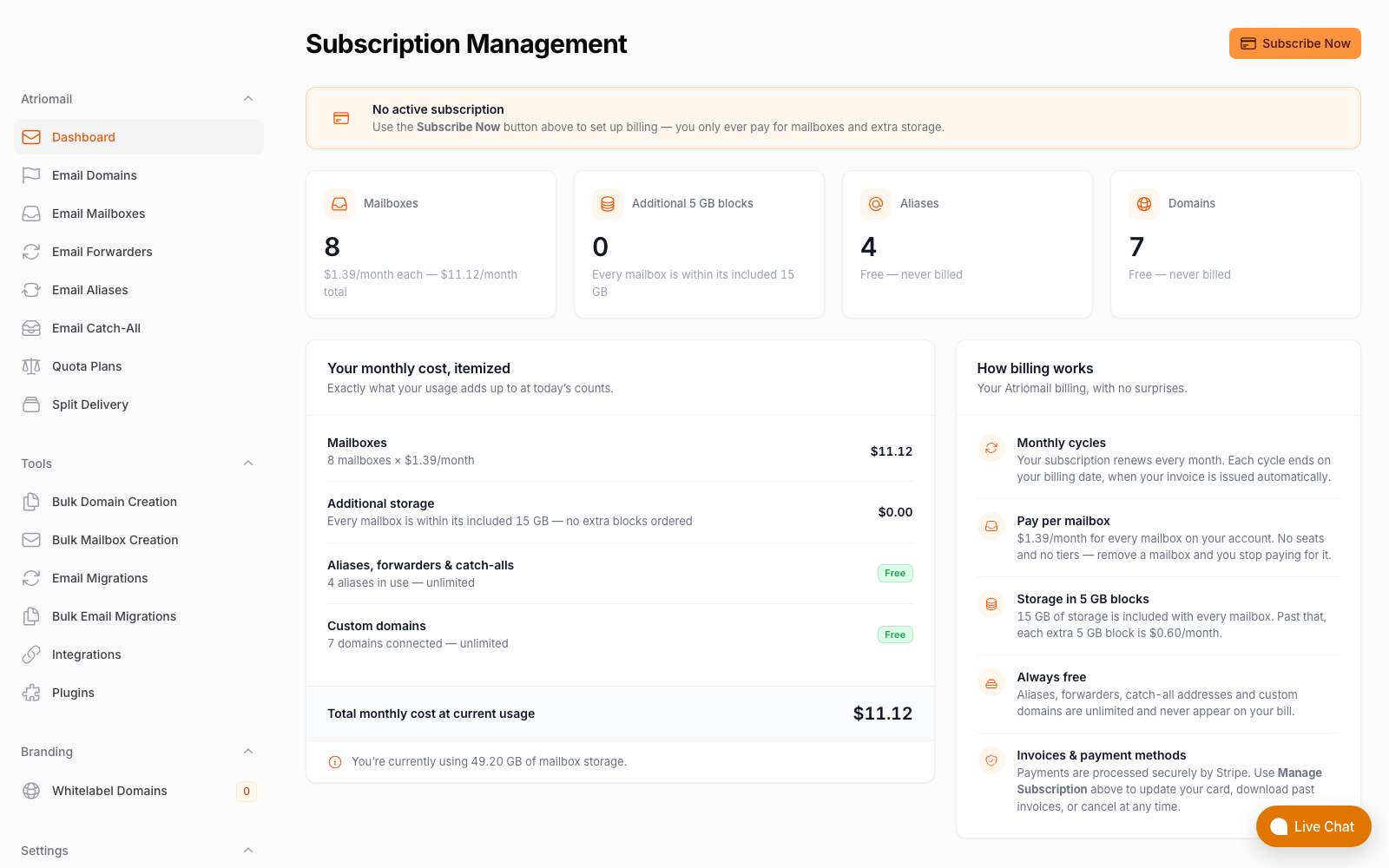
The Atriomail billing screen shows what you pay wholesale, broken down per active mailbox. Your WHMCS product prices sit above this.
Your Admin View: The Service Tab
For each active Atriomail service, your WHMCS admin panel includes a service-level tab with operational details you need without leaving WHMCS. It shows the linked Atriomail customer account and domain, the domain's current verification status, a mailbox list with usage figures for each mailbox, and the most recent API error if something went wrong during provisioning or a subsequent sync.
The tab includes four action buttons: re-check verification (forces a fresh status poll from Atriomail), re-sync (reconciles the WHMCS state with Atriomail), reset a mailbox password, and resend the welcome email. A Test Connection button on the module configuration page verifies the API key is working before you take the first live order. The product configuration page also includes a setup checklist to catch missing settings before they cause a provisioning failure.
What This Means for Your Business
On a 200-mailbox book, priced at $5.00 per mailbox per month, you pay Atriomail $278.00 a month (200 times $1.39) and collect $1,000.00 from clients, leaving $722.00 per month above wholesale. That figure is before card fees, support time, and any white-label add-on fee. The same arithmetic at smaller scales: 100 mailboxes leaves $361.00 per month, 50 mailboxes leaves $180.50 per month.
The WHMCS automation captures value on both ends of the transaction. If manually processing a new mailbox order, updating a billing record, and sending credentials to the client takes your team 10 minutes per request, then each automated provisioning through the module saves you that time without any additional action. Over a 200-mailbox book with regular adds and storage upgrades, that adds up. Managing clients at that scale through a single Atriomail reseller account is the model the platform is built around; the full multi-client workflow is covered in the guide to managing email for multiple agency clients.
Moving clients from cPanel, Plesk, or DirectAdmin hosting mail to Atriomail is typically done with the built-in IMAP migration tool, which has no charge. For a larger client book, that onboarding is worth sequencing in advance; the agency playbook for step-by-step email migrations covers how to handle that without disrupting live mail. If you plan to add the white-label add-on so clients see your product name on the panel, the guide to email branding best practices for resellers walks through what changes and when it makes financial sense to add it.
Bringing 50 or more client mailboxes across to Atriomail? Large onboarding batches are easier to sequence with a plan in place. Get in touch before you start so we can walk through the migration order, DNS cutover timing, and any accounts that may need special handling.
Limits to Know
- WHMCS 9 is required. The module is built and tested on WHMCS 9. Earlier versions are not supported.
- The product type must be Hosting Account or Reseller Account. Other product types do not work with the module.
- The client area Dashboard displays DNS records; it does not publish them. The client copies the MX, SPF, and SES verification records from the Dashboard to their DNS host. On Cloudflare and Namecheap, connecting your Atriomail account enables automatic publishing. On Route 53, DNSimple, or any other provider, the records are added from the DNS Setup dialog in the panel.
- WHMCS billing only tracks client-area changes. Mailboxes or storage added directly in the Atriomail panel or via the REST API do not generate WHMCS recurring charges automatically.
- The recurring charge line is titled "AtrioMail mailboxes." That text appears on client invoices in WHMCS. If you want clients to see your own product name and branding on the control panel, that requires the separate paid white-label add-on, which involves a one-time setup fee and a monthly fee on top of the per-mailbox price.
- Default limits are 5 mailboxes and 15 GB base storage. Raise both on the product before assigning it to a client with a larger account.
- A downgrade below current usage is refused. Change Package cannot reduce limits below what is currently in use; the client must remove mailboxes first.
- Atriomail does not offer a working Blesta module today. A Blesta integration would need to be built on the REST API.
- Support is available during business hours, not round the clock.
Frequently Asked Questions
Does the WHMCS module set up email DNS records automatically?
The Dashboard shows every DNS record the domain needs (MX, SPF, Amazon SES verification records, each with a copy button) but does not publish them. To publish automatically, connect your Atriomail account to Cloudflare or Namecheap. When a domain in one of those connected accounts is added in Atriomail and passes the security check, the MX, SPF, DMARC, autodiscover, autoconfig, and DKIM records are written into the zone. On any other DNS host, add the records from the DNS Setup dialog in the panel or the client area Dashboard.
Will my clients see "AtrioMail" on their WHMCS invoices?
The recurring charges the module adds to WHMCS are titled "AtrioMail mailboxes." If you want clients to see your own product name when they sign in to the Atriomail control panel, that requires the separate paid white-label add-on, which puts your product name and favicon on the panel on your own hostname. The add-on involves a one-time setup fee and a monthly fee on top of the per-mailbox price. The guide to white-label email for agencies covers what it changes and what stays neutral on the platform.
What happens when I terminate a service in WHMCS?
Termination deletes the domain and all its mailboxes and aliases permanently in Atriomail, and removes the recurring charges the module added in WHMCS. Deletion is permanent; mail stored in those mailboxes cannot be recovered after termination. If you are moving a client to a different provider rather than closing their account entirely, copy their mail out first with any IMAP migration tool before triggering the termination in WHMCS.
What if a client needs more than 5 mailboxes?
Raise both limits on the WHMCS product before assigning it to a client who needs more than 5 mailboxes, or create a separate higher-tier product for larger accounts. Change Package to a bigger product updates the limits in Atriomail at the same time. You can also add up to 500 mailboxes on a single domain in one batch from the Atriomail panel for large accounts being onboarded outside the WHMCS flow.
Can I use the REST API instead of the WHMCS module?
Yes. The Atriomail REST API covers domains, mailboxes, forwarders, catch-alls, storage, customer accounts, IMAP migration jobs, DNS record checks, and single-use sign-in links. Any tool that can send HTTPS requests with a custom header can call it. Changes through the API are reflected in Atriomail but do not create recurring charges in WHMCS. Use the module when WHMCS is your billing system; use the API when you are building your own portal or integrating a different billing platform.
How does the single-use sign-in link work?
The client area generates a link that opens the full Atriomail control panel for that client's account. Valid for 60 seconds and single-use, it takes them into the account management panel where they can manage mailboxes, run migrations, check DNS status, and configure settings the WHMCS client area does not expose. It does not sign them into webmail.
Recommended
- Email Domain Management: Setup and Branding Guide
- Multi-Client Email Management for Agencies
- How Usage-Based Email Pricing Works for Resellers
- A Guide to White-Label Email for Agencies
- Step-by-Step Email Migrations: The Agency Playbook
- Email Branding Best Practices for Resellers
Latest from the blog
- IceWarp Email Hosting for Resellers: Storage, Scale, and the White-Label Threshold · Sep 19, 2026
- Moving a Client's Mailboxes to Atriomail: How the Built-In IMAP Migration Works · Sep 18, 2026
- Zoho Workplace vs. White-Label Email Hosting: The $3/User Decision for MSPs · Sep 17, 2026
- Connecting Cloudflare and Namecheap for Automatic Mail DNS in Atriomail · Sep 16, 2026
- MailEnable for Hosting Resellers: Free License, Manual Billing, and the Break-Even · Sep 15, 2026