
At 5:30 PM UTC on August 31, 2026, Microsoft logged incident EX1464935 in the Microsoft 365 admin center. Exchange Online was the first service named: users were reporting authentication errors, delays sending and receiving email, and mailbox access failures. Within 45 minutes, five more services appeared in a second incident report (MO1465074): Microsoft Teams, SharePoint Online, OneDrive for Business, Microsoft Purview, and Microsoft Defender XDR. An outside analyst noted that services "failed within 45 minutes of each other, suggesting a shared dependency failure" in a centralized authentication layer.
For individual users, the incident was a frustrating afternoon. For an MSP who has moved 30 client accounts to Microsoft 365 CSP, it was 30 simultaneous email outages, 30 simultaneous support escalations, and zero levers to pull. That asymmetry is what this piece is about.
Table of Contents
- What Happened on August 31
- Why One Authentication Failure Took Down Six Services
- The MSP Problem: Correlated Failures Across Your Whole Book
- Email-Only Clients Carry Full Platform Risk
- Auditing Which Clients Actually Need the M365 Stack
- What a Diversified Book Looks Like in Practice
- When M365 Is Still the Right Answer
- FAQ
- Where Atriomail Fits
Key Takeaways
| Point | Details |
|---|---|
| Exchange Online outage started 5:30 PM UTC, August 31 | Authentication component failure cascaded to Teams, SharePoint, OneDrive, Purview, and Defender XDR within 45 minutes. Nearly 50,000 Downdetector reports at peak. As of September 1, still unresolved. |
| Six M365 services share one authentication layer | Services that appear independent all authenticate through the same Microsoft identity platform. When it fails, the blast radius is the entire suite, not just email. |
| Correlated failure hits all clients at once | If 30 clients are on M365 CSP, a single Microsoft authentication incident takes all 30 offline simultaneously. The MSP has no remediation options: no DNS failover, no rerouting, nothing to do but wait. |
| Email-only clients on Exchange Online Plan 1 get full platform exposure | A client using only Exchange Online shares the same authentication infrastructure as every other M365 service. When auth fails, they lose email even though they never use Teams or SharePoint. |
| Diversifying reduces the blast radius | Moving email-only clients to an independent email platform decouples them from Microsoft's authentication layer. A Microsoft auth failure doesn't propagate to accounts on a separate infrastructure. |
What Happened on August 31
The admin center logged the first reports at 5:30 PM UTC. Initial symptoms were the familiar Exchange Online failure modes: users could not authenticate into Outlook for web, Outlook desktop clients kept prompting for passwords, and email delivery stalled on both inbound and outbound paths. Microsoft's status page listed "delays or failures when sending or receiving email messages" and "authentication errors when accessing Exchange Online services."
Between 6:00 PM and 6:15 PM UTC, the scope widened. A second incident tracking number (MO1465074) absorbed Exchange Online and added Teams, SharePoint Online, OneDrive for Business, Microsoft Purview, and Microsoft Defender XDR. Teams users saw calendar and meeting failures; SharePoint and OneDrive returned intermittent errors on file access; Purview and Defender XDR reported authorization failures.
At peak, Downdetector recorded nearly 50,000 simultaneous reports across affected services. Cybersecurity News noted that Microsoft identified "issues related to a core authentication configuration used by multiple internal services within the Exchange Online infrastructure." As of September 1, the incident was still classified as active, with no confirmed root cause and no resolution timeline published. This is at least the third Exchange Online incident Microsoft has reported in 2026.
Why One Authentication Failure Took Down Six Services
The cascade makes sense once you understand what M365 is under the hood. Exchange Online, Teams, SharePoint, OneDrive, Purview, and Defender XDR all authenticate through a common Microsoft identity platform. That shared authentication layer is what makes M365 coherent as a product suite: single sign-on, seamless switching between apps, one set of credentials across everything. It is also what turns a single authentication failure into a broad service disruption.
From a user perspective, these look like six separate applications. From an infrastructure perspective, they share plumbing. When the authentication component encounters a configuration problem or a capacity event, every service that depends on it starts failing. The failure propagates through the dependency tree, not in isolation per product.
The timeline confirmed this. Services did not fail one at a time over several hours, with separate independent causes. They failed within a 45-minute window, all tracing back to the same authentication configuration problem. That is characteristic of a shared dependency failure, not six coincident unrelated incidents.
The MSP Problem: Correlated Failures Across Your Whole Book
The individual-user experience of this outage and the MSP experience of this outage are fundamentally different, and the gap between them is the point that gets missed in coverage aimed at general IT audiences.
For an individual user, the August 31 incident meant one inbox stopped working for a few hours. Frustrating, temporary, one person's problem.
For an MSP who manages email for 40 client businesses and has put all of them on M365 CSP, the same authentication failure means 40 simultaneous client outages. Those 40 clients called their MSP, not Microsoft. The MSP had no answer except "Microsoft is working on it." There was no DNS record to change, no failover to activate, no secondary mail server to route through, no WHMCS provisioning action to take. The only available response was to wait for Microsoft to fix its authentication layer and to communicate status updates that said nothing specific.
This is what concentrated vendor risk looks like in practice. When the vendor's platform has a problem, it's not one client's problem. The failure is correlated across every account on that platform. The larger the share of clients on one vendor, the larger the number of simultaneous failures the MSP is responsible for managing, with exactly zero levers available to speed the resolution.
The Namecheap datacenter outage in August 2026 illustrated the same principle at the infrastructure level: resellers who had domains, DNS, and email all on Namecheap's Phoenix infrastructure took a multi-service, multi-client hit when a cooling failure knocked out those servers. The shared dependency was physical co-location rather than an authentication layer, but the MSP's experience was identical: correlated failure, no remediation options, wait and communicate.
The common thread is vendor concentration. When multiple critical services for multiple clients share a single upstream dependency, a failure in that dependency creates a correlated, simultaneous outage across all of them. The individual failure modes differ; the structural result is the same.
Email-Only Clients Carry Full Platform Risk
A meaningful portion of MSPs have clients on Exchange Online Plan 1 specifically because it is the email-only option in the M365 ecosystem. The rationale is straightforward: the client needs professional email on their domain, nothing else, and Plan 1 at $4/user/month (annual, via CSP) provides that without paying for Teams or Office apps.
What the August 31 outage makes concrete is that Exchange Online Plan 1 clients do not get independence from the broader M365 platform. They authenticate through exactly the same Microsoft identity platform as a Business Premium user with every M365 app active. When that authentication layer fails, Plan 1 clients lose email access for the same reason that Business Standard clients lose Teams: the shared auth component that serves all of them went down.
The tradeoff here is asymmetric. A Business Standard client who loses access to Teams, SharePoint, and OneDrive during a Microsoft auth failure is losing services they actively use and pay for. Their exposure to the full platform risk at least reflects the full platform value they're receiving. A Plan 1 client who loses only email during the same outage is equally exposed to the platform risk but receives none of the suite's breadth. They pay for email and get the full platform's reliability profile bundled in whether they want it or not.
That is a reasonable tradeoff to accept for some clients. It becomes harder to justify when the client could instead be on an email platform that is not architecturally dependent on Microsoft's authentication component at all.
Auditing Which Clients Actually Need the M365 Stack
The practical response to concentrated vendor risk is not to move all clients off M365. That would remove Teams, Office apps, and SharePoint from clients who depend on them, and the total cost of replacing those services separately would likely exceed M365 pricing for many accounts. The practical response is segmentation: identifying which clients are genuinely using the M365 suite versus which ones happen to be on M365 because nobody asked the question.
A useful audit covers three questions per client:
- Active Teams usage. Is the client using Teams for meetings, calls, or internal communication? Check meeting counts and channel activity, not just license assignment.
- Active SharePoint or OneDrive usage. Is the client storing and collaborating on documents in SharePoint or OneDrive? Or is their shared storage happening elsewhere (Dropbox, Google Drive, a NAS)?
- Office desktop app dependency. Are users running Word, Excel, or PowerPoint from the M365 subscription? Or are they primarily browser-based and could work with an alternative?
A client who answers yes to all three is getting full value from the M365 suite. A Microsoft authentication failure is an inconvenience they accept as part of the platform they chose. They belong on M365.
A client who answers no to all three is paying for email and not using the suite. They are exposed to the full platform's reliability profile without deriving the suite's value from it. That client is a candidate for migration to a standalone email platform.
Most books have both types. The audit's job is to tell them apart. A reasonable goal is not to move every client, but to move the ones where the tradeoff is clearly wrong: email-only clients who are on M365 by default rather than by design.
What a Diversified Book Looks Like in Practice
An MSP who moves email-only clients to a standalone email platform ends up with a mixed book: some clients on M365 (the ones who genuinely use the suite) and some on a separate email platform. The operational picture changes in two ways.
First, the correlated failure problem shrinks. A Microsoft authentication failure still takes down the M365 clients. But clients on an independent email platform are unaffected: their email runs on infrastructure that does not share Microsoft's authentication layer. The number of simultaneous support escalations drops to match the number of clients actually on M365 at the time of the failure, rather than every client in the book.
Second, the margin picture improves. Microsoft 365 CSP indirect margins are thin and unpublished, determined by the distributor relationship and typically running in single-digit percentage territory on Plan 1. A standalone email client at $1.39/mailbox wholesale, billed at $5/mailbox, produces $180.50/month in margin on a 50-mailbox account. That margin is predictable, month over month, without a distributor cut or a vendor-controlled price adjustment. The WHMCS or Blesta integration puts the email line item on the same invoice as the rest of the managed services stack, so the billing experience for the client does not require a separate Microsoft invoice showing up every month.
The migration path for email-only clients moving off Exchange Online is the same IMAP process that works for any provider. Existing mail, folders, and message dates copy over without starting the client's mailbox empty. DNS changes to update MX, SPF, DKIM, and DMARC records are automated per domain. There is no required downtime window: mail queues on the old server while DNS propagates and resumes delivery to the new mailbox once propagation completes.
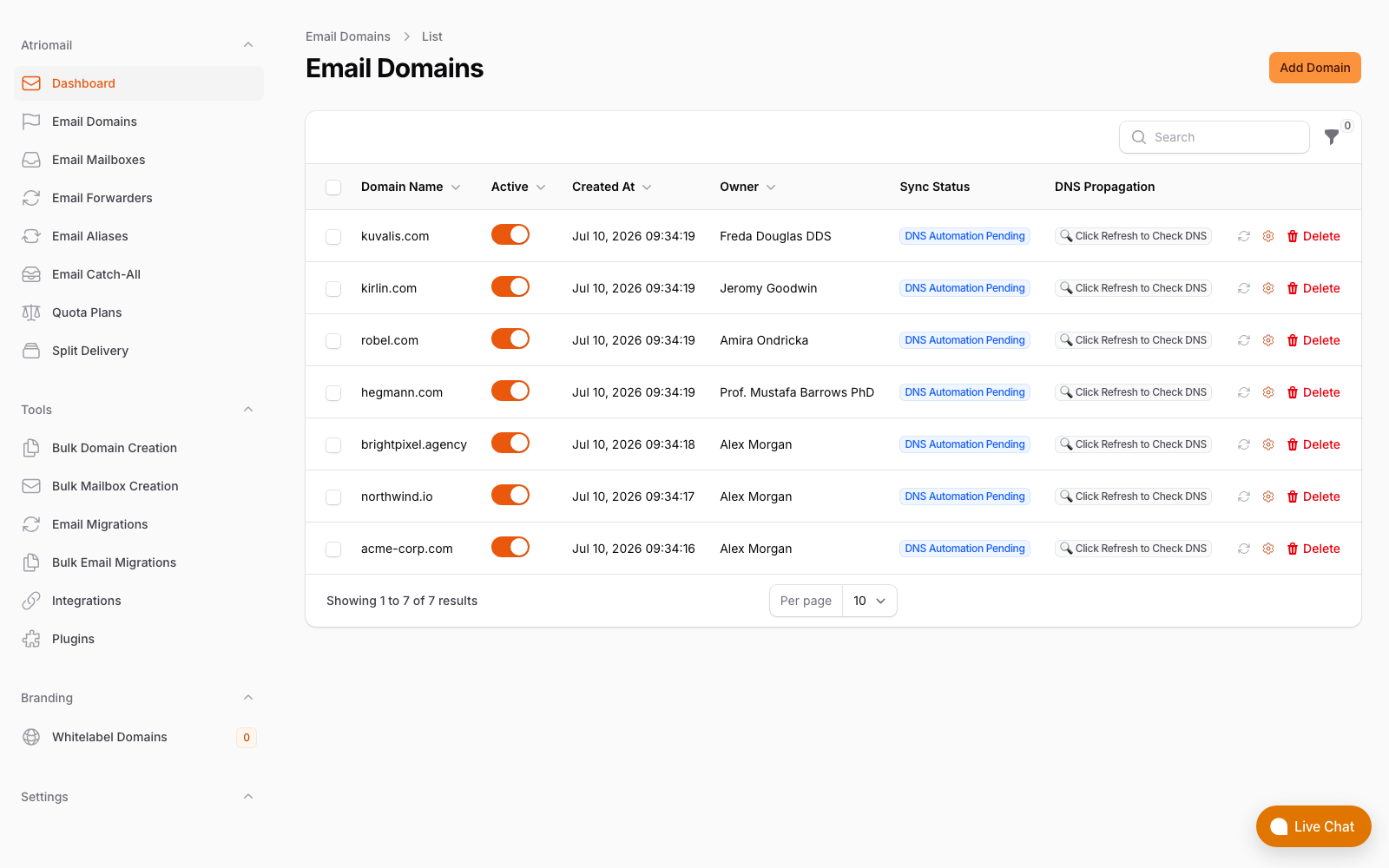
DNS records including SPF, DKIM, and DMARC publish automatically per domain in the panel, across 15 supported DNS providers. No manual record entry per domain.
For an honest comparison of standalone email platforms available to resellers and MSPs, the email hosting alternatives comparison covers the main options and their tradeoffs across margin, WHMCS integration, and operational complexity.
When M365 Is Still the Right Answer
This analysis is not an argument to move every client off M365. It is an argument to be deliberate about which clients belong on M365 and why.
A client whose daily work is built on Teams, who co-authors documents in SharePoint, and who relies on Office desktop apps is genuinely dependent on the M365 platform. Migrating them to standalone email would not reduce their exposure to Microsoft reliability, because their Teams and SharePoint still run on the same authentication layer. It would only remove email from that exposure while requiring a separate solution for the collaboration tools that are the actual driver of their M365 dependency.
For that client, M365 is the right answer. The August 31 outage was a bad day; it does not change the fundamental value calculation for a client who lives in the suite.
The clients this analysis applies to are the ones who ended up on M365 because it was the path of least resistance, not because of a considered decision about the suite. Those clients are carrying platform risk without receiving platform value. The August 31 outage is a concrete illustration of what that risk looks like when it materializes.
Where Atriomail Fits
The argument above is about blast radius, not about Microsoft being unreliable. The problem is that thirty clients on one identity platform fail as one event, and the MSP has nothing to do but wait.
The remedy is architectural: email-only clients do not need to share a failure domain with Teams, SharePoint and Defender. Moving them to Atriomail puts those mailboxes on separate infrastructure with their own DNS and their own MX records, so an authentication incident inside the Microsoft suite does not reach them, and a problem on either side leaves the other side of your book serving mail.
That separation is worth doing on its own merits rather than as insurance. Those mailboxes are $1.39 per month each with 15 GB included, they carry the margin the client's M365 seat never paid you, and free IMAP migration moves existing mail, folders and dates across without the client starting from an empty inbox. Clients whose work genuinely lives in Teams and SharePoint should stay where they are, exactly as the section above argues. The pricing page has the numbers.
Frequently Asked Questions
Does white-label email hosting ever have its own outages?
Yes. No hosted service achieves 100% uptime. The point of diversifying email infrastructure is not zero risk. It is breaking the correlation between vendor failures. If all clients are on one vendor's authentication layer, one incident takes all of them down simultaneously. If some clients are on a separate platform that does not share Microsoft's infrastructure, a Microsoft authentication failure does not propagate to those accounts. Two separate failure modes cannot produce simultaneous correlated failures across both platforms.
Can an MSP run both M365 and white-label email in the same book?
Yes. The typical transition runs both in parallel: existing M365 clients stay on M365 and new clients, or email-only clients identified in an audit, go onto the standalone email platform. There is no requirement to migrate everything at once, and no requirement to ever move clients who genuinely need the M365 suite.
What does migrating off Exchange Online involve for email-only clients?
The process runs over IMAP: existing mail, folders, and message dates copy from the Exchange Online mailbox to the new mailbox without data loss. DNS records (MX, SPF, DKIM, DMARC) update to point at the new mail server. Mail queues on Exchange Online during DNS propagation and delivers to the new mailbox once propagation completes. No cutover window is required and the client's inbox starts populated, not empty. For accounts that have been on Exchange for years, the migration copy can take several hours, but it runs in the background without the client noticing anything except a brief period where they see new mail in two places.
Does the M365 outage affect clients using a third-party SMTP relay through Exchange Online?
Yes. A third-party relay that authenticates against Exchange Online (the most common configuration for on-premises servers sending through M365) is subject to the same authentication layer. If the auth component fails, the relay connection fails too, even if the relay service itself is functioning normally. The failure domain is Microsoft's authentication platform, not the relay service or the client's own server.
Recommended
- Exchange Online Plan 1 vs. White-Label Email Hosting: The Email-Only Decision for MSPs
- Microsoft 365 CSP Reseller Program vs. White-Label Email Hosting, Atriomail
- The Namecheap Outage Took Down 1.4 Million Mailboxes: What Resellers Should Build Differently
- Multi-Client Email Management for Agencies, Atriomail
- Email Hosting Alternatives for Hosting Providers: Comparison, Atriomail
- Pricing and the Reseller Margin Calculator, Atriomail
Latest from the blog
- How to Rotate a DKIM Key Without Breaking Mail That's Already Signed · Oct 21, 2026
- Microsoft Cut CSP Partner Margins on Exchange Online: What It Does to Your Resale Price · Oct 20, 2026
- How to Fix Forwarded Mail That's Failing SPF and Breaking DMARC · Oct 19, 2026
- What to Check Before Onboarding a 200-Mailbox Client in Atriomail · Oct 18, 2026
- Hostinger Retires cPanel Reseller Hosting: What Happens to the Client Email You Bill · Oct 17, 2026