
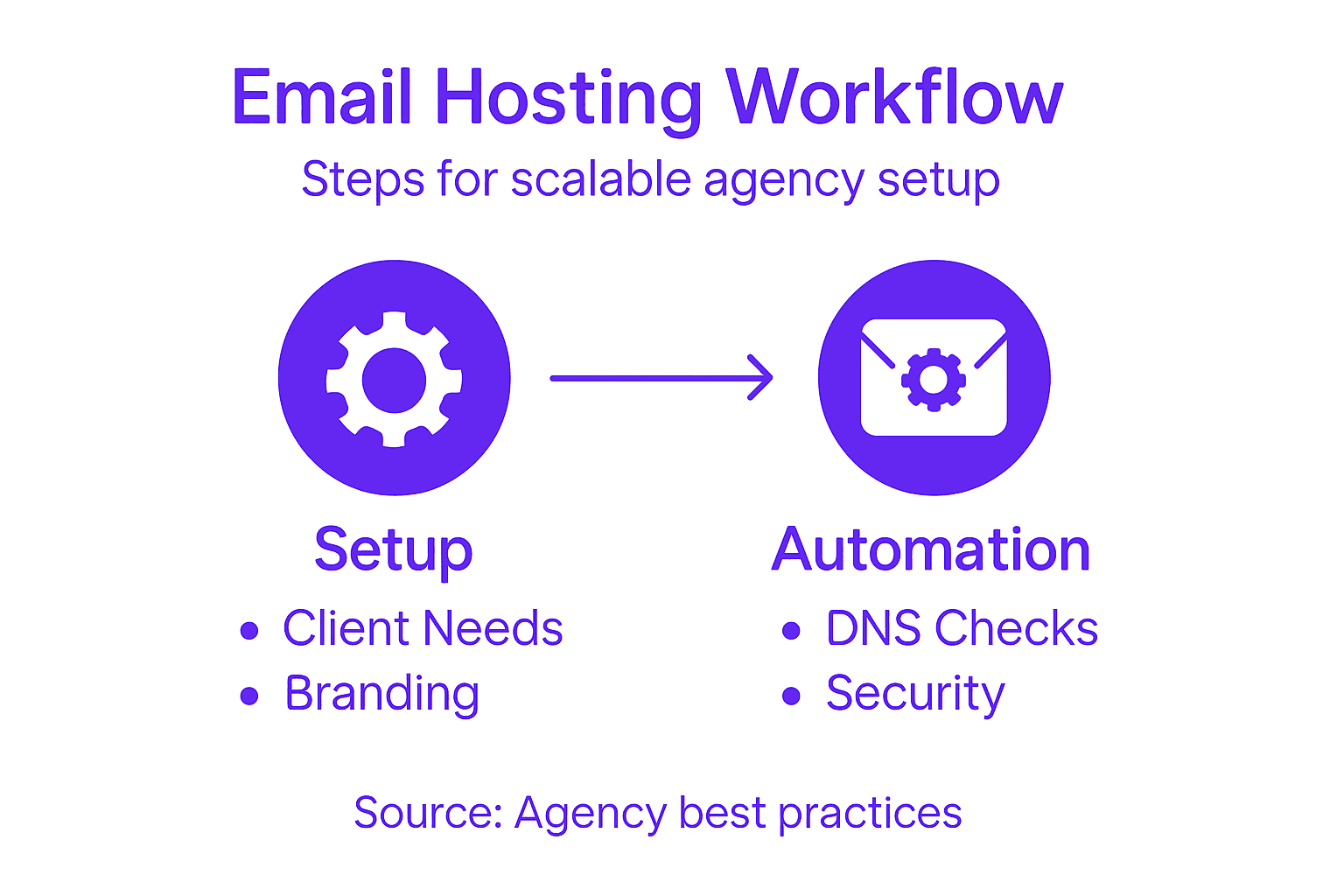
Choosing the right email hosting approach often feels like a balancing act for growing IT agencies. When North American clients expect a branded experience and seamless communication, every technical detail matters. Scalable white-label solutions allow agencies to deliver customized service, save valuable time, and keep operational headaches to a minimum. This guide lays out practical steps for assessing business needs, setting up branded domains, automating DNS security, integrating flexible billing, and ensuring reliable client deliverability.
Table of Contents
- Step 1: Assess Business Requirements And Client Branding Needs
- Step 2: Configure White-Label Email Platform And Domain Settings
- Step 3: Automate DNS Validation And Security Integration
- Step 4: Integrate Billing And Usage-Based Scaling
- Step 5: Verify Workflow Performance And Client Deliverability
Quick Summary
| Key Takeaway | Explanation |
|---|---|
| 1. Understand Client Needs Fully | Conduct detailed discussions to gather clients’ business goals, pain points, and compliance requirements before starting the email hosting process. |
| 2. Configure Email for Brand Ownership | Ensure clients’ email interfaces reflect their branding by customizing domain settings, colors, and logos to foster a sense of ownership. |
| 3. Automate DNS and Security Management | Use API integrations to automate DNS setup, security protocols, and validation checks to minimize human error and enhance email reliability. |
| 4. Implement Usage-Based Billing | Connect a flexible billing system that tracks client usage and adjusts charges accordingly to create predictable revenue streams and foster client satisfaction. |
| 5. Monitor Email Deliverability Regularly | Establish proactive metrics and auditing processes to ensure client emails are reaching inboxes, maintaining high deliverability rates and protecting domain reputation. |
Step 1: Assess business requirements and client branding needs
Before you build an email hosting workflow, you need to understand what your clients actually need and how they want to present themselves. This step involves gathering critical information about your clients’ business goals, current infrastructure, branding standards, and growth expectations. Getting this right now prevents costly rework later and sets the foundation for a scalable solution that works across your entire agency.
Start by having detailed conversations with your clients about their current situation. Ask about their existing email setup, team size, growth projections for the next 12 to 24 months, and any pain points they’re experiencing. Many agencies skip this step and assume they know what clients need, but clients often have specific requirements that aren’t immediately obvious. Find out if they need advanced collaboration features, specific security protocols, or compliance requirements like HIPAA or GDPR. Understanding scalable business email provider selection helps you ask the right questions and identify which features matter most.
Next, dive into their branding requirements. Your clients want their email to feel entirely like theirs, not like they’re using a third-party service. Document their preferred domain setup, whether they need custom domain aliases, their color preferences for web interfaces, and any specific logo or styling guidelines. Ask about their client communication standards and whether they need to maintain specific email signatures or security controls. This is where white-label solutions become critical because clients expect complete brand ownership. Some clients may have rigid branding requirements while others are flexible, so understanding their priorities helps you recommend the right technical approach.
Also assess your operational capacity. How many clients do you currently manage, and how many do you plan to onboard in the next six months? Understanding how email hosting scales with team growth helps you plan infrastructure that won’t require constant rebuilding. Look at your team’s technical expertise, your support capabilities, and whether you have the bandwidth to manage email infrastructure directly or if you need a managed solution that handles the heavy lifting for you. This assessment determines whether you’ll handle everything yourself or partner with a platform that automates much of the operational burden.
Document everything you learn in this phase. Create a simple profile for each client that includes their business size, growth timeline, branding preferences, compliance needs, and technical requirements. This becomes your reference point as you build out the workflow and helps ensure nothing gets missed during implementation.
Here’s a summary of client email hosting requirements to assess before implementation:
| Requirement Area | Why It Matters | Example Considerations |
|---|---|---|
| Business Growth | Impacts scalability | Expected users in 12-24 months |
| Branding Needs | Ensures ownership | Custom domains, branded interfaces |
| Security Needs | Protects reputation | HIPAA, GDPR, 2FA setup |
| Technical Support | Determines approach | In-house vs. managed platform |
Pro tip: Create a standardized intake questionnaire that you send to new clients before starting implementation. This saves time in follow-up conversations and ensures you capture all the details you need to build a truly scalable workflow.
Step 2: Configure white-label email platform and domain settings
Now that you understand your clients’ needs and branding preferences, it’s time to set up the actual platform infrastructure. This step involves configuring your white-label email platform to display your clients’ branding while establishing the domain infrastructure that makes their email system work reliably. Getting these settings right ensures your clients see a completely branded experience from day one, and it prevents technical headaches down the road.
Start by logging into your email hosting platform and creating branded instances for each client. You’ll need to configure the client portal, administrative dashboard, and any user-facing interfaces to match their branding guidelines. This includes uploading their logos, applying their color schemes, and customizing any welcome messaging. The platform should allow you to control every visual element so clients never see your agency branding unless they specifically look for it. When setting up these branded spaces, configure custom domains for the client portal and any web-based email access points. Using subdomains instead of root domains is a smart approach because it prevents DNS conflicts and keeps your main domain clean. For example, rather than pointing their entire domain to your platform, you might use something like mail.clientdomain.com for their email access portal.
Next, configure the DNS settings that actually make email delivery work. You’ll need to set up MX records, SPF records, DKIM authentication, and DMARC policies specific to each client. Configuring white-label domain settings properly is essential because even small DNS errors will break email delivery or trigger spam filters. If your platform includes automatic DNS configuration tools, use them. They eliminate manual entry mistakes and save hours compared to manual record creation. However, verify that each record is actually in place and pointing to the correct servers before telling your clients their email is ready. Test sending emails from multiple addresses to ensure proper authentication and delivery.

Finally, configure any security and compliance settings your clients require. Set up password policies, enable two-factor authentication options, and establish any archiving or backup protocols they need. If clients specified particular security requirements during the assessment phase, now is when you implement them. Document all configuration settings for your records so you can replicate the setup for future clients or troubleshoot issues quickly.
Pro tip: Create a configuration template or checklist for each client type you serve, then use it as a starting point for new deployments. This consistency reduces setup time by 40 percent and ensures you never forget to apply a critical branding element or security setting.
Step 3: Automate DNS validation and security integration
Manual DNS configuration is tedious and error-prone, especially when you’re managing multiple clients. This step focuses on automating DNS validation and security protocols so your clients’ email systems work reliably without constant manual tweaking. Automation reduces support tickets, speeds up client onboarding, and ensures every security layer is properly configured from day one.
Start by connecting your email hosting platform to your clients’ DNS providers through API integrations. Most major DNS providers like Route 53, Cloudflare, and GoDaddy offer API access that allows your platform to create and update DNS records automatically. When you enable these integrations, your platform can deploy MX records, SPF configurations, DKIM keys, and DMARC policies without requiring clients to manually enter anything. DNS-based domain validation automates certificate issuance and domain verification, which means your clients’ domains are authenticated and their email starts working immediately upon account creation. This is a massive time saver compared to the old method of having clients log into their registrar accounts and manually paste records into text fields. The fewer steps your clients must complete, the faster you can activate their email service and start generating revenue.
Next, configure automated security validation checks within your platform. Set up monitoring that continuously verifies each client’s DNS records are in place and pointing to the correct servers. If a record gets accidentally deleted or modified, the system should alert you immediately so you can fix it before email delivery breaks. Implement automated SSL/TLS certificate provisioning so your clients’ mail servers always have current encryption certificates without manual renewal. Many agencies lose clients because email stops working due to expired certificates or incorrect DNS records. Automation prevents this entirely. Connect your security protocols to automatically apply to every new client account. This means SPF, DKIM, and DMARC are configured identically for all clients unless they request exceptions, ensuring consistent security across your entire client base.
Below is a comparison of manual vs. automated DNS validation for client email setups:
| Method | Setup Time | Error Risk | Ongoing Maintenance |
|---|---|---|---|
| Manual DNS Validation | Hours per client | High, manual entry mistakes common | Frequent checks needed |
| Automated DNS Validation | Minutes per client | Low, API ensures accuracy | Alerts trigger on issues |
Finally, set up automated reporting so clients can see the status of their DNS configuration and security posture without contacting you. A simple dashboard showing green checkmarks next to properly configured records gives clients confidence and reduces support requests. Schedule automated validation checks to run daily or weekly, then generate reports that show any issues requiring attention. This hands-off approach means your team spends less time on repetitive configuration work and more time on strategic account management and growth.
Pro tip: Test your DNS automation workflow with one client before rolling it out to everyone. This reveals integration hiccups and gives you a chance to refine the process, ensuring smooth deployments for your entire client base.
Step 4: Integrate billing and usage-based scaling
Your infrastructure is set up and clients are using email. Now you need to connect billing so revenue automatically flows based on what clients actually consume. This step involves integrating a billing platform that tracks usage metrics, generates invoices, and scales pricing automatically as client volumes grow. Done correctly, this transforms your email business from flat-rate chaos into predictable, profitable scaling.
Start by choosing a billing platform that handles flexible pricing models. Your email hosting platform likely has integrations with major billing providers, but you can also connect independent solutions. The key is finding one that supports usage-based billing where customers pay for actual consumption rather than fixed monthly fees. With usage-based billing models, you charge clients based on metrics like mailboxes, storage gigabytes, or API calls, aligning revenue with the value you deliver. This approach satisfies clients because they only pay for what they use, and it scales your revenue as clients grow. Set up clear pricing tiers so clients understand exactly what they’ll be charged. For example, you might charge a base fee for ten mailboxes, then per-mailbox rates for additional users, plus overage fees if they exceed storage limits. Define these tiers in your billing platform and connect them to your email hosting system so usage tracking happens automatically.
Next, configure real-time usage tracking between your email platform and billing system. Every time a client adds a mailbox, purchases storage, or sends an API call, that action should be recorded and instantly reflected in their billing account. Your billing platform should generate invoices automatically on a schedule you define, whether that’s monthly, quarterly, or based on usage thresholds. Flexible billing automation tools eliminate manual invoicing and reduce your administrative overhead significantly. Connect your billing system to your accounting software so financial data flows automatically into your records without manual data entry. This integration means you spend less time on billing administration and more time growing your business.
Finally, implement alerts and reporting so you can monitor usage patterns across all clients. Some clients will spike usage unexpectedly, and you need visibility into those changes. Set up notifications when clients approach overage thresholds so you can proactively communicate with them. Create dashboards showing which clients consume the most resources, which are growing fastest, and which might be at churn risk due to low usage. This data helps you identify upsell opportunities and understand your client segments better.
Pro tip: Start with a simple pricing model and refine it after three months of real usage data. Clients will teach you what pricing structure works best through their behavior, so don’t overcomplicate things initially.
Step 5: Verify workflow performance and client deliverability
Your workflow is live and billing is running. Now you need to verify that everything actually works as intended and that client emails reach inboxes instead of spam folders. This step involves monitoring performance metrics, testing deliverability, and establishing proactive alerts so you catch problems before clients notice them.
Start by implementing monitoring for the key metrics that matter. Track inbox placement rates to see what percentage of client emails actually land in recipient inboxes versus spam folders. Monitor bounce rates to identify undeliverable addresses, spam complaint rates to watch for reputation issues, and engagement metrics to understand how clients’ messages perform across different Internet Service Providers. Monitoring email deliverability at scale means tracking these metrics segmented by domain and ISP so you understand exactly where deliverability problems occur. Set up automated alerts that notify you when metrics dip below acceptable thresholds. For example, if a client’s inbox placement rate drops below 95 percent, you should be alerted immediately so you can investigate whether their domain reputation has been damaged or whether authentication records need adjustment. Regular seed list testing sends emails to test accounts across different providers, revealing exactly how clients’ messages appear in various inbox environments. This catches rendering issues and deliverability problems that real-world data alone might not reveal.
Next, conduct authentication and configuration audits for each client. Verify that SPF, DKIM, and DMARC records are properly configured and actually validating incoming mail. Use email deliverability testing tools to analyze authentication headers, check spam scores, and identify blacklist issues that might block client emails. Many clients don’t realize their domain reputation is suffering until you tell them, so regular audits prevent silent failures. Create a simple report showing each client their authentication status, recent performance trends, and any recommendations for improvement. This transparency builds trust and positions you as a proactive partner rather than someone they only hear from when problems occur.
Finally, establish baseline performance expectations so you and your clients understand what constitutes normal versus problematic. Document typical bounce rates for their industry, expected engagement metrics for their message types, and reasonable inbox placement expectations. When new clients onboard, run initial deliverability tests to establish their baseline, then monitor against that baseline over time. This approach helps you distinguish between client-side issues and platform-wide problems, making troubleshooting faster and more accurate.
Pro tip: Run a full deliverability audit quarterly for each client, even if metrics look good. Catching small reputation issues early prevents major problems later and gives you opportunities to show value through proactive recommendations.
Simplify and Scale Your Agency’s Email Hosting Workflow Today
Building a scalable, white-label email hosting workflow for your agency requires mastering complex tasks like DNS automation, security integration, and usage-based billing. This article outlines the challenges agencies face when trying to meet diverse client branding needs while maintaining reliable deliverability and operational efficiency. If you want to avoid costly manual setups and fragile infrastructures you will find immense value in a platform designed to handle these pain points—freeing you to focus on growth and client success.
AtrioMail offers a fully managed, white-label email hosting solution that integrates DNS validation automation for MX, SPF, DKIM, and DMARC records so you can eliminate error-prone manual configurations. Our scalable usage-based pricing model also means you only pay for what your clients actually use allowing your revenue to grow as they grow. Plus, with complete brand control and automation tools you can deliver the seamless client experience your agency promises without managing complex infrastructure.
Experience the freedom of breaking away from big ecosystems like Google and Microsoft while enhancing your profit margins and scalability. Get started now by creating your independent branded email platform with AtrioMail.
Ready to transform your email hosting into a predictable, scalable, and brand-driven service? Visit AtrioMail Registration to launch your white-label email platform. Discover how easy it is to automate DNS validation and security integration by exploring our automated DNS setup. Take control today and position your agency for lasting client success.
Frequently Asked Questions
How can I assess my clients’ business requirements for email hosting?
Start by conducting detailed discussions with your clients to understand their current email setup, team size, and specific goals. Collect information on their growth projections and any pain points to develop a tailored email hosting solution that aligns with their needs.
What branding considerations should I include when setting up email hosting for clients?
Focus on incorporating clients’ branding by customizing the email portal with their logos, color schemes, and specific domain requirements. Capture their preferences for email signatures and communication standards to ensure a fully branded experience from day one.
How do I automate DNS validation for client email systems?
Connect your email hosting platform to clients’ DNS providers using API integrations to allow for automatic updates to DNS records. This significantly reduces setup time and minimizes errors by automating the configuration of essential DNS settings like MX records, SPF, DKIM, and DMARC.
What steps should I take to monitor email deliverability for my clients?
Implement monitoring for key metrics such as inbox placement rates and bounce rates to assess how well client emails are being delivered. Set up automated alerts for any dips in performance, helping you act quickly to resolve issues before they affect your clients.
How can I integrate billing for my email hosting services?
Choose a billing platform that supports usage-based pricing models to charge clients according to their actual email usage. Ensure real-time tracking of metrics like mailboxes and storage, and automate invoice generation to maintain efficiency and accuracy in billing.